
Maintenance Types
A workshop does not do "maintenance". It does a 90-day routine service, an annual overhaul, and the emergency call-out when something breaks at two in the morning. Those are three different jobs with three different checklists, three different intervals and three different sets of people — and a Maintenance Type is how you tell them apart.
Everything downstream reads from it. The plan schedules a type on a date. The record is of a type. The asset's component says which types are legitimate for it. Get the small handful of types right at the beginning and the rest of the area falls into place.
Find them at Assets > Fixed Asset Maintenance > Maintenance Type. Like everything in this folder, they need the fixedassets-maintenance licence.
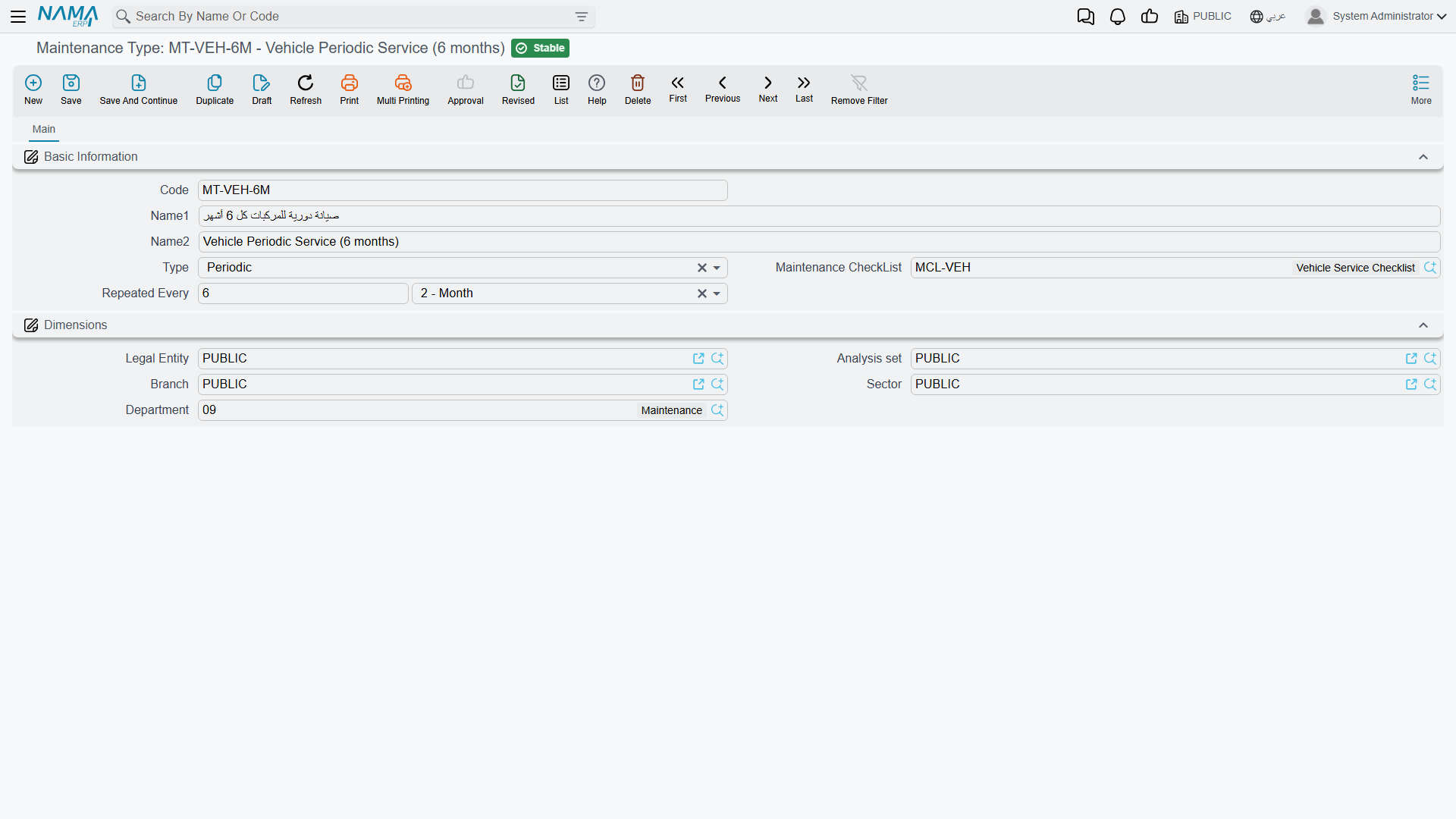
What is on the screen
It is a small master file — one page, one group of fields, plus the usual dimensions.
| Field | What it is for |
|---|---|
| Code | Your identifier for the type, e.g. MT-90D. |
| Name1 / Name2 | The Arabic name and the English name. |
| Type | The nature of the work — see below. A reporting classification; it changes no behaviour. |
| Maintenance CheckList | The inspection sheet that comes with this kind of job. Picking this type on a plan line or a record pulls this checklist's questions onto the document. |
| Repeated Every | A number and a unit — the interval at which this kind of maintenance comes round. |
Nothing on this screen is validated and nothing on it is mandatory beyond the usual code and name, so it is quick to set up and quick to correct.
Type — the four natures
| English | Arabic | Typical use |
|---|---|---|
| Preventive | وقائيه | Work done to stop a failure that has not happened yet — an overhaul, a bearing replaced on schedule. |
| Periodic | دوريه | The routine service that comes round on the calendar. |
| Incidental | طارئه | The unplanned call-out after a breakdown. |
| Other | أخري | Anything that does not fit the three above. |
This is a label, not a switch: the system treats all four identically. Its value is in reporting and in filtering the records list — "show me every incidental job on the presses this year" is a question worth being able to ask.
Repeated Every — where the next-due date comes from
The interval is a pair: a Value and a Unit. The unit list runs from seconds to years; in practice you will use days, weeks, months or years. "Every 90 days", "every 6 months", "every year".
Its one job is this. When you choose this maintenance type on a maintenance record — or on a maintenance record request — the system takes the document's own Value Date, adds the interval, and proposes the answer in the Next Expected Maintenance Date field. Choose Periodic Maintenance on a record dated 1 April 2026 with an interval of 90 days and the field fills in with 30 June 2026.
That proposal is a starting point, not a decision. You can overwrite it before you commit — if the contractor tells you on the day that this machine needs looking at in six weeks rather than three months, type six weeks' worth of date and commit that instead. Whatever is in the field when the record commits is what gets stamped onto the asset's component line as its next expected maintenance date.
The interval is a calculator, not a scheduler
Setting an interval does not put anything in a queue. It fills in a date field, and that date is then visible on the asset. The visits themselves are written by hand into a maintenance plan, and the records that close them are raised by a person.
Which types an asset will accept
A maintenance type is not usable on any asset you like. The gate is the component type.
Each Fixed Asset Component Type — Spindle, Control Unit, Coolant Pump — carries its own Maintenance Types grid listing the kinds of maintenance that are legitimate for that sort of part. When you fill in a maintenance record, the maintenance type picker offers only the types on that grid, and the commit is refused if you get past it with something else. An empty grid means "no restriction" — any type is allowed on that component.
So the setup runs in this direction: create the maintenance types first, then list them on the component types that can receive them, then let the asset's components inherit from its asset type. The details of that grid are on the components page.
One more place uses the type: the asset's own component line names a maintenance type alongside the component type. That pairing is what a committed record looks for when it decides which component line to stamp with the visit dates.
Actions on this screen
The maintenance type has no buttons of its own — it is a short master file you fill in and save.
Al-Waha's types
Al-Waha Industries keeps its list short — a long list of maintenance types is a sign that something that should be a checklist has been made into a type.
| Code | Name | Nature | Checklist | Repeated Every |
|---|---|---|---|---|
MT-90D | Periodic Maintenance / صيانة دورية | Periodic | CNC Routine Inspection | 90 Days |
MT-ANN | Annual Overhaul | Preventive | Machine Annual Overhaul | 1 Year |
MT-BRK | Breakdown Call-Out | Incidental | (none) | (none) |
MT-90D is the one that runs through the rest of these pages. It carries the CNC Routine Inspection checklist, so every record of that type arrives with the same four questions already on it, and its 90-day interval is what turns 1 April into a proposed 30 June.
MT-BRK deliberately has neither a checklist nor an interval. A breakdown is not predictable and has no standard inspection sheet — leaving both empty means the record simply comes up blank, with no next-due date proposed, which is exactly right for unplanned work.