
Loan Adjustments
Once a Loan Document is running, three separate screens change it without touching the original disbursement: writing part of the balance off, moving installments around in time, and pausing (or resuming) the whole loan. All three point back at the Loan Document they adjust and share its installment schedule.
Writing off a loan: Loan Relief Document
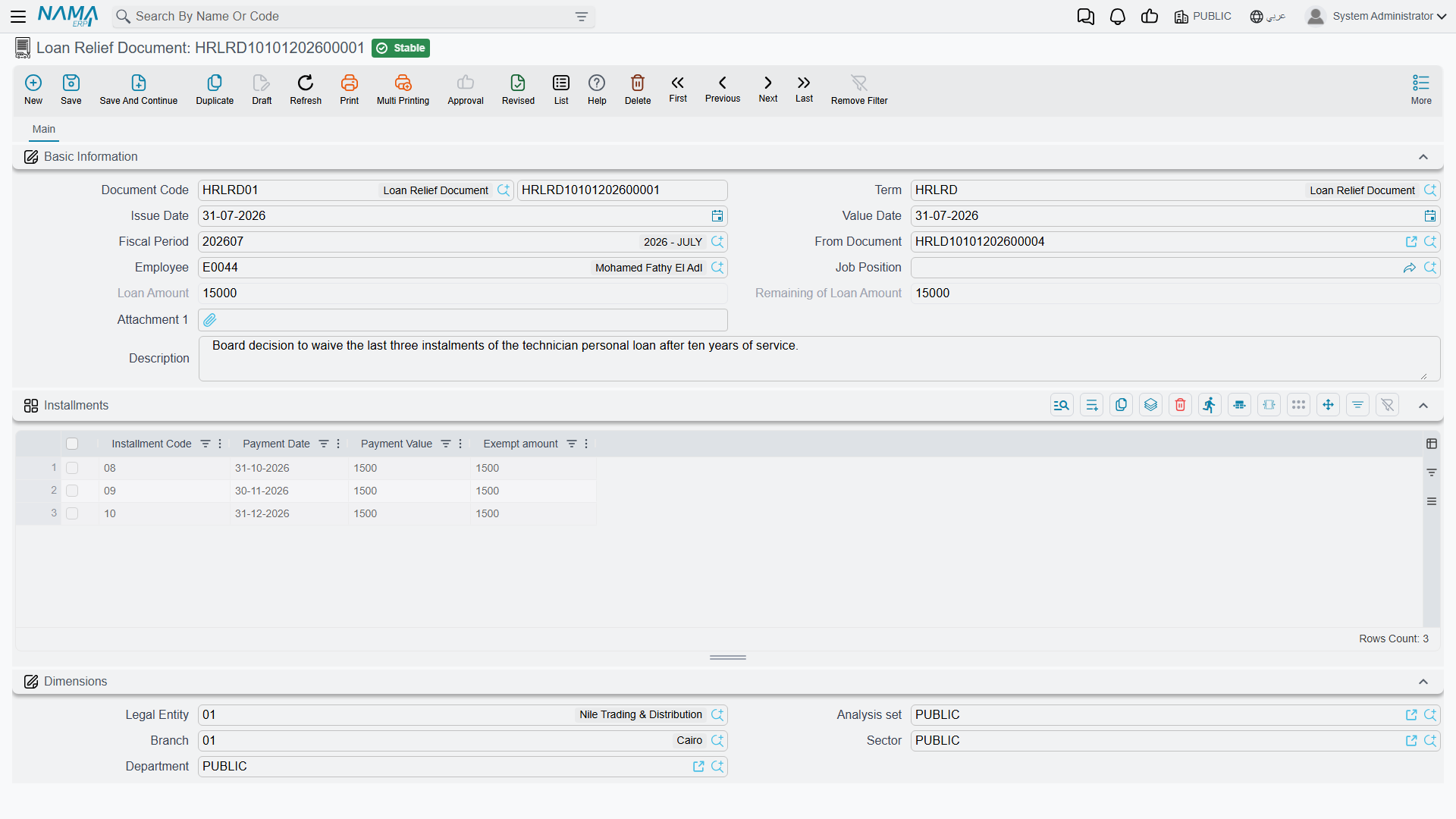
The Loan Relief Document (سند أعفاء سلفة) forgives all or part of an outstanding loan — for example, a hardship write-off, or a final settlement where the remaining balance is cleared instead of collected. It works line-by-line against the loan's own installments, exactly like a payment document, except the amount is relieved rather than paid.
Where to find it: Payroll > Loans / Installments > Loan Relief Document.
| Field | Arabic | Notes |
|---|---|---|
| Loan Document | سند سلفة | The loan being relieved. |
| Loan Amount / Remaining Loan Amount | قيمة السلفة / المتبقي من قيمة السلفة | A read-only snapshot of the loan's original amount and what is still outstanding at the moment this document is written. |
| Installment Code (grid) | كود القسط | Which installment line is being relieved. |
| Relief Amount (grid) | الجزء المعفي | How much of that installment is forgiven — can be the full remaining value or only part of it. |
How it's processed / what it posts
On commit, the Loan Relief Document generates its ledger effect as a background business request with a processing status, retryable from the Business Requests view. Each relieved installment line posts its Relief Amount through the debit/credit sides configured on the relief document's own term (التوجيه) — typically debiting a relief/write-off expense account and crediting down the same employee-loans account the original Loan Document debited, so the receivable is cleared without any further cash movement.
Rescheduling installments: Loan Installment Reschedule
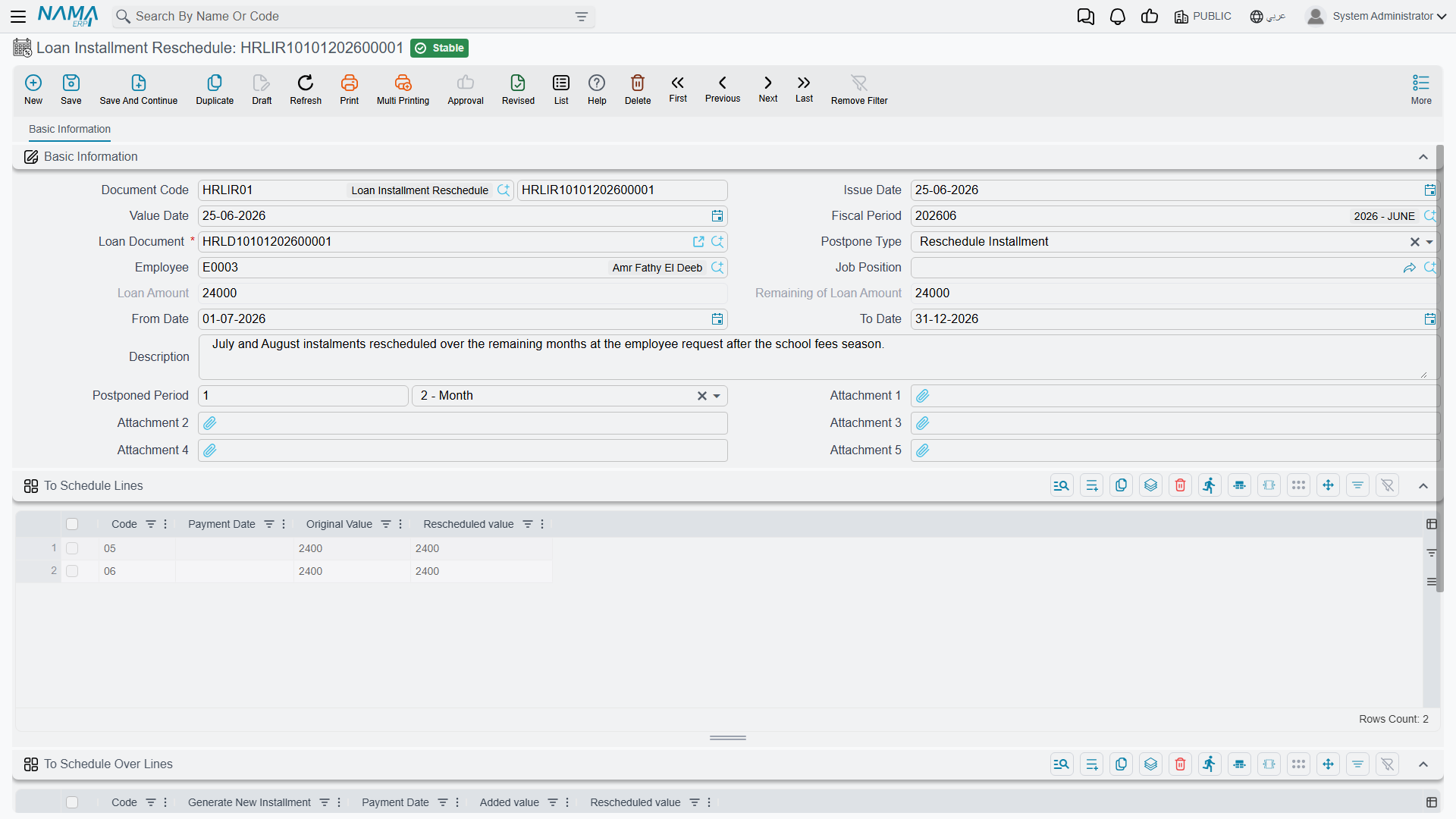
The Loan Installment Reschedule document (سند إعاده جدوله اقساط سلفه) changes when — or how — unpaid installments of a loan are collected, without changing the total amount owed or posting anything to the ledger; it is a pure scheduling change. It works in one of two modes, chosen through Postpone Type (طريقة جدوله الاقساط):
- Postpone Installment (تأجيل) — pick a date range (
From Date/To Date, من تاريخ / إلى تاريخ) and a time period (Time Period, الفترة, e.g. one month); every not-yet-paid, not-exempt installment whose payment date falls in that range is simply shifted forward by that period. Nothing about the installment values changes, only their dates. - Reschedule Installment (إعاده جدوله) — pick specific installments to draw value from in the To Schedule Lines grid (الاقساط المعاد جدولتها) and specific installments to add that value onto in the To Schedule Over Lines grid (الاقساط الموزع عليها); the two sides must total the same amount. An installment in the second grid can either be one that already exists on the loan, or — by checking Generate New Installment (إنشاء قسط جديد) — a brand-new installment line created on the fly with its own payment date.
Where to find it: Payroll > Loans / Installments > Loan Installment Reschedule.
No accounting effect, and irreversible against paid installments
A reschedule only ever touches installments that are still Not Paid — it cannot move value into or out of an installment that has already been paid or exempted. Because it changes only dates and the split of remaining value across installments, it never generates a ledger entry; the original loan disbursement entry from the Loan Document is untouched.
Pausing a loan: Loan Disable Document
The Loan Disable Document (سند تعطيل سلفة) pauses (or resumes) automatic and manual recovery of a loan without writing anything off. Checking Disable Loan (تعطيل السلفة) marks the loan document and every one of its installments as disabled: the salary engine stops deducting its recovery component, and the loan stops appearing in the picker used to create new Loan Payment Documents against it. Unchecking it (or canceling the document) reverses this and recovery resumes normally.
Where to find it: Payroll > Loans / Installments > Loan Disable Document.
| Field | Arabic | Notes |
|---|---|---|
| Loan Document | سند سلفة | The loan being paused or resumed. |
| Disable Loan | تعطيل السلفة | Checked = pause recovery; unchecked = resume it. |
| Loan Amount / Remaining Loan Amount | قيمة السلفة / المتبقي من قيمة السلفة | A read-only snapshot for reference. |
A loan cannot be paused mid-payment
A loan cannot be disabled if it already has a payment recorded after this document's value date — the pause only makes sense looking forward, not to unwind money already collected. This document generates no accounting entry of its own; it only flips the loan's disabled flag.
Actions on this screen
None of the three — the Loan Relief Document, the Loan Installment Reschedule and the Loan Disable Document — has buttons of its own. You point each at its Loan Document, fill in the lines and save.
Messages you may see
| Message | Why | What to do |
|---|---|---|
| Document {0} , No Installment to postpone from that date — «المستند {0} , لا يوجد اقساط لتأجيلها في هذه الفتره» | Postpone Installment mode, but no unpaid, non-exempt installment of that loan has a payment date inside the From Date / To Date window. | Widen the date range, or check the loan — its installments in that window may already be paid or exempted. |
| Document {0} , No Installment to reschedule from that date — «المستند {0} , لا يوجد اقساط لجدوله في هذه الفتره» | Reschedule Installment mode with an empty To Schedule Lines grid, so there is no installment to draw value from. | Add the installments whose value is being moved. |
| Document {0} , No Installment to reschedule over from that date — «المستند {0} لا يوجد اقساط لتوزيع الاقساط المجدوله عليها» | The To Schedule Over Lines grid is empty, so the value has nowhere to land. | Add the installments that will carry the moved value — existing ones, or new ones with Generate New Installment ticked. |
| Document {0} , The added values {1} are not equal to the rescheduled values {2} — «المستند {0} , القيم المضافة {1} لا تساوي القيم {2} المعاد جدولتها» | The two grids do not total the same amount; a reschedule may move value around but never change what the employee owes. | Adjust either side until the totals match exactly — the message shows both figures. |
| Document {0} , The installment {1} cant be repeated in Scheduled and Scheduled Over Lines — «المستند {0} , لا يمكن تكرار القسط {1} في كلا من السطور المجدوله والسطور الموزع عليها» | The same installment code appears both as a source and as a destination, which would move value onto itself. | Remove it from one of the two grids. |
| Document {0} , Some Installments Repeated — «المستند {0} , بعض الاقساط مكرره في الاقساط المجدوله أو الاقساط الموزع عليها» | One of the two grids lists the same installment code twice. | Delete the duplicate row and put the whole value on one line. |
| Document {0} , The installment {1} can not be found in the original loan document {2} — «المستند {0} , لا يمكن ايجاد القسط {1} فى سند السلفة {2}» | A To Schedule Lines row names an installment code that does not exist on the loan document. | Pick the codes from the loan's own installment list. |
| Document {0} , You cant create the installment {1} which already exists in the loan document {2} — «{2} المستند {0} , لا بمكن أن تنشئ القسط {1} لإنه موجود في سند السلفة» | Generate New Installment is ticked for a destination code that the loan already has, so the new line would collide with the existing installment. | Untick Generate New Installment to add value to the existing installment, or give the new installment a code the loan does not use. |
| Document {0} , You cant use the Installment {1} which not exist in The Loan Document {2} — «{2} المسند {0} , لا يمكن استخدام القسط {1} لانه غير موجود في سند السلفه» | The mirror case: a destination line names a code that is not on the loan, but Generate New Installment is not ticked. | Tick Generate New Installment to create it, or choose an installment that exists. |
| Document {0} , The installment {1} date is out of range of this document — «المستند {0} , تاريخ القسط {1} خارج عن فتره المستند» | An installment chosen as a source has a payment date outside this document's From Date / To Date window. | Widen the document's date range, or leave that installment out of the reschedule. |
Where this fits
- Loan Documents & Payments — the disbursement and installment schedule every adjustment here works against.
- Loan Types — the recovery component and eligibility rules behind the loan being adjusted.