
Loan Types
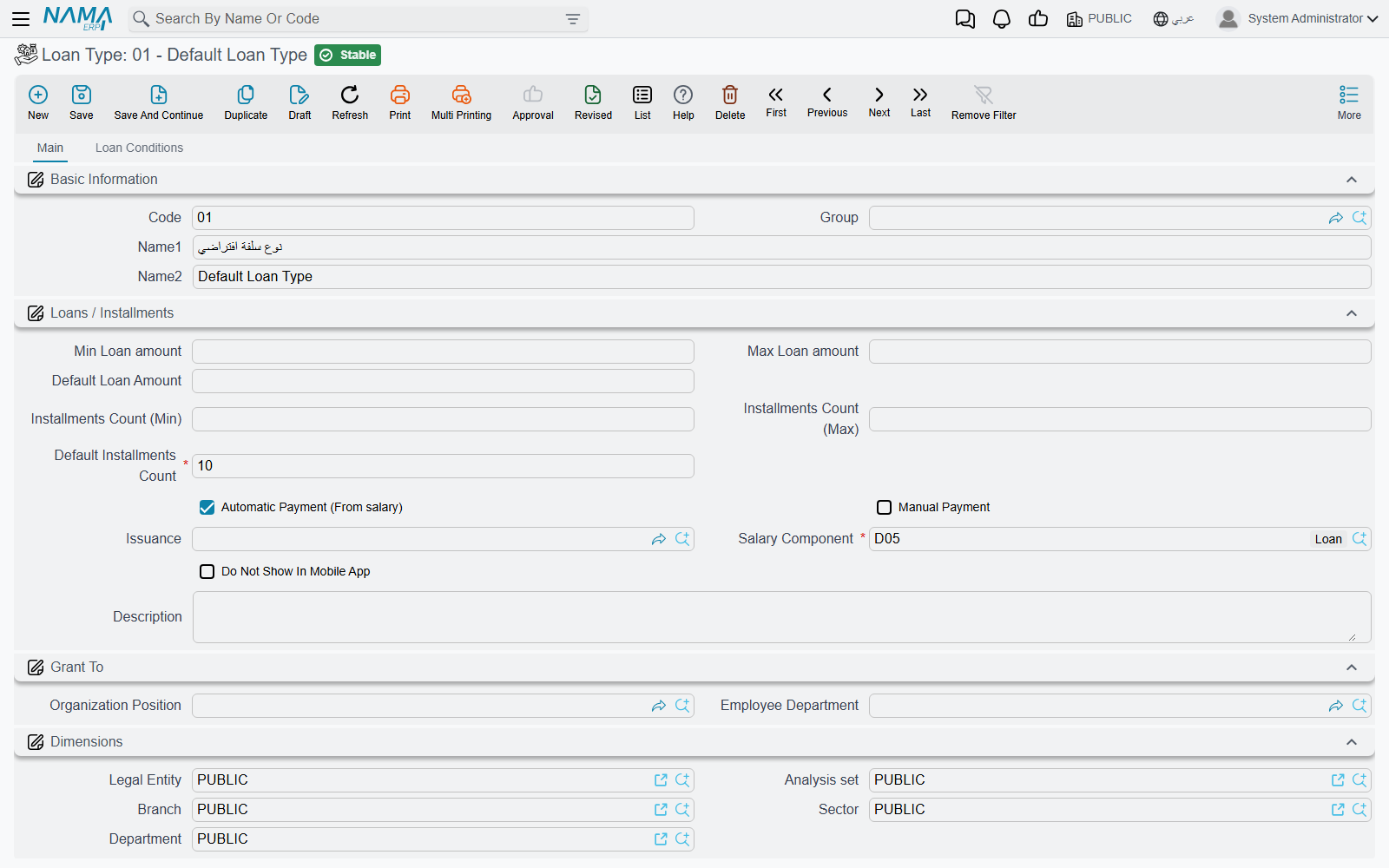
Every loan or salary advance in Nama starts from a Loan Type (نوع السلفة) — a master file that defines what an employee can borrow: the default and allowed range for the amount, the default and allowed range for the number of installments, who is eligible, and — most importantly — which salary component recovers it from pay. Nama does not model "interest-free advance" and "installment plan" as two different entities; the difference is purely how a loan type is configured. A type whose default installment count is 1 behaves like a one-off advance handed out and settled in a single payroll cycle; a type with many installments behaves like a proper installment plan recovered gradually.
Where to find it: Payroll > Loans / Installments > Loan Type.
Key fields
| Field (English) | Arabic | Notes |
|---|---|---|
| Default Installments Count | عدد الأقساط الافتراضي | Required. Pre-fills new Loan Requests of this type. A value of 1 turns the type into a single lump-sum advance. |
| Minimum / Default / Maximum Loan Amount | أقل قيمة للسلفة / القيمة الأفتراضية للسلفة / أقصي قيمة للسلفة | The boundaries a Loan Request of this type must respect. |
| Minimum / Maximum Installments Count | الحد الأدنى لعدد الأقساط / الحد الأقصى لعدد الأقساط | The installment-count range allowed for this type. |
| Organization Position / Employee Department | الدرجة الوظيفية / إدارة موظف | Narrows which employees may use this type. When either is left blank the type is open to every position/department; the loan type list an employee sees on their own request is filtered to types that either match their own department/position or leave it blank. |
| Salary Issuance | الصرفية | Restricts the type to one payroll stream, the same issuance classifier used across the module (see HR Years, Periods & Salary Issuance). |
| Salary Component | مفرد راتب | Required. The single salary component — normally an Installment-classified deduction — through which the salary engine pulls this loan's installment out of pay automatically each period. |
| Automatically Deducted From Salary | تخصم من الراتب آليا | If checked, installments of this loan type are recovered every payroll run through the salary component above, with no separate action needed. |
| Manual | يدوي | If checked, this loan type can also (or only) be settled by hand through a Loan Payment Document instead of, or in addition to, the automatic payroll deduction — see Loan Documents & Payments. |
Eligibility conditions
A Loan Type can carry a grid of Conditions Should Matched In Loan Document (الشروط الواجب توافرها في سند السلفه) — the rules a Loan Document of this type must pass before it can be committed. Each row can combine:
- A free-form query or criteria on the employee file or on the loan document itself, for cases the built-in fields below don't cover.
- Years-of-experience and service-months ranges (
From Exp Year/To Exp Year,From Service Month/To Service Month) — an employee must fall inside the range to qualify. - A salary bracket (
Salary Document Amount Greater Than Or Equal/Less Than) and a loan-value bracket (Loan Value Greater Than/Less Than), so a rule can apply only to loans of a certain size taken by employees in a certain pay range. - A Max Installment Type (نوع الحد الأقصى للقسط) ceiling expressed as Basic Salary Percent, Salary Components Percent (against the specific components listed in the type's own Salary Components grid, مفردات الراتب), Final Salary Percent, or a Fixed Value — plus a matching Max Installment Value (الحد الأقصى للقسط) applied per installment rather than to the loan total.
- Whether to fold in installments of the same loan type already running this month when checking these ceilings (
Consider Same Type Installments In Same Month/ الأخذ في الاعتبار الاقساط من نفس النوع في نفس الشهر), and whether to look back at the employee's earlier loans of this type at all (Search Pre Loans For Loan Type). - A restricting job position, organization position, or department for that specific rule (narrower than the type-level fields above), and a date range on the loan document itself.
Setup, not approval
These conditions are a validation gate on the Loan Document, not an approval workflow — a document that fails one of them simply cannot be committed. Use the standard approval case configuration on the document term if you also need a human sign-off before disbursement.
Actions on this screen
The Loan Type screen has no buttons of its own; it is filled in and saved.
Messages you may see
| Message | Why | What to do |
|---|---|---|
| You shuold choose Payment Method (Auto / Manual) — «يجب تحديد طريقة سداد السلفة» | Neither Automatically Deducted From Salary nor Manual is ticked, so nothing would ever recover the loan. | Tick at least one recovery method — usually the automatic payroll deduction. |
| Minimum installments count should be less than max installments count — «الحد الأدنى للأقساط يجب أن يكون أقل من أو يساوى الحد الأقصى للأقساط» | Minimum Installments Count is greater than Maximum Installments Count, so no installment count would be allowed at all. | Swap the two figures, or clear whichever bound you do not need. |
| Installments Count should be Greater Than Or equal {0} and Less Than Or equal {1} — «عدد الأقساط يجب أن يكون أكبر من أو يساوى {0} وأقل من أو يساوى{1}» | Both bounds are set and Default Installments Count falls outside them. | Bring the default inside the allowed range, or widen the range. |
| Installments Count should be Greater Than {0} — «عدد الأقساط يجب أن يكون أكبر من{0}» | Only a minimum is set, and the default installment count is below it. | Raise the default, or lower the minimum. |
| Installments Count should be Less Than {0} — «عدد الأقساط يجب أن يكون اقل من{0}» | Only a maximum is set, and the default installment count is above it. | Lower the default, or raise the maximum. |
| Default loan amount should be Greater Than Or equal {0} and Less Than Or equal {1} — «القيمة الإفتراضية للسلفة يجب أن تكون أكبر من أو تساوى {0} وأقل من أو يساوى {1}» | Default Loan Amount sits outside the Minimum / Maximum Loan Amount window the type allows. | Put the default inside the window, or adjust the boundaries. |
| Could not find any line matching employee {0} in loan type {1} — «لا يمكن إيجاد اي سطور مطابقة للموظف {0} في نوع السلفة {1}» | Raised when saving a Loan Document: the type carries a Conditions Should Matched In Loan Document grid, and no row matches this employee — their experience, service months, salary bracket, loan value, position or department falls outside every rule. | Either add a condition row that covers this employee, or use a loan type whose conditions they satisfy. An empty conditions grid lets every employee through. |
Where this fits
- Loan Documents & Payments — the request, the disbursement document, and the manual payment document this type feeds.
- Salary Components — where the recovery component's own classification and account lines live.