
Course Evaluation
Employee Evaluation rates ongoing staff performance against a catalog of scored criteria. A Course Evaluation (تقييم دورة تدريبية) applies that exact same scoring mechanism to training, right after a course wraps up — except here the subject being rated can be the course itself, the student who took it, or the instructor who delivered it. It draws on the same Evaluation Element (عنصر تقييم) catalog described on the Employee Evaluation page, with a set of training-specific weight overrides layered on top.
Where to find it
| Screen | Menu path |
|---|---|
| Course Evaluation | Human Resources > Training > Course Evaluation |
| Evaluation Element (the shared catalog) | Human Resources > Main > Evaluation Element |
| Evaluation Elements Group | Human Resources > Training > Evaluation Elements Group |
Evaluation Element — the training-specific angles
The Evaluation Element catalog is fully described on the Employee Evaluation page — a Default Weight, an Applied For position, and a Ranges grid that turns a raw score into a qualitative Finding. Alongside the five staff-appraisal angles (Upper/Lower/Peer/Self/External), the same element record carries a second block of angles reused specifically by training:
| Field (English) | Arabic | Notes |
|---|---|---|
| Used In Course Evaluation | يستخدم في تقييم الدورة التدريبية | Makes this element selectable when the evaluation's subject is the course itself. |
| Course Evaluation Rate | نقاط العنصر | The weight this element is worth when scored as part of a course-subject evaluation, overriding the Default Weight. |
| Used In Student Evaluation | يستخدم في تقييم المتدربين | Makes this element selectable when the subject is a student. |
| Student Evaluation Rate | نقاط العنصر | The weight this element is worth when scored as part of a student-subject evaluation. |
| Used In Instructor Evaluation | يستخدم في تقييم المدرب | Makes this element selectable when the subject is an instructor. |
| Instructor Evaluation Rate | نقاط العنصر | The weight this element is worth when scored as part of an instructor-subject evaluation. |
Only elements catalogued this way — and Evaluation Elements Groups scoped to training — are offered on a Course Evaluation's own Details grid and Elements Group field, so the two modules' criteria never get mixed up on screen even though they share one catalog.
Course Evaluation — scoring it
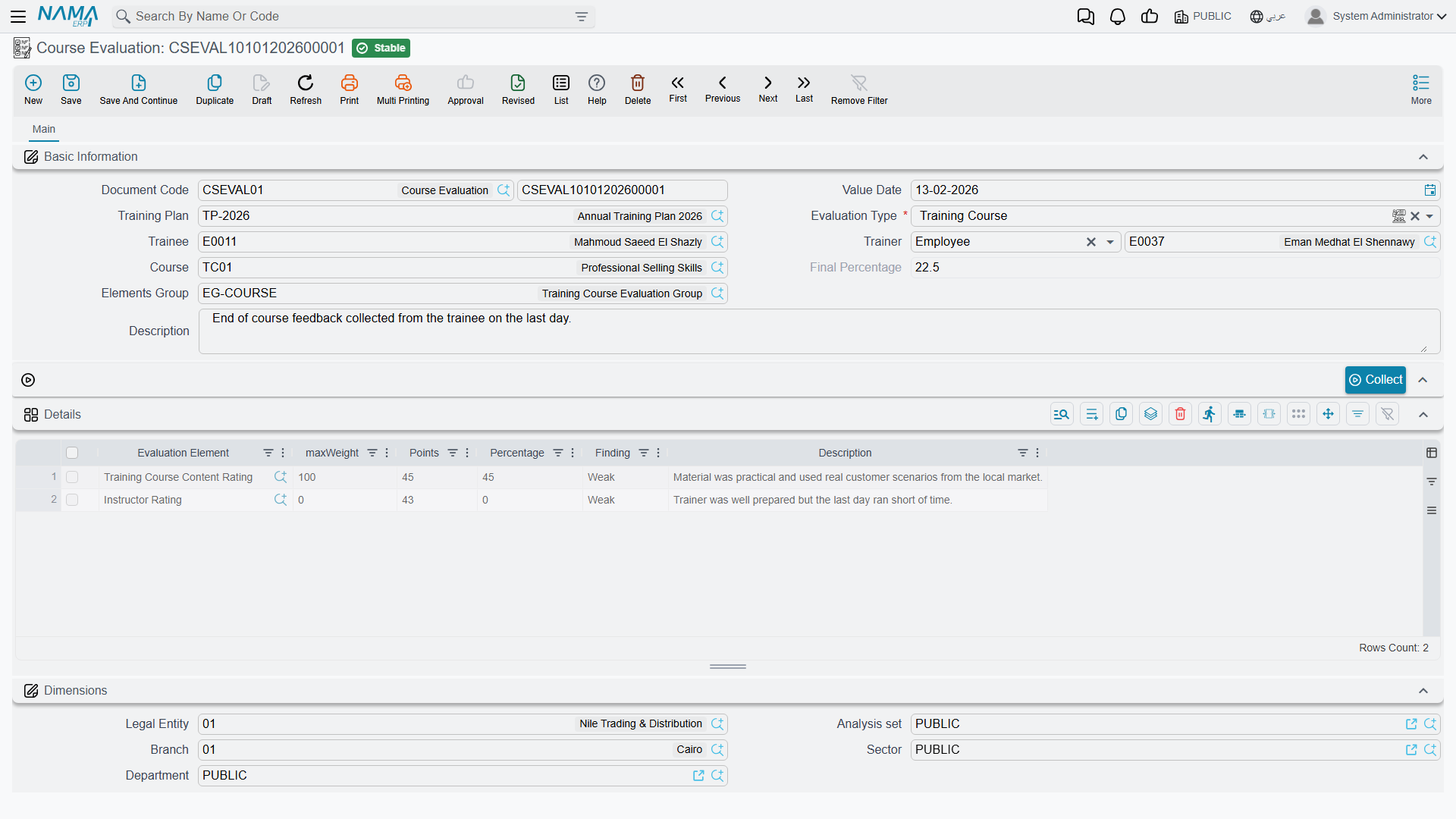
A Course Evaluation's header starts with an Evaluation Type (نوع التقييم): Training Course, Student, or Instructor — which of the three is being rated. What else is required on the header follows from that choice: pick Training Course and the Course field becomes mandatory; pick Student or Instructor and the Trainee field is required instead. A Trainer field is always available too, pointing to either an employee or an outside training provider — the same internal/external distinction a Training Course itself can carry. A Training Plan link ties the evaluation back to the plan the course belongs to, when there is one.
| Field (English) | Arabic | Notes |
|---|---|---|
| Evaluation Type | نوع التقييم | Training Course, Student, or Instructor. |
| Trainee | المتدرب | Required unless Evaluation Type is Training Course. |
| Trainer | المدرب | An employee or a third-party training provider. |
| Course | الدورة التدريبية | Required when Evaluation Type is Training Course. |
| Elements Group | مجموعة نقاط التقييم | An optional bundle of elements to draw from, scoped to training. |
| Final Percentage | النسبة النهائية | The rolled-up result across every scored element. |
The Details grid can be populated two ways. Choosing an Elements Group copies in every element it bundles, along with its remark, in one step. Clicking Collect (تجميع) instead pulls in the training-catalog elements directly, without going through a group. Either way, each Details row carries the Evaluation Element, a computed Max Weight, the Points actually scored, the resulting Percentage, and a Finding — the qualitative label matched against the element's own Ranges, exactly as on Employee Evaluation.
Max Weight is where the training-specific rates from the element catalog come in: it starts from the element's Default Weight, then gets overridden by whichever rate matches this evaluation's own Evaluation Type — the Course Evaluation Rate for a Training Course subject, the Student Evaluation Rate for a Student subject, or the Instructor Evaluation Rate for an Instructor subject (falling back to Default Weight if that particular rate is left empty).
A worked example
Suppose Evaluation Type is set to Training Course, and the Details grid includes "Course Content Quality" — Default Weight 20, but with a Course Evaluation Rate of 30 set on the element itself. Because this record's Evaluation Type is Training Course, that element's Max Weight here becomes 30, not 20. A score of 27 points works out to 90%; if that element's own Ranges say "80 and above = Excellent," its Finding shows as Excellent.
Actions on this screen
- Collect — with Evaluation Type set to Training Course, replaces the Details grid with every evaluation element whose Target Of Evaluation is the training course, so you only have to score them. With no evaluation type chosen it does nothing.
The Evaluation Element has no buttons of its own.
Related pages
- Training Courses & Plans — the course, plan, enrollment, and closing records a Course Evaluation typically follows.
- Employee Evaluation — the shared Evaluation Element catalog and its staff-appraisal angles.