
Employee Evaluation
Where Performance Indicators measure things that can be counted automatically — hours, occurrences, sales — an Employee Evaluation (تقييم موظف) is for the parts of performance that need a human judgment: how well someone communicates, how reliable their work is, how they handle a difficult client. This page covers how a periodic appraisal is built from a catalog of scored criteria, and how that appraisal can, in turn, become a Performance Indicator of its own.
Where to find them
| Screen | Menu path |
|---|---|
| Evaluation Element (the catalog) | Human Resources > Main > Evaluation Element |
| Evaluation Elements Group | Human Resources > Training > Evaluation Elements Group |
| Employee Evaluation Request | Human Resources > Recruitment > Employee Evaluation Request |
| Employee Evaluation | Human Resources > Recruitment > Employee Evaluation |
Evaluation Element — one scoring criterion
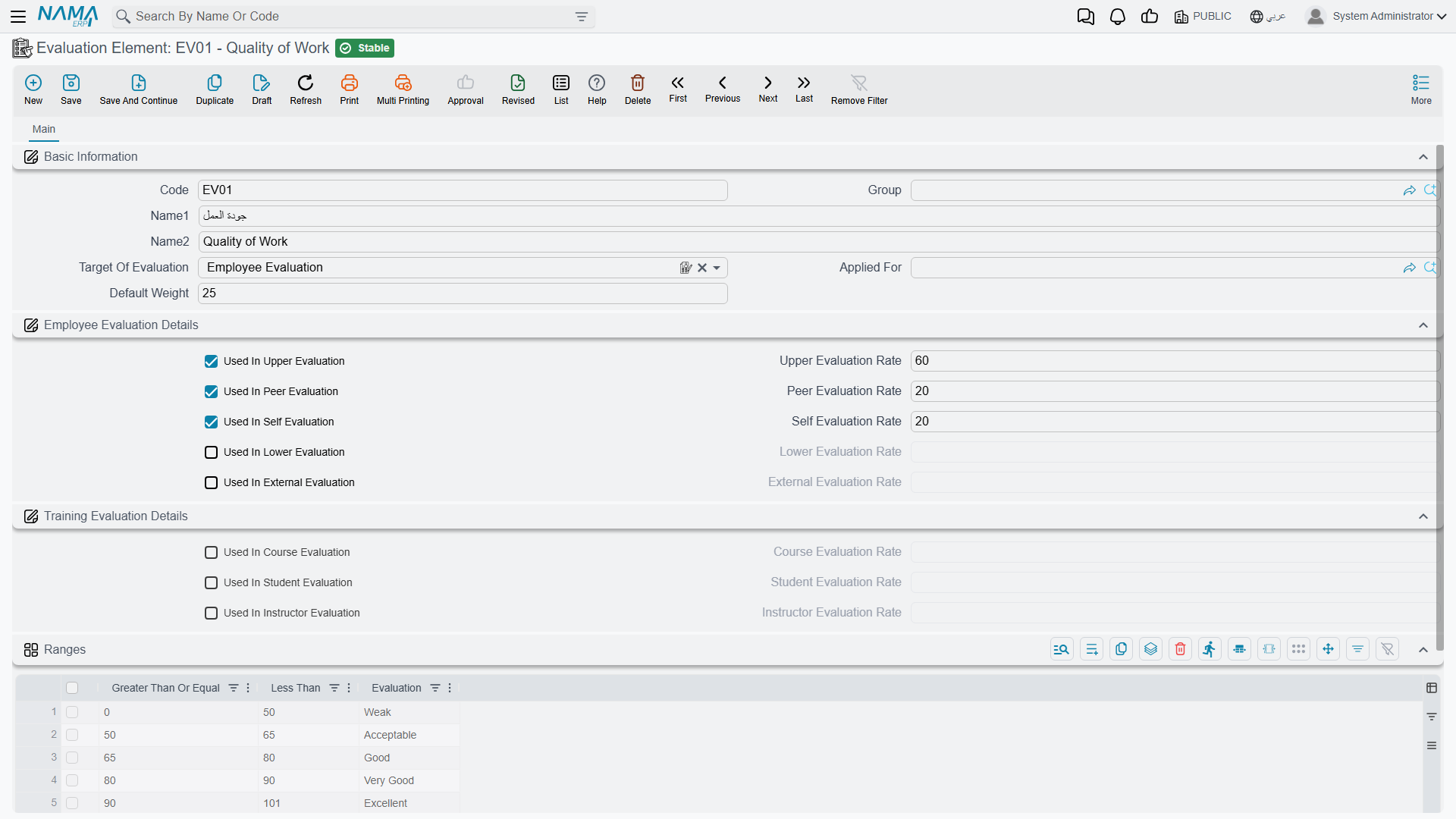
An Evaluation Element (عنصر تقييم) is a single named criterion — "Punctuality," "Teamwork," "Quality of Work" — with a Default Weight (the maximum points it is worth). What makes an element reusable across very different kinds of evaluation is that it carries its own weight per angle: the same "Communication" element can be worth 10 points when a manager rates an employee, but only 5 points when peers rate each other.
| Evaluation angle | Arabic | Used-in flag | Its own rate field |
|---|---|---|---|
| Upper | رؤساء | Used In Upper Evaluation | Upper Evaluation Rate |
| Lower | مرؤسيين | Used In Lower Evaluation | Lower Evaluation Rate |
| Peer | زملاء | Used In Peer Evaluation | Peer Evaluation Rate |
| Self | ذاتي | Used In Self Evaluation | Self Evaluation Rate |
| External | جهة من الخارج | Used In External Evaluation | External Evaluation Rate |
The same element record also carries three more angles reused by the training module — Course Evaluation, Student Evaluation, and Instructor Evaluation — each with its own used-in flag and rate, so the same catalog of criteria can back both a periodic staff appraisal and a post-course evaluation (see Course Evaluation).
An element can also be limited to a specific Applied For (job position), and it carries its own Ranges grid that turns a raw score into a qualitative label:
| Ranges column | Arabic | Meaning |
|---|---|---|
| Greater Than Or Equal | أكبر من أو يساوي | The lower bound of this band. |
| Less Than | أقل من | The upper bound of this band. |
| Evaluation | التقييم | The label this band maps to (for example, "Excellent," "Good," "Needs Improvement"). |
Evaluation Elements Group — a reusable bundle of criteria
Rather than picking elements one at a time on every appraisal, an Evaluation Elements Group (مجموعة نقاط تقييم) bundles a fixed set of elements — plus a remark per element — under one code, scoped to a Target Of Evaluation. A "Manager Appraisal" group, for instance, might bundle Punctuality, Quality of Work, and Teamwork, ready to be pulled into an evaluation in one click.
Employee Evaluation Request — planning the appraisal
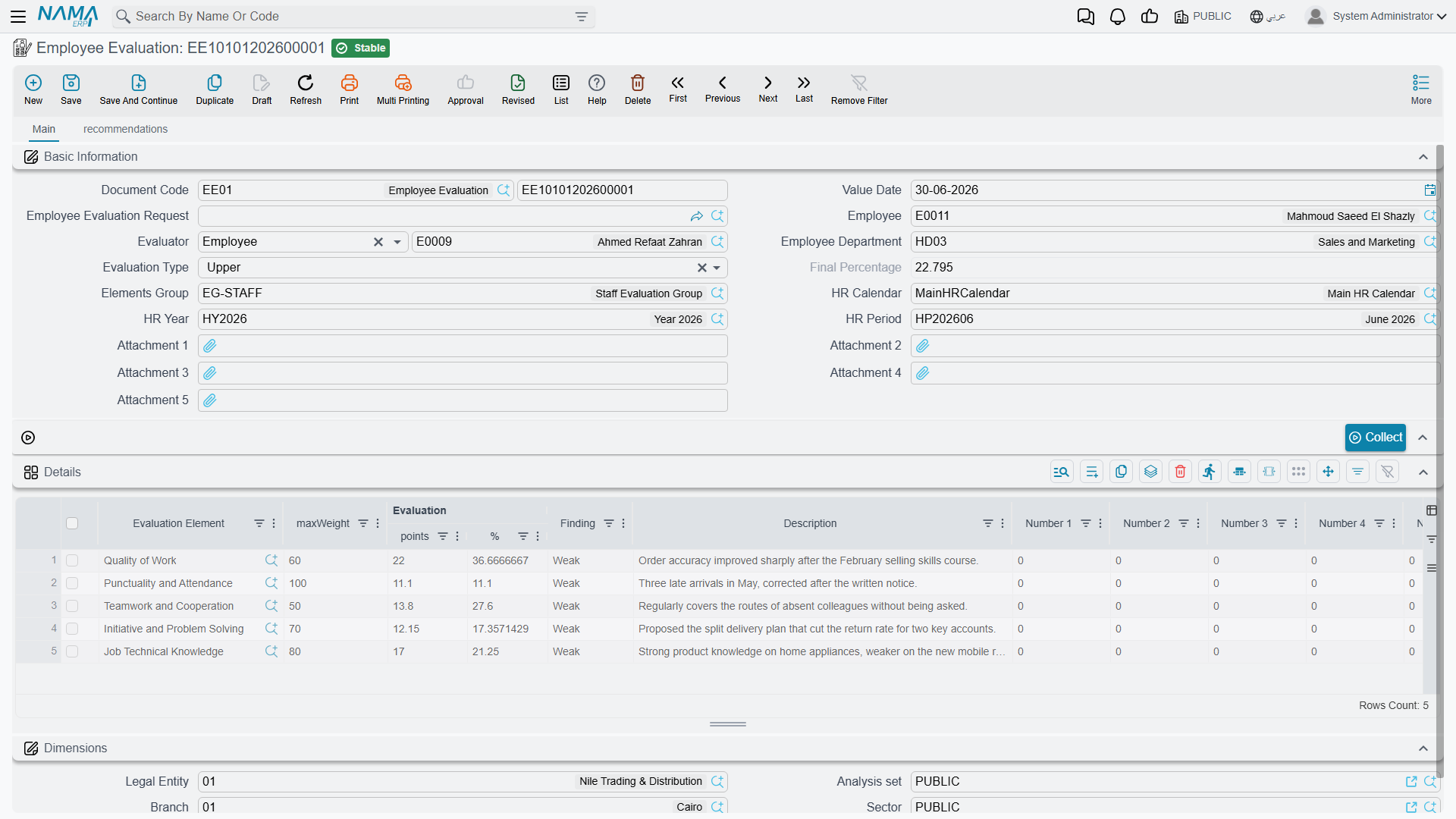
An Employee Evaluation Request (طلب تقييم موظف) sets up who is being evaluated, by whom, and against which criteria, before the scoring actually happens: the Employee, the Evaluator, the Employee's Department, the Evaluation Type (which of the five angles above applies), the Elements Group to draw criteria from, and the HR Calendar/Year/Period the appraisal belongs to. Clicking Collect (تجميع) fills the request's Details grid with every evaluation element meant for employee evaluations and flagged as used in the chosen Evaluation Type, so the evaluator doesn't have to add each criterion by hand.
Employee Evaluation — scoring it
An Employee Evaluation carries the same header as the request, plus a link back to it via its own Employee Evaluation Request field — so a planned appraisal turns into a scored one without re-entering who, whom, and against which criteria. It can just as easily be opened directly, without ever having started from a request.
| Field (English) | Arabic | Notes |
|---|---|---|
| Employee Evaluation Request | طلب تقييم موظف | The request this evaluation was planned from, if any. |
| Employee / Evaluator | الموظف / المقيم | Who is being scored, and who is doing the scoring. |
| Employee Department | إدارة موظف | The employee's department, for reporting. |
| Evaluation Type | نوع التقييم | Which of the five angles (Upper/Lower/Peer/Self/External) this appraisal represents. |
| Final Percentage | النسبة النهائية | The rolled-up result across every scored element. |
| Elements Group | مجموعة نقاط التقييم | Which bundle of criteria this appraisal draws from. |
| HR Calendar / Year / Period | تقويم الرواتب / سنة الرواتب / فترة الرواتب | Which HR period this appraisal belongs to. |
The Collect button again fills the Details grid with the matching elements, where each row carries: the Evaluation Element, its Max Weight (the ceiling from the element's Default Weight), the Points actually scored, the resulting Percentage, and a Finding — the qualitative label produced by matching the score against the element's own Ranges. Ten free Number slots and ten free Description slots are also available per row, for any extra structured notes an evaluator wants to keep (a rating on a specific incident, a client's name, and so on).
A second tab, Recommendations, is where the evaluation turns into next steps: a grid of Recommender, their Job Position, and free-text Recommendations — the concrete actions (a raise, a training course, a warning, a promotion) that came out of the appraisal.
A worked example
Suppose the "Manager Appraisal" Elements Group bundles three elements: Punctuality (Default Weight 30, Upper rate also 30), Quality of Work (Default Weight 50), and Teamwork (Default Weight 20). The manager scores an employee 25, 40, and 15 points respectively — 80 points out of a possible 100, an overall Final Percentage of 80%. If Quality of Work's own Ranges say "70 and above = Good," that element's Finding shows as Good, even though the appraisal's overall percentage might fall in a different band on its own criteria.
Actions on this screen
The Employee Evaluation and the Employee Evaluation Request share one button:
- Collect — fill in the Employee and the Evaluation Type first, then press it. It replaces the Details grid with every evaluation element whose Target Of Evaluation is the employee evaluation and that is flagged as used in that evaluation type (Upper, Lower, Peer, Self or External), sets each row's Max Weight from the element's Default Weight, and totals the weights. With the employee or the type empty, or no element matching, the grid is left as it was.
The Evaluation Element and the Evaluation Elements Group have no buttons of their own.
Where evaluation results can go next
An evaluation's Final Percentage is not, by itself, tied to pay — but it doesn't have to stay a standalone record either. A Performance Indicator of type System can be configured to source its value from an Evaluation Element, which means a well-defined appraisal outcome can flow into a Salary Calculation Formula exactly like an attendance-based indicator would — for example, turning a strong quarterly appraisal into an automatic bonus addition on the next Salary Document.
Related pages
- Performance Indicators — how an evaluation's result can itself become a measured indicator that feeds a salary formula.
- Course Evaluation — the training-side reuse of the same Evaluation Element catalog.
- How Salary Is Calculated — the full pipeline an evaluation-driven indicator would ultimately feed.