
Performance Indicators
Some pieces of an employee's pay aren't fixed numbers — they depend on something that has to be measured first: how many overtime hours were worked, how many late arrivals happened, how many sales were closed, or how the employee's last appraisal scored. A Performance Indicator (مؤشر الأداء) is Nama's way of naming that measured thing so a salary formula can read it. This page covers how an indicator is defined, the three ways its value can be entered or approved, and how it ultimately reaches the salary.
Where to find them
| Screen | Menu path |
|---|---|
| Performance Indicator (the catalog) | Payroll > Performance Indicators > Performance Indicator |
| Performance Measure | Payroll > Performance Indicators > Performance Measure |
| Manual Measure | Payroll > Performance Indicators > Manual Measure |
| System Indicator Approval | Payroll > Performance Indicators > System Indicator Approval |
Performance Indicator — naming what gets measured
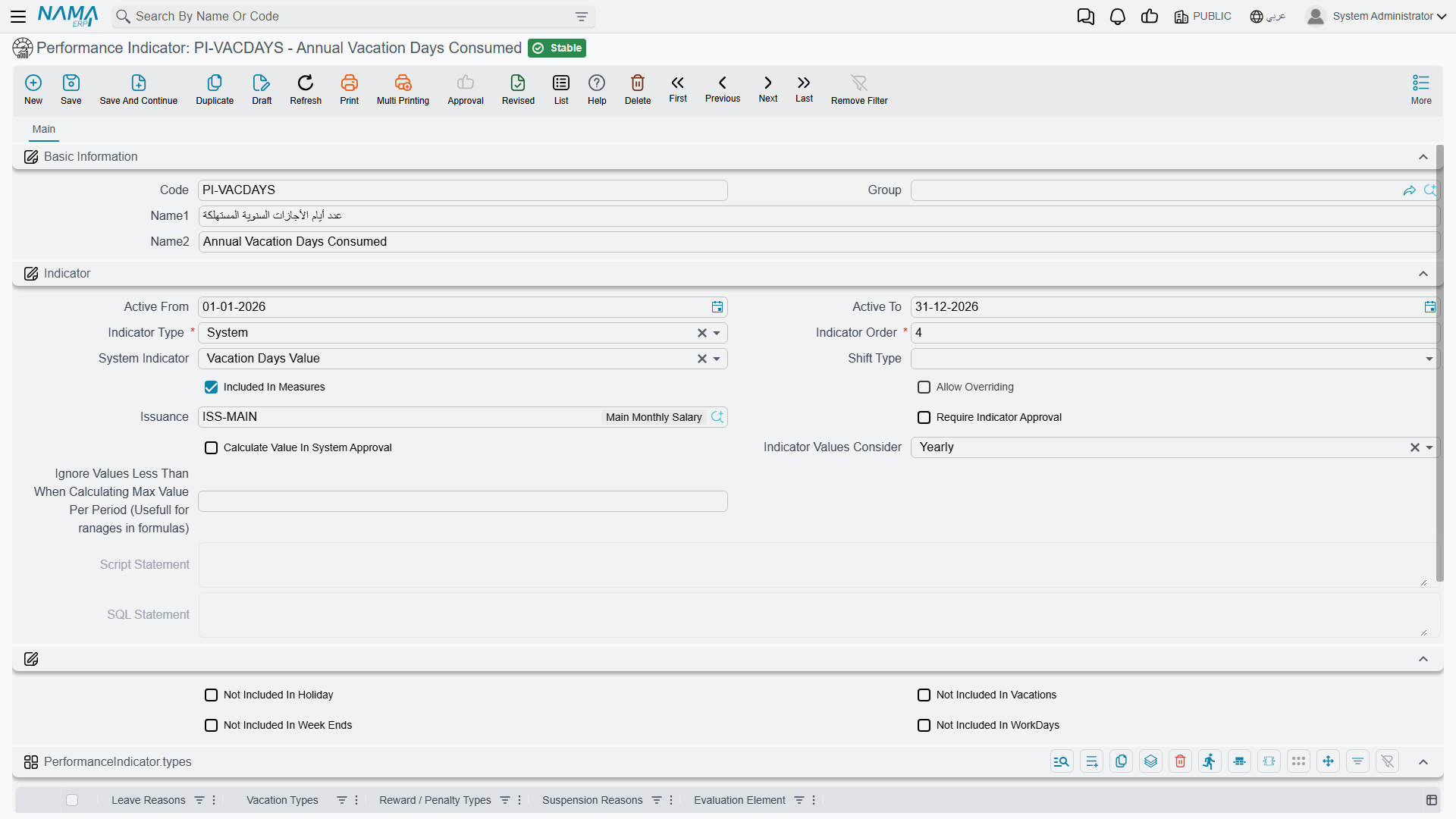
A Performance Indicator is a small master record. Its most important setting is Indicator Type — where its value actually comes from:
| Indicator Type | Arabic | Where the value comes from |
|---|---|---|
| Manual | يدوي | Typed in by hand, one employee at a time, on a Manual Measure document (see below). |
| System | نظامى | Read automatically from another catalog already in Nama — see below. |
| Script | من سيناريو | Computed by a scenario script written for this indicator. |
| SQL Statement | SQL من جملة | Computed by a SQL query written for this indicator. |
| Groovy Script | Groovy Script | Computed by a Groovy script written for this indicator. |
When Indicator Type is System, a second field decides everything: System Indicator (المؤشر النظامى) names which reading the system takes — one of 73 built-in measurements of attendance, overtime, vacations, rewards, appraisals and the rest. It becomes required the moment the type is System, and the whole list is further down this page.
The Types grid on the same screen is not where the value comes from — it is a filter, and only some indicators accept one. An indicator that counts vacations can be narrowed to particular Vacation Types or Leave Reasons; one that counts rewards or penalties to particular Reward/Penalty Types; a suspension count to particular Suspension Reasons; an appraisal reading to a particular Evaluation Element. The indicators that read attendance take no filter at all — they read the attendance record itself — and the screen refuses to save one that has rows in the grid, answering "You can not link reason types grid with the system indicator type {0}".
Two more rules the type brings with it
Daily Indicator From SQL is the one system indicator whose reading you write yourself: its SQL Statement is required, and it is evaluated per day. And Indicator Values Consider must be left at None unless the indicator is a System one — on every other type, Yearly, Aggregated Period and Salary Period are refused on save.
The 73 system indicators
These are the values the System Indicator field offers, exactly as they read on screen. Most are self-explanatory once you know the family they belong to; what is worth checking before you build a formula on one is the third column, which says whether that indicator accepts a Types grid row as a filter. Anything marked — reads the attendance record directly and is rejected on save if the grid has rows.
Where an indicator's name ends in Shift 1, Shift 2 or Shift 3, it measures one part of a split working day; the unnumbered version of the same name measures the whole day.
Attendance, absence and working days
| System Indicator | Arabic | Types grid |
|---|---|---|
| Attend Hours (Hours) | ساعات الحضور (بالساعة) | — |
| Attend Hours Shift 1 (Hours) | ساعات الحضور دوام 1 (بالساعة) | — |
| Attend Hours Shift 2 (Hours) | ساعات الحضور دوام 2 (بالساعة) | — |
| Attend Hours Shift 3 (Hours) | ساعات الحضور دوام 3 (بالساعة) | — |
| Actual Work Days | ايام العمل الفعلية | — |
| Working Days | أيام العمل | accepted |
| None Working Days | أيام عدم العمل | accepted |
| Week End Days | ايام العطلات الأسبوعية | — |
| Holiday Days | ايام العطلات الرسمية | — |
| Absense Days | أيام الغياب | — |
| Shift 1 Absence | غياب دوام 1 | — |
| Shift 2 Absence | غياب دوام 2 | — |
| Shift 3 Absence | غياب دوام 3 | — |
| Total Working Months | شهور العمل الكلية | accepted |
| Experience Day (Use With End Of Service Component) | يوم خبرة (يستخدم مع مخصص نهاية الخدمة) | — |
| Days difference between work starting date and return date | فرق الأيام بين تاريخ المباشرة وتاريخ العودة | accepted |
Overtime
| System Indicator | Arabic | Types grid |
|---|---|---|
| OverTime (Hours) | وقت إضافي (بالساعة) | — |
| OverTime Normal Day (Hours) | وقت إضافي يوم عادي (بالساعة) | — |
| OverTime Other Than Normal Day (Hours) | وقت إضافي اى اجازة (بالساعة) | — |
| OverTime In Week Ends (Hours) | وقت إضافي عطلة أسبوعية (بالساعة) | — |
| OverTime In Holidays (Hours) | وقت إضافي يوم عطلة (بالساعة) | — |
| OverTime In Vacations (Hours) | وقت إضافي في اجازة (بالساعة) | — |
| OverTime Shift1 (Hours) | وقت إضافي دوام 1 (بالساعة) | — |
| OverTime Shift2 (Hours) | وقت إضافي دوام 2 (بالساعة) | — |
| OverTime Shift3 (Hours) | وقت إضافي دوام 3 (بالساعة) | — |
Lateness, early arrival and short time
| System Indicator | Arabic | Types grid |
|---|---|---|
| Late Hours (Hours) | ساعات التأخير (بالساعة) | — |
| Late Arrival Shift1 (Hours) | حضور متأخر دوام 1 (بالساعة) | — |
| Late Arrival Shift2 (Hours) | حضور متأخر دوام 2 (بالساعة) | — |
| Late Arrival Shift3 (Hours) | حضور متأخر دوام 3 (بالساعة) | — |
| Early Hours (Hours) | ساعات الحضور المبكر (بالساعة) | — |
| Early Arrival Shift1 (Hours) | حضور مبكر دوام 1 (بالساعة) | — |
| Early Arrival Shift2 (Hours) | حضور مبكر دوام 2 (بالساعة) | — |
| Early Arrival Shift3 (Hours) | حضور مبكر دوام 3 (بالساعة) | — |
| Early Leave (Hours) | إنصراف مبكر (بالساعة) | — |
| Early Leave Shift1 (Hours) | إنصراف مبكر دوام 1 (بالساعة) | — |
| Early Leave Shift2 (Hours) | إنصراف مبكر دوام 2 (بالساعة) | — |
| Early Leave Shift3 (Hours) | إنصراف مبكر دوام 3 (بالساعة) | — |
| Out Time during shift 1 | ساعات الخروج أثناء الدوام 1 | — |
| Out Time during shift 2 | ساعات الخروج أثناء الدوام 2 | — |
| Out Time during shift 3 | ساعات الخروج أثناء الدوام 3 | — |
| Under Time (Hours) | إجمالي الوقت المتبقي لتحقق الدوام (بالساعة) | — |
| Under Time 1 (Hours) | الوقت المتبقي لتحقق الدوام 1 (بالساعة) | — |
| Under Time 2 (Hours) | الوقت المتبقي لتحقق الدوام 2 (بالساعة) | — |
| Under Time 3 (Hours) | الوقت المتبقي لتحقق الدوام 3 (بالساعة) | — |
Missing punches
| System Indicator | Arabic | Types grid |
|---|---|---|
| No Check In | عدم تسجيل بصمة دخول | — |
| No Check Out | عدم تسجيل بصمة خروج | — |
| Shift 1 No Check In | عدم تسجيل بصمة دخول دوام 1 | — |
| Shift 1 No Check Out | عدم تسجيل بصمة خروج دوام 1 | — |
| Shift 2 No Check In | عدم تسجيل بصمة دخول دوام 2 | — |
| Shift 2 No Check Out | عدم تسجيل بصمة خروج دوام 2 | — |
| Shift 3 No Check In | عدم تسجيل بصمة دخول دوام 3 | — |
| Shift 3 No Check Out | عدم تسجيل بصمة خروج دوام 3 | — |
Vacations, permissions and suspensions
| System Indicator | Arabic | Types grid |
|---|---|---|
| Vacation Days Value | أيام الأجازات | accepted |
| Vacation Type Value Daily | أيام الأجازات يومي (يطبق عليه تكرارات) | — |
| Vacation Types Count | عدد أجازات | accepted |
| Permissions Hours (Hours) | ساعات الأذون | — |
| Permissions Hours of Specific Type (Hours) | ساعات الأذون من نوع معين | accepted |
| Permission Types Count | عدد أذون إنصراف | accepted |
| Suspension Type | نوع ايقاف | accepted |
Missions
| System Indicator | Arabic | Types grid |
|---|---|---|
| Days Missions | مأمورية بالأيام | — |
| Hours Missions | مأمورية بالساعات | — |
| Total Mission Hours From Mission Doc (Does not consider intersections) | إجمالي عدد ساعات المأموريات من السندات (لا تأخذ التقاطع في الحسبان) | accepted |
| Mission Allownce | بدل مأمورية | accepted |
Rewards and penalties
| System Indicator | Arabic | Types grid |
|---|---|---|
| Reward Types Count | عدد مكافأت | accepted |
| Penalty Types Count | عدد الجزاءات | accepted |
| Reward Penalty Daily | مكافأه - جزاء يومي (يطبق عليه تكرارات) | — |
| Penalties Postponed To Next Month | الجزاءات المرحلة إلى الشهر القادم | accepted |
| Penalties Postponed From Previous Month | الجزاءات المرحلة من الشهر السابق | accepted |
Appraisal
| System Indicator | Arabic | Types grid |
|---|---|---|
| Evaluation Points | نقاط التقييم | accepted |
| Inverse Evaluation Points | مقلوب نقاط التقييم | accepted |
| Evaluation Percent | نسبة التقييم | accepted |
| Inverse Evaluation Percent | مقلوب نسبة التقييم | accepted |
Written by you
| System Indicator | Arabic | Types grid |
|---|---|---|
| Daily Indicator From SQL | مؤشر يدوي يومي من جملة SQL | — |
A handful of other settings shape how an indicator behaves once it starts collecting values:
| Field (English) | Arabic | Purpose |
|---|---|---|
| Active From / Active To | فعّال من / فعّال إلى | The date range the indicator is in effect. |
| Indicator Order | ترتيب المؤشر | Where this indicator falls relative to others, when more than one feeds the same calculation. |
| Shift Type | نوع الدوام | Whether the indicator counts during the Normal Shift, the Added Shift (overtime), or Both. |
| Included In Measures | متضمنة في القياس | Whether this indicator is picked up when a Performance Measure batch collects employees. |
| Allow Overriding | السماح بتغيير القيمة | Whether a system-computed value can still be corrected by hand afterward. |
| Require Indicator Approval | يتطلب سند موافقة على مؤشر أداء نظامى | Forces a System Indicator Approval document before a System-type value is accepted (see below). |
| Calculate Value In System Approval | احتساب القيمة في سند موافقة على مؤشر أداء نظامي | Whether the approval document itself computes the value, rather than just reviewing one already computed. |
| Indicator Values Consider | إعتبار قيم المؤشر | How repeated values roll up over a period — Yearly, Aggregated Period, Salary Period, or None. |
| Ignore Values Less Than When Calculating Max Value Per Period | تجاهل القيم الأقل من عند حساب إجمالى الفترة | Excludes small values from the period's maximum — useful when a formula uses a range/bracket over the indicator. |
| Not Included In Holiday / Vacations / Week Ends / WorkDays | لا يتم احتسابه في أيام العطلات الرسمية / الأجازات / العطلات الأسبوعية / أيام العمل | Excludes the indicator's contribution on any of these day types. |
| Issuance | الصرفية | Ties the indicator to one Salary Issuance, for companies running more than one payroll stream. |
An indicator can also be scoped by Dimensions (Legal Entity, Analysis Set, Branch, Sector, Department), and a read-only Component Calc Formulas list on the record shows every Salary Calculation Formula that already reads this indicator — a quick way to see where a given measurement is actually used before you change it.
Manual Measure — typing in a value by hand
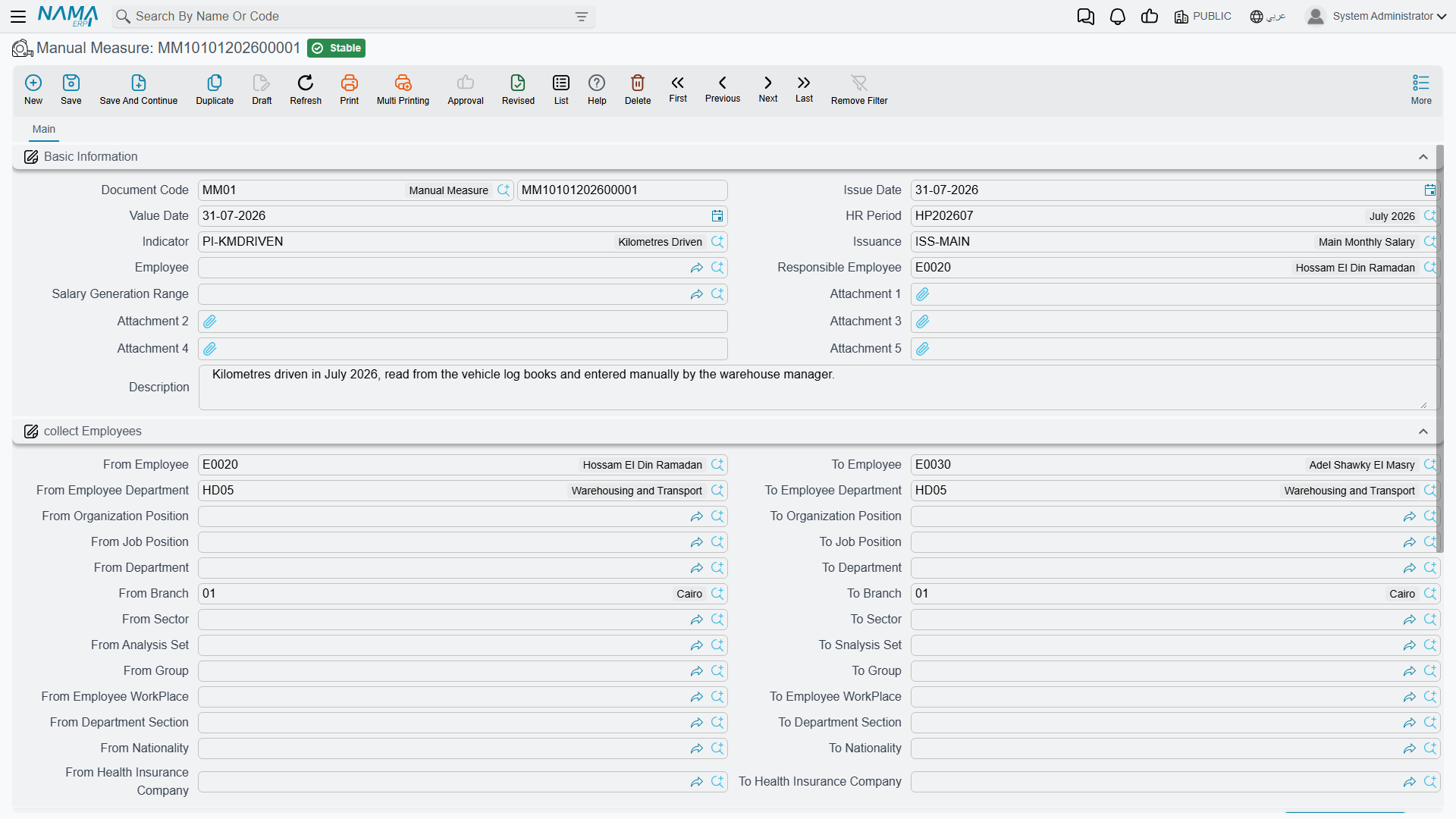
When an indicator's type is Manual, its values are entered on a Manual Measure document — one document per batch of employees and period. A Collect Employees block (from/to employee, department, branch, sector, job/organization position, nationality, health-insurance company, and more) combined with the Collect Employees button pulls in every matching employee at once, instead of adding rows one by one.
Each collected employee gets a Details row with: the Indicator, the Value, a free-text Remark, and up to two attachments — handy for attaching evidence (a signed timesheet, a sales report) behind a specific figure.
Performance Measure — the batch that reconciles manual and system values
Performance Measure is the wider, period-level batch: it is where manual entries and automatically-computed values for up to twenty indicator slots per employee live side by side, tab by tab:
| Tab | Arabic | What it holds |
|---|---|---|
| Basic Information (with Manual Details grid) | المؤشرات اليدوية | Up to 20 hand-typed indicator/value pairs per employee, plus the same Collect Employees block described above. |
| System Details | المؤشرات الآلية | Up to 10 indicator values computed automatically by the system for the period. |
| Calculated Details | المؤشرات المحسوبة | Up to 10 indicators shown side by side — the Manual value next to the System value — so a reviewer can see at a glance where the two disagree before the figure is finalized. |
This three-way layout is exactly how Nama reconciles "what someone typed" against "what the system measured" before either one is allowed to feed a salary formula.
System Indicator Approval — clamping and approving a system value
When an indicator's Require Indicator Approval flag is on, a System-type value doesn't go straight into salary — it first passes through a System Indicator Approval document. This is the gate that lets a reviewer cap and sign off on an automatically-measured figure before it counts, which matters most for things like overtime hours where an unreviewed system reading could otherwise inflate pay.
| Field (English) | Arabic | Purpose |
|---|---|---|
| Performance Indicator / System Indicator | مؤشر الأداء / المؤشر النظامى | Which indicator this approval covers. |
| Max Value Per Day / Max Value Per Day (Time) | أقصى عدد ساعات لليوم الواحد | A ceiling on the indicator's value for any single day. |
| Ignore Values Less Than When Calculating Max Value Per Period | تجاهل القيم الأقل من عند حساب إجمالى الفترة | Same idea as on the indicator itself — small values don't count toward the period ceiling. |
| From Date / To Date | من تاريخ / إلى تاريخ | The date range this approval covers. |
| Details (grid) | التفاصيل | One row per employee, repeating the indicator/employee/date-range setup plus the resulting Indicator Value Over Period — the clamped figure that is actually approved. |
Rather than a separate screenshot, picture the same style of form as the Performance Indicator screen above: a header carrying the indicator, the per-day ceiling, and the date range, over a details grid that lists one clamped total per employee.
Actions on this screen
On the Manual Measure:
- Collect Employees — pick the HR Period first. It replaces the Details grid with one row per employee in the Working state who matches the Collect Employees range during that period, sorted by code, ready for you to type the values.
On the Performance Measure:
- Collect Employees — also needs the HR Period. It opens a small dialog asking which grids to fill: Collect In Manual (ticked by default), Collect In Calculated and Collect In System. Each ticked grid is replaced with the values collected for the matching employees in that period; unticked grids are left alone.
The Performance Indicator and the System Indicator Approval have no buttons of their own.
How an indicator becomes part of the salary
None of the four screens above touch pay by themselves — an indicator only affects a paycheck once a Salary Calculation Formula is set up to read it. A formula whose Formula Type is Related To Performance Indicator points at one indicator, and its Applicability Method decides how the reading is used:
- Daily (يومي) — the indicator is factored in per working day.
- Periodic (فتري) — the indicator's whole-period total is used once.
A worked example
Suppose "Overtime Hours" is a System indicator, tied to attendance and gated behind System Indicator Approval with a Max Value Per Day of 3 hours. An employee logs 5 hours of overtime on one day; the approval document clamps that day's contribution to 3. Across the period, their approved overtime total feeds a formula set to Related To Performance Indicator with a Periodic applicability, which multiplies the total hours by an hourly overtime rate to produce the addition on that employee's Salary Document.
See How Salary Is Calculated for where this fits in the full five-step pipeline, and Time & Attendance for how daily punches turn into the kind of raw figures that System indicators and formulas ultimately consume.
Messages you may see
| Message | Why | What to do |
|---|---|---|
| You can not link reason types grid with the system indicator type {0} — «{0}لا يمكن ربط نوع سطور الأسباب بمؤشر من نوع» | The indicator's System Indicator is one of the attendance readings, which takes no filter at all, yet the Types grid has rows in it. | Empty the Types grid. Attendance indicators read the attendance record itself; only vacation, reward/penalty, suspension and evaluation indicators accept a filter. |
| Field {0} can not be yearly or aggregated period unless indicator type is system — «لا يمكن جعل الحقل {0} سنوي او فترات مجمعة إلا إذا كان نوع المؤشر نظامي» | Indicator Values Consider is set to Yearly, Aggregated Period or Salary Period on an indicator whose type is not System. | Leave the field at None, or change the indicator's type to System if it really is a system reading. |
| The employee {0} is repeated more than once | On a Performance Measure, the same employee appears twice in the manual details or in the calculated details grid. This message has no Arabic string, so it stays in English on Arabic screens. | Delete the duplicate row — one row per employee per indicator slot. |
| Another Performance Measure {0} in the same period for employee {1} manual line number {2} — «مؤشر أداء آخر {0} - للموظف {1} - منشأ على نفس الفترة - داخل المؤشرات اليدوية سطر رقم {2}» | Another Performance Measure document for the same HR period already carries a manual line for this employee, so the period's figures would be counted twice. | Open the document named in the message and add the employee's values there, or remove the employee from this batch. |
| Another Performance Measure {0} in the same period for employee {1} calculated line number {2} — «مؤشر أداء آخر {0} - للموظف {1} - منشأ على نفس الفترة - داخل المؤشرات المحسوبة سطر رقم {2}» | The same overlap on the calculated side: another measure for the period already has a calculated line for the employee. | Consolidate the period into one Performance Measure per employee. |
| The performance indicator {0} is not a system indicator — «مؤشر الأداء {0} ليس مؤشر نظامي» | A System Indicator Approval line points at an indicator whose type is Manual, Formula or Groovy; only System readings are clamped and approved this way. | Pick a System indicator, or drop the line — a manual value is entered and reviewed on the measure document instead. |
| The performance indicator {0} system indicator type is {1}, which is not allowed in the document type {2} — «المؤشر النظامي لمؤشر الأداء {0} نوعه {1}، حيث أنه غير مسموح به في المؤشر النظامي في السند {2}» | The indicator is a System one, but its particular system reading is not among those this approval document accepts (the approval types are limited to specific attendance-hours readings). | Use the approval document that covers that reading, or choose an indicator whose system type this document allows. |
| Field {0} and {1} can not be both empty — «لا يمكنك ترك الحقلين {0}، {1} فارغين» | An approval line has neither Max Value Per Day nor Max Value Per Period filled, so there is no ceiling to approve against. | Enter at least one of the two ceilings on that line. |
Related pages
- Salary Calculation Formulas — the "Related To Performance Indicator" formula type that actually reads an indicator's value.
- How Salary Is Calculated — the full pipeline these indicators feed into.
- Time & Attendance — the daily punches behind attendance-driven System indicators.
- Employee Evaluation — appraisal scores can themselves become a System indicator's source.