
Time Attendance
An Attendance Plan and Shift tells Nama what an employee's day is supposed to look like. This page is about what actually happened: the raw check-in and check-out punches, however they were captured, and how those punches turn into money on the payslip.
Nama records punches two different ways, for two different sources:
- Time Attendance (حضور / إنصراف) — a batch document that brings in punches from a physical fingerprint/card machine, one file (or a manual line) at a time, for many employees at once.
- Electronic Attendance (حضور إلكتروني) — a single employee's own check-in/check-out through the mobile app, optionally geofenced to a specific location.
Both ultimately feed the same place: a per-employee, per-day record of "in" and "out" that the salary engine reads when it calculates lateness, overtime, and absence.
Time Attendance — punches from a machine
Found at Payroll > Time Attendance > Time Attendance.
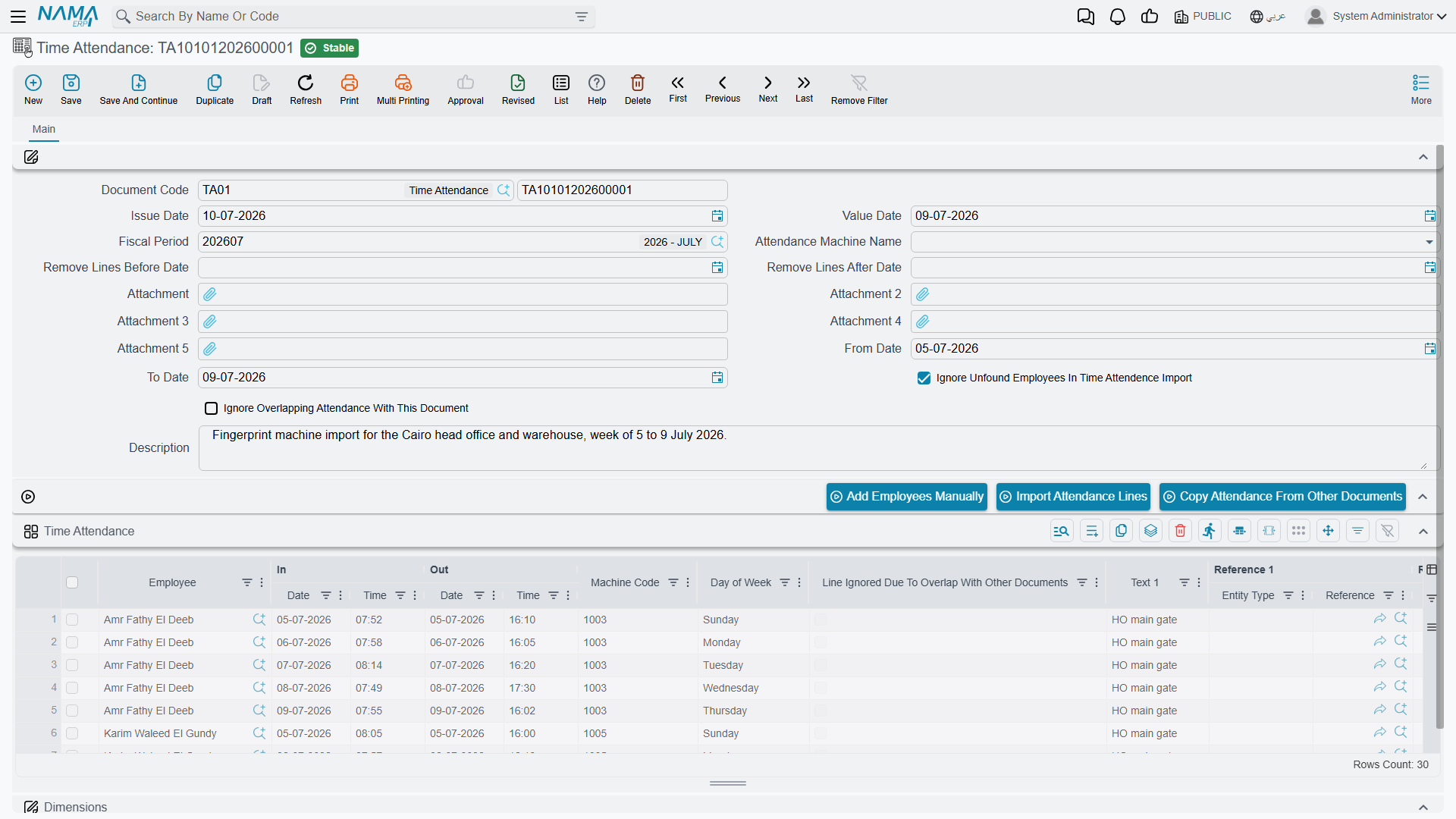
A Time Attendance document is a container for a batch of punches — usually everyone whose fingerprint machine exported a file that day, or that week. Its header covers the batch as a whole:
| Field (English → Arabic) | Purpose |
|---|---|
| Document Code / Book (رقم المستند / الدفتر) | The document's own numbering. |
| Issue Date / Value Date (تاريخ التحرير / التاريخ الفعلي) | When it was written up, and the accounting/business date it counts for. |
| Fiscal Period (الفترة) | The HR period this batch of punches belongs to. |
| Attendance Machine Name (آلة الحضور والإنصراف) | Which machine's export format this document expects — see Attendance Machines for how a machine's file layout is described to Nama. |
| From Date / To Date (من تاريخ / إلى تاريخ) | The date range the imported punches should fall within. |
| Remove Lines Before/After Date (حذف السطور قبل/بعد تاريخ) | Housekeeping switches that drop stray lines outside the expected range before saving. |
| Ignore Unfound Employees In Import (تجاهل اكواد الموظفين الغير موجودة) | Skip file rows whose machine employee-code doesn't match anyone, instead of stopping the whole import. |
| Ignore Overlapping Attendance With This Document (تجاهل الحضور والانصراف المتقاطع) | See Attendance Machines — lets this batch's punches coexist with punches already recorded for the same employee/time from another document, rather than conflicting. |
| Attachment 1–5 (مرفق) | The exported machine file(s) themselves, up to five per document. |
Actions on this screen
Three buttons drive how lines get onto the document, rather than typing each punch by hand:
| Action | Purpose |
|---|---|
| Add Employees Manually (إضافة موظفين يدويا) | Asks for a date range and an employee filter (employee range, job position, department, dimensions, employee state — Working by default), then writes the attendance each employee was scheduled for: one line per working day of their attendance plan, with the shift's start and end times, skipping weekly rest days and official holidays. Untick Attending or Leaving in the dialog to leave that half of each line empty for you to type. Two ticks record the shift in Reference 1 and the attendance plan in Reference 2 of each line. The lines are added to those already on the grid. |
| Import Attendance Lines (إستيراد الحضور والإنصراف) | Reads the attached machine file(s) using the selected machine's formula and fills the grid, replacing whatever lines it held. Needs an attachment and an Attendance Machine Name. |
| Copy Attendance From Other Documents (نسخ الحضور والانصراف من السندات الأخرى) | Asks for a date range and an employee, and copies that employee's lines from other committed Time Attendance documents that fall in the range (documents marked to ignore overlapping attendance are left out). The copies are added below the existing lines, for correcting a period without retyping it. |
Each resulting line in the Time Attendance grid records one employee's in/out pair for one day:
| Column (English → Arabic) | Purpose |
|---|---|
| Employee (الموظف) | Who punched. |
| In Date / In Time (الحضور | تاريخ / وقت) |
| Out Date / Out Time (الإنصراف | تاريخ / وقت) |
| Machine Code (كود الماكينة) | The employee's ID as known to the physical machine, distinct from their Nama employee code. |
| Day of Week (اليوم) | Read-only, for a quick sanity check against weekends/holidays. |
| Line Ignored Due To Overlap (تم تجاهل السطر للتقاطع) | Marked automatically when this line was suppressed because another document already covers the same time — see Attendance Machines. |
| Text 1 / Reference 1 / Reference 2 | Free extra fields some machine formulas populate. |
A file is one of two ways in
This document reads the file the machine exports. If the machine publishes an API or writes into a database the branch can reach, Nama can instead collect the punches by itself on a schedule, through an Attendance Machine Configuration. The Attendance Machines page covers both paths: how a file's format is described to Nama (the attendance formula), the automated collection, and how machine-to-machine punch overlaps are resolved.
Electronic Attendance mobile self-service punches
Found at Payroll > Mobile App - HR > Electronic Attendance.
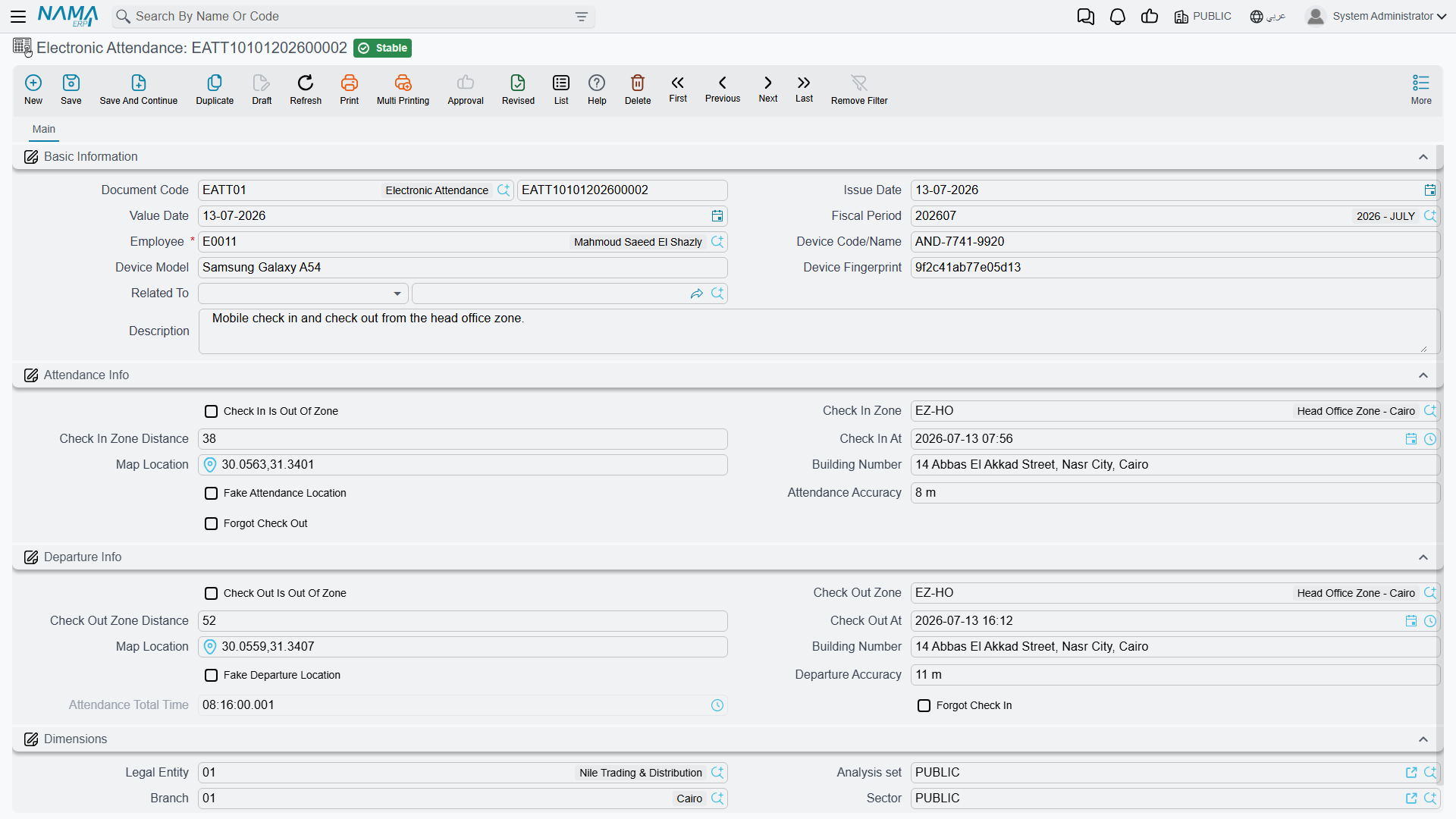
Where Time Attendance is a bulk import, Electronic Attendance is one employee tapping "check in" / "check out" on their phone, one record per punch pair. Its header identifies the employee and the device:
| Field (English → Arabic) | Purpose |
|---|---|
| Employee (الموظف) | Who is checking in. |
| Device Code/Name (كود/اسم جهاز الجرد) | The phone or device the punch was made from. |
| Device Model (نوع الجهاز) | The device's model/type, as reported by the app. |
| Related To (يرتبط بـ) | An optional link back to whatever business record this attendance instance relates to. |
The record then splits into a Check-In side and a matching Check-Out side, and both can be geofenced independently:
| Field (English → Arabic) | Purpose |
|---|---|
| Check In/Out Is Out Of Zone (الحضور/الإنصراف خارج النطاق) | Whether this punch fell outside its allowed geofence. |
| Check In/Out Zone (منطقة الحضور/الإنصراف) | Which Electronic Attendance Zone the punch was checked against. |
| Check In/Out Zone Distance | How far the punch's GPS position was from that zone's location. |
| Check In/Out At | The timestamp of the punch. |
| Map Location / Building Number (الموقع على الخريطة / رقم المبني) | The GPS point and address captured at the moment of the punch. |
| Fake Attendance/Departure Location | Flagged when the app detects the device's location was likely spoofed. |
| Attendance/Departure Accuracy | The GPS accuracy reported by the device at that moment. |
| Forgot Check Out / Forgot Check In (نسيان بصمة خروج / دخول) | Set when the matching half of the pair was never recorded — the employee checked in but never checked out, or vice versa. |
| Attendance Total Time (إجمالي وقت الحضور) | The computed duration between check-in and check-out. |
A forgotten punch isn't a dead end
When Electronic Attendance flags Forgot Check In or Forgot Check Out, record a Leave Permission of the matching type (Forgot Check In / Forgot Check Out) for that day, so the missing punch gets a proper, reviewable explanation instead of silently counting as an absence. The Electronic Attendance record itself has no buttons — it is written by the mobile app and only read here.
Electronic Attendance Zone geofence
Electronic Attendance Zone (منطقة حضور إلكتروني, master file at Payroll > Mobile App - HR > Electronic Attendance Zone) is what "in zone" or "out of zone" is measured against. Each zone is a location — country, city, state/governorate, area, street, building number, and a point on the map (Map Location) — plus a Max Distance Away tolerance. When an employee checks in, Nama compares their GPS position to the zone's point; inside the tolerance, the punch is in-zone, outside it, Electronic Attendance flags it as out-of-zone.
How a punch becomes an addition or a deduction
Neither Time Attendance nor Electronic Attendance touches the payslip directly — they only establish, per employee per day, when work started and ended. That raw record is then rolled up into daily figures (worked time, lateness, early leave, overtime, absence), and those figures reach salary through performance indicators: a Salary Calculation Formula of the "Related To Performance Indicator" type reads a Performance Indicator built on the day's attendance figures and turns it into an addition (e.g. an overtime component) or a deduction (e.g. a lateness penalty). See How Salary Is Calculated for the full pipeline this step (Step 4) belongs to.
Attendance documents never post accounting on their own
Time Attendance and Electronic Attendance have no ledger effect of their own — they are pure attendance data. The accounting entry, if any, is always carried by the Salary Document that later reads the resulting performance-indicator figures, not by the attendance record itself.
Workflow
- Bulk machine punches: attach the exported file(s) to a Time Attendance document, select the right Attendance Machine Name, and run Import Attendance Lines — or add employees manually for hand entry.
- Mobile self-service punches: employees check in/out from the app; Nama saves each as an Electronic Attendance record, checking the GPS position against any configured Electronic Attendance Zone.
- Handle a forgotten punch: use Convert To Leave Permission on the flagged Electronic Attendance record rather than leaving it incomplete.
- Let the salary engine read the result: once the period's attendance is complete, performance indicators pick up the daily figures and feed the relevant salary formulas.
Messages you may see
| Message | Why | What to do |
|---|---|---|
| Check out date {0} can not be before check in date {1} — «تاريخ الخروج {0} لا يمكن ان يكون قبل تاريخ الدخول {1}» | On an Electronic Attendance record the check-out timestamp is earlier than the check-in timestamp. The values shown in the message are not the two timestamps, so read the record's own Check In At / Check Out At fields. | Correct whichever timestamp is wrong; a night shift that ends after midnight still needs the later date on the check-out side. |
| Total hours {0} for document {1} exceeded the maximum allowed hours {2} — «إجمالي الساعات {0} للمستند {1} تجاوز الحد الأقصى المسموح به وهو {2}» | The computed Attendance Total Time is longer than the hours allowed before a check-out is blocked (24 hours unless the shift or HR Configuration sets a different ceiling) — usually a check-out that was never made on the day it belonged to. | Fix the check-out time, or handle the missing punch through Convert To Leave Permission instead. |
| There are opened attendance must be closed first — «يوجد سندات حضور مفتوحة يجب غلقها أولا» | The employee already has a committed Electronic Attendance record with a check-in and no check-out inside the allowed window, so a second open punch would leave two unfinished pairs. | Close the earlier record — check out on it, or flag it Forgot Check Out and convert it to a leave permission — then punch again. |
| Could not find allowed zone to check in — «لا يمكن إيجاد مناصق مسموح تسجيل دخول بها» | Attendance zones are switched on, but the check-in did not fall inside any defined Electronic Attendance Zone, so no zone could be attached to it. | Define a zone for that site, or widen an existing zone's Max Distance Away. |
| Could not find allowed zone to check out — «لا يمكن إيجاد مناصق مسموح تسجيل خروج بها» | The same for the check-out half of the pair. | As above, for the location the employee checked out from. |
| You cannot check in from your current location. The distance between your location and the nearest zone ({0}) is {1} — «لا يمكنك تسجيل دخول من الموقع الحالي, المسافة بين موقعك وأقرب منطقة ({0}) هي {1}» | The punch was flagged out of zone and the mobile-app configuration's Prevent Save If Attendance Out Of Zone is on. The message names the nearest zone and how far away the employee was. | Punch from inside the zone, or raise that zone's tolerance if the site is genuinely bigger than the geofence. |
| You cannot check out from your current location. The distance between your location and the nearest zone ({0}) is {1} — «لا يمكنك تسجيل خروج من الموقع الحالي, المسافة بين موقعك وأقرب منطقة ({0}) هي {1}» | The same rule applied to the check-out. | As above. |
| Check in zone {0} is not the same as check out zone {1} | The configuration requires a completed pair to check out in the same zone it checked in from, and the two zones differ. This message has no Arabic string, so it stays in English on Arabic screens. | If moving between sites during a shift is normal, switch that configuration option off; otherwise close the punch at the site it started from. |
| Attendance Hours in line {0} is greater than Maximum allowed attendance hours — «ساعات الحضور فى السطر {0} أكبر من أقصى عدد ساعات حضور متواصل» | On a Time Attendance document, the line's check-in to check-out span is longer than HR Configuration's Max Continuous Attendance Hours (23 unless changed). This usually means a check-out was missed and the next day's punch was paired with it. | Correct the line's out date and time. Raise the configuration value only if shifts that long are real. |
| Attendance Hours in line {0} is negative | On a Time Attendance line the out date and time are before the in date and time. This message has no Arabic string, so it stays in English on Arabic screens. | Correct the line. A shift that ends after midnight needs the next day's date on the out side. |
| Ignoring overlapping attendance is not allowed. Enable it in HR configuration first. | Ignore Overlapping Attendance With This Document is ticked on the document, but HR Configuration's Allow Ignore Overlapping Attendance Documents is off. This message has no Arabic string, so it stays in English on Arabic screens. | Untick the option, or have an administrator switch the configuration on first — see Ignore Overlapping Attendance. |
Messages raised while Import Attendance Lines reads the machine file (an unknown or repeated machine code, a row that can't be parsed) are listed on Attendance and Departure Formulas.
Related pages
- Attendance Plans & Shifts — the expected schedule that punches are measured against.
- Attendance Machines — how a machine's exported file format is described to Nama, and how overlapping punches across documents are resolved.
- Leave Permissions & Missions — short in-period exceptions (early leave, forgotten punches, missions) that adjust how a day's attendance is read.
- Salary Calculation Formulas and Performance Indicators — how attendance figures turn into money.
- How Salary Is Calculated — the full pipeline attendance feeds into.