
Leave Permissions & Missions
Not every departure from the schedule needs a full vacation. Sometimes an employee just needs to leave two hours early, arrive late, or step out on company business for the afternoon. Nama covers these short, intra-day exceptions with two lightweight documents: Leave Permission (إذن إنصراف) for authorized time away from the desk, and Mission Document (سند مأمورية) for time spent out of the office on business. Neither posts to the ledger by itself — their whole job is to make sure that short absence is explained on the attendance record rather than showing up as unexplained lateness or a gap in the day.
Leave Permission — authorized short absence
Found at Payroll > Time Attendance > Leave Permission.
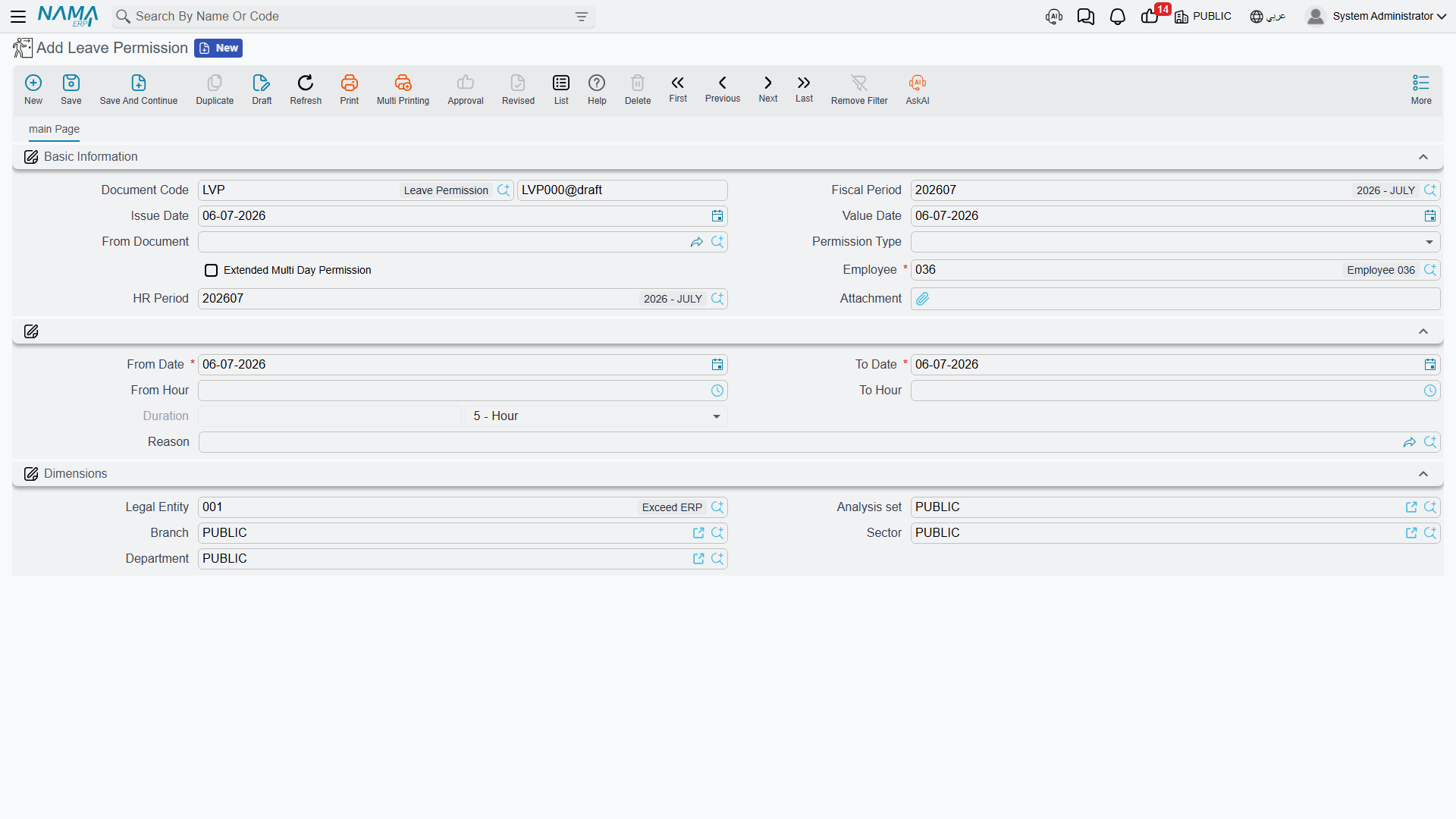
A Leave Permission records a specific, time-boxed absence for one employee, with a Permission Type that says why:
| Permission Type | Arabic | Typical use |
|---|---|---|
| Early Leave | اذن مبكر | Leaving before the shift ends. |
| Late Arrival | اذن تاخير | Arriving after the shift starts. |
| Leave During Work | انصراف خلال العمل | Stepping out mid-shift and returning. |
| Forgot Check In | نسيان بصمة دخول | Covers a missing check-in — typically one an Electronic Attendance record flagged that way. |
| Forgot Check Out | نسيان بصمة خروج | Covers a missing check-out, the same way. |
| Other 1 / 2 / 3 | أخرى 1 / 2 / 3 | Site-specific catch-all categories. |
Its header carries the usual document identity plus two fields worth calling out:
| Field (English → Arabic) | Purpose |
|---|---|
| From Document (بناءا على) | An optional link to whatever record this permission originates from — most often the Leave Permission Request it answers (choosing a request there copies its type, employee, period, dates, hours and reason), following the same "document tells you where it came from" idea covered in HR Requests & Documents. |
| Extended Multi Day Permission (إذن ممتد لأكثر من يوم) | Lets a single permission span more than one calendar day, instead of being confined to one. |
| HR Period (فترة الرواتب) | The payroll period this permission counts against. |
The body of the document pins down exactly how long the absence is:
| Field (English → Arabic) | Purpose |
|---|---|
| From Date / To Date (من تاريخ / إلى تاريخ) | The date span the permission covers. |
| From Hour / To Hour (من ساعة / إلي ساعة) | The specific hours within that span. |
| Duration — Value / Unit (المدة — القيمة / الوحدة) | The computed length of the permission, in Day/Week/Month/Year/Hour/Minute/Second. |
| Reason (السبب) | A Leave Reason picked from the shared reasons catalog. |
No accounting effect
A Leave Permission does not generate any ledger entry by itself. Its effect is entirely on the attendance record — an hour marked here is an hour that will not be flagged as unexplained lateness or absence when the period's performance indicators are calculated. If the reason or the component setup calls for a deduction (an unpaid leave reason, for instance), that shows up later as a salary component driven by the resulting performance-indicator figure, not as something the permission itself posts.
Leave Permission Configuration — the guardrails
Leave Permission Configuration (إعدادات إذن الانصراف, master file at Payroll > Main > Leave Permission Configuration) is where an organization caps how much of this short-absence allowance an employee (or group of employees) can use. Rather than one flat rule, it holds a Details grid of rules, each scoped by:
- A date range the rule applies within (From/To Value Date).
- The Leave Permission document's own dimensions (its legal entity, branch, sector, department, analysis set) or a free-form query/definition.
- The employee's dimensions (legal entity, branch, sector, department, analysis set).
and each rule then sets:
| Field (English → Arabic) | Purpose |
|---|---|
| Max Permission Hours Per Month (أقصى عدد ساعات إذون انصراف شهريا) | The total hours of leave permission an employee can take in a month. |
| Max Single Permission Hours (أقصى عدد ساعات للإذن الواحد) | The longest any one permission can be. |
| Max Permissions Per Month (أقصى عدد إذون انصراف شهريا) | The number of separate permissions allowed in a month, regardless of their individual length. |
Because a rule can be scoped narrowly (one department) or broadly (the whole company), an organization can give, say, sales staff a looser allowance than back-office staff, all from the same configuration record.
Leave Reason catalog of reasons
Leave Reason (نوع سبب, master file at Payroll > Main > Leave Reason) is a shared reasons catalog — the same entity backs reasons for vacations, leave permissions, rewards, penalties, suspensions, and missions, distinguished by its Selected Group field:
| Selected Group | Arabic | Applies to |
|---|---|---|
| Vacation | الأجازة | Vacation documents. |
| Leave | إنصراف | Leave Permission documents. |
| Reward | مكافأة | Reward records. |
| Penalty | جزاء | Penalty records. |
| Suspension | وقف عن العمل | Suspension documents. |
| Mission | مأمورية | Mission Documents. |
For a reason scoped to Leave, the fields that matter are:
| Field (English → Arabic) | Purpose |
|---|---|
| Without Salary Deducted From Termination (بدون مرتب و يخصم من نهاية الخدمة) | This reason's leave is unpaid, and counts against end-of-service calculations. |
| Without Salary Not Deducted From Termination (بدون مرتب ولا يخصم من نهاية الخدمة) | Unpaid, but does not affect end-of-service. |
| Max Permission Count Per Reason (أقصي عدد أذون شهريا لكل سبب على حدة) | A monthly cap specific to this one reason, on top of whatever Leave Permission Configuration allows overall. |
| Deducted From Paid Vacation Period In Dues (تخصم من مدة الأجازة مدفوعة الأجر في التصفية) | Whether time taken under this reason eats into the paid-vacation period counted at final settlement. |
| Consider Return Date As Working Start Date (إعتبار تاريخ العودة تاريخ مباشرة العمل) | Treats the day the employee returns as a fresh work-start date for calculation purposes. |
| Change Employee State To (تغير حالة الموظف إلى) | Optionally flips the employee's working state (e.g. to Suspended) while this reason is in effect. |
| Max Permissions Per Month / Max Permission Hours Per Month / Max Single Permission Hours | The same three caps as Leave Permission Configuration, settable per reason instead of (or in addition to) globally. |
Mission Document — time out of the office on business
Found at Payroll > Time Attendance > Mission Document.
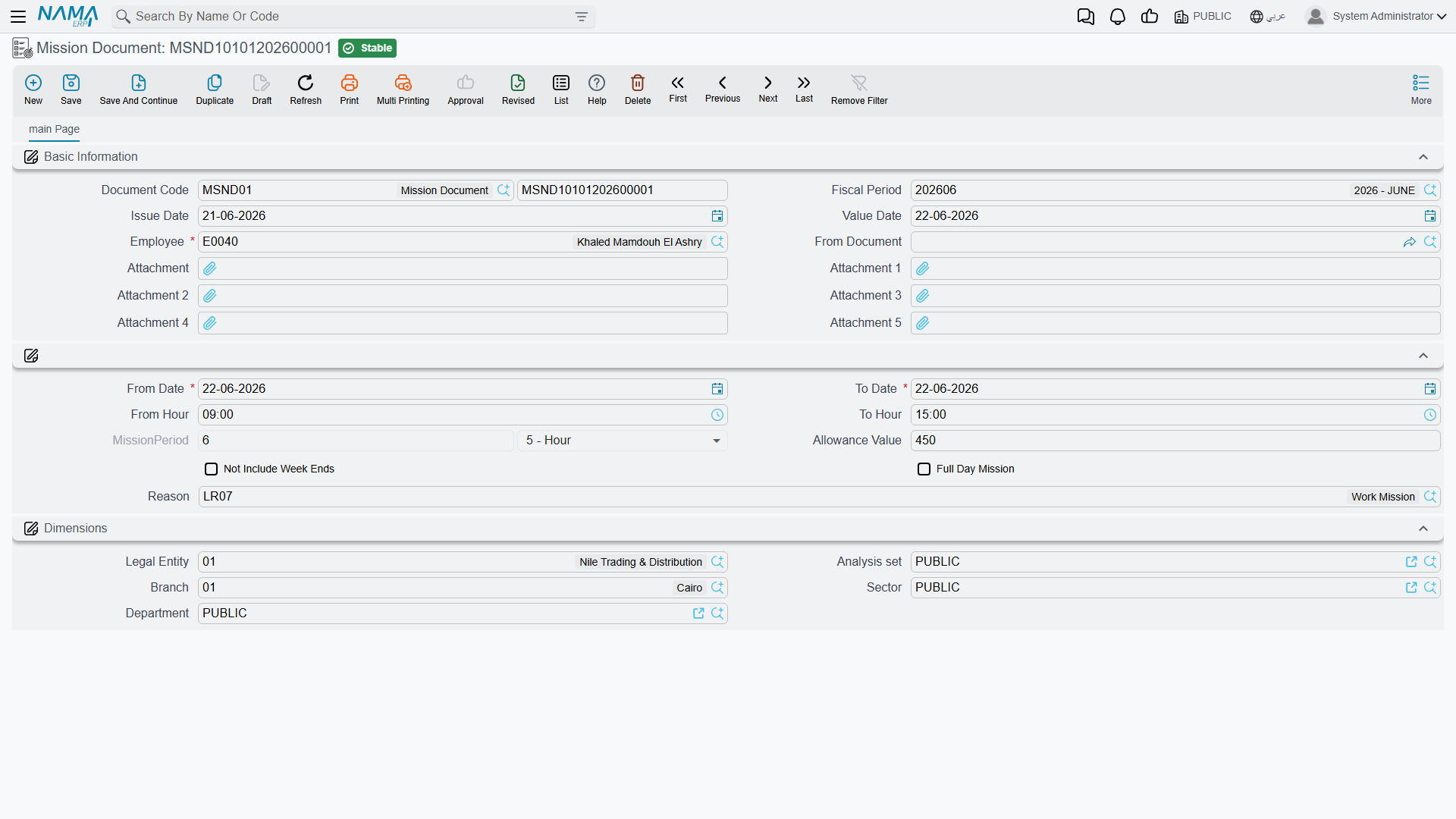
A Mission Document records an employee being away from their normal workplace on the company's business — a client visit, a delivery run, an external meeting — as opposed to a personal absence. Structurally it looks a lot like a Leave Permission:
| Field (English → Arabic) | Purpose |
|---|---|
| Employee (الموظف) | Who is on the mission. |
| From Document (بناءا على) | The optional originating record, same idea as on Leave Permission. |
| From Date / To Date, From Hour / To Hour | The span of the mission. |
| Mission Period — Value / Unit (مدة المأمورية) | The computed length of the mission. |
| Allowance Value (قيمة البدلات) | A monetary allowance associated with the mission (e.g. transport or per-diem), which a salary formula can pick up. |
| Not Include Week Ends (لا تشمل العطله الأسبوعية) | On a mission whose hours span several days — a two-week posting to Alexandria — leaves the weekly rest days inside that span out of the counted period. A mission that fits inside one day always counts, rest day or not: it happened. Cannot be combined with Full Day Mission. |
| Full Day Mission (مهمه يوم كامل) | The mission runs around the clock rather than for set hours — a three-day delivery run to Aswan — so every day between From Date and To Date counts as worked, weekly rest days among them. |
| Reason (السبب) | A Leave Reason scoped to Mission. |
| Attachment 1–5 | Supporting documents (a travel order, a client visit report, and so on). |
A mission is time worked, not time off
The key distinction from a Leave Permission is intent: a mission employee is still working, just not at their desk. That is why full-day missions don't need to be flagged as absent, and why a mission commonly carries an Allowance Value rather than a deduction — it is compensating the employee for being out, not excusing an absence.
When a mission overlaps something else
Because a mission is time worked, it does not sit quietly beside the attendance record — it takes part in it. The day gains a stretch of hours that no fingerprint produced, and that stretch has to coexist with whatever else the day already holds: the real punches, a leave permission, a partial vacation. Two questions come out of that, and between them they account for most of the support traffic around missions.
The same hours claimed twice — overlap and priority
Picture an employee who scans in at 09:06 and out at 17:05, and who also has a mission covering 09:00 to 17:00 on that same day. Eight hours were worked, but the day is carrying two records of them. Unless something reconciles the two, those eight hours are counted twice.
The reconciliation is a payroll setting, in Payroll Settings under the Attendance Settings group:
Handle Overlap Between Attendance, Missions, and Leave PermissionsWith it enabled, the day's records are laid out on a single timeline and compared in pairs. Wherever two of them cover the same minutes, the stronger record keeps those minutes and the weaker one is trimmed back to the part that does not overlap — or dropped entirely when the stronger record covers it end to end. Strength is a number you set, and the lowest number wins:
| Setting (English → Arabic) | Default |
|---|---|
| Mission Document Priority With Overlap (اولوية المأموريات عند التداخل) | 1 |
| Time Attendance Priority With Overlap (اولوية الحضور و الانصراف عند التداخل) | 2 |
| Leave Permission Priority With Overlap (اولوية الأذون عند التداخل) | 3 |
| Partial Vacation Priority With Overlap (اولوية الاجازات الجزئية عند التداخل) | 4 |
So out of the box a mission outranks everything else: in the example above the mission keeps 09:00–17:00 and the punch line is dropped, because the mission covers it from end to end. Swapping the first two numbers makes the fingerprint the authority instead, leaving the mission only the hours the machine did not already account for.
An older settings record may not have it enabled
A payroll settings record created today has overlap handling ticked from the start, but a record that predates the option keeps it unset — and unset means off, with both records counted in full. When a day shows double hours, read that checkbox before investigating anything else rather than assuming the default.
The mission's hours become the day's check-in and check-out
Because the mission joins the day as a genuine stretch of time, the day's first-in and last-out readings can be taken from the mission's own From Hour / To Hour. This is why mission days read as exact round times — 09:00:00 to 17:00:00 — sitting in the same list as ordinary fingerprint days reading 09:06:35 and 16:58:12. Nothing is wrong with the data: you are looking at the mission's own hours, not at a punch.
If you would rather the mission stay out of those two readings, the same settings group has a pair of switches for it (with the matching pair for leave permissions beside them):
Mission Does Not Affect In First In TimeMission Does Not Affect In Last Out TimeA mission on the weekly rest day
This case earns its own heading: it is the most frequently misread behaviour in mission handling, and the figures it produces look exactly like a bug.
Start with the ordinary case. On a working day a mission's hours are measured against what the shift expected, as long as the setting that lets missions count toward overtime at all is on:
Consider Missions in Overtime CalculationWith it enabled, an eight-hour mission against an eight-hour shift produces zero overtime. The mission accounted for the day and nothing is left over, which is what everyone expects to see.
A weekly rest day has no shift behind it, so it has no expected hours — there is nothing to measure the mission against and nothing to subtract. A different rule applies there: the whole mission counts as overtime. The same eight hours therefore appear twice on the same day, in two different columns:
| The day | Net Mission Time (إجمالي وقت المأموريات) | Net Overtime (إجمالي الوقت الإضافي) |
|---|---|---|
| Working day — eight-hour mission on an eight-hour shift | 8 | 0 |
| Weekly rest day — eight-hour mission | 8 | 8 |
Read as a description of the day, that is not a duplicate at all. The employee gave up their day off, so every hour of it is overtime, and the mission column is simply recording why they were there. The trouble starts only when the salary formula pays both columns — then the same eight hours are paid twice and a day off quietly costs double.
Neither figure needs correcting, then — what decides the pay is which of them the salary components read, and the Performance Indicator types are already split by day type for exactly this purpose:
| Indicator type | What it reads |
|---|---|
| OverTime (Hours) — وقت إضافي (بالساعة) | Net overtime on every day, rest days included. |
| OverTime Normal Day (Hours) — وقت إضافي يوم عادي (بالساعة) | Net overtime on working days only — zero on rest days, official holidays and vacation days. |
| OverTime In Week Ends (Hours) — وقت إضافي عطلة أسبوعية (بالساعة) | Net overtime on weekly rest days only. |
| Hours Missions — مأمورية بالساعات | The day's net mission time. |
| Total Mission Hours From Mission Doc — إجمالي عدد ساعات المأموريات من السندات | The mission documents' own periods, taken without regard to overlap. |
An overtime component built on OverTime Normal Day alongside a mission component on Hours Missions pays the rest-day mission once, as mission hours, and still pays ordinary weekday overtime. A component on OverTime with no mission component beside it pays it once, as overtime. The combination that pays twice is OverTime together with a mission-hours component — and where the components are already built that way, clearing Consider Missions in Overtime Calculation takes mission hours out of overtime on every day, rest days included.
Not Included In Week Ends is not a mission switch
The Performance Indicator's Not Included In Week Ends (لا يتم احتسابه في أيام العطلات الأسبوعية) flag looks like the surgical answer to this, and it is not: it zeroes the whole indicator on every weekly rest day, so an employee who merely punched overtime on a Friday with no mission in sight loses it too. Choose the indicator type that matches the day you mean to pay for instead.
Holidays and vacation days can be told to behave like working days
The all-overtime rule is not peculiar to the weekly rest day — an official holiday and a vacation day are treated the same way by default. Unlike the rest day, though, those two can be switched back, so that the day measures the mission against expected hours the way a working day does:
Calculate Normal Work Hours For Holidays (Overtime will not be all day)Calculate Normal Work Hours For Vacations (Overtime will not be all day)Actions on this screen
The Leave Permission, Mission Document, Leave Permission Configuration and Leave Reason screens have no buttons of their own. The one button in this area sits on the Leave Permission Request (Payroll > Time Attendance > Leave Permission Request), the request an employee raises — often from the mobile app — before HR records the permission:
- Convert To Leave Permission — opens a new Leave Permission in a popup, already carrying the request's employee, permission type, HR period, dates, hours, reason and multi-day setting, for you to review and save. The request must be saved first.
Workflow
- Short authorized absence: raise a Leave Permission with the right Permission Type, date/hour range, and a Leave Reason scoped to Leave — or, when the employee asked through a Leave Permission Request, press Convert To Leave Permission on the request.
- Cap the allowance: define (or rely on) Leave Permission Configuration rules and the reason's own per-reason limits so short absences don't quietly add up unchecked.
- Business trip out of the office: raise a Mission Document with its own date/hour range, an allowance if applicable, and a Leave Reason scoped to Mission.
- Let attendance and salary read the result: both documents feed the day's attendance picture, which performance indicators then turn into the relevant salary additions or deductions.
Related pages
- Time Attendance — the punch record that leave permissions and missions adjust the reading of.
- HR Requests, Documents & Aggregated Documents — the general request/document pattern; leave permissions and missions use the lightweight "document with an optional From Document origin" variant of it.
- How Salary Is Calculated — how attendance figures, including permissions and missions, ultimately turn into pay.