
Salary Calculation Formulas
A Salary Component set to Variable Value doesn't carry a number of its own — it carries a Component Calculation Formula, which is the recipe that turns that month's inputs into a figure. This page covers how formulas are built, and covers the separate Daily Salary document used for employees who are paid by the day rather than by the month.
Component Calculation Formula — the recipe
Found at Payroll > Salary Configurations > Component Calculation Formula, a formula's most important setting is its Formula Type — where the number comes from in the first place. There are more than twenty sources available; the ones support staff run into most often are:
| Formula Type | Arabic | Reads from |
|---|---|---|
| Percentage From Totals / Additions / Deductions | نسبة من الإجمالي / الإضافات / الأستقطاعات | A slice of other components' amounts. |
| Insurance Percentage (and its Fixed / Variable / Employee / Company variants) | نسبة من وعاء التأمينات (وتنويعاتها) | The employee's or the company's share of the fixed or variable insurance base. |
| Tax Percentage / Taxes | نسبة من وعاء الضرائب / الضرائب | A flat percentage, or a full progressive tax table (its own dedicated bracket grid — see below). |
| Related To Performance Indecator | مرتبط بمؤشر أداء | A measured figure — overtime hours, sales, attendance — from a Performance Indicator. |
| Related To Component | مرتبط بمفرد | Another component's own value, used as a building block. |
| Composite Formula | تتكون من معادلات أخري | A weighted combination of other formulas, each multiplied/divided by its own factor. |
| Fixed Value In Offer | القيمة المثبتة بالعرض الوظيفي | The literal value that was written into the employee's job offer. |
| Percentage From Service End | نسبة من نهاية الخدمة | A share of the end-of-service base — see Provisions & End of Service once published. |
| Balance From Employee Account (Debit-Credit / Credit-Debit) | رصيد حساب من حسابات الموظف | The running balance of one of the employee's own accounts — used for things like recovering an outstanding balance. |
When a formula is Related To Performance Indicator, its Applicability Method decides how the indicator's figure is applied:
| Applicability Method | Arabic | Behavior |
|---|---|---|
| Daily | يومي | The indicator is factored in per working day. |
| Periodic | فتري | The indicator's whole-month total is used once. |
A Daily formula must use the Sections calculation method (below); saving a Daily formula set to One Percentage is refused.
Factor Value and Performance Factor: what gets multiplied
Two more settings decide how a performance-indicator formula turns the indicator's figure into money. Both are required on this formula type.
The Factor Value field (حساب المعامل) decides whether the indicator's own figure takes part in the calculation, or only whether the line applied:
| Factor Value | Arabic | With Sections | With One Percentage |
|---|---|---|---|
| Factor Only | المعامل فقط | Each calculation line gives its rate (Multiply By ÷ Divide On) × the number of times the line applied: for a Daily formula, the number of days that matched it. The size of the figure on each day doesn't matter. | The first matching line gives its rate × 1. The indicator's figure is only used to pick the line. |
| Factor And Value | المعامل و قيمة المؤشر | Each line gives its rate × the sum of the indicator's figures on the days it applied, after adding the line's Added Value to each day's figure. | The first matching line gives its rate × the indicator's total. |
The Performance Factor (معدل الأداء) is then multiplied by that result. It sets the base the formula's result is a fraction of:
| Performance Factor | Arabic | Multiplies the result by |
|---|---|---|
| Formula Result | ناتج المعادلة | 1. The formula's own number is the amount. |
| Monthly Basic Salary / Today Basic Salary | الراتب الأساسي الشهري / راتب أساسي اليوم | The basic salary, or the basic salary divided by the days in the month. |
| Monthly Net Salary / Today Net Salary | الإجمالي الشهري / راتب نهائي اليوم | The salary total, or that total divided by the days in the month. |
| Percentage Of Specific Components | نسبة من مفردات راتب محددة | The total of the components named on the formula. |
| Employee Daily Salary | الأجر اليومي للموظف ( عمالة ) | The employee's daily wage. |
Worked example: the same lateness, two ways
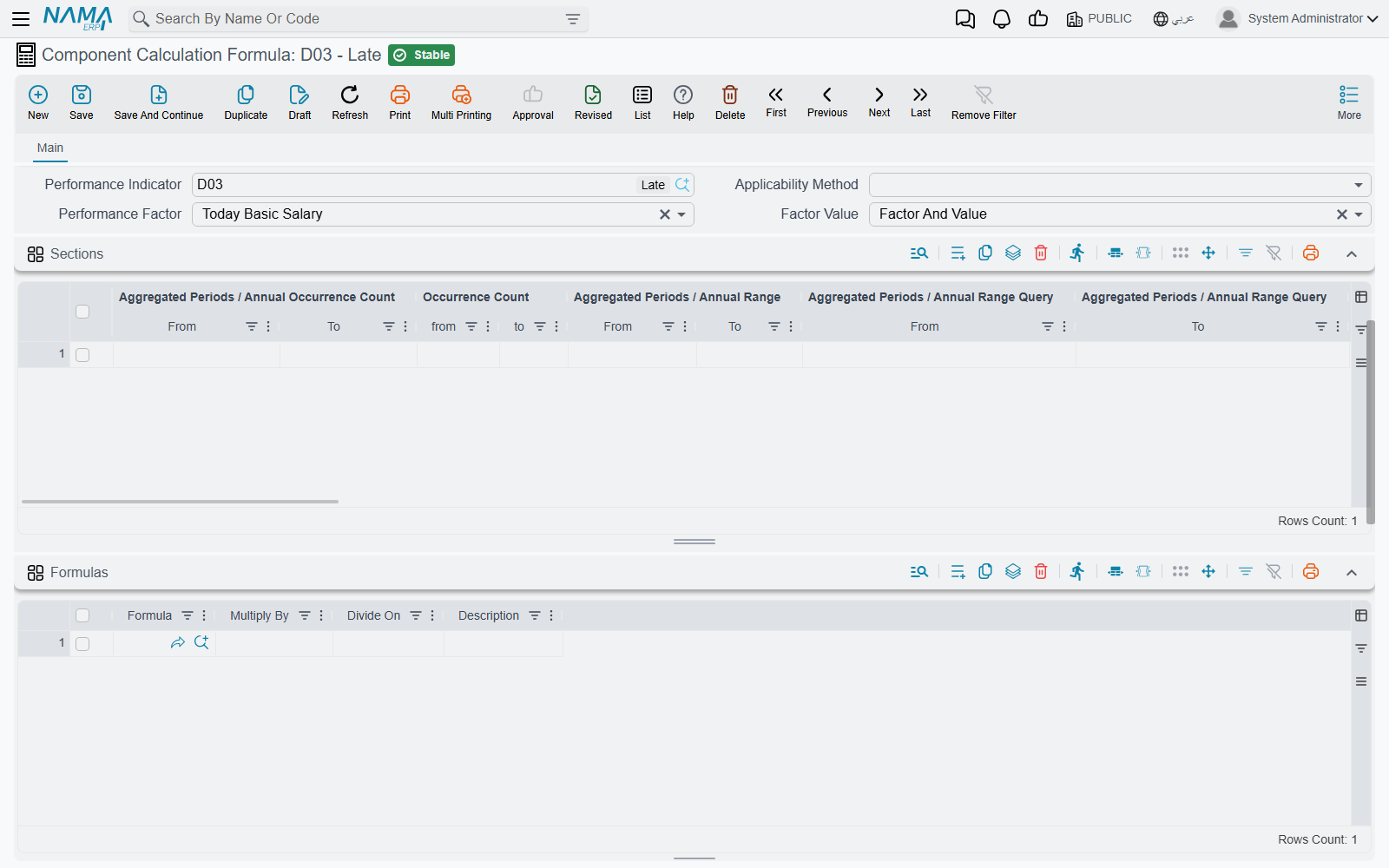
An employee is late on three days in the month: 10, 5 and 12 minutes. The lateness indicator is Daily, the method is Sections, and one line covers 1 to 15 minutes.
- To deduct a quarter day for each late day, set Factor Only, Multiply By 1, Divide On 4, and Performance Factor Today Basic Salary. The line applies on 3 days, so the deduction is 3 × ¼ = ¾ of a day's basic salary. It would be the same if each delay were one minute.
- To deduct by the minute against an 8-hour day, set Factor And Value, Multiply By 1, Divide On 480, and the same performance factor. The minutes add up to 27, so the deduction is 27 ÷ 480 of a day's basic salary.
If the customer complains that a deduction ignores how long the employee was late, the formula is set to Factor Only. If the customer expected a flat amount per occurrence, it is set to Factor And Value.
Calculation method: one rate, or progressive brackets
| Calc Method | Arabic | Behavior |
|---|---|---|
| One Percentage | نسبة واحدة | A single rate applies to the entire base. |
| Sections | شرائح | Progressive brackets — each slice of the base is computed at its own rate, exactly like an income-tax table. |
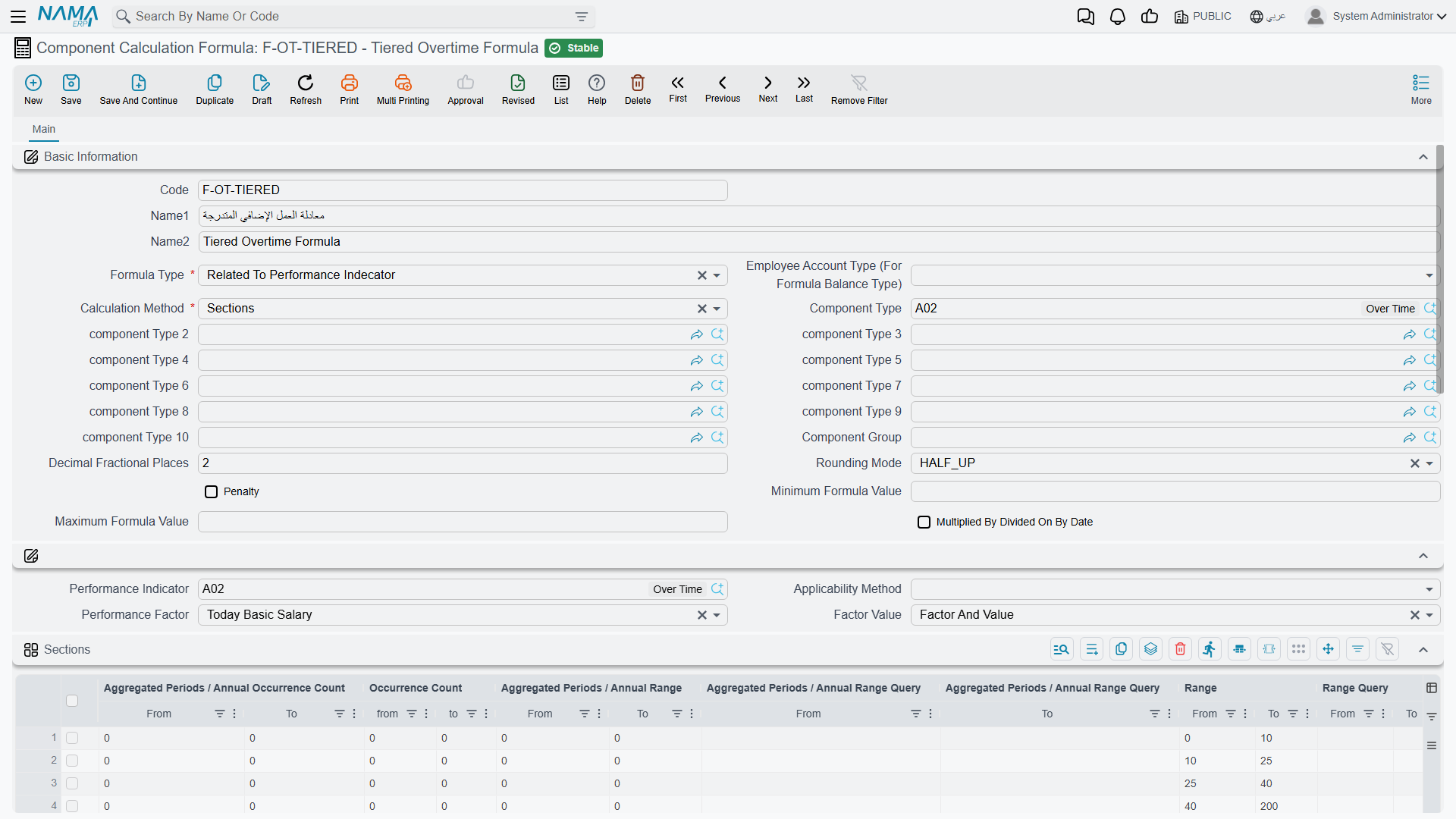
With Sections, the formula's calculation lines define the brackets, and each line can combine several kinds of gate at once:
- Range — a from/to band on the base value (or a SQL query for a computed range), plus a separate Experience Days from/to band for seniority-based brackets.
- Rate — multiply-by / divide-on factors, a flat rate, and an Added Value on top.
- Criteria (المعايير) — an optional filter (on the employee file, the HR information record, or the salary document itself) that must match for the bracket to apply at all.
- Occurrence Count — from/to bounds on how many times this bracket has already fired this period, or in the year/aggregated-period, useful for rules like "the first two occurrences are free, the third onward is penalized."
- Vacation / Holiday / Weekend factors — separate multipliers applied when the day in question falls on a vacation, an official holiday, or a weekly rest day.
The whole formula can also be clamped with an overall Minimum Formula Value / Maximum Formula Value, regardless of what the brackets compute.
What an empty bound means
An empty bound on a calculation line never blocks the line. It removes the limit on that side:
- Range, Experience Days and Occurrence Count: an empty From has no lower limit. An empty To has no upper limit, and so does a To of 0. A line set to "from 3, to 0" therefore means "3 or more", not "nothing". There is no way to write "up to zero".
- Experience Days left empty on both sides applies to every employee, however long they have worked.
- Multiply By and Divide On left empty count as 1.
- A day whose indicator figure is zero never matches any line, whatever the range says. A line can't be used to pay or deduct on "zero" days.
Occurrence Count is counted per line, on every day the line's range and criteria matched. A single line with Occurrence Count From = 3 and an empty To therefore ignores the first two matching days and applies from the third onward. You don't need a second line to cover the first two days.
A worked example: a seniority bonus by brackets
Suppose a component pays a seniority bonus as a percentage of basic salary, defined with Sections using the Experience Days range instead of a value range:
- 0 – 365 days of service → 0%
- 366 – 1,095 days → 5%
- 1,096 days and above → 10%
An employee with 900 days of service falls in the second bracket, so their bonus is 5% of basic salary — not a blend of the brackets below it, because experience-day brackets (like value brackets) select one matching bracket rather than accumulating across all of them the way progressive tax slices do. If the same component also carried a Criteria limiting it to a specific department, an employee outside that department would get nothing at all, regardless of their experience.
For the Taxes formula type specifically, brackets are defined in a separate, purpose-built Tax Ranges grid instead of the generic calculation lines: a Value threshold, a Tax Percentage, a Discount Percentage with its own min/max discount, and — for annual calculations — an "annual income greater than / less than or equal" band. A handful of extra flags (Tax On Tax, Tax Range Is Monthly, Discount Employee Insurance Before Tax, and others) refine how this interacts with country-specific tax rules.
A Composite Formula instead lists other formulas in a Formulas grid, each with its own multiply-by / divide-on factor, letting one formula be assembled from several simpler ones. And a formula can optionally pull figures from up to ten other issuances (see HR Years, Periods & Salary Issuance) when computing its rate — useful when, say, a commission formula needs to see totals from a separate "Sales" payroll stream.
The "why is this number what it is" audit trail
The HR module's Salary Config settings include Log Salary Account Detail In Database (تسجيل تفاصيل حساب المرتب في قاعدة البيانات). When it's turned on, every bracket that actually fires while calculating a salary document is written to a detail audit entry — the trail support staff rely on when an employee asks "why is my bonus this amount and not that one."
Daily Salary — for employees paid by the day
Not every employee is paid a monthly component-driven salary. For daily-wage staff, Nama uses a separate document: Daily Salary (أجر يومى, Payroll > Payroll > Daily Salary).
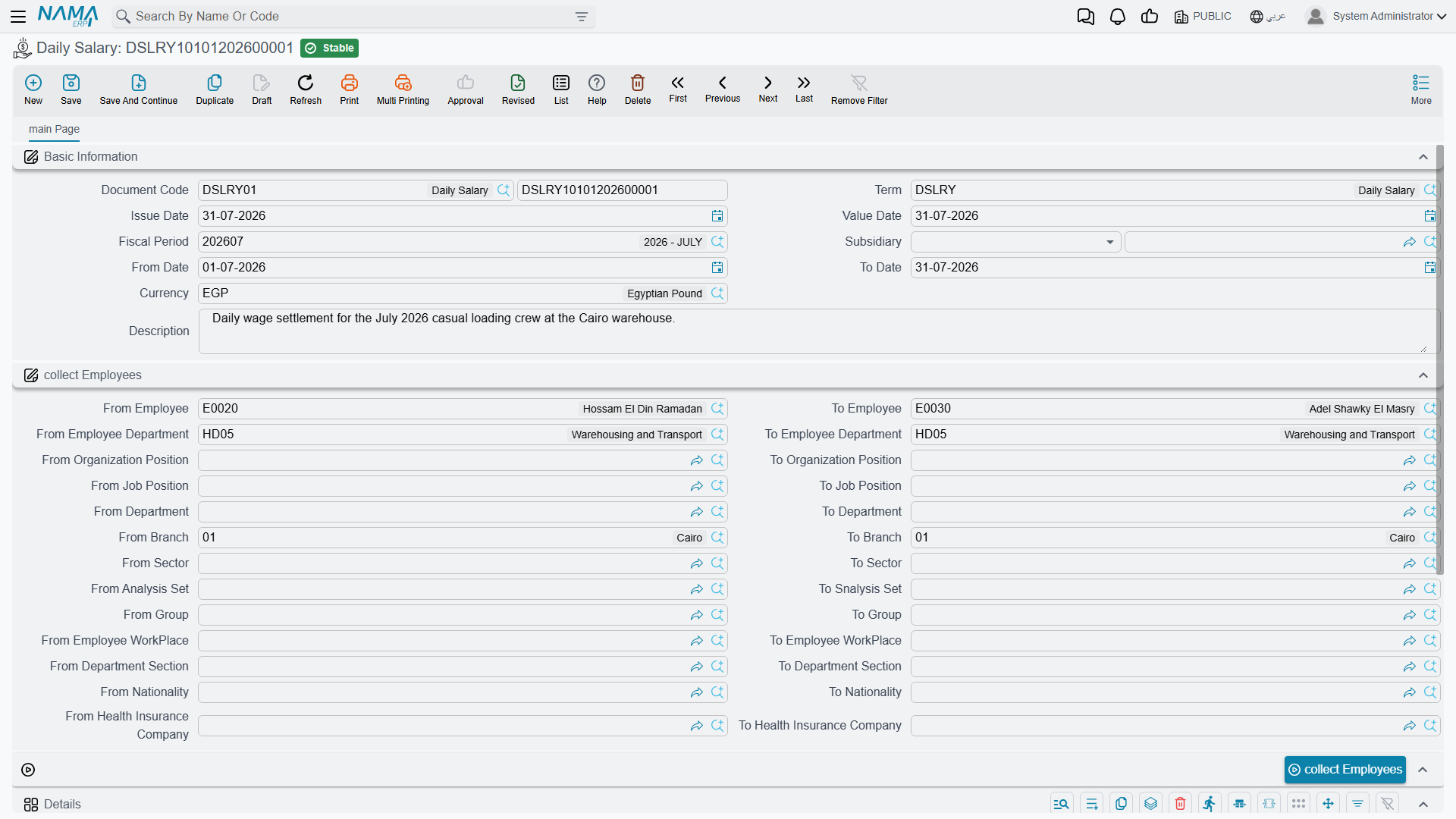
| Field | Purpose |
|---|---|
| Document Code (Book / Code) | The document's own numbering. |
| Term (توجيه المستند) | The document term that governs its numbering and accounting. |
| Issue Date / Value Date | When it was written up, and the accounting date it takes effect on. |
| Fiscal Period / Subsidiary | The accounting period and the ledger subsidiary it posts against. |
| From Date / To Date | The date range this daily-wage run covers. |
A Collect Employees block (from/to employee, department, branch, sector, job/organization position, nationality, health-insurance company, and more) combined with the Collect Employees (تجميع الموظفين) button pulls in every matching employee in one pass, rather than adding them one at a time.
Each collected employee gets a Details line with: Daily Wage (days count, per-day value, total), Overtime (hours, hourly wage, total), Other Additions, Deduction (hours, hourly wage, total), Other Deductions, and a computed Net Value.
Actions on this screen
On the Daily Salary:
- Collect Employees — rebuilds the Details grid with one line per employee who matches the employee range and has Daily Wage Work (العمل بأجر يومى) ticked on the employee record. Monthly-paid staff never come in, however wide the range. Pressing it again replaces the lines, so collect first and type the days, hours and amounts afterwards.
The Component Calculation Formula screen has no buttons of its own.
How it's processed / what it posts
Unlike a Salary Component — which relies entirely on the component's own account lines carried through a monthly Salary Document — Daily Salary posts its own accounting effect directly. Its document term configures separate debit and credit sides for the Daily Wage Total, the Overtime Total, Other Additions, Deduction Total, and Other Deductions, each posted as its own background business request. If a Daily Salary document's processing fails, it is retried the same way as any other business request, from the Business Requests view.
Messages you may see
| Message | Why | What to do |
|---|---|---|
| Calculation method must be percentages not one percent if you are using daily applicability | The formula's Applicability Method is Daily but its Calculation Method is One Percentage. A Daily formula judges each day separately, which only the Sections method does. This message has no Arabic string, so it stays in English on Arabic screens. | Switch the Calculation Method to Sections and put the rate on a calculation line. Use Periodic instead if a single figure for the whole month is what you want. |
| Employee Account Type (For Forumla Balance Type) Can not Be Empty — «لا يمكن ترك نوع حساب الموظف(لنوع معادلة الرصيد) فارغ» | The Formula Type is one of the Balance From Employee Account types, but the formula doesn't say which of the employee's accounts to read. | Fill Employee Account Type (For Formula Balance Type) on the formula. |
| The formula {0} has recursion - in line {1} of formula {2} | A Composite Formula includes itself, directly or through another composite formula in its Formulas grid, so it could never finish calculating. This message has no Arabic string, so it stays in English on Arabic screens. | Remove the line named in the message, or point it at a formula that doesn't lead back to this one. |
Related pages
- Salary Components — where a formula gets attached, via a component's Variable Value.
- Time & Attendance — the daily punches that ultimately drive performance-indicator-based formulas.
- Performance Indicators — the measured figures a "Related To Performance Indicator" formula reads.
- How Salary Is Calculated — the full pipeline these formulas fit into.