
Annual Increases
Salaries don't stay still. Once a year — or whenever a company decides on a raise round — every employee's pay needs to move: a percentage on the basic salary, a fixed bump to an allowance, a new insurable base. Doing that one employee at a time is exactly the kind of repetitive work that invites mistakes. The Annual Increases Document turns a raise campaign into a single, reviewable document: you describe who gets raised and how, collect the matching employees, and let the document generate the individual salary changes.
Where to find it
Payroll > Main > Annual Increases Document (الرواتب > الأساسيات > مستند الزياده السنوية).
Why it exists
A raise round has two moving parts that this document keeps together in one place: the scope (which employees are in the round) and the rule (what happens to their pay). Rather than editing hundreds of employee records by hand, you state the rule once, let the document harvest the eligible employees from filter criteria, and — for each one — it produces the actual per-employee change that carries the new figures onto the employee's record.
This document does not post to the ledger
An Annual Increases Document is a payroll-configuration action, not an accounting one. It changes what employees will be paid going forward; it does not itself create any general-ledger entry. The financial effect only shows up later, when the next salary documents are generated with the raised figures.
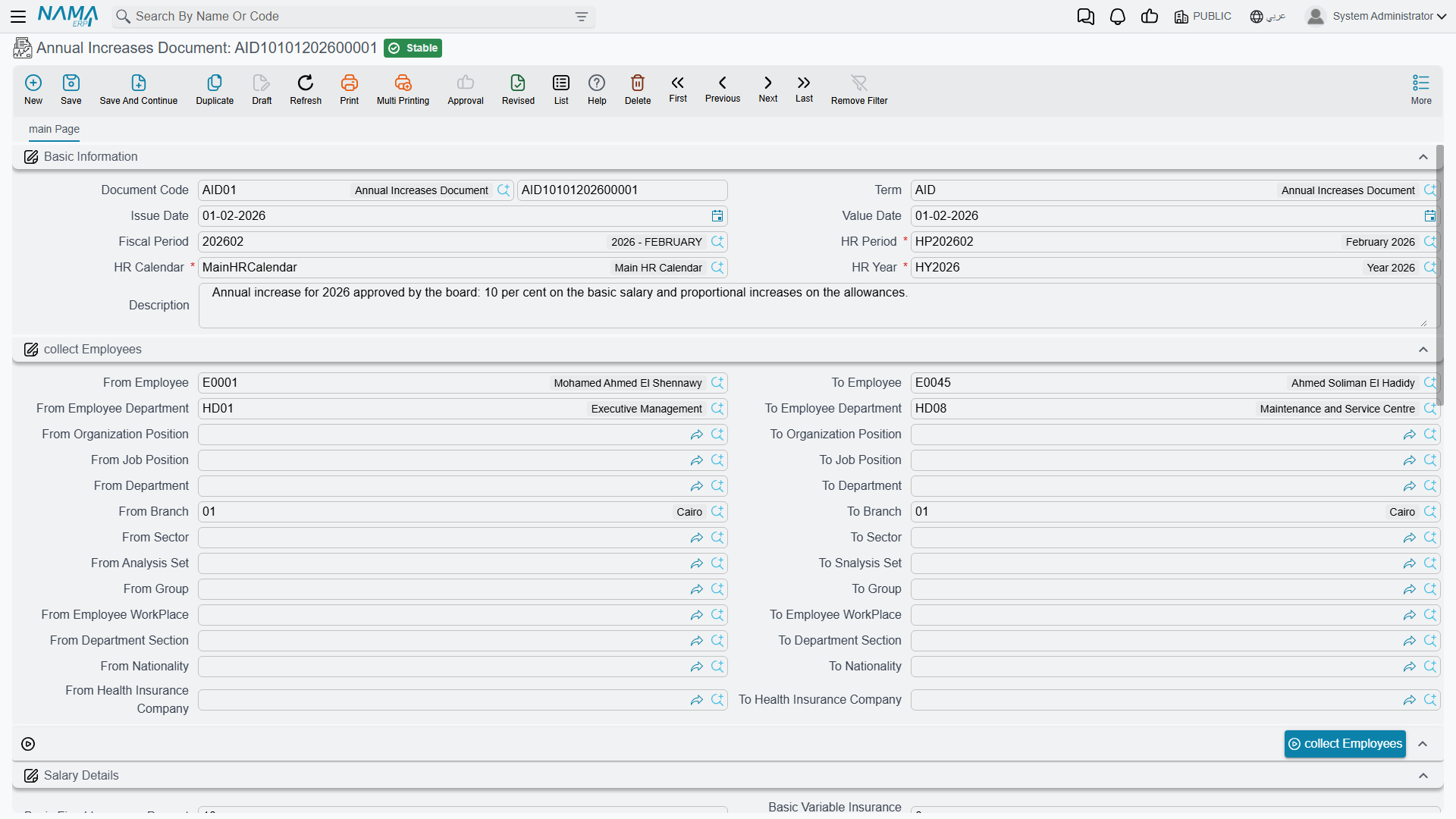
The header: period, scope, and blanket increases
The top of the document fixes the timing and the population, and offers a few whole-population increases:
| Field (English) | Arabic label | Purpose |
|---|---|---|
| HR Year / HR Period / HR Calendar | سنة الرواتب / فترة الرواتب / تقويم الرواتب | The payroll year, period and calendar the raise round belongs to. |
| Issue Date / Value Date | تاريخ الإصدار / التاريخ الفعلي | When the document is written up, and the effective date the increase takes hold. |
| Generation Type | نوع الإنشاء | Tracks whether the per-employee lines have been generated yet, and whether they are still editable. |
| Basic Fixed Insurance Percent / Basic Fixed Insurance Value | نسبة الزيادة في الأساسي التأميني الثابت / قيمة الزيادة في الأساسي التأميني الثابت | A blanket percentage or fixed amount added to the fixed insurable basic salary for the whole round. |
| Basic Variable Insurance Percent | نسبة الزيادة في الأساسي التأميني المتغير | A blanket percentage added to the variable insurable basic salary. |
| Daily Salary Percent | نسبة الزيادة في الأجر اليومي | A blanket percentage added to the daily wage, for daily-paid labor. |
| Branch / Department / Sector / Legal Entity / Analysis Set | الفرع / الإدارة / القطاع / الشركة / مجموعة التحليل | The standard Dimensions that scope the document. |
Who gets raised — the employee range
The document doesn't take a hand-typed list of employees. Instead you define a range of criteria — a set of from / to filters — and the document collects everyone who matches. The available bands cover employee, department, employee's department, department section, branch, sector, group, job position, organization position, work place, nationality, health-insurance company, analysis set, and the generic reference/description fields. Leaving a band open widens the net; narrowing it targets a specific slice of the workforce — one branch, one nationality, one job grade.
The rule: which components get raised, and by how much
The Details grid (التفاصيل) is where the actual raise rule lives. Each line targets a salary component and states how it moves:
| Field (Arabic → English) | Purpose |
|---|---|
| نوع المفرد (Component Type) | The category of salary component the rule applies to. |
| مفرد الراتب هدف الزيادة (Target Salary Component) | The specific component being increased. |
| نوع الزيادة (Increase Type) | How the component moves — see the values below. |
| نسبة/قيمة الزيادة (Increase Percentage / Value) | The magnitude — read as a percentage or an amount, depending on the increase type. |
Increase Type (نوع الزيادة) decides the mechanism:
| Value (Arabic → English) | Meaning |
|---|---|
| نسبه مضافة (Addition Percentage) | Raise the component by a percentage of its current value. |
| قيمة مضافة (Addition Value) | Add a fixed amount to the component. |
| نسبه مخصومة (Deduction Percentage) | Reduce the component by a percentage — a negative round. |
| قيمة مخصومة (Deduction Value) | Subtract a fixed amount from the component. |
| استبدال القيمة (Replace Value) | Overwrite the component's value with the figure entered — used when the new pay is set outright rather than nudged. |
Blanket rules apply to everyone collected — exceptions handle the edge cases
The Details grid is the blanket rule for the whole round. When a handful of employees should be treated differently — a larger raise for a top performer, no raise for someone still on probation — you record them in the Exceptions grid (الإستثناءات) instead. Each exception line names the employee, the target component, an increase type and a magnitude of its own, overriding the blanket rule for that one person.
Workflow
- Create the document under Payroll > Main > Annual Increases Document and set its HR Year, Period, Calendar, and effective (Value) date.
- Define the scope by filling the employee range criteria — as wide or as narrow as the round requires.
- Define the rule(s) in the Details grid: for each component you want to move, pick the target component, the increase type, and the magnitude. Add any per-employee overrides in Exceptions.
- Collect the employees. Use Collect Employees (تجميع الموظفين) to resolve the range criteria into concrete employee lines, then, if individual employees need fine-tuning, Collect Employees With Components (تجميع الموظفين مع المفردات) to write every employee × Details rule into the Exceptions grid, where you edit the few that differ.
- Review the generated lines. Each collected employee appears in the Employees Lines grid (سطور الموظفين), showing the employee, their supervisor, and — once processed — a link to the per-employee change document that actually carries the new figures onto the employee's record.
- Save and process. The document then generates one employee-info change per collected line, applying the raised figures going forward.
Edit the campaign, not the generated changes
Like other batch documents in Nama, the per-employee changes an Annual Increases Document produces are managed by the document. Re-collecting or reprocessing the campaign is the right way to adjust the round — editing the generated single changes directly puts them out of step with the campaign that owns them.
Actions on this screen
- Collect Employees — adds one employee line for every employee who matches the range and is still working at the end of the chosen period. The HR Period must be filled first. Employees already on the document are kept and never duplicated, so you can widen the range and press it again.
- Collect Employees With Components — builds the Exceptions grid from what is already on the document: one line per collected employee for every Details rule, carrying that rule's component, increase type and percentage. It replaces whatever the Exceptions grid held, so press it before you start editing exceptions, then change or delete lines until only the real exceptions remain. It does nothing until both the employee lines and the Details grid have something in them.
How it's processed
When saved, the document resolves its scope into employee lines and, per line, produces a per-employee change that writes the raised figures back onto each employee's record. This happens as background business requests with a processing status; if a line fails to process, it can be retried from the Business Requests view like any other request. No amount is posted to the general ledger by this document — the money only moves when the next salary run picks up the new figures.
Messages you may see
| Message | Why | What to do |
|---|---|---|
| You can fill only the field Basic Fixed Insurance Value or Percent the field , not both — «يمكنك ملء الحقل نسبة الزيادة في الأساسي التأميني الثابت أو حقل القيمة و ليس كلاهما معا» | Both Basic Fixed Insurance Percent and Basic Fixed Insurance Value carry a figure, so the blanket increase to the fixed insurable basic could be read two ways. | Keep the percentage or the amount, and clear the other. |
| Employee {0} must be in employee lines — «يجب ان يكون الموظف {0} فى سطور الموظفين» | An Exceptions row names an employee who is not among the employees the document collected, so there is no blanket rule for the exception to override. | Widen the employee range so the document collects that employee, or remove the exception row. |
| You must enter one of the target component or the component type — «يجب ان يتم إدخال مكون الراتب هدف الزيادة او مكون الراتب» | An exception row says nothing about what is being increased — both Target Salary Component and Component Type are empty. | Fill one of the two on that row. |
| Target component {0} must be in the details — «مكون الراتب هدف الزيادة {0} يجب ان يكون فى التفاصيل» | The exception targets a component that the Details grid does not raise at all; an exception can only override a blanket rule that exists. | Add the component to the Details grid, or point the exception at a component the round already covers. |
| The employee {0} with component type {1} is repeated in line {2} and {3} — «الموظف {0} مع مكون الراتب {1} مكرر فى السطر {2} و {3}» | Two exception rows give the same employee a different treatment for the same component. | Delete one of the two rows — the message gives both line numbers. |
Related pages
- Salary Components — the components an increase rule targets, and where the raised values ultimately live.
- Salary Documents — where the raised figures finally turn into paid salary and a ledger effect.
- How Salary Is Calculated — the full pipeline the raised components feed into.
- HR Years, Periods & Salary Issuance — the payroll calendar a raise round is tied to.