
Salary Documents
Everything on the salary components, formulas and structures pages is setup — the machinery that decides how much each employee should be paid. This page is where that machinery finally runs. Two documents do the work: a Salary Sheet, which is the batch run for a whole payroll period, and a Salary Document, which is the individual payslip it produces for each employee — and the source of the accounting entry.
Two documents, one job
| Salary Sheet (سجل الرواتب) | Salary Document (سند الراتب) | |
|---|---|---|
| Scope | One period + issuance for many employees | One employee for one period |
| Role | The batch run: collect employees, generate their payslips | The individual payslip, and the accounting source |
| Posts to the ledger? | No — it orchestrates | Yes — the GL entry lives here |
The sheet is the button you press once a month; the documents are what come out of it, one per employee. You review and adjust on the sheet, but the money is defined, line by line, on each document.
Where to find them
- Salary Sheet — Payroll > Payroll > Salary Sheet (الرواتب > الرواتب > سجل الرواتب).
- Salary Document — Payroll > Payroll > Salary Document (الرواتب > الرواتب > سند الراتب).
- Salary Generation Range — Payroll > Salary Configurations > Salary Generation Range (الرواتب > إعدادات الراتب > مجال اصدار الرواتب).
The Salary Sheet — the batch run
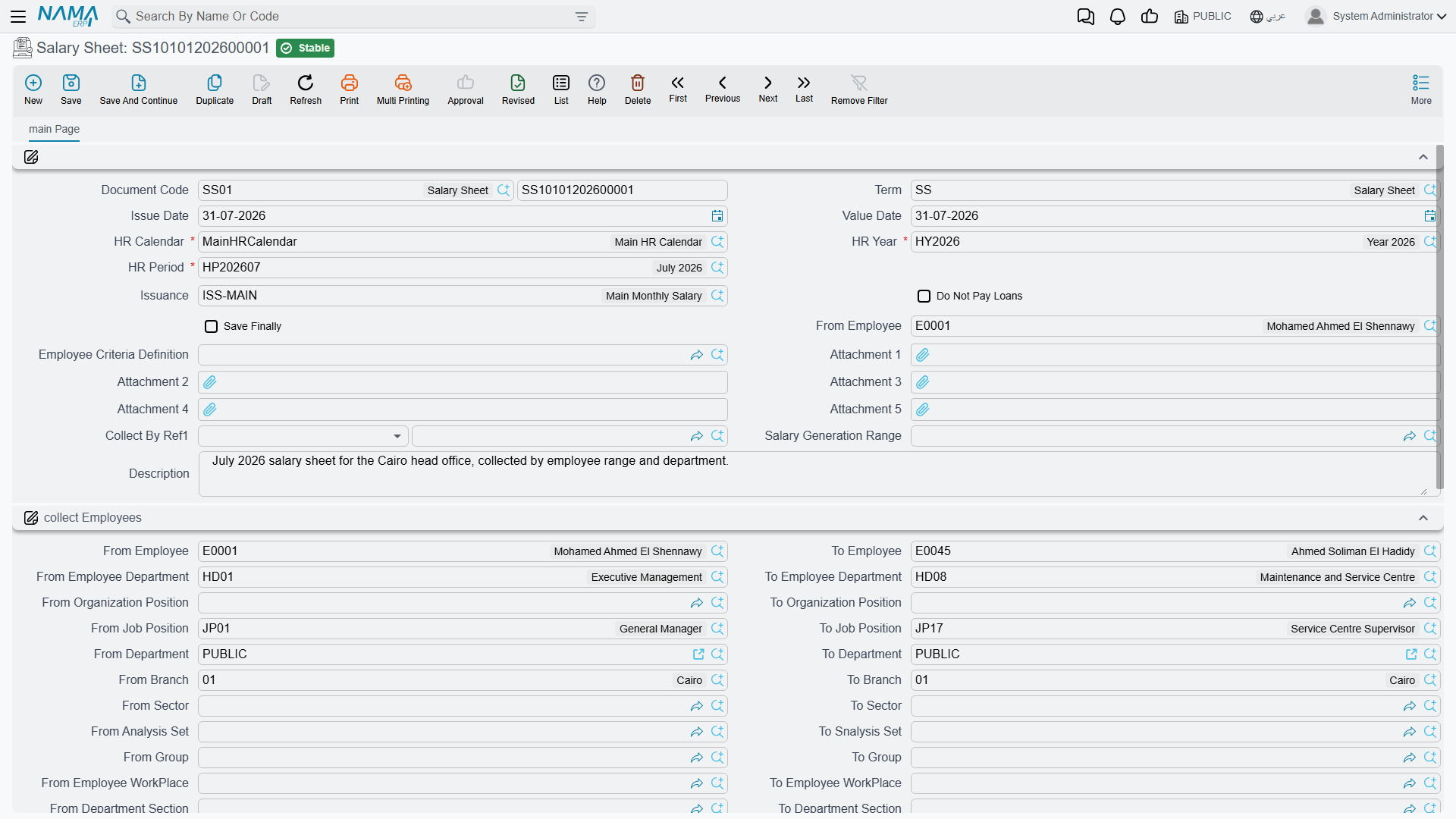
A sheet is built for one HR Period and one Salary Issuance at a time — which is exactly what lets the same month carry more than one parallel run (see HR Years, Periods & Salary Issuance). Its header sets the period and everything that decides who gets pulled in:
| Field (Arabic → English) | Purpose |
|---|---|
| تقويم الرواتب / فترة الرواتب / سنة الرواتب (HR Calendar / HR Period / HR Year) | The time framework this run belongs to. |
| توجيه المستند (Term) | The document term that governs the sheet's numbering. |
| معايير تجميع الموظفين (Employee Criteria Definition) | A free-form criteria filter for which employees to collect. |
| مجال اصدار الرواتب (Salary Generation Range) | A saved, reusable employee-selection template (see below) used instead of typing the criteria each time. |
| Employee range (من موظف / إلى موظف … From/To Employee, Department, Branch, Sector, Job Position, Nationality, and more) | An explicit from / to range block that narrows the collected population. |
| تجميع بمرجع 1 … 5 (Collect By Ref 1 … 5) | Five equality filters on the employee's own Reference 1 … 5 fields — the usual way to collect by a classification Nama does not ship as a field of its own. |
| عدم دفع السلف في السند (Do Not Pay Loans) | Suppress this run's automatic installment deductions. |
| عدم حذف سندات الرواتب الموجودة بالسطور المحذوفة (Do Not Delete Salary Documents Of Removed Sheet Lines) | Keep already-generated payslips even if their line is removed from the sheet. |
| الحفظ نهائياً (Save Finally) | Save the run as final rather than draft. |
| إجمالي الإضافات / إجمالي الإستقطاعات / إجمالي الأخرى / المرتب النهائي (Total Additions / Total Deduction / Total Other / Net Salary) | Roll-up totals across every line, computed by the run. |
Once collected, each employee appears as a line in the Salary Sheet Lines grid (السجلات), carrying that employee's net salary, working days, addition/deduction/other totals, a Selected checkbox (اختيار) to include or exclude them from generation, and — after generation — a link to the Salary Document produced for them and its last-generation timestamp.
Salary Generation Range — a reusable selection
Typing the same employee-selection criteria every month is wasted effort, so Nama lets you save it once as a Salary Generation Range — a named master record holding exactly the same from / to criteria block a sheet uses, plus an optional Limit To Employees (قصر الإصدار على الموظفين التاليين) whitelist for pinning the run to a specific list. A sheet then just points at the range instead of re-entering the filters. It is pure selection configuration; it computes nothing and posts nothing.
How Collect Employees decides who is in
Collect Employees looks like a search box and behaves like a funnel. It runs in two stages: first it searches the employee file using everything you filled in on the header, then it walks that result row by row and drops anyone who should not be paid on this particular run. Almost every "why isn't this employee on my sheet?" question is answered by working out which of the two stages dropped them.
Two things must be true before the button will do anything at all: the HR Period must be filled — otherwise you get Please select period — and, if the sheet's term has Salary Range Must be Specified (يجب تحديد مجال الإصدار) ticked, a Salary Generation Range must be chosen, otherwise you get You Must Fill Salary Generation Range.
Stage one, the search
Every filter on the header is combined with and. Nothing you fill in overrides anything else, and nothing widens the result: each box you fill can only make the list smaller.
| Filter | What it matches |
|---|---|
| فترة الرواتب (HR Period) | Only employees whose تاريخ المباشرة الفعلية (Commencement date) falls on or before the period end date. Someone who started the day after the period closed is never collected, whatever else you fill in. |
| تجميع بمرجع 1–5 (Collect By Ref 1–5) | An exact match on the employee's own Reference 1–5 fields — see the next section. |
| The employee range block (من موظف / إلى موظف … From/To Employee) | An alphabetical from / to comparison on codes, not on names — employee, branch, sector, analysis set, group, work place, department section, nationality, health insurance company, job position, department, employee department and organization position. |
| مجال اصدار الرواتب (Salary Generation Range) | The saved range's own from / to block is added on top of the one typed on the sheet, together with its قصر الإصدار على الموظفين التاليين (Limit To Employees) list and its own criteria. |
| معايير تجميع الموظفين (Employee Criteria Definition) | A free-form criteria record, added to everything above. |
| The sheet's own dimensions (legal entity, branch, sector, analysis set, department) | The employee's HR information must carry the same dimension. Employees whose dimension is the public value (PUBLIC) always pass the legal-entity test. |
A range and a Salary Generation Range do not replace each other
It is tempting to read the saved range as "use this instead of what I typed on the sheet". It is not — the two are stacked. If the sheet says from employee 1000 to 1999 and the range says from employee 2000 to 2999, both conditions apply and the sheet collects nobody. Fill in one or the other, not both.
Notice what is not on that list: employment state. At this stage the search deliberately returns everyone, resigned and terminated employees included. Filtering by state is stage two's job, because someone who resigned mid-month is still owed part of a salary.
Collect By Ref 1 to 5, filtering on the employee's own reference fields
Every master record in Nama, the employee card included, carries five spare generic reference fields — مرجع 1 to مرجع 5 (Reference 1 to Reference 5). They can point at any record type you like, which makes them the standard place to park a classification Nama does not ship out of the box: a payroll group, a funding source, a contract type, a paying company, a site.
تجميع بمرجع 1 to تجميع بمرجع 5 (Collect By Ref 1 to 5) on the salary sheet header are the matching filters for those five slots. Fill تجميع بمرجع 2 with a record and the collection keeps only employees whose مرجع 2 points at that exact record.
Several things follow from that, and they are what trips people up:
- It is an equality, not a range and not a hierarchy. There is no from/to pair for these, and no roll-up: picking a parent record does not bring in employees pointing at its children. The employee's reference must be the very record you chose.
- An empty Collect By Ref filters nothing. Leave it blank and the whole population passes.
- A filled Collect By Ref excludes employees whose reference is blank. The moment you use it, anyone who never had that classification filled in on their employee card silently drops out of the run — the single most common reason a sheet filtered this way comes back short.
- The five are combined with each other, and with everything else, using and. Filling both Ref 2 and Ref 3 means both must match.
- The same five filters behave identically on the aggregated job offer screen, so what you learn here transfers.
Only Collect By Ref 1 is on the screen by default
The salary sheet stores all five and Collect Employees reads all five — but the standard edit screen only shows تجميع بمرجع 1. If you need 2 to 5, add them to the salary sheet's edit screen through the screen layout first; until they are on the screen there is no way to fill them, and an empty one filters nothing.
While you are there: because these are generic references, restrict each one to the record type it is actually meant to hold, and give it a name that means something to the user, through Allowed Values For Generic References. Otherwise the user is offered a type list of everything in the system. Do the same on the employee's own Reference 1 to 5, and point both sides at the same type — or the filter can never match.
Stage two, the exclusions
Whatever the search returned is now filtered again, employee by employee, in this order:
- Employees already on this sheet are skipped. Collect Employees is safe to press repeatedly — it appends, it never duplicates a line, and it never replaces the lines already there. Blank lines carrying no employee are cleaned out first.
- Employees who are not working are tested for partial work. Anyone whose state is Working stays. For everyone else — resigned, on unpaid leave, suspended — the system reads their state history: if their state changed into or out of Working inside the period, or their last state change was a paid vacation, or they are still effectively working, they are kept and will be paid for the part of the month they worked. Someone whose firing date falls before the period started is never partially working, so they drop.
- Employees already paid for this period and this issuance are removed. Anyone who already has a salary document for the same فترة الرواتب and the same صرفية الراتب — drafts included — is left out, and the sheet says so: There are N out of M employees already have salary documents for period …. Because the issuance is part of that test, opening a second issuance for the same month collects the whole population again, which is exactly what makes parallel runs possible.
- The legal-entity check. The employee's HR information is re-read as of the sheet's value date, and an employee whose legal entity at that date is neither the sheet's legal entity nor the public one is dropped. This is what catches employees who were moved between companies mid-year.
- Employees with no component for this issuance may be dropped — see the options table below.
- Employees already sitting on another sheet may be dropped — likewise.
What survives is sorted by employee code and appended to the lines grid.
Options that change who is collected
Three different places carry settings that quietly change the outcome, which is why two sheets built from identical headers can collect different people:
| Setting | Where it lives | Effect when ticked |
|---|---|---|
| يجب تحديد مجال الإصدار (Salary Range Must be Specified) | Salary sheet term | Refuses to collect until a Salary Generation Range is chosen — a good guard against someone accidentally collecting the entire company. |
| عدم إعتبار الشركة عند تجميع الموظفين (Ignore Legal Entity In Collecting Employees) | Salary sheet term | Skips the per-employee legal-entity check in step 4. |
| السماح بإصدار سندات الراتب للموظفين الذين هم بأجازة بدون راتب (Allow Issue Salary Documents For Employees In Vacation Without Salary) | Salary sheet term | Also keeps employees who spent the whole period on unpaid vacation, so a document carrying only other effects can be issued for them. |
| تجميع الموظفين الذين حالتهم "علي رأس العمل" فقط في سجل الراتب (Collect Working Employees Only In Salary Sheet) | HR configuration | Turns step 2 off entirely: only employees whose state is Working are collected. Anyone who resigned mid-month is excluded, and their final part-month salary has to be handled another way. |
| عدم تجميع الموظفين الذين لهم سجل رواتب على نفس الفترة (Do not Collect Employees With Any Salary Sheet Line) | HR configuration | Excludes employees who already appear on another salary sheet for the same period and issuance, even when no salary document has been generated from it yet. Without it, two half-finished sheets can both hold the same employee. |
| عدم تجميع الموظفين الذين ليس لهم مفردات لهذه الصرفية (Do Not Collect Employees That Do Not Have Components For This Issuance) | Salary issuance | Keeps only employees who actually have a salary component attached to this issuance — either on their own component line or through the component type. Ideal for a bonus or commission issuance that concerns a handful of people. |
When an employee doesn't come in
Work down the funnel in the order it runs and the answer usually appears within the first three checks:
- Is their Commencement date after the period end?
- Does a Collect By Ref on the header point at something their employee card's reference field doesn't — including the case where that reference is simply empty?
- Are the sheet's own range block and its Salary Generation Range both filled, and do they contradict each other?
- Do the range comparisons work on their code? A range of
A100toA200will not catch employeeB050, however their name sorts. - Is their state not Working, with Collect Working Employees Only In Salary Sheet turned on?
- Do they already have a salary document — including a draft — for this period and this issuance? The message shown after collecting tells you how many fell out this way.
- Is their legal entity, as of the sheet's value date, different from the sheet's?
- Does the issuance require a component they don't have?
The Salary Document payslip
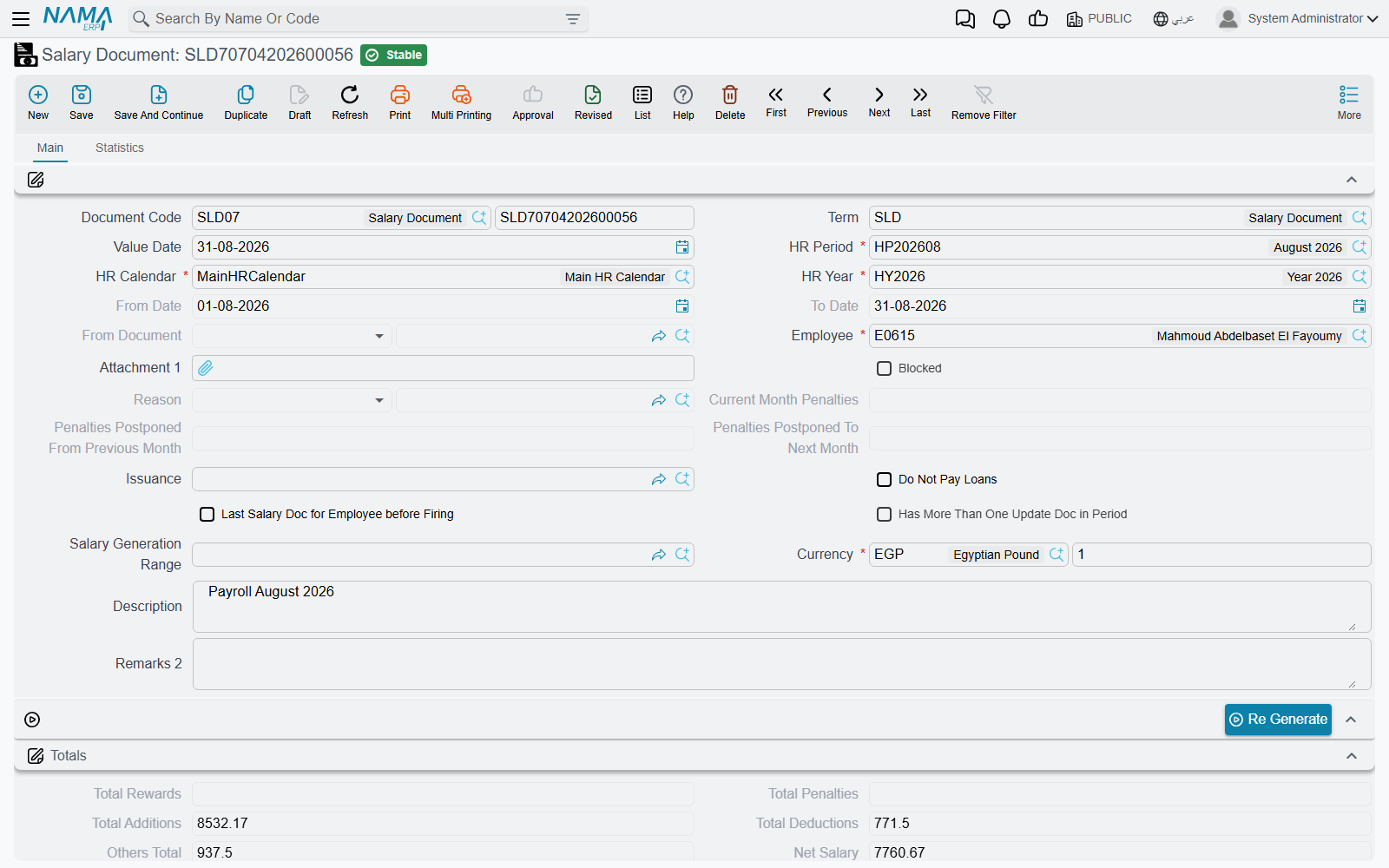
Each line the sheet generates becomes a full Salary Document: one employee, one period, and the complete breakdown of their pay. Its header carries the period and the computed totals; its detail grid carries the individual component lines.
| Field (Arabic → English) | Purpose |
|---|---|
| الموظف (Employee) | Whose payslip this is. |
| من تاريخ / إلى تاريخ (From Date / To Date) | The span the salary covers — usually the period, but shorter for a partial month. |
| أيام العمل / أيام عدم العمل (Working Days / None Working Days) | The day-count that pro-rates the pay. |
| أيام أجازات مدفوعة الأجر / أيام أجازات بدون مرتب (Paid Vacation Days / Vacation Days Without Salary) | Vacation days split by whether they are paid. |
| أيام إيقاف عن العمل بدون مرتب (Suspension Days Without Salary) | Unpaid suspension days that reduce the pay. |
| إجمالي الإضافات / إجمالي الإستقطاعات / إجمالي الآخري (Total Additions / Total Deductions / Others Total) | The three effect-type roll-ups. |
| جزاءات الشهر الحالي / الجزاءات المرحلة من الشهر السابق / المرحلة للشهر التالي (Current Month Penalties / Postponed From Previous Month / Postponed To Next Month) | How penalties this period carry in and out. |
| إجمالي الأقساط المدفوعة (Total Paid Installments) | Loan installments recovered this run. |
| إجمالي وعاء التأمينات الثابتة / المتغيرة / إجمالي وعاء الضريبة (Fixed / Variable Insurance Basis Total / Tax Basis Total) | The insurance and tax bases the formulas built up. |
| المرتب النهائي (Net Salary) | The bottom line: additions − deductions. |
| ما تم صرفة / المتبقي (Issued Value / Remaining Value) | How much has been paid out against this document, and what is still owed. |
| فترة غير مكتملة (جزئية) (Partial Period) | Marks a run that covers only part of the period. |
The Salary Document Lines grid (المفردات) is the heart of the payslip. Each line names a Component (مكون), its Component Effect Type (نوع التأثير — Addition / Deduction / Other), the addition and deduction amounts, the base and original values, an indicator value where a performance indicator fed the figure, and a full day-count breakdown (work / vacation / non-work days, each split by weekend vs. weekly-rest day). Two further grids capture the Rewards / Penalties applied this run (المكافأت / الجزاءات) and the Paid Installments (الأقساط المدفوعة), each installment line linking back to its loan document.
Workflow
- Open the period. Make sure the target HR Period is open — a closed period blocks generation.
- Create a Salary Sheet for that period and the relevant issuance.
- Collect employees with Collect Employees (تجميع الموظفين) — the sheet pulls in everyone matching its criteria, range, generation range and Collect By Ref filters, then drops anyone already paid for that period and issuance. Read the message it shows afterwards: it reports how many of the matched employees were skipped because they already have a salary document. Press it again after changing a filter — it appends and never duplicates. Use Select All / Deselect All (اختيار الكل / ازالة الاختيار من الكل) to fine-tune the population, and see How Collect Employees decides who is in when someone is missing.
- Generate the documents with Generate Salary Documents (إصدار سندات الرواتب). Its dialog lets you generate all lines, only the ticked ones, or all except the ticked ones; one Salary Document is produced per line generated. See Actions on this screen for every option.
- Review each payslip — the component lines, the base/addition/deduction/other breakdown, and the resulting Net Salary. If a figure looks wrong, the day-count and indicator columns explain how it was reached; the salary engine page lists the usual reasons a component comes out as zero.
- Regenerate if needed. Re Generate (أعد الإصدار) recomputes a document; components flagged Do Not Override After Regenerate keep any manual edits.
Edit through the sheet, not around it
The salary documents belong to the sheet that made them. Adjusting the population, re-collecting, and regenerating from the sheet keeps everything in step — deleting or hand-editing an individual document outside that flow risks leaving it inconsistent with the run it came from.
Actions on this screen
The salary run is driven from the sheet; the individual payslip has only its regenerate buttons.
On the Salary Sheet:
- Select All / Deselect All — tick or clear the selection box on every employee line. The ticks matter to the generation options below.
- Collect Employees — fills the lines from the period, the employee range, the generation range and the Collect By Ref filters (see How Collect Employees decides who is in). The period must be filled first.
- Generate Salary Documents — creates or refreshes one salary document per line. The sheet must be saved first. A dialog asks three things: Regenerate Lines With Salaries (off by default — turn it on to recompute lines that already have a document), Generate Lines Without Salaries (on by default), and Generate Lines: Generate All Lines (the default), Generate Selected Lines Only or Generate All Lines Except Selected.
- Save All Drafts — saves every salary document of the sheet that has never been saved as final, going through approvals where the document needs them, then refreshes the sheet's accounting effect. The sheet must be saved first.
- Generate Salary Documents Without Save (More menu) — the same generation, but it takes the ticked lines as they are on screen, without saving the sheet first. Its dialog adds Generate Salary Documents Generated Before Date: fill it and only lines never generated, or last generated before that date, are processed — useful for resuming a large run that stopped part-way.
- Regenerate Contracting Cost Entries And Accounting Effects (More menu) — only where the Contracting module is in use: rebuilds the project cost entries of the sheet's saved salary documents, then the accounting effect. The sheet must be saved first.
From the Salary Sheet list, Generate Salary Documents and Regenerate Contracting Cost Entries And Accounting Effects work on every sheet you tick.
On the Salary Document:
- Re Generate — recomputes this payslip from the employee's current data (step 6 above). It is on the screen and in the More menu; the document must be saved first. From the list, it regenerates every document you tick and reports any that failed by code.
- Regenerate Contracting Cost Entries And Accounting Effects (More menu, and the list) — the per-document version of the sheet button above.
The Salary Generation Range has no buttons of its own.
How it's processed / what it posts
The Salary Document is the accounting source — the sheet itself posts nothing; it only orchestrates. Once a salary document is committed, its ledger effect is built as a background business request with a processing status, retryable from the Business Requests view if it fails.
The document carries no accounting logic of its own. Instead, it posts line by line through the account lines of the components that make it up: for every salary component on the document, that component's own debit account lines and credit account lines produce the entry — an addition-effect component debiting a salary-expense account and crediting a payable, a deduction crediting the relevant liability, and so on. Reward/penalty lines post through their own account lines the same way. This is exactly why the accounting is configured on the components, not here: the salary document simply totals its lines and drives each one through its component's accounts.
Optional: contracting cost allocation
Beyond the per-component postings, a salary document's term can additionally allocate the labor cost as a contracting cost — a Contracting Cost Debit / Contracting Cost Credit (مدين / دائن تكلفة المقاولات) pair configured on the document term — for organizations that carry employee time onto project/contract costing. This is an add-on to the main component-driven posting, not a replacement for it, and only applies when the contracting module is in use.
Messages you may see
| Message | Why | What to do |
|---|---|---|
| Please select period — «من فضلك اختر الفترة» | Collect Employees was pressed with HR Period empty. | Choose the period first. |
| You Must Fill Salary Generation Range — «يجب ملء حقل مجال إصدار الرواتب» | The sheet's term has Salary Range Must be Specified ticked and no Salary Generation Range is chosen. | Choose a range, or untick the option on the term. |
| There are {0} out of {1} employees already have salary documents for period {2} — «يوجد {0} موظف من اصل {1} لديهم سندات رواتب بالفعل لهذه الفترة {2}» | Not a refusal — the sheet is telling you how many of the employees it found were left out because they already have a document for this period and this issuance. | Nothing, if that is what you expect. If it is not, check whether you are on the same issuance as the earlier run. |
| Hr period {0} is closed — «فترة الرواتب {0} حالتها مغلقة» | The HR period is closed, and closing an HR period stops every payroll document that names it — sheets and payslips alike. | Reopen the period on HR Years and Periods, run what you need, close it again. |
| The Employee {0} is not working — «الموظف {0} ليس على رأس العمل» | The employee's state is not Working and they did not qualify as partially working for this period. | If they should be paid, correct the state history so the change falls inside the period; the collection rules above describe exactly what counts. |
| The employee {0} already has another salary document for the same period — «الموظف {0} لديه سند راتب اخر على نفس الفترة» | A payslip already exists for that employee, period and issuance — drafts included. | Find and edit the existing document instead of making a second one. |
| Cannot Apply two documents of same type on {0} on the same period — «لا يمكن حفظ مستندين للموظف {0} على نفس فترة الرواتب» | A second HR document of the same type is being saved for the same employee and payroll period. | Edit the existing one. |
| Can not regenerate revised salary document {0} — «لا يمكن إعادة إصدار سند الراتب {0} الذي تمت مراجته» · Can not regenerate revised salary sheet {0} — «لا يمكن إعادة إصدار سجل الرواتب {0} الذي تمت مراجعته» | Regeneration was attempted on a document or sheet that carries a revision sign-off. | Unrevise it first — see Revise and Unrevise. |
Related pages
- How Salary Is Calculated — the full five-step pipeline that leads up to this document.
- Salary Components — where each line's account lines (and therefore the ledger effect) are configured.
- HR Years, Periods & Salary Issuance — the period and issuance a sheet runs against.
- Salary Blocking — holding an employee's pay, and paying part of it out.
- Annual Increases — how raised component values reach the next salary run.
- Reference Fields & Lookups — restricting and naming the generic Reference 1–5 fields that Collect By Ref matches on.