
Maintenance Requests and Expenses
Accruing the annual charge tells you what the community owes. This page is about the other half — actually spending the money, deciding who bears each line of it, and pushing the cost out over the units it belongs to.
Two documents do the work. The Maintenance Expense Request (طلب مصروف صيانة) is the "we need to spend this" record. The Maintenance Expense (مصروف صيانة) is the "we did spend this" record. The first has no financial effect at all; the second books everything.
Carry one job through the page: the lift controller in Building C has failed. The replacement quote from the lift company is 4,200. The building's 40 flats all use the lift, and the company is bearing the whole cost this time rather than recharging it.
The request — authorising the spend
The site manager who finds the broken lift raises a request, not an expense. It is a plain document: pick the estate, itemise the work, attach the quotes and the photographs of the failure, and name the responsible employee who will chase it.
You raise it from Real Estate and Property > Documents > RE Maintenance Expense Request with the realestate licence.
What it deliberately does not have is just as important:
- no document term and no accounting effect — no entry is created, no ledger line exists, nothing is committed to a supplier;
- no payment voucher buttons — you cannot pay from a request;
- no distribution — nothing is spread over units yet.
There is no status field on the request
A request does not move through "submitted → approved → rejected" states of its own. Approval is Nama's generic approval mechanism, applied to this document as it is to any other document in the system — you define an approval rule and use the standard approval actions. In many installations the practical approval is simpler still: somebody with authority creates the expense document from the request, and that act is the approval.
The lines
Both documents share exactly the same header and exactly the same grid, so learning one teaches you the other. Each line carries:
| Column | What it is for |
|---|---|
| Item | the expense item from the maintenance catalogue — "lift controller card" |
| Real Estate | which estate this line is against |
| Line Subsidiary | who is on the other side of the entry — the contractor, a supplier, an owner |
| Value | the pre-tax amount |
| Tax 1 / Tax 2 (% and value) | filled from the item's tax plan |
| Value After Tax | the line total |
| Customer Endure (% and value) | the share recharged to the customer |
| Company Endure (% and value) | the share the company absorbs |
Always pick an Item on every line
The Item is what supplies the line's tax plan and its default subsidiary, and the calculation runs through it on every save. Leave a line without an item and the document will not recalculate cleanly. Make "no line without an item" a house rule — see Fee, Commission, Broker and Expense Catalogues for how the catalogue is built.
For the lift: one line, item "lift controller card", real estate Building C, line subsidiary the lift company, value 4,200, company endure 100%, customer endure 0%.
The expense — booking the spend
Once the quote is accepted, create the Maintenance Expense from the request using the From Document field. That single choice copies everything across: the amount and currency, the buyer, the estate, the owner, the subsidiary, the remarks, and every detail line with its item, value, taxes, endurance percentages and values. Nothing is retyped.
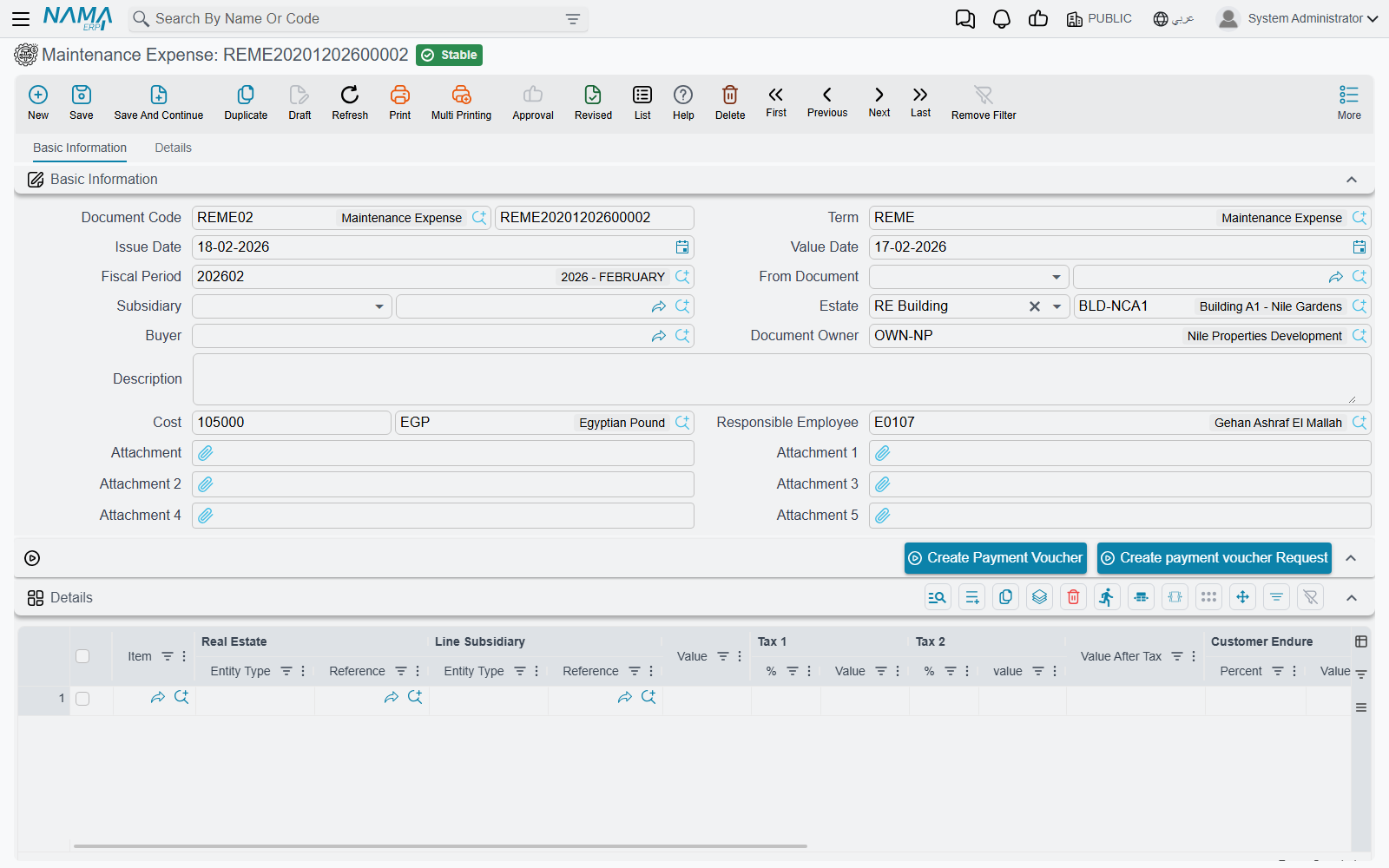
The expense lives at Real Estate and Property > Documents > Maintenance Expense, and unlike the request it carries a document term.
You can also start an expense from a rent contract or a sales contract instead of from a request. Doing so brings across the estate and the parties; a rent contract also brings its maintenance value as the cost, while a sales contract brings the parties and estate but leaves the cost at zero for you to fill.
Three behaviours to know before you type
The header estate overwrites every line. If the header Estate is filled, that estate is copied onto each line's Real Estate on every recalculation. So you cannot mix estates across the lines while a header estate is set — either clear the header estate and set each line, or accept one estate for the whole document.
The header cost is recalculated. Cost is always re-derived as the sum of the line values as soon as there is at least one line. A cost typed by hand only survives on a document with no lines at all.
Every line must add up to 100%. Company Endure Percent plus Customer Endure Percent must equal exactly 100 on every line, or the commit is blocked with an error on the company-endurance column. Type one and the other follows; the two value columns are then derived from the line value. Our lift line is 100 / 0.
Recharging the customer's share
The endurance split is the heart of the document. A line where the company bears 100% is a cost the company swallows. A line where the customer bears 60% is a cost the company pays out and then recharges — and the term has a separate account pair for each share, so the company-borne portion and the customer-borne portion land in different accounts from the same line.
That matters because the expense is also treated as a tax invoice toward the buyer. When the document is pushed to the tax authority or offered for online payment, the amount billed is only the customer's share — the company's share never appears on the invoice. Set the split before you send anything.
What gets recorded
When the expense is saved, its accounting effect is created as a business request processed in the background. Working from each detail line, five independent debit/credit pairs are available:
| The value recorded | Comes from |
|---|---|
| the line value | the main debit and credit pair on the term |
| tax 1 value | the tax 1 pair |
| tax 2 value | the tax 2 pair |
| the company-borne value | the company-share pair |
| the customer-borne value | the customer-share pair |
Each pair fires only when both of its sides are configured; a half-configured pair is skipped without a message. That is the universal rule for Real Estate terms, explained in How Real Estate Document Terms Work, and this document's own term page — the one where you set the accounts for the cost, the taxes and the two endurance shares — is covered in Collection, Maintenance, Investment and Cost Document Terms.
One refinement worth knowing: the tax accounts are taken from the expense item first, and only fall back to the term. An item that carries its own tax accounts overrides the term for the lines that use it, which is how you route the VAT on, say, contracted services differently from the VAT on parts.
Each ledger line is stamped with the line's estate as its source and the line's subsidiary as its subsidiary, in the document's own currency, with the line remarks as the narration (falling back to the header remarks). Failed processing is retried from the Business Requests list view via More menu → Reprocess / Recommit.
Paying the contractor
Two buttons on the document's action block turn the expense into money out — the same two on the request and on the expense:
- Create Payment Voucher — opens a new payment voucher for the document's amount and currency, with the buyer as the subsidiary, for you to complete and commit.
- Create payment voucher Request — opens a payment request for the same amount and currency in a pop-up, for organisations that route outgoing money through a request first. It carries the amount and the link back to this document, not the party.
The generated vouchers are listed back on the document's Details tab, so you can always see what has been paid against this expense. Neither document has any other button.
Distributing the cost over the units
Booking 4,200 against Building C is accurate but not very useful. Somebody eventually needs to know what flat B-302's share of that lift repair was — for a service-charge statement, for a dispute, or for next year's difference accrual.
That is what the maintenance distribution does, automatically, when the document is processed.
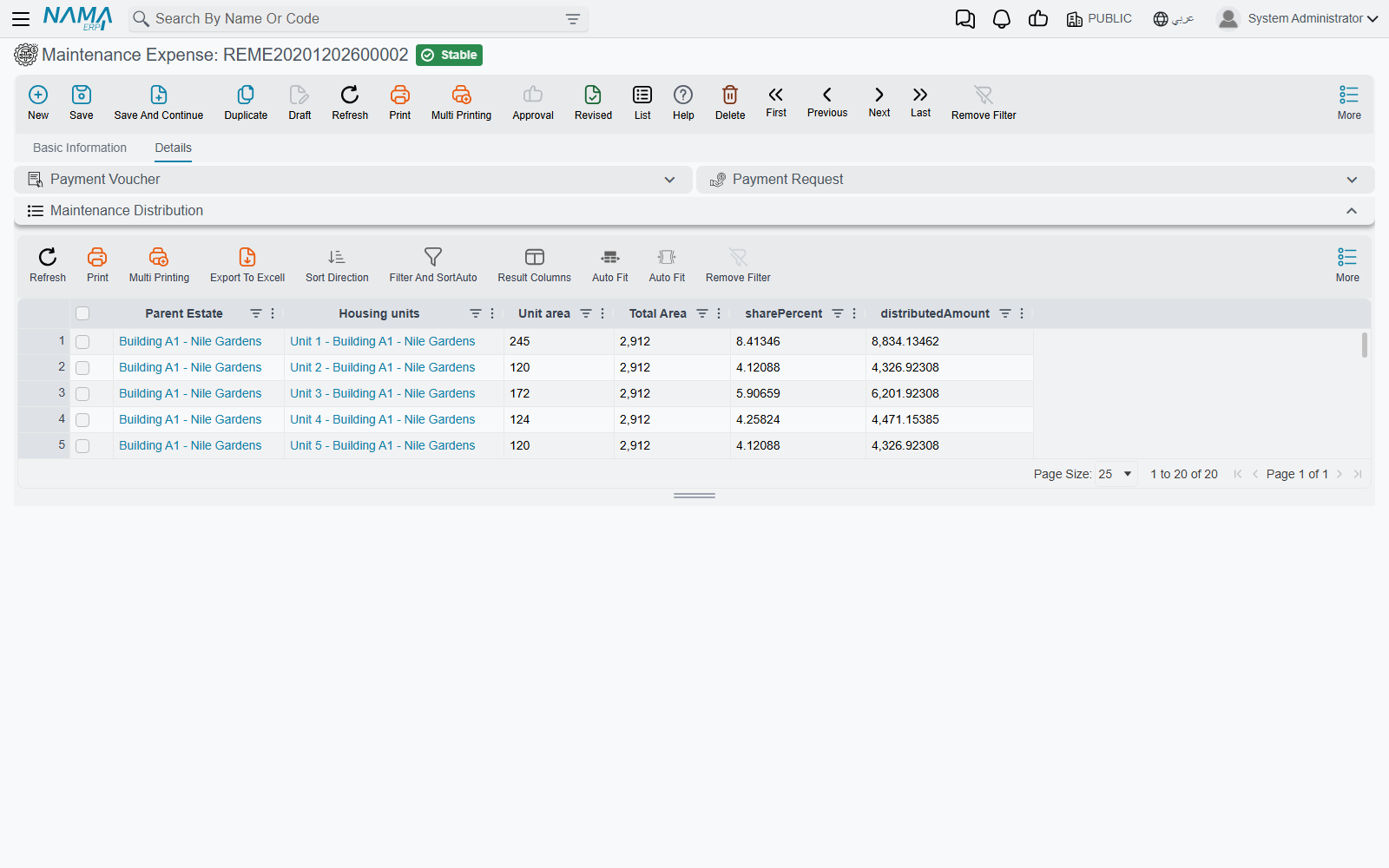
The rule is:
- if the header estate is set and the cost is not empty, the whole cost is distributed under that estate;
- otherwise, each line's estate distributes that line's own value.
"Distribute under an estate" means: collect every rental unit beneath it in the estate tree — or the estate itself if it already is a unit — and split the amount by area:
share %          = unit area × 100 ÷ total area
distributed amount = amount × unit area ÷ total area
Building C's 40 flats total 4,000 m². A 120 m² flat is 3% of that, so its share of the 4,200 repair is 126. The rows are written with the parent estate, the unit, its area, the total area, the share percentage and the distributed amount, and they appear on the document's Details tab.
Two details that make the arithmetic honest:
- Rounding residue goes on the last row, so the rows always sum exactly to the amount rather than leaving a stray fraction.
- If the total area is zero — because nobody filled the unit areas — the split falls back to an equal split, one equal share per unit. That is a reasonable fallback, but it is not what you asked for, so fill the unit areas.
The distribution uses the gross amount
The split ignores the company/customer endurance percentages entirely — it distributes the whole line or header value. The endurance split decides who pays; the distribution decides which unit the cost belongs to. They answer different questions and are not combined.
The lift, end to end
- The site manager raises a request against Building C: one line, lift controller card, 4,200, quotes attached, company endure 100%. No entry is created.
- The request is approved and the property manager creates the Maintenance Expense from it — every line copies across.
- Committing books 4,200 to the maintenance-cost account against the lift company, and the company-share pair carries the whole 4,200 as a company-borne cost. Nothing is invoiced to the buyers, because the customer share is zero.
- Forty distribution rows are written under Building C; the 120 m² flat shows 126, and the shares sum exactly to 4,200.
- Create Payment Voucher raises the payment to the lift company.
- At year end, this 4,200 is one of the numbers that goes into comparing spending against the annual accrual.