
How Real Estate Document Terms Work
A sales contract knows everything about the business event it records. It knows that villa B-12 in Palm Compound sold for 1,200,000, that the buyer paid 240,000 up front, that 24,000 of the price is a maintenance deposit and that the remaining 960,000 is spread over 60 monthly installments. The one thing it does not know is which account any of those numbers belongs in.
That is what the document term (توجيه المستند) is for. Every Real Estate document carries a Term field next to its book, and the term is the record that says: put the contract price here, put the maintenance deposit there, treat installments falling in this fiscal year as revenue and everything later as deferred income. Change the term and the same contract produces a completely different journal entry.
Because the term is chosen per document rather than fixed per document type, you can run several account configurations side by side — a term for compound sales and a term for tower sales, a collection term that settles installments strictly in order and another that does not, a rent term that accrues monthly and another that accrues yearly. Most implementations end up with a handful of terms per document type, each paired with its own book.
There are around thirty term screens in the Real Estate module, but only a few genuinely different shapes. They inherit from each other, so almost every option you will meet is explained on this page; the three family pages then only describe what is specific to them:
- Sales Document Terms — contracts, handover, reservations, waivers, purchase and opening sales.
- Rent Document Terms — leases, offers, accrual ledgers and lease termination.
- Collection, Maintenance, Investment and Cost Document Terms — everything outside the two contract families.
What one accounting side actually is
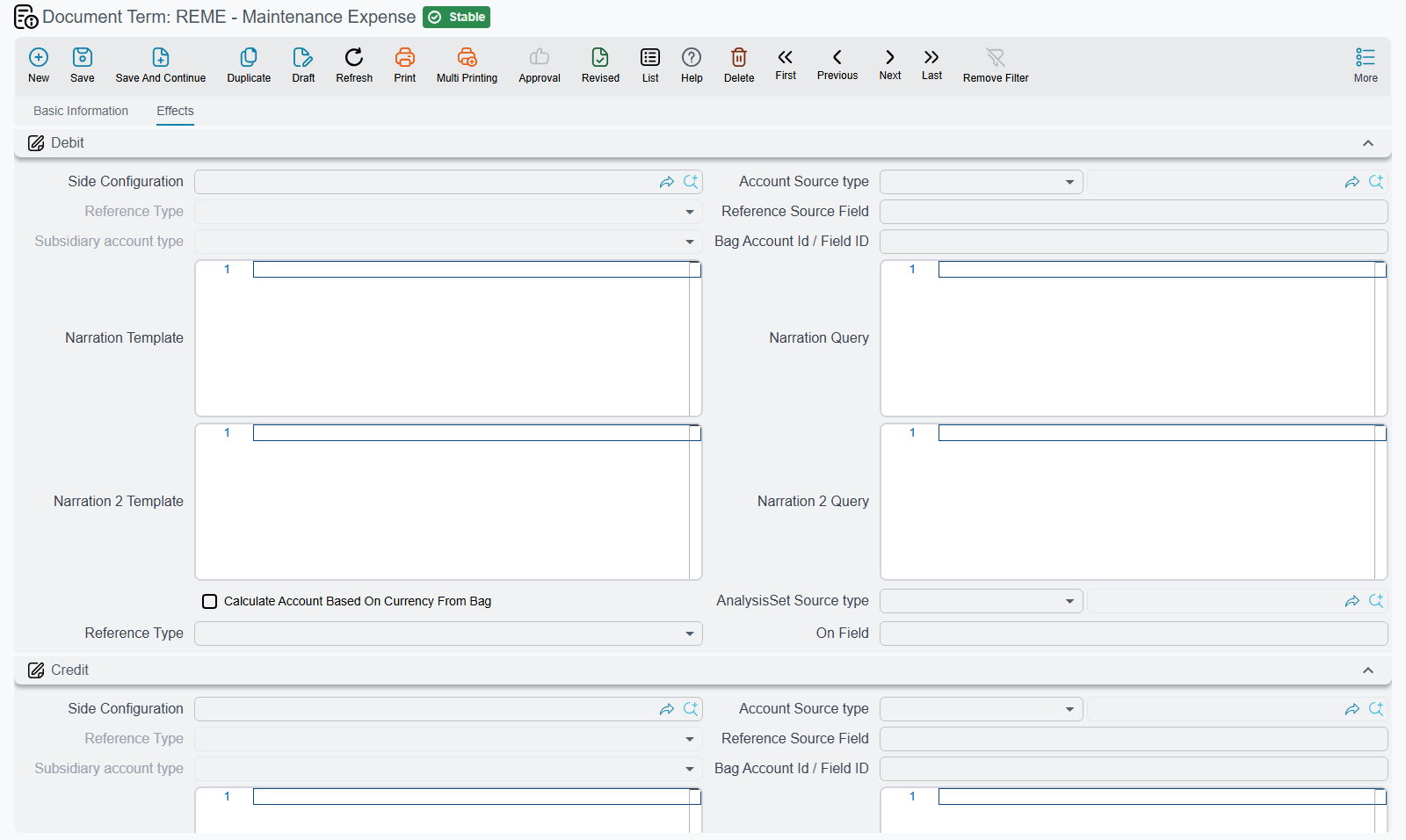
Nearly every option on a Real Estate term screen is an accounting side: one half of a journal entry pair. They all look the same, and they appear dozens of times, so it is worth reading the block once carefully and then never again.
A full accounting side is rendered as a titled group — Maintenance Deposit Debit, Income Credit, Total Penalties - Debit — containing these fields:
Each side has its own id on the term (termConfig.debit2, termConfig.maintenanceCredit and so on — the family pages name them), and the fields inside it carry the same suffix on every side:
| Field | Id suffix (after the side's id) | What it decides |
|---|---|---|
| Side Configuration | .sideConfig | Whether this side is used at all, and how it behaves as a ledger side |
| Account Source type | .accountSource.type | Where the account comes from: a fixed account you name here, or a lookup that follows a reference on the document |
| Account | .accountRef | The fixed account, when the source is a fixed account |
| Reference Type / Reference Source Field | .accountSource.entityType / .accountSource.fieldID | When the account follows the document: which reference to read (for example the buyer) and which field on it holds the account |
| Subsidiary account type | .subsidiaryAccountType | Which kind of subsidiary (ذمة) the line is stamped with — customer, supplier, owner and so on |
| Bag Account Id | .bagAccountId | The account taken out of an account bag, for configurations built on bags |
| Calculate Account Based On Currency From Bag | .accountSource.accFrmBagCrrncy | Picks the bag account matching the line's currency and account type |
| Narration Template / Narration Query, Narration 2 Template / Narration 2 Query | .narrationTemplate / .narrationQuery, .narration2Template / .narration2Query | The two description lines written on the ledger line, either as a template with placeholders or as a query |
| AnalysisSet Source type, Analysis set, Reference Type / On Field | .analysisSetSource.type, .dimensions.analysisSet, .analysisSetSource.entityType / .analysisSetSource.fieldID | Where the analysis set on the line comes from — fixed, or read from a reference on the document. Shown only when the global configuration adds the analysis-set source to terms |
Some sides are not full blocks but a single lookup field pointing at a reusable Accounting Side Config record. Those behave identically; the configuration simply lives in a shared master record so several terms can point at the same side. You will meet them on the header-discount and pre-handover sides of a sales term, on the tax sides almost everywhere, and on the whole Remaining Effects page of the lease-termination term.
A pair only fires when both sides are filled
This is the single rule that explains most "why is my journal entry missing a line?" calls.
Accounting sides always come in pairs — a debit and a credit for the same amount. When a document is processed, each pair is checked, and a pair whose debit or credit side is empty is skipped silently. There is no error, no warning and no half-entry: that amount simply does not appear in the journal entry, and the rest of the entry is produced normally.
So if you configure Maintenance Deposit Debit but leave Maintenance Deposit Credit empty, the maintenance deposit is not booked at all — and because the price and income blocks were configured properly, the entry still balances and looks perfectly healthy. Always configure a pair as a pair, and when an amount you expected is missing from an entry, the first place to look is the other half of its block.
The one place where the system does stop you is the routing grid described below: a routing row that names an Amount Debit without an Amount Credit refuses to save at all, with "Two Accounting Sides must be exist".
Reading a finished entry
A document's effects are created as a business request processed in the background, so the entry appears a moment after the save rather than during it. If a request fails, you find it in the Business Requests list view, filter by status and use the More menu → Reprocess / Recommit. A term that is only half configured will not fail — it will succeed with a shorter entry.
Routing money by installment type — the Configuration List
The account blocks on a term work at document level: one pair for the whole price, one pair for the whole maintenance deposit, one pair for all the discounts. That is enough for most contracts, but not for the very common case where different installments on the same contract belong in different accounts.
Take villa B-12 again. Its installment plan contains sixty ordinary installments that are property revenue, plus one maintenance-cost installment that is not revenue at all — it is money the company holds on behalf of the owners' community and must sit in a liability account. Both live in the same grid on the same contract, and the document-level income pair cannot tell them apart.
The Confiuration List grid termConfig.configLineList (سطور إعدادات التوجيه — the English caption really does ship with the typo) solves exactly this. Each row selects a set of installment types and gives them their own account pairs. It appears on the sales terms, all the rent terms and the collection terms.
Each row has three parts.
Which installments the row applies to. Five Installment type slots (Installment type, Installment type 2 … Installment type 5 — termConfig.configLineList.installmentType … installmentType5) list the types the row covers, and five Do Not Apply On Type slots (termConfig.configLineList.doNotApplyOnType … doNotApplyOnType5) list types it must skip. Two further switches filter by date rather than by type:
| Column | Column id | Effect |
|---|---|---|
| Do Not Use With Current Year Installments | termConfig.configLineList.doNotUseWithCurrentYearInstallments | Skip installments due on or before the end of the document's fiscal year |
| Do Not Use With Next Years Installments | termConfig.configLineList.doNotUseWithNextYearsInstallments | Skip installments due after the end of the document's fiscal year |
Those two are what let you send this year's rent and next year's rent to different accounts inside one routing row.
What is booked. Four amount buckets, each with its own debit and credit:
| Column pair | Column ids | Books |
|---|---|---|
| Amount Debit / Amount Credit | termConfig.configLineList.amountDebit / amountCredit | The installment amount itself — the only pair the system insists you fill completely |
| Penalty Debit / Penalty Credit | termConfig.configLineList.penaltyDebit / penaltyCredit | The late-payment penalty carried on the line |
| Discount Debit / Discount Credit | termConfig.configLineList.discountDebit / discountCredit | The discount carried on the line |
| Prepaid Debit / Prepaid Credit | termConfig.configLineList.prepaidDebit / prepaidCredit | The amount already paid on the line |
The merged components. Merge Value 1 Debit / Credit through Merge Value 5 Debit / Credit (termConfig.configLineList.mergeValue1Debit … mergeValue5Credit) exist for terms that switch on Merge Similar Payment Lines. When that option collapses several generated installments of the same type and due date into one line, the original amounts are kept as five component values on the surviving line, and these five pairs let you record each component on its own accounts instead of losing the breakdown.
How a row is matched
The matching rules are worth knowing exactly, because a row that matches everything is easy to create by accident:
- An installment line with no type never matches any row.
- The current-year / next-years switches are applied first — a line filtered out by date is out, whatever its type.
- If all ten type slots are empty — the five include slots and the five exclude slots — the row matches every installment line. An empty row is a catch-all, not a no-op.
- Otherwise the include and exclude slots decide.
- A bucket is only recorded when its debit side is filled.
- When the term's year-splitting option is on, installments that span a fiscal-year boundary are split first and each half is matched separately.
Worked example — sending the maintenance deposit somewhere else
On the sales contract term for Palm Compound you want ordinary installments to hit property revenue and maintenance-cost installments to hit the maintenance-deposit liability. Two rows do it:
| Row | Installment type | Do Not Apply On Type | Amount Debit | Amount Credit |
|---|---|---|---|---|
| 1 | (empty) | Maintenance cost | Instalments receivable | Property revenue |
| 2 | Maintenance cost | (empty) | Instalments receivable | Maintenance deposits held |
Row 1 relies on rule 3 — it has no include type, so it matches everything except what its exclude slot removes. Row 2 catches the maintenance-cost installment on its own. The 24,000 deposit on villa B-12 now lands in the liability account while the other 936,000 of installments goes to revenue, without anybody touching the contract.
The routing grid does not replace the document-level pairs
Both run. If you configure the income pair on the term and a routing row that matches the same lines, the amount is booked twice. Decide per term which mechanism owns which amount, and leave the other one empty.
Tax policy: the term wins, the module configuration is the fallback
Real Estate documents look up their tax percentages in a grid called Legal Entity TaxestermConfig.legalEntityTaxes (السياسة الضريبية), and this grid exists in two places: on every sales and rent term, and once in the module configuration. This is the part of Real Estate setup that confuses people most, so it is worth stating plainly:
The term's own Legal Entity Taxes grid is read first. Only when the term's grid is completely empty does the system fall back to the module configuration's grid.
It is not a merge and not a per-row override — one filled row on the term takes the whole decision away from the module configuration. So the practical pattern is: set the company-wide policy once in the module configuration, leave the grid empty on nearly every term, and fill it only on the specific term that needs a different rate.
The grid has the same columns in both places, except that the term screens of the sales family leave out the Unit Model column (the rent terms show it):
| Column | Column id on the term | What it does |
|---|---|---|
| Type | termConfig.legalEntityTaxes.type | Applies the row only to installments of this type |
| Unit Model | termConfig.legalEntityTaxes.unitModel | Applies the row only to units built from this model |
| Effective From / Effective To | termConfig.legalEntityTaxes.effectiveFrom / effectiveTo | The date window in which the row applies, compared with the document's value date — except on a rent contract, where each installment is matched by its own due date, so a rate change in the middle of a lease applies only to the installments due after it. The same rule picks the unit's or the buyer's tax plan |
| Entity Type / Entity Type List | termConfig.legalEntityTaxes.entityType / entityTypeList | Restricts the row to one document type, or to a list of them |
| Tax 1 / Tax 2 | termConfig.legalEntityTaxes.tax1 / tax2 | The two percentages |
| Tax 1 Is Deduction / Tax 2 Is Deduction | termConfig.legalEntityTaxes.tax1IsDeduction / tax2IsDeduction | Marks the tax as withheld from the amount rather than added to it |
| Calculate Tax From Main Price | termConfig.legalEntityTaxes.calculateTaxFromTotalPrice | Bases the tax on the main price rather than on the line's net value |
The families, and how the pages fit together
The thirty-odd term screens group into four shapes:
| Family | Members | Documented in |
|---|---|---|
| Sales | Sales contract, initial sales contract, opening sales, reservation, reservation cancel, waiver, handover, purchase contract, sales offer | Sales Document Terms |
| Rent | Rent contract, rent offer, rent offer cancel, rent installment accrual ledger, opening rent contract, multi rent contract | Rent Document Terms |
| Collections | Collect document, exemption document, aggregated collect, fine, return payment, lease termination | Collection, Maintenance, Investment and Cost Document Terms |
| Single purpose | Maintenance, investment, cost, opening cost, post-handover cost, ownership transfer, bank payout, owner payout | the same page |
Members of a family share one option set, and often literally one screen: the collect document and the exemption document have identical term screens, and the rent contract, the two rent offers and the accrual ledger all use the same term shape with different pages shown.
Where accounts come from something other than the term
Two exceptions are worth knowing before you start hunting for a missing account on a term screen:
- Fee types and commission types carry their own debit and credit accounts. A commission line on a sales contract is booked from the commission type's accounts, not from anything on the contract term; the same is true of the Other Fees grid and its fee types. See Fee, Commission, Broker and Expense Catalogues.
- Tax accounts come from different places on a collection than on a contract. On a collect document they are resolved through a fallback chain that ends at the term: the system looks at the expense type, then the unit, then the unit model, and only then at the term's tax sides — the term is the last resort, not the first. A sales or rent term is the opposite: its own tax sides are the only ones read, and nothing on the unit or the expense type is consulted.
Finally, two documents in the module have no term at all: the inspection record and the maintenance expense request. Both are documentary — they record what happened and authorise the next step, but they produce no journal entry, so there is nothing to configure. The sales offer is different: it produces no entry either, but it does have a short term of its own with two options — see Sales offer.