
Sales Document Terms
Selling a property is not one accounting event. The price is revenue, but not all of it belongs to this year. The maintenance deposit inside the price is not revenue at all. The brokerage fee the owner pays and the brokerage fee the buyer pays go to two different places. Penalties and discounts accumulate over the life of the contract. And in a great many companies none of it may be recognised until the keys are actually handed over.
The sales term is where all of that is decided. Nine document types share one option set — the sales contract, the initial (preliminary) contract, the opening sales contract, the reservation, the reservation cancellation, the waiver, the handover, the purchase contract and the sales offer — so once you have configured one of them properly, the rest are variations on the same screen.
Read How Real Estate Document Terms Work first: the anatomy of an accounting side, the rule that a pair only fires when both halves are filled, the Confiuration List routing grid and the tax-policy precedence are all explained there and are not repeated here.
What the term books, block by block
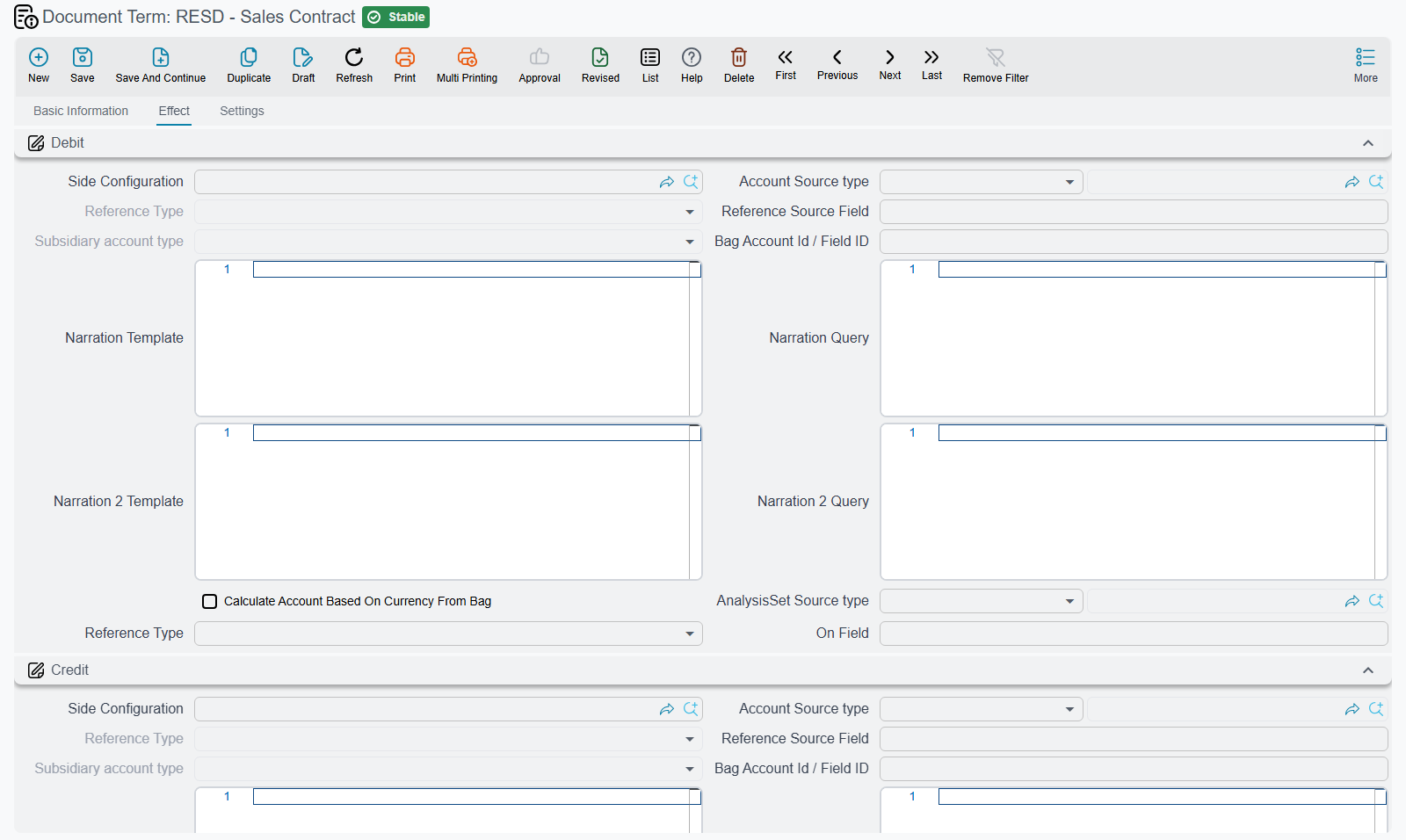
The heart of a sales term is page 0, titled Effect (التأثير). It is a long page, and it is long because a sales contract's journal entry is assembled from up to a dozen independent blocks, each of which is only produced when both of its sides are configured.
| Account block | Field ids | Books |
|---|---|---|
| Debit / Credit | termConfig.debit2 / termConfig.credit2 | The contract price |
| Income Debit / Income Credit | termConfig.loanValDebit / termConfig.loanValCredit | Installments falling due inside the document's fiscal year — recognised revenue |
| Advance Income Debit / Advance Income Credit | termConfig.liquidDebit / termConfig.liquidCredit | Installments falling due in later years — deferred income |
| Fees owner debit / Fees owner credit | termConfig.collectDebit1 / termConfig.collectCredit1 | The brokerage fee (السعي) charged to the owner |
| Fees buyer debit / Fees buyer credit | termConfig.collectDebit2 / termConfig.collectCredit2 | The brokerage fee charged to the buyer |
| Maintenance Deposit Debit / Credit | termConfig.maintenanceDebit / termConfig.maintenanceCredit | The maintenance deposit built into the price |
| Total Penalties - Debit / Credit | termConfig.feesValDebit / termConfig.feesValCredit | The total of the late-payment penalties on the installment lines |
| Total Discounts - Debit / Credit | termConfig.feesDebit / termConfig.feesCredit | The total of the discounts on the installment lines |
| Header Discount Debit / Credit | termConfig.hdrDiscountDebit / termConfig.hdrDiscountCredit | The discount applied to the whole price at header level |
| Pre-Handover debit / Pre-Handover credit | termConfig.preHandoverDebit / termConfig.preHandoverCredit | The construction cost already accrued on the estate before it was handed over |
| Tax1 Debit / Tax1 Credit | termConfig.tax1Debit / termConfig.tax1Credit | Tax 1 on the installment lines |
| Tax2 Debit / Tax2 Credit | termConfig.tax2Debit / termConfig.tax2Credit | Tax 2 on the installment lines |
Two more amounts on a sales contract are not configured here at all: each line of the Other Fees grid is booked from its own fee type's accounts, and each commission line is booked from its own commission type's accounts. Both catalogues are described in Fee, Commission, Broker and Expense Catalogues.
Underneath the account blocks sit the routing grid (Confiuration List, termConfig.configLineList) and the term's own tax policy grid (Legal Entity Taxes, termConfig.legalEntityTaxes), then a group of behavioural switches.
The income / advance income split
The one block worth dwelling on is the income pair versus the advance income pair, because it is the mechanism that keeps a long installment plan out of a single year's profit and loss.
Villa B-12 sells on 1 March for 1,200,000 with 240,000 down and 60 monthly installments of 16,000. When the contract is processed, the system walks the installment grid and asks of every line: is this due inside the document's fiscal year? The ten installments falling before 31 December go to the income pair. The other fifty go to the advance income pair. Next year's opening does not move them — they are released as they are collected and accrued.
An installment whose period straddles the year end can be split pro-rata by day count if the term says so, so that only the part earned this year lands in income.
The two tax pairs
The installment grid has carried Tax 1 and Tax 2 amounts all along: the rates come from the Legal Entity Taxes grid, the amounts sit on every installment line, and the contract totals them. What decides where those amounts land in the journal entry is the Taxes (الضرائب) group further down the same Effect page, holding Tax1 Debit / Tax1 Credit and Tax2 Debit / Tax2 Credit.
Three things about this group catch people out.
Each tax is booked line by line, not as one document total. A sixty-installment contract produces sixty tax pairs, each carrying its own installment's reference data, so an analysis set that follows the line reaches the tax entry as well. Shorten Ledger Effect collapses them into one pair per account, exactly as it does the rest of the entry.
A sales term does not fall back to the expense type or the unit. This is the one place where the sales family behaves differently from collections. A collect term is the last stop in a chain that starts at the expense type and passes through the unit and the unit model; a sales term is the only place looked at. Accounts sitting on the unit or on the expense type are not consulted here, so if the pair is empty on the term, the tax is not booked at all.
A tax marked as a deduction stays negative. Withheld tax is held as a negative amount on the installment line, and the pair books it exactly as it stands — as a negative debit against a negative credit, not as a swapped pair. The entry still balances; it simply reads with minus signs.
And the universal rule bites here as everywhere else: a pair with only one side filled books nothing and warns about nothing.
The group is on the five terms whose documents actually produce an entry — the sales contract, the opening sales contract, the waiver, the purchase contract and the handover. The preliminary contract, the reservation and the reservation cancellation have no account blocks of any kind, so there is nothing to tax there either.
The behavioural switches
These are the options that change what the document does rather than where the money goes. They sit in a group at the bottom of page 0, with two of them on a second page titled Settings (الإعدادات).
| Option | Field id | What it does |
|---|---|---|
| Create Accounting Effects For Handoverd Documents Only | termConfig.createAccEffectsForHandoveredDocumentsOnly | Suppresses the contract's whole journal entry until the unit has actually been handed over. No entry is created at signature; the handover document releases it later. (The shipped English label really does read "Handoverd".) |
| Validate Remaining And Installments Total Equality | termConfig.validateInstallmentsTotal | On by default. Blocks the commit when the installment total does not match the remaining value, within the tolerance set in the module configuration. Turn it off only for contracts whose installment plan deliberately does not add up to the price. |
| Shorten Ledger Effect | termConfig.shortenLedgerEffect | Compresses the journal entry: lines sharing the same account and analysis are merged instead of producing one line per installment. On a 60-installment contract this is the difference between a two-line entry and a sixty-line one. |
| Manual Coding | termConfig.manualCoding | Off by default, meaning the system numbers the installment lines itself. Turn it on when installment codes must match an external or legacy numbering the user types by hand. |
| Pay Installments In Order | termConfig.payInstallmentsInOrder | Forces collections against this contract to settle installments oldest first. A collection term can override it for a specific collection book — see Collection, Maintenance, Investment and Cost Document Terms. |
| Calculate Maintenance From Details | termConfig.calcMaintenanceFromDetails | Changes where the maintenance deposit total comes from. On: it is summed from the maintenance-cost installment lines, and the percentage field is cleared. Off: it is totalled from the installment-construction rows. A mismatch between the two is what produces "Total maintenance costs {0} not equal maintenance cost {1}". |
| Merge Similar Payment Lines | termConfig.mergeSimilarPaymentLines | When the installment plan is generated, lines with the same type and the same due date are collapsed into one. The original amounts survive as the five merged-value components, which the routing grid can record separately. |
| Prevent Accounting Effects For Other Fees Lines | termConfig.preventAccEffectsForOtherFeesLines | Skips the Other Fees ledger lines entirely, for companies that invoice those fees separately. |
| Force Price List | termConfig.forcePriceList | Blocks the commit unless the contract price equals the price the price list produces for that estate. |
| Consider Paid With Reservation Paid From Installments | termConfig.considerPaidWithReservationPaidFromInstallments | Treats the reservation deposit as already collected against the first installment instead of as a separate credit: the generated down-payment line carries the deposit as its paid value and only the balance stays outstanding. |
Recognising revenue on delivery — the worked example
This is the most-asked configuration in the module, and it takes two terms, not one.
- On the sales contract term, tick Create Accounting Effects For Handoverd Documents Only. Villa B-12's contract is now committed on 1 March with no journal entry at all.
- On the handover term, decide its own Create Accounting Effects. Leave it off if the handover is purely a trigger; turn it on if the handover document should also produce an entry of its own.
- When the handover document is committed in September, the contract's suppressed entry is generated at that moment. Cancelling or deleting the handover reverses it again.
Configuring only step 1 gives you a contract that never creates an entry. Configuring only step 2 gives you a contract that creates its entry at signature and a handover that creates a second one. They belong together.
Where each document differs
All nine terms carry the same underlying option set. What changes is which options the screen shows and what each document adds.
Sales contract
The full screen: page 0 Effect with every account block, the tax grid, the switch group and the routing grid; page 1 Settings with Force Price List and Consider Paid With Reservation Paid From Installments. Everything above applies as written. See The Sales Contract.
Estate handover
One page only, and it adds one option:
| Option | Field id | What it does |
|---|---|---|
| Create Accounting Effects | termConfig.createAccountingEffects | On: the handover document produces its own journal entry, built from the same blocks as a contract. Off: committing the handover only stamps the contract and the unit as delivered. Switching it off after entries exist deletes the handover's own entry. |
Purchase contract
The company is the buyer here, so the same blocks run in the opposite commercial direction. The term adds one option:
| Option | Field id | What it does |
|---|---|---|
| Estate Value Field | termConfig.estateValueField | Normally the value capitalised onto the purchased estate is the contract price. Naming a field here makes the system read that field on the purchase contract instead — used when the amount to capitalise is price plus fees plus registration costs held somewhere else on the document. |
See Estate Values, Additions and Revaluation.
Opening sales contract
Same two pages, Effect and Settings, and the same blocks for the price, the owner and buyer fees, the maintenance deposit, the penalties, the discounts, the recognised income, the header discount and the two taxes — because an opening contract is an ordinary contract that happens to be dated before go-live. Two things are specific to it, an extra account pair and an option:
| Block or option | Field id | What it does |
|---|---|---|
| Net value installment debit / Net value installment credit | termConfig.issuedDebit / termConfig.issuedCredit | Books the amount the buyer had already paid on the contract before go-live (the opening contract's prepaid total). Like every pair, it is skipped unless both sides are filled. |
| Allow Non Opening Fiscal Period In Opening Sales | termConfig.allowNotOpenPerInOpenSales | Off by default: the document refuses to commit outside an opening fiscal period, failing with "Fiscal period must be openning". Turn it on only when opening balances genuinely have to be entered into a normal period. |
Initial (preliminary) sales contract
The shortest term in the family. It has a single page titled Settings, and it shows no account blocks at all — which matches the document, since a preliminary contract has no accounting effect. It carries Merge Similar Payment Lines, Force Price List, Consider Paid With Reservation Paid From Installments, the routing grid, and two options the sales contract does not show:
| Option | Field id | What it does |
|---|---|---|
| Has Buyer | termConfig.hasBuyer | On by default; makes the Buyer field mandatory. Turned off for company-owned initial contracts where no buyer exists yet. |
| Reserve Estate | termConfig.reserveEstate | Forces the document's own Reserve Estate flag on when it is saved, so committing the preliminary contract writes itself into the estate's reservation slot and blocks anybody else from selling or reserving the unit. Un-ticking it, or pointing the contract at a different unit, releases or moves that reservation. |
See Reservations and Initial Sales Contracts.
Reservation document
Page 0 Effect here holds a single pair — the reservation deposit, termConfig.paidDebit / termConfig.paidCredit — because that is the only money a reservation moves. Page 1 Settings carries Force Price List and Consider Paid With Reservation Paid From Installments, which is the option that later decides whether this deposit is treated as a payment against the first installment of the sales contract.
Reservation cancellation
A single page titled Settings, holding Has Buyer, Merge Similar Payment Lines, Force Price List, Consider Paid With Reservation Paid From Installments and the routing grid. What is retained and what is refunded is booked through the routing grid rather than through named blocks.
Waiver document
Page 0 Effect carries the price, owner fees, buyer fees, maintenance deposit, header discount and tax blocks, plus a dedicated pair for the waiver price — the commission the company charges for transferring the contract to a new buyer. Below them sit the routing grid and Validate Remaining And Installments Total Equality. Page 1 is Settings.
The two waiver-price captions are swapped
The block captioned Waiver credit holds the debit side of the waiver price (termConfig.issuedDebit), and the block captioned Waiver Debit holds the credit side (termConfig.issuedCredit). Put the account you want debited under Waiver credit.
The option that matters is:
| Option | Field id | What it does |
|---|---|---|
| Reverse Commissions Accounting Effects | termConfig.reverseCommissionsAccEffects | Records every commission line on the waiver with its commission type's debit and credit sides swapped, so the original contract's commission entry is reversed when the buyer waives ownership. |
Worked through: a customer who paid 3 of 10 installments on a 1,200,000 villa waives it to a friend, and the company charges 2% — 24,000 — for the transfer. The waiver-price pair books the 24,000; if Reverse Commissions Accounting Effects is on, the 24,000 broker commission booked when the original contract was signed is reversed at the same time. See Waivers and Cancelling a Sale.
Sales offer
The sales offer is a quotation: it produces no journal entry, so its term has no account blocks at all — just one page titled Settings with the two options the other sales documents carry on theirs:
| Option | Field id | What it does |
|---|---|---|
| Force Price List | termConfig.forcePriceList | Refuses to save the offer unless its price equals the unit's current price-list price, with "The estate {0} price is {1} in price list, this must match the price {2}" — «سعر الوحدة {0} في قائمة الأسعار يساوي {1}, سعر الوحدة يجب أن يساوي {2}». Both prices in the message are the price-list price; the offer's own price is not shown. Every other sales-family term that shows this option runs the same check. |
| Consider Paid With Reservation Paid From Installments | termConfig.considerPaidWithReservationPaidFromInstallments | Applies when the offer's installment plan is generated: the amount paid with the reservation is counted as already paid on the down-payment line, exactly as on a sales contract. |
Choosing a starting point
If you are configuring the sales family from nothing, do it in this order:
- The sales contract term first. It is the only one that exercises every block, and the other eight are trimmed versions of it.
- Decide the recognition moment before you fill any account. Revenue at signature or revenue at handover changes which terms need which options, and it is much harder to change once contracts exist.
- Fill the income and advance income pairs even if every contract is short. They are what keeps a December contract with January installments out of the wrong year.
- Leave the routing grid empty until you need it, then add rows for the installment types that genuinely belong elsewhere — the maintenance-cost lines almost always do.
- Copy the finished term for the initial contract, reservation and waiver rather than starting each from scratch; only the options listed above differ.