
The Sales Contract
Everything before this point in the sales cycle is about intent. A sales offer is a price on paper. A temporary reservation is a promise to hold a unit for a few days. Even a confirmed reservation only books the deposit the customer handed over, and a preliminary contract — however detailed — creates no entry at all.
The sales contract is where the sale becomes real. Committing it marks the unit sold, writes the buyer onto it, turns the payment plan into a receivable, and produces the one journal entry that recognises the price of the property. It is the only document in the sales family that books the revenue of the sale itself, and every downstream document — collection vouchers, fines, handover, waiver — hangs off it.
You will find it at Real Estate and Property > Sales > Sales Contract, and it needs the realestate-sales licence.
Throughout this page we sell villa B-12 in Palm Compound for 1,200,000, with a 20% down payment of 240,000, sixty monthly installments of 16,000, and a 2% broker commission.
Filling the contract, block by block
Basic information and where the contract came from
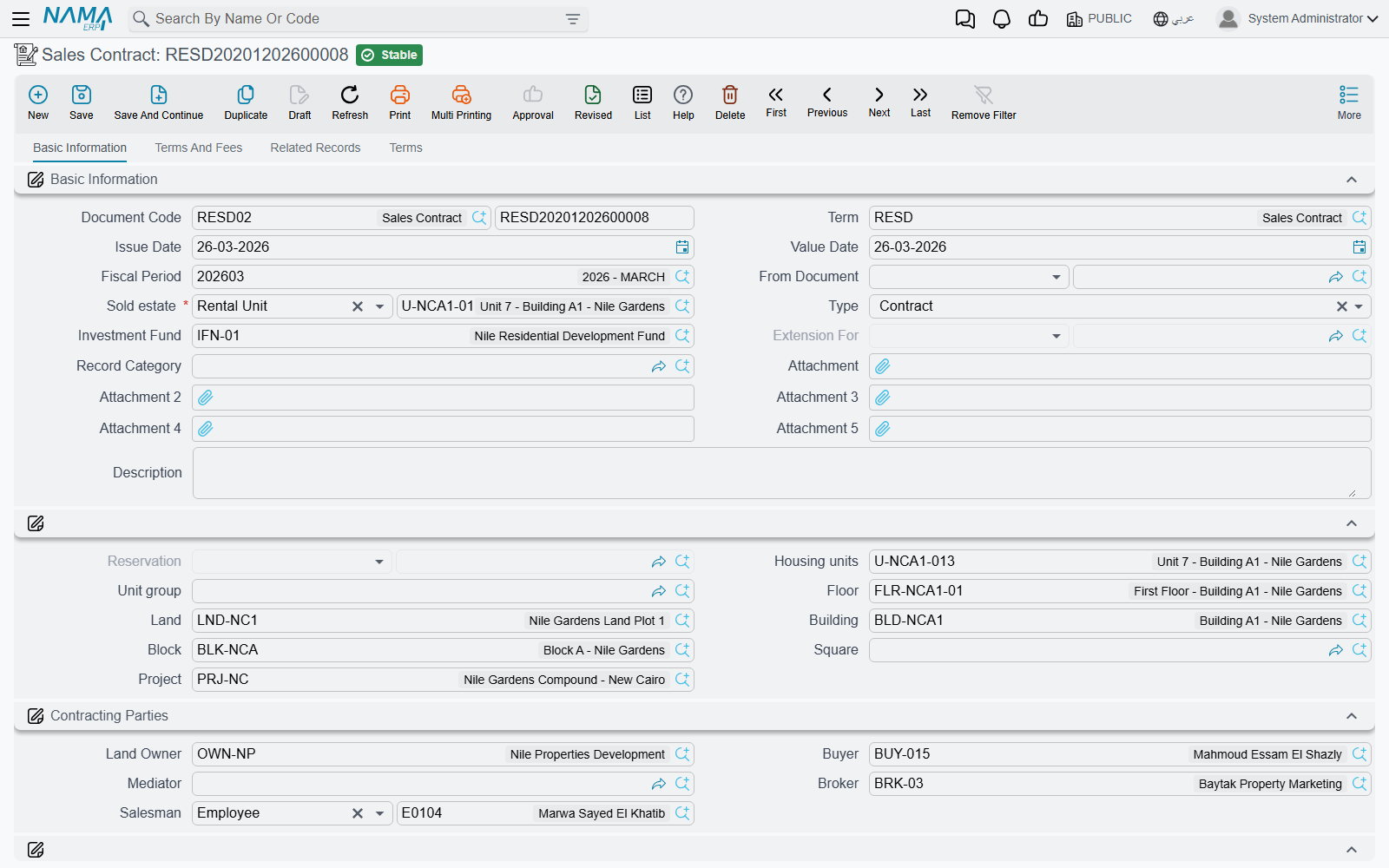
The top of page 0 is the usual document header — book and code, document term, issue date, value date and fiscal period — followed by the two fields that decide what the rest of the screen will look like.
From Document (بناءا على) is how a contract inherits its history. Point it at the confirmed reservation for villa B-12 and the system carries the buyer, the estate, the deposit already paid and the payment template forward. Point it at a preliminary contract instead and the same thing happens from there. The Reservation field a little further down is system-maintained — it is filled from the From Document and cannot be typed into. If you want the contract linked to a reservation, set the From Document; do not go looking for a way to edit the reservation field.
Estate (العقار) is the property being sold — a unit, a land plot, a floor, a building, a block or a unit group. Choosing it back-fills the whole location breadcrumb underneath (project, square, block, building, floor, land, unit, unit group), so you never type the address twice. The picker is filtered: it offers only estates that are currently Avaliable (the spelling on screen) and not already reserved, which is why a unit someone else is holding simply does not appear in the list.
The rest of the block is Type (see Contract or extension below), the investment fund the unit belongs to if any, the document category, five attachments and remarks.
The contracting parties
Four party fields and one employee:
| Field | Who it is |
|---|---|
| Land Owner (المالك) | the selling side — the party the unit is being sold from |
| Buyer (المشتري) | the customer; this is the party the receivable is raised against |
| Mediator (الوسيط) | an intermediary third party recorded for reference |
| Broker (وسيط) | the real-estate broker |
| Sales Man (مندوب المبيعات) | your own employee, or a third party |
Two things are worth knowing here. First, the Buyer is mandatory unless the term switches Has Buyer (له مشتري) off — it is on by default, and you want it on for a real sale. Second, the Broker field is informational: naming a broker in the header does not create a commission line and does not create any entry. Commissions are entered by hand in the commissions grid further on, and they are what actually books money. The broker master file itself is described in the catalogue page.
Just below the parties sits a small group of three read-only fields — the waiver document, a waivered marker and a handed over marker. You never fill these; they light up when a waiver or a handover is issued against the contract.
The money
The whole middle of page 0 — the price block, the installment-construction block, the Multiple Construction Info grid, the action buttons and the Installments grid — is the money model shared by every sales-family document. It has its own page, and it is the page to read before you fill anything here. In outline: the price block derives 1,200,000 from the areas and meter prices (or you type it), takes off the 240,000 down payment, adds fees and the maintenance deposit, and leaves a remaining value; the construction block describes how that remaining value becomes sixty lines; and Create installments builds them.
If your organisation publishes price books and payment templates, pick a Sales Payment Method and the whole plan arrives pre-filled — see price lists and payment plan templates.
Fees and commissions
Page 1, Terms And Fees, carries three grids that all end up as money.
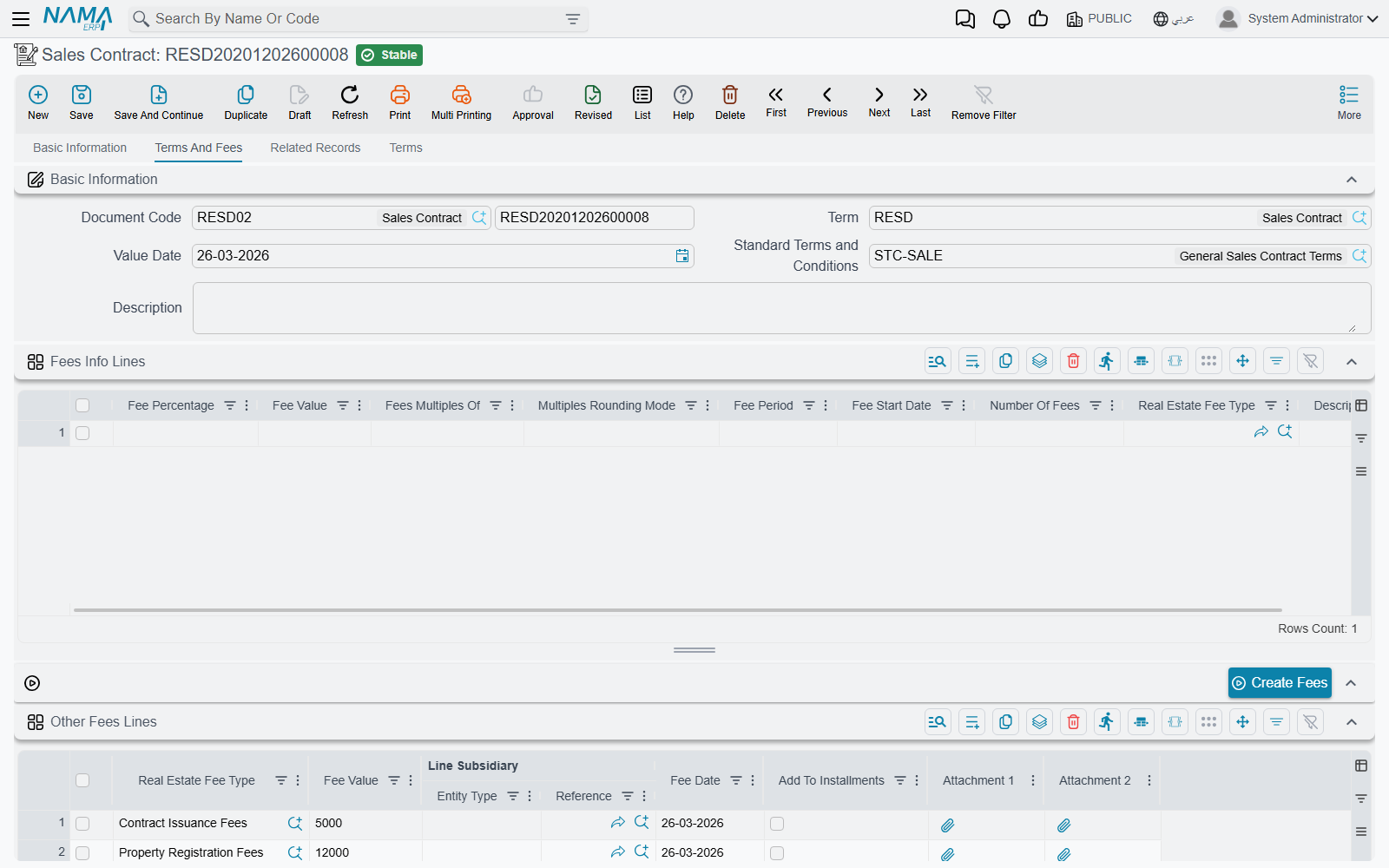
Fees Info Lines is a generator, not a list of charges. One line describes a recurring fee — a percentage or a value, how many of them, over what period, starting when, rounded to what multiple, and of which fee type. Pressing Create Fees (إنشاء الرسوم) expands those descriptions into the real Other Fees grid, dating the generated lines from the down-payment date (or the document value date if there is none) and sorting them by fee date.
Other Fees is where the actual charges live, whether they were generated or typed straight in: fee type, fee value, the line's own subsidiary, the fee date, and Add To Installments (إضافة إلى الأقساط), which folds the fee into the generated schedule instead of leaving it standing alone. The accounts for these lines come from the fee type's own Fee Debit and Fee Credit — one of the few places in the module where accounts are read from a master file rather than from the document term. A term option, Prevent Accounting Effects For Other Fees Lines, suppresses those ledger lines entirely if you would rather account for fees another way.
Terms (the clause grid on the same page) holds the contract's own conditions text, usually copied in from a standard-terms master file. The separate Terms page at index 3 is the structured version — one row per standard clause with a planned end date, an extended end date, a fulfilment date and any extension fines. Both are described on the owners and standard clauses page.
The commissions grid
This is the grid that pays the people who sold the unit, and it deserves reading carefully, because when it books surprises people.
Each line names a Commission Type, a Commission Recipient — an employee, a broker or a third party — the recipient's name, a percentage and a value, plus Calculate Percentage From Value (احتساب النسبة من القيمة) and two attachments.
The base the percentage applies to is not chosen on the contract — it comes from the commission type. Each commission type carries a Calculate Commission Based On setting, and that decides what the percentage bites into:
| Basis | What the percentage is taken from |
|---|---|
| Unit Price (the default) | the contract's total price |
| Net Value | the remaining value on the contract |
| Unit N1 … Unit N5 | one of the five free numeric fields on the property record |
| Contract N1 … Contract N5 | one of the five free numeric fields on the contract header |
Picking a commission type immediately fills the percentage from the type's default percentage and computes the value. On villa B-12, a Sales Commission type set to 2% on the Unit Price basis produces 24,000 the moment you choose it.
Calculate Percentage From Value flips the direction of that arithmetic. Leave it unticked — the normal case — and you type a percentage and the system computes the value. Tick it, and you type the value the broker actually negotiated and the system back-computes the percentage for the record. Either way the two stay consistent on every save.
Commissions are booked when the contract commits, not when the broker is paid
When the contract commits, every commission line produces a debit and a credit taken from the commission type's own Debit and Credit sides — not from the sales term. The expense and the liability to the broker are recognised there and then, with the contract as the reference and the commission recipient as the subsidiary.
Paying the broker afterwards is a completely separate step: an ordinary payment voucher against the broker's subsidiary account. Nothing on the sales contract moves when that payment happens.
Because both sides come from the commission type, a commission type with only one side configured books nothing at all — silently. If commissions are missing from a journal entry, check the commission type's accounts first.
If the sale is later given up, the waiver document can record the same commission types with their sides swapped, which is how a commission recognised here is unwound.
What committing the contract does
Saving the contract is instant; the effects are produced as a business request processed in the background. In order, a commit:
- Marks the property sold. The estate's status becomes Sold, its sold flag is set, the contract's buyer is written onto it as buyer and owner, and the estate is pointed back at this contract. Selling a block or a building cascades the status down to everything beneath it.
- Closes off the reservation. A linked reservation flips to Sold; a linked preliminary contract is stamped sold and pointed at this contract. Cancelling or deleting the contract puts the reservation back to Confirmed.
- Writes the real-estate system entries that drive the sold/reserved state of the estate tree and the sales-transaction list views. An extension skips this step — see below.
- Creates commercial papers for any installment lines that carry commercial-paper creation data. Which document types may do this at all is a module-wide setting; see module configuration.
- Recalculates the standard-clause end dates if the contract has been extended.
- Updates the investment revaluation entries when the unit belongs to an investment fund.
- Builds and sends the journal entry. If processing fails, it is retried from the Business Requests list view — filter for failed rows and use More → Reprocess / Recommit.
The journal entry, block by block
The entry is assembled from a series of independent blocks, each drawing its accounts from a different pair of sides on the sales document term. The universal rule applies throughout: a block is only produced when both of its sides are configured. A half-configured pair is skipped in silence, which is the single most common reason for a journal entry that looks short.
| What is recorded | Where its accounts come from |
|---|---|
| Installment lines routed per installment type | the Confiuration List (سطور إعدادات التوجيه) grid on the term — each row routes one installment type to its own pair |
| Installments due in this fiscal year | Income Debit / Income Credit |
| Installments due in a later fiscal year | Advance Income Debit / Advance Income Credit |
| The total price | the plain debit / credit pair on the term |
| Pre-handover construction cost carried on the property | Pre-Handover debit / Pre-Handover credit |
| Owner fees | Fees owner debit / Fees owner credit |
| Buyer fees | Fees buyer debit / Fees buyer credit |
| The maintenance deposit | Maintenance Deposit Debit / Maintenance Deposit Credit |
| Total discounts | Total Discounts Debit / Total Discounts Credit |
| Total penalties | Total Penalties Debit / Total Penalties Credit |
| The header discount on the price | the Header Discount pair |
| Tax 1 and tax 2 on each installment line | the Tax1 Debit / Tax1 Credit and Tax2 Debit / Tax2 Credit pairs |
| Other-fees lines | the fee type's own Fee Debit / Fee Credit |
| Commission lines | the commission type's own Debit / Credit |
This year's income versus advance income
The split between the two income pairs is done per installment line, by its due date, against the fiscal year of the document. Villa B-12 is signed in March 2026 with monthly installments starting in April: the down-payment line and the nine installments falling in April to December are recognised as income of 2026 — 240,000 + (9 × 16,000) = 384,000 — while the remaining fifty-one installments, 816,000, land in advance income and are recognised as those years arrive.
A term option can go one step finer and split a single installment that straddles two fiscal years pro-rata by days. Water-cost, insurance, maintenance-cost and commission lines are never split that way.
The tax on the installments
The installment grid computes tax 1 and tax 2 for every line from the tax policy — the rates come from the term's own Legal Entity Taxes grid, or from the module configuration when the term's grid is empty. Those amounts reach the journal entry through the Taxes group on the term, and they are booked per installment line: each line's tax produces its own debit and credit, carrying that installment's reference data, rather than one lump sum for the contract.
Worth knowing when an expected tax line is missing: a sales term is the only place the accounts are looked for. This is different from a collection voucher, where the system tries the expense type, then the unit, then the unit model before falling back to the term. Accounts configured on villa B-12 itself, or on its unit model, are simply not consulted by the contract — if the pair on the term is half-filled or empty, the tax quietly does not appear.
Tax marked as a deduction is held as a negative amount on the line and is booked as it stands, so those lines read with minus signs on both sides rather than as a swapped debit and credit.
Two switches that change everything
- Create Accounting Effects For Handovered Documents Only (إنشاء تأثير محاسبى لمستندات التسليم فقط) suppresses the whole journal entry until the unit is delivered. The contract commits, the receivable schedule exists, the estate is sold — and nothing is in the ledger. The handover document is what finally releases it. This is how "recognise revenue on delivery" is configured.
- Shorten Ledger Effect (اختصار القيد) compresses the generated lines, so a contract with sixty installments does not produce a journal entry sixty lines long.
Contract or extension
The Type field offers Contract (عقد) and Extension (ملحق). An extension is an annex on an existing contract: an agreed price increase, an extra fee, a rescheduling. Choosing Extension makes the Extension For (مٌلحق ل) field mandatory — it points at the sales contract, opening sales contract or waiver being annexed — and choosing Contract requires that field to be empty.
The important difference is behavioural: an extension does not re-run the property bookkeeping. It does not re-mark the estate, does not touch the reservation and does not rewrite the system entries. It only adds money lines to a contract that already exists. An extension dated on or after the date of a waiver on the contract it extends is rejected, and every extension shows up on the parent contract's Related Records page.
Actions on this screen
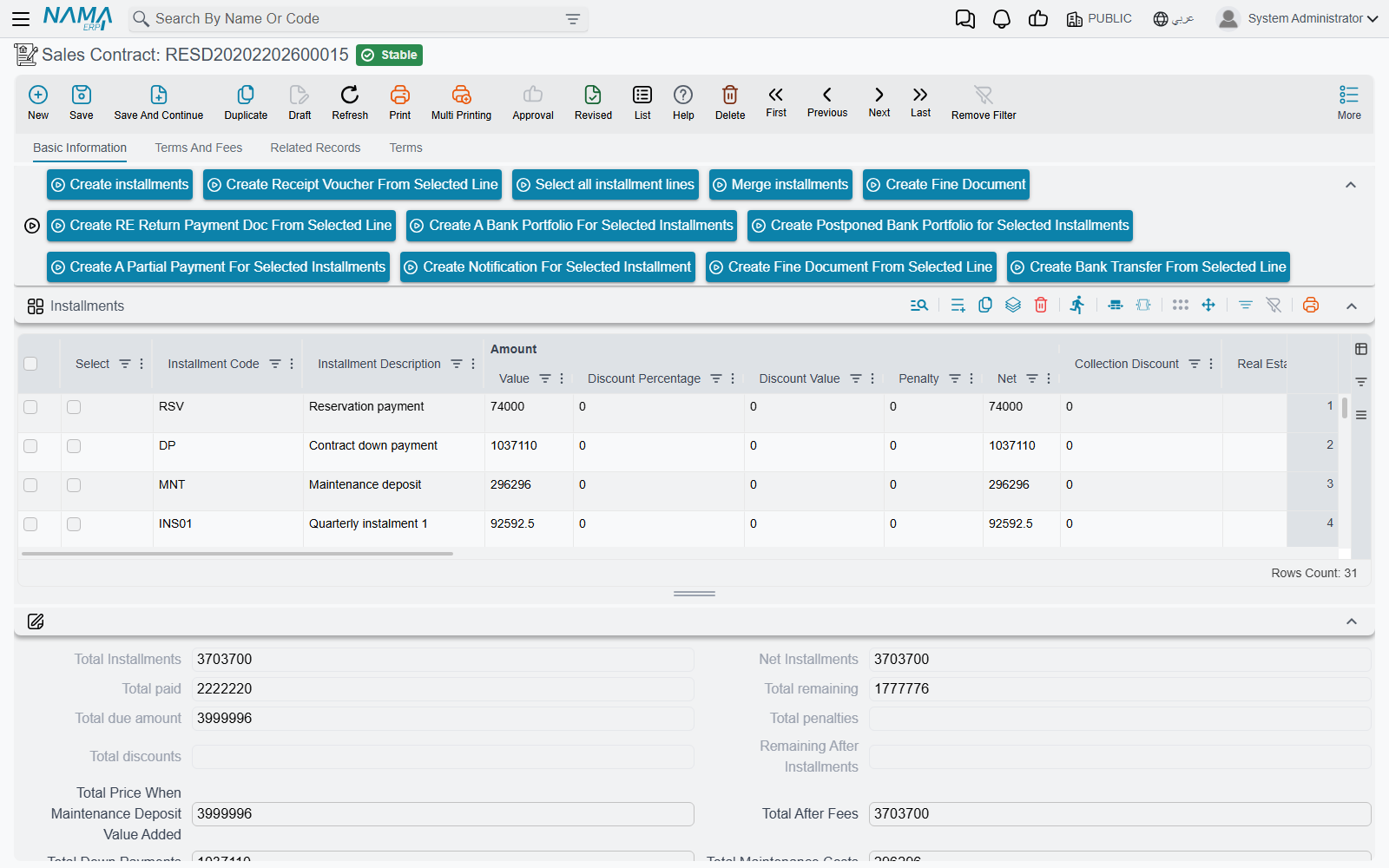
The sales contract's buttons sit in the action block above the Installments grid, and nearly all of them work on the rows you have ticked in that grid. The same toolbar, or most of it, appears on every sales-family document — the offer, the reservation, the initial contract, the opening sale and the waiver — so this list is the reference the other pages point to.
Building and reshaping the plan:
- Create installments — the generator. Rebuilds the whole Installments grid from the price block, the construction block, the Multiple Construction Info grid and the fee lines; see Building the Installment Plan. It replaces every row, so use it before anything is collected.
- Select all installment lines — ticks every row, ready for the buttons below.
- Merge installments — early settlement. The ticked rows leave the grid and their value is spread over the remaining rows inside the code or due-date range you give, with an optional discount percentage spread over the same rows. Worked through on Building the Installment Plan.
- Create Fees — on page 1, Terms And Fees: expands the Fees Info Lines into dated rows of the Other Fees grid, as described under Fees and commissions above.
Collecting the ticked rows — each of these opens a new, unsaved document carrying the buyer and one installment line per ticked row. Rows with nothing remaining are skipped, and with no qualifying row ticked the button refuses with Please select installment line with remaining value:
- Create Receipt Voucher From Selected Line — a receipt voucher for the total remaining value of the ticked rows.
- Create Bank Transfer From Selected Line — a bank transfer for that total, with the buyer on the transfer line and the account taken from the buyer's main account.
- Create RE Return Payment Doc From Selected Line — a return payment document with one return line per ticked row, for money being handed back.
Working with commercial papers — these four take only ticked rows that already carry a Commercial Paper (cheque or note); with none ticked they refuse with Please select installment lines with commercial papers. Each opens the named accounting document with one line per paper at the row's remaining value:
- Create A Bank Portfolio For Selected Installments — a Bank Portfolio, to hand the cheques to the bank for collection.
- Create Postponed Bank Portfolio for Selected Installments — a Postponed Bank Portfolio.
- Create A Partial Payment For Selected Installments — a Commercial Papers Partial Payment, for a cheque that was only partly honoured.
- Create Notification For Selected Installment — a Bank Notice.
Fines:
- Create Fine Document — opens a new fine document in a pop-up, linked to this contract in Related To, with the parties, the estate and its site copied across, and the contract's installment lines copied in (unless the fine's term has Do Not Copy Installments With Related To switched on).
- Create Fine Document From Selected Line — the same, but only the ticked rows with a remaining value are copied in.
Finally, each row of the Installments grid — and of the Multiple Construction Info grid — carries a Create collect doc from selected line button. It opens a new collect document in a pop-up for the ticked installments, or for the row you pressed it on when nothing is ticked.
The validations you will actually meet
- The installment total must match the remaining value, within the tolerance set in module configuration. This is the check that stops a contract over a one-piastre rounding gap, which is exactly what the tolerance is for. The term option Validate Installments Total can switch the check off per document term.
- A paid line cannot be deleted or re-coded. Once an installment has been collected, requested for collection or covered by a commercial paper, its code is frozen and the line cannot disappear — you get "Can not delete or change code of a paid line {0}". This is what protects you from an accidental rebuild of the grid.
- Installment codes must be unique across the contract. They are generated automatically unless the term has Manual Coding on.
- The reservation must be consistent. If the estate already carries a reservation and this contract does not link to it, commit fails with "The estate {0} has a reservation doc".
- The maintenance deposit needs a payment method. If a deposit value is present, the payment type is required, and for One Value the payment date is required too. The total maintenance cost must equal the maintenance-cost installment lines plus the deposit.
- Construction-info lines must be coherent — each needs either a value or a percentage, and the line that distributes the remainder must have neither.
- A waivered contract is frozen. Once a waiver has been issued against it you get "This contract can not be modified,because there is waiver Document {0} based on it". To change anything you deal with the waiver, not the contract.
- Force Price List, if the term switches it on, requires the contract price to equal the price the price list produces for that estate, and names both figures in the error.
From here
Once the contract is committed, the money is collected against it — the installment grid is a projection that the collection documents update. Delivery is recorded with the handover document, and if the buyer gives the unit up, that is a waiver.