
Reservations and Initial Sales Contracts
Between "the customer is interested" and "the customer has bought" there is a stretch of time where the unit must be taken off the market without any revenue being recognised. Three documents live in that stretch, and they lock the unit in three different ways.
The reservation document holds a deposit and locks the unit — but only from the moment it is confirmed. The reservation cancellation releases it again and settles what the company keeps. The initial sales contract is a full preliminary agreement that can also lock the unit and yet produces no accounting entry at all.
We follow villa B-12 from the sales cycle page: priced at 1,200,000, held with a 20,000 deposit, then converted into a contract.
The reservation document
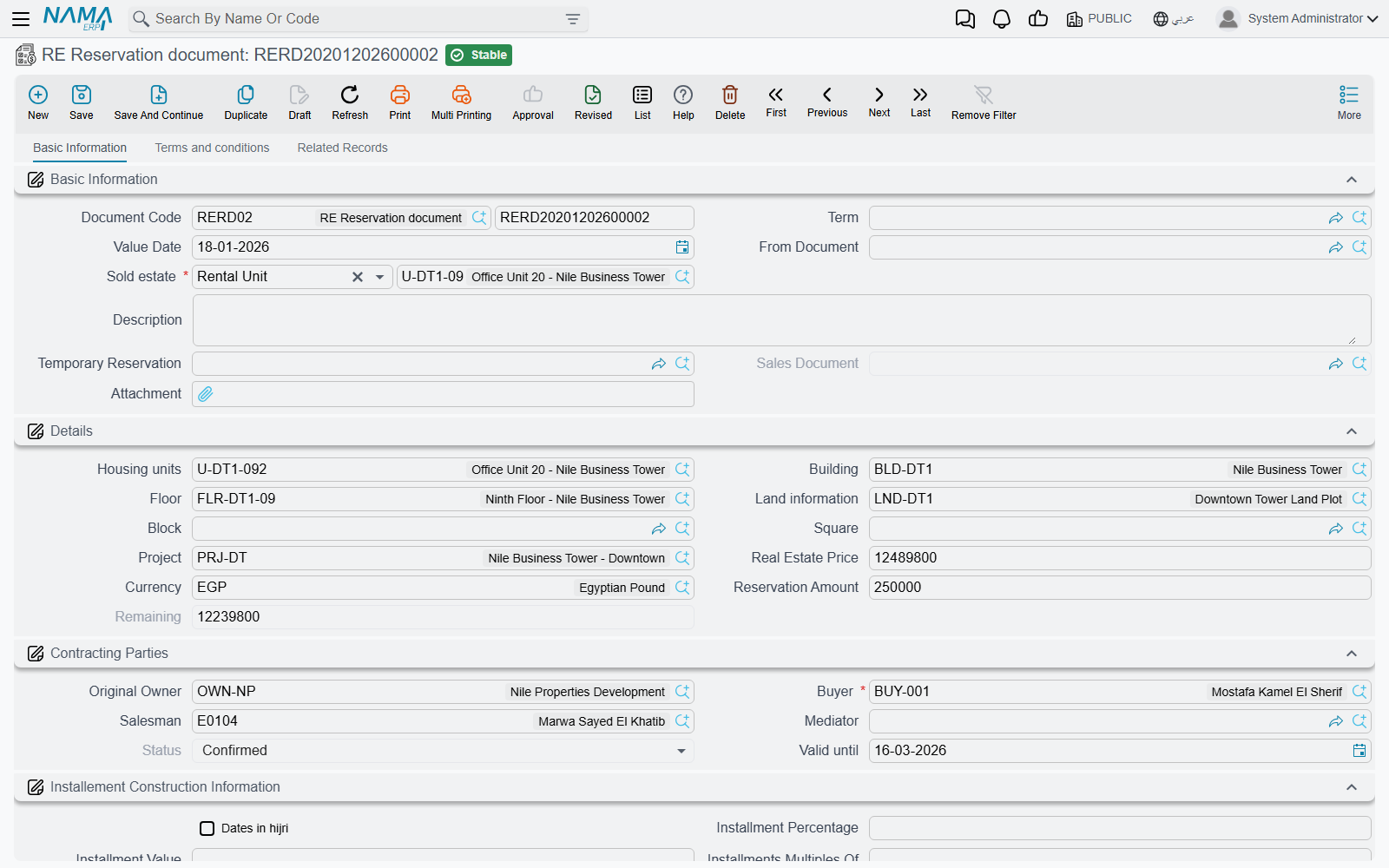
Issue it from Real Estate and Property > Sales > RE Reservation document. Note the licence: this document is gated on realestate, not on realestate-sales, so it is available even in an installation that has only the base real-estate licence.
Page 0 (Basic Information) is the whole document. It starts with the Based On field and the estate, plus a link back to the temporary reservation the hold came from and a system field that will later point at the sales contract. The details group carries the estate breadcrumb — unit, building, floor, land, block, square, project — with the unit's price, the currency, the amount the customer actually paid to reserve, and the remaining balance, which the system keeps as price minus paid. The contracting-parties group holds the owner, the buyer, the salesman and the mediator, together with the Status field and Valid Until. Page 1 is the terms and conditions grid, and page 2 lists the collect documents raised against this reservation.
The estate picker is deliberately narrow: it only offers estates whose status is Avaliable and whose reserved flag is not already set. If the villa you expect is missing from the list, it is already reserved or already sold.
Status is the whole story
| Status | Meaning |
|---|---|
| Initial | The default on a new record. The document exists; the unit is not locked. |
| Confirmed | The unit is reserved. This is the only status that locks anything. |
| Cancelled | The reservation was abandoned and the unit released. |
| Sold | A sales contract has been committed on this reservation. |
The Status field is read-only — you cannot type into it. It moves when you press the Confirmed or Cancelled action on the document, and it moves on its own when a sales contract is committed.
A reservation left at Initial protects nothing
Committing the document is not enough. Until somebody presses Confirmed, villa B-12 still shows as available in every estate searcher and a colleague can sell it. The sales contract enforces the same rule from the other side: a contract built on a reservation that is still Initial — or that is Cancelled — is rejected with an invalid-reservation-status message.
Cancelling reverses the lock in exactly the same way: moving a confirmed reservation to Cancelled releases the unit again. Cancelling or deleting the reservation document itself releases it too.
What it books
The reservation document does create a ledger entry, but only for the deposit. One debit line and one credit line are produced for the amount paid — 20,000 in our example — from the Paid Debit and Paid Credit accounts on the document term (توجيه). The owner is used as the supplier and the buyer as the customer on those lines, and the salesman and the estate come along as analysis sources, so the entry can be reported by unit and by salesman.
Nothing else on the screen is recorded. The 1,200,000 price sits on the document as information; it becomes a receivable only when the sales contract is committed.
If both account sides are left empty, no entry is produced at all — which is a legitimate configuration if your company treats reservation deposits as a cash-desk matter and records them elsewhere.
The term's second page carries two settings: Force Price List, which makes the price-list price mandatory (see Price Lists and Payment Plan Templates), and Consider Paid With Reservation Paid From Installments, which decides whether the deposit already paid here is treated as settling installments on the contract that follows rather than simply reducing the balance.
Turning it into a contract
Once the customer signs, press Creat Sales Document on the saved reservation. Nama opens a new sales contract pre-filled with the estate, the buyer, the owner, the mediator, the block, the land, the unit, the square, the price — and, importantly, the 20,000 in the paid with reservation field, so the contract's plan starts from the right balance.
On commit, the contract stamps the reservation as Sold and stores a link to itself. Cancel or delete the contract and the reservation returns to Confirmed with the link cleared, ready to be used again.
Two validations catch the common mistakes:
- A reservation that already points at a different sales contract cannot be reused — the commit is rejected with a "reservation document is already used" message.
- If the unit carries a reservation document but the contract's own reservation field is empty, the commit fails with "The estate {0} has a reservation doc". That field is system-maintained: you do not fill it by hand, you set the contract's Based On to the reservation and the link is made for you.
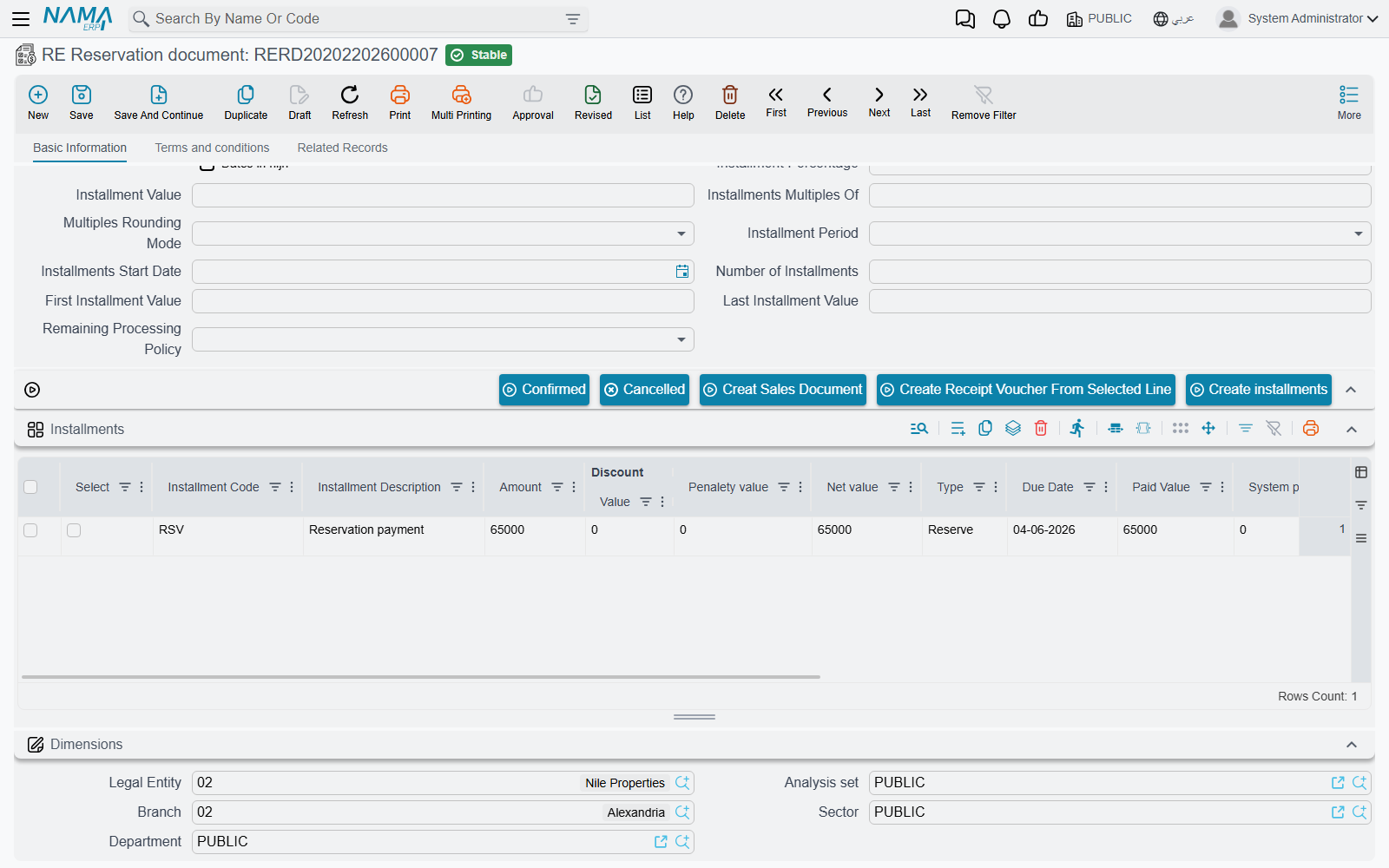
The reservation also carries its own installments grid with Create installments, and the buttons to raise a collect document or a receipt voucher from a selected line — useful when the deposit is paid in two or three visits rather than all at once.
Cancelling a reservation
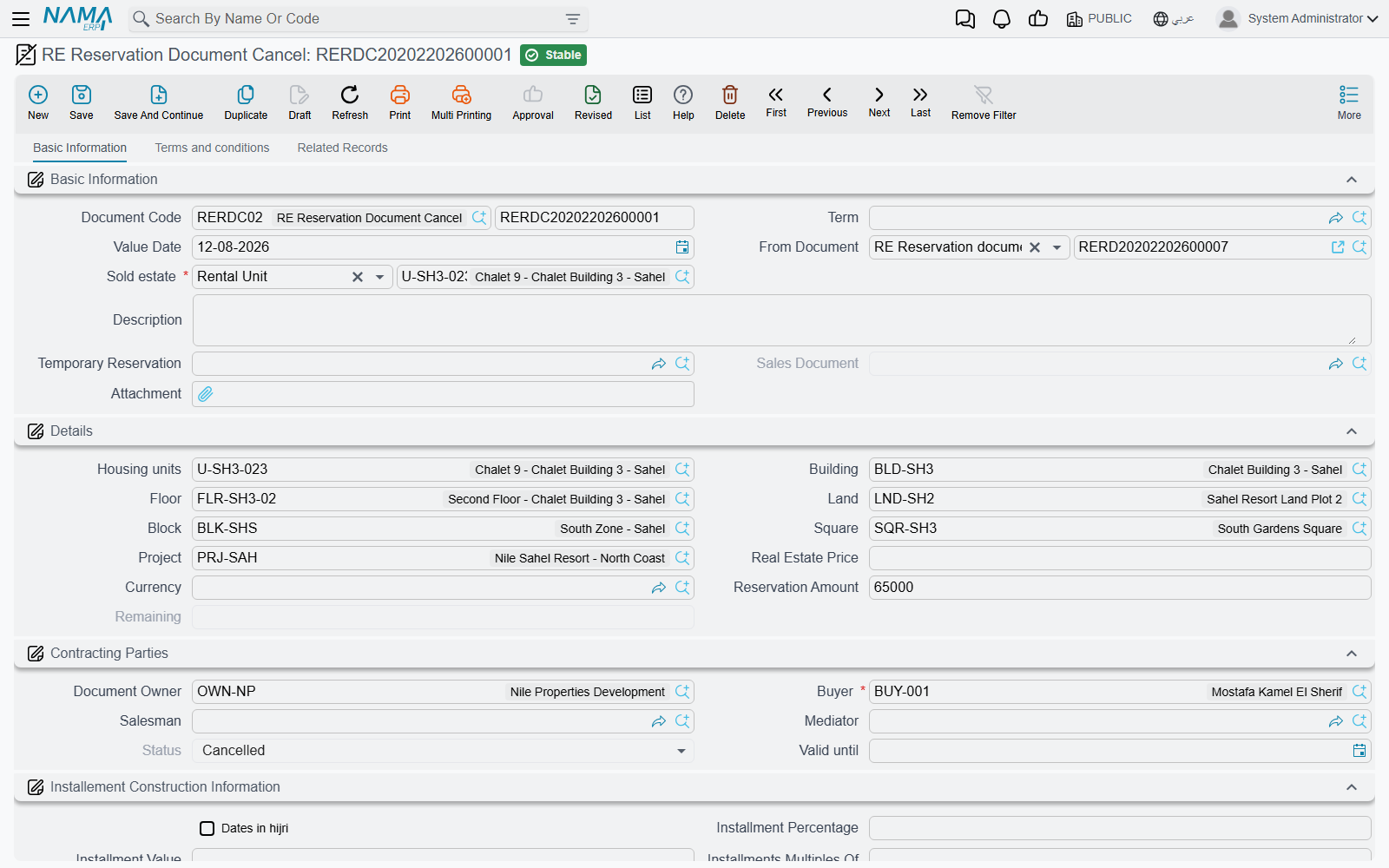
The customer changes his mind. Real Estate and Property > Sales > RE Reservation Document Cancel (licence realestate) is the document that unwinds the reservation and settles the money: typically part of the 20,000 is retained as a cancellation charge and the rest is refunded.
It uses the same screen as the reservation document, with the Multiple Construction Info grid added on page 0. The action block is what tells you which way money is moving: instead of a receipt voucher, it offers Create Payment Voucher From Selected Line — because the company is paying money out.
Committing it releases the unit. Unlike every other document in this family, it does not check whether the unit can be reserved, for the obvious reason that it is already reserved.
Its accounting is much richer than the reservation's single pair. The cancellation runs a full sales-style entry: the per-installment-type lines from the term's configuration grid, the split of installments between income and advance income by due date, the price, owner fees, buyer fees, the maintenance deposit, discounts and penalties — each block appearing only when the accounts behind it are configured, and nothing at all being produced if none of them are. The accounts and the routing per installment type are set on the document term; the mechanics are on How Real Estate Document Terms Work.
The initial sales contract
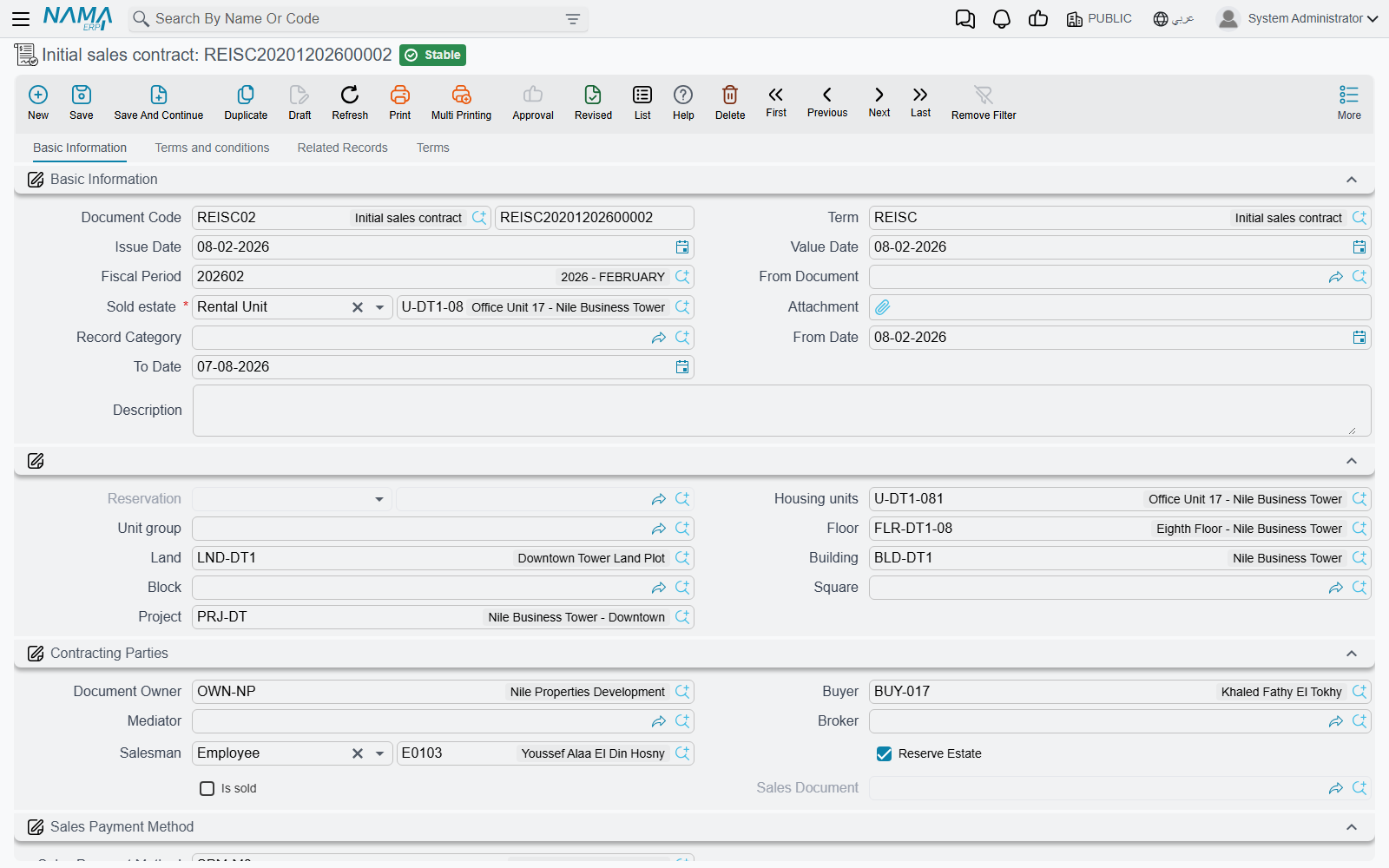
Many developers sign a preliminary agreement — full price, full schedule, both signatures — weeks or months before the notarised contract. Real Estate and Property > Sales > Initial sales contract (licence realestate-sales) is that agreement.
On screen it looks like the real thing. It has the estate breadcrumb, the contracting parties including broker and salesman, the payment-method reference, the complete price block, the installment construction blocks and the installments grid, plus terms-and-conditions and standard terms pages. It has From Date and To Date for the validity of the preliminary agreement, and two system fields — Sold and Sales Contract — that record whether it has already been turned into a real contract and which one.
Two things make it different, and both matter.
It can lock the unit. Tick Reserve Estate and committing the document reserves the unit exactly as a confirmed reservation would. If you want that to be the rule rather than a choice, tick Reserve Estate on the document term instead and every initial contract issued on that term forces the flag on. Cancelling or deleting the document releases the unit again.
It creates no accounting effects whatsoever. Not a deferred entry, not a memo entry — nothing. Its document term has a settings page and no accounts at all, because there is no entry for accounts to control. This surprises people, because the document carries a 1,200,000 price and sixty installments and looks in every way like a contract. Those installments are a plan, not a receivable. Nothing is owed to you in the ledger until the sales contract is committed.
The settings that are on the term are about validation and about how the plan is built:
| Term option | What it does |
|---|---|
| Has Buyer | Makes the buyer mandatory before the document can be committed. |
| Reserve Estate | Forces the document's Reserve Estate flag on, so every contract on this term locks its unit. |
| Merge Similar Payment Lines | Merges identical installment lines when the plan is generated. |
| Force Price List | Refuses the commit unless the price equals the price-list price for that unit. |
| Consider Paid With Reservation Paid From Installments | Treats what was already paid on the reservation as settling installments rather than reducing the balance. |
From preliminary to binding
There is no "create sales contract" button here. You open a new sales contract and set its Based On field to the initial contract; because the initial contract is a reservation-carrying document, the contract picks up the link automatically. On commit, the initial contract is stamped Sold and points at its sales contract — and a second sales contract built on the same initial contract is rejected, because it has already been sold.
Carrying the paid installments across
If customers pay installments against the preliminary agreement, switch on Copy paid installments from the initial contract to the sales contract in the module settings so those payments are not lost in the conversion. See Real Estate Module Configuration.
Actions on these screens
On the reservation document:
- Confirmed and Cancelled — set the reservation's Status. The status field itself cannot be typed into; these two buttons are the only way to move it by hand, and only a Confirmed reservation locks the unit (see Status is the whole story above).
- Creat Sales Document — on the saved reservation, opens a new sales contract in a pop-up, pre-filled as described in Turning it into a contract above.
- Create installments — builds the reservation's own Installments grid from its construction block.
- Create Receipt Voucher From Selected Line — a receipt voucher for the remaining value of the ticked installments; the usual way to record a deposit paid in instalments.
- Create collect doc from selected line — a button on each row of the Installments grid; it opens a collect document for the ticked rows, or for that row when nothing is ticked.
- Installment Payments (in the More menu) — lists, in a pop-up, the payment documents recorded against the reservation's installments.
On the reservation document cancel:
- Create installments — builds the cancellation's Installments grid.
- Create Payment Voucher From Selected Line — a payment voucher for the remaining value of the ticked rows: the refund.
- Create collect doc from selected line on each Installments row, and Installment Payments in the More menu, as on the reservation.
On the initial sales contract: the sales contract's installment toolbar — Create installments, Select all installment lines, Merge installments, Create Receipt Voucher From Selected Line, Create RE Return Payment Doc From Selected Line, Create Fine Document, and the four commercial-paper buttons (Create A Bank Portfolio For Selected Installments, Create Postponed Bank Portfolio for Selected Installments, Create A Partial Payment For Selected Installments, Create Notification For Selected Installment). Each is described on The Sales Contract. Here, the Create collect doc from selected line button sits on the rows of the Multiple Construction Info grid and collects the installments you have ticked in the Installments grid.
Where to go next
- The binding contract these documents feed: The Sales Contract
- The money model shared by all three screens: Building the Installment Plan
- The accounts behind the reservation and its cancellation: Sales Document Terms
- Where these documents sit in the story: The Property Sales Cycle