
Waivers and Cancelling a Sale
Most readers arrive at this page with one of two questions. Either a buyer wants out of a contract and you need to know how to undo it — or somebody has told you there is a "cancel contract" document and you are looking for it.
The second question has the shorter answer, so let us deal with it first.
There is no sales-contract cancellation document
Nothing in the module cancels a sales contract. When a sale has to be undone, there are exactly two routes:
- A waiver of type For Company — the proper instrument. The unit comes back to the company, the settlement with the buyer is recorded and accounted for, and the original contract stays on file stamped as waivered. This is what you use once anything at all has happened against the contract.
- Cancelling or deleting the sales contract — done with the platform's own Document Cancel Document, or by deleting the contract outright. The honest route only when the contract should never have existed: entered on the wrong unit, for the wrong buyer, in the wrong month, with nothing collected against it. Cancelling or deleting it reverses what the commit did — the property goes back to available, the reservation flips back to Confirmed, the journal entry is withdrawn.
There is a document called Cancel Contract Request (طلب فسخ تعاقد) at Real Estate and Property > Documents > Cancel Contract Request. It is the customer's request on paper: it records the unit, the contract to be cancelled, all the parties and a grid of the commissions that will have to be settled or clawed back, and the unit's screen shows a link to it. It needs no document term and creates no journal entry; the cancellation itself is the waiver you issue afterwards.
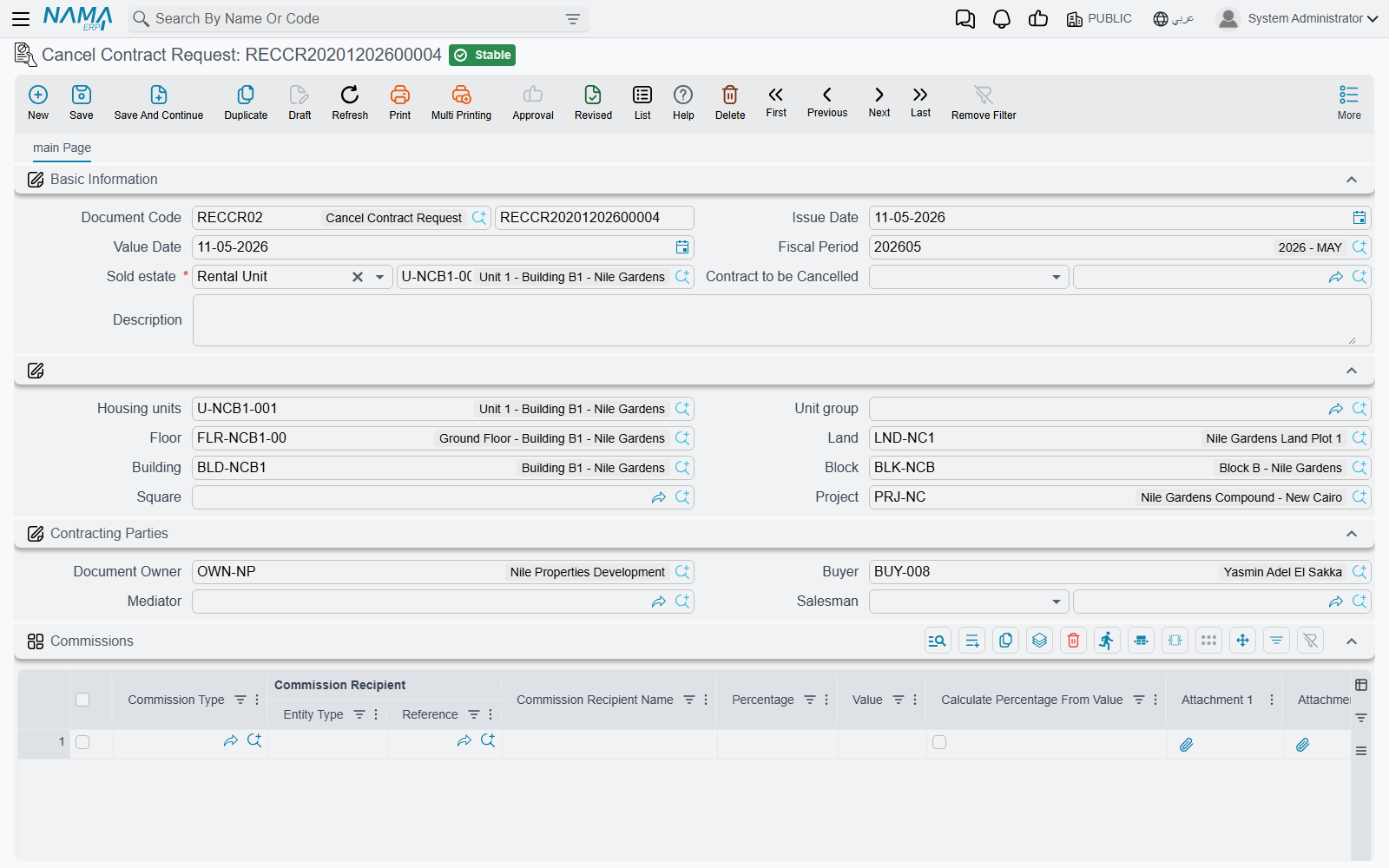
That makes it genuinely useful as a routing and approval record — the customer's request, captured, with the commission clawback listed on it — as long as everyone understands it is a request and not the reversal.
Looking for the lease termination?
There is a second, similarly named document — Cancel Contract (انهاء عقد ايجار), in the Rents menu — and despite the name it has nothing to do with sales. It terminates a lease: it settles the insurance deposit, the unused commission, the water and maintenance charges and the rent already paid, each through its own accounts.
If that is what you came for, it is documented under renewing and ending a lease.
The waiver document
Real Estate and Property > Documents > Waiver Document (سند تنازل عن ملكية), on the realestate-sales licence, is how ownership of a contract changes hands or comes back.
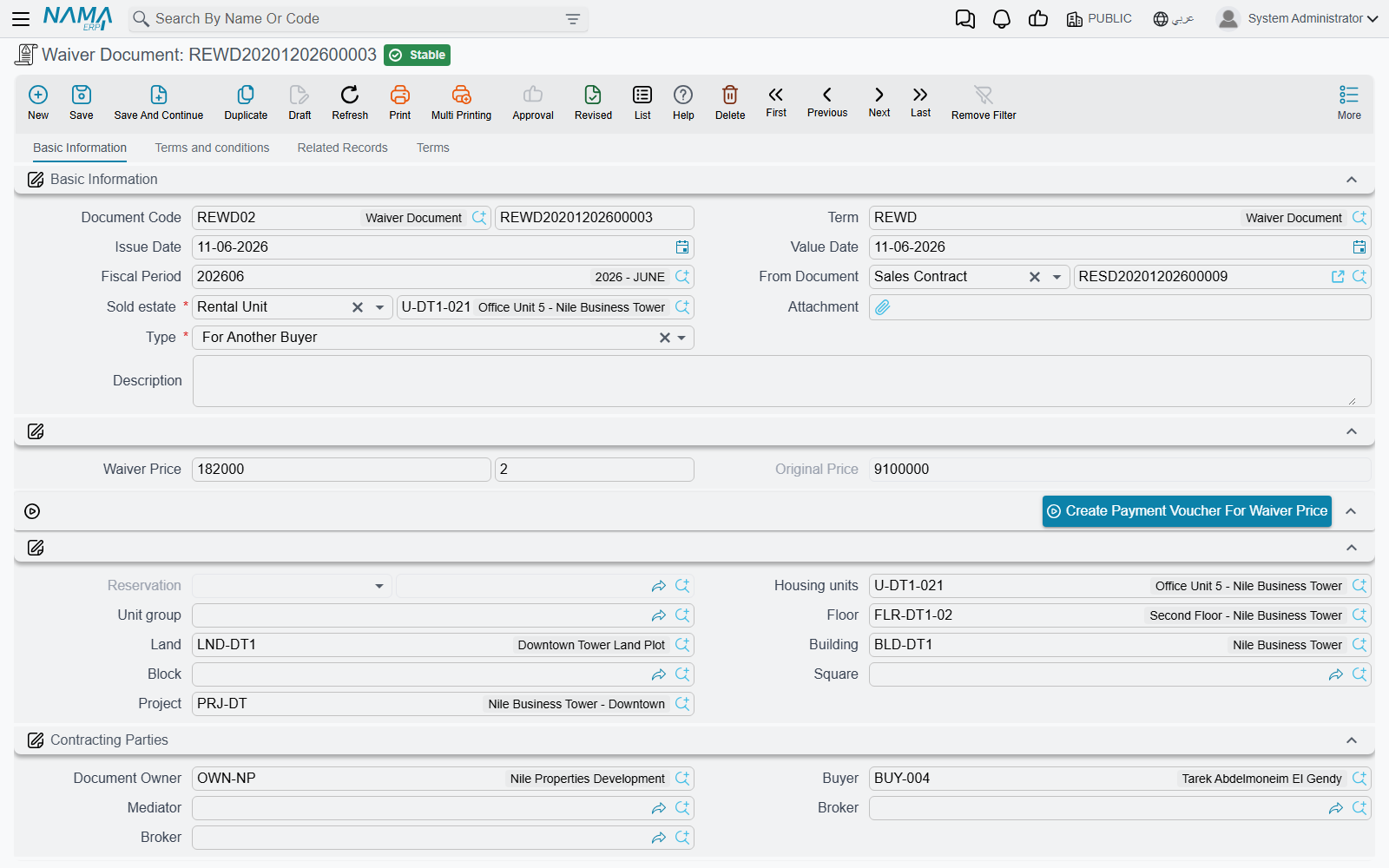
It is built on the same skeleton as the sales contract — the same estate breadcrumb, the same price block and installment grid, the same fee and commission grids — because a waiver is a sale, viewed from the other end.
Our example: a customer bought villa B-12 for 1,200,000 on a ten-installment plan, has paid three of them, and now wants to hand the contract to a friend. The company charges 2% of the original price to allow it.
The two types
Type (النوع) is the field that decides everything, and it defaults to For Another Buyer.
For Another Buyer (لمشتري اخر) is a resale before completion. The unit stays sold — it never comes back to the company's stock — and the new buyer simply takes over the seven unpaid installments. This is the common case in a market where units change hands while the building is still going up.
For Company (للشركة) brings the unit back. The property's sold flag is cleared and its status returns to Avaliable (the spelling on screen), so it can be sold again to somebody else. This is the closest thing the module has to cancelling a sale.
In both cases the property is stamped as waivered with a pointer to this document, and so is the original contract. That stamp matters: a waivered contract can no longer be modified. Any change you need after this point is made on the waiver, not on the contract behind it.
What the document brings with it
Choosing the property on a waiver seeds nearly the whole screen from the contract that is being given up:
- the unpaid installments of the current contract are copied into the installment grid — the three already paid stay where they belong, on the original contract;
- Owner is set to the contract's buyer, because on this document the outgoing buyer is the party the company is dealing with;
- the entire price block, the Original Price, the installment-construction block, the multiple-construction lines, the other-fees lines and the currency are all copied;
- From Document is set to the sales or opening sales contract.
A few consequences of that seeding are worth knowing. Paid With Reservation is disabled on this screen. The From Document cannot be changed after the first commit — "From document can not be changed from {0} to {1}" — so if it is wrong, cancel and start again. And unlike a sales contract, the Buyer is optional: a For Company waiver has no incoming buyer to name.
If the original contract cannot be resolved when the waiver commits, you will see "Please recommit the previous sales doc for this waver" — recommit the contract and try again.
The waiver price
Next to the type sits a small composite widget holding the waiver value and its percentage, kept in step with the Original Price as you edit either one. On villa B-12, 2% of 1,200,000 is 24,000.
The button beside it, Create Payment Voucher For Waiver Price (إنشاء سند صرف لقيمة التنازل), builds a payment voucher for that value made out to the document's Owner — which, as we saw, the seeding set to the outgoing buyer. That is the settlement side of the transaction: money leaving the company rather than arriving.
The pages
| Page | What is on it |
|---|---|
| Basic Information | the header, the type and waiver price, the estate breadcrumb, the contracting parties, the price block, the construction block, the action buttons, the Installments grid, the totals and the dimensions |
| Terms and conditions | the standard-terms reference, the Other Fees grid, the Commissions grid and the clause grid |
| Related Records | collect documents, fine documents and extensions raised against this waiver |
| Terms | the structured standard-clause grid |
Actions on these screens
On the waiver document:
- Create Payment Voucher For Waiver Price — opens a new payment voucher for the waiver value, made out to the document's Owner, as described under The waiver price above.
- The sales contract's installment toolbar, working on the waiver's own Installments grid — Create installments, Select all installment lines, Merge installments, Create Receipt Voucher From Selected Line, Create RE Return Payment Doc From Selected Line, Create Fine Document, and the four commercial-paper buttons (Create A Bank Portfolio For Selected Installments, Create Postponed Bank Portfolio for Selected Installments, Create A Partial Payment For Selected Installments, Create Notification For Selected Installment). Each is described on The Sales Contract.
- Create collect doc from selected line — a button on each row of the Installments grid; it opens a collect document for the ticked rows, or for that row when nothing is ticked.
On the cancel contract request: no buttons on the screen. Its More menu carries Installment Payments, which lists in a pop-up the payment documents recorded against the request.
What a waiver books
A waiver produces everything a sales contract produces — the price, the income and advance-income split by installment due date, owner and buyer fees, the maintenance deposit, discounts, penalties, the header discount, the fee lines from their fee types and the commission lines from their commission types. That whole block-by-block list is on the sales contract page and is not repeated here. The waiver also writes the real-estate system entries, exactly as a real sale does, so the property's status and the sales-transaction views stay consistent.
On top of that, two things are specific to a waiver.
The waiver price gets its own pair of account sides on the waiver's document term — the page where you set where the waiver charge is booked. The 24,000 charged to the outgoing buyer lands there.
Commissions can be reversed. A term option, Reverse Commissions Accounting Effects (عكس التأثير المحاسبي للعمولات), records every commission line on the waiver with its debit and credit sides swapped. This is the counterpart to a fact from the sales contract: commissions are recognised in full when the contract commits, out of the commission type's own accounts, and not when the broker is eventually paid. If the sale is undone, that recognition has to come back out, and this switch is what does it.
Which way you want it depends on the type of waiver:
- On a For Company waiver the sale is being reversed, so reversing the original commission is usually right — the broker's fee on a sale that did not complete should not stay in the accounts.
- On a For Another Buyer waiver the sale continues under a new name and the original brokerage was genuinely earned; reversing it would usually be wrong.
Since the option lives on the document term, the clean way to run both is two terms — one for each waiver type — rather than one term that has to be edited depending on the case.
The waiver term also carries Validate Installments Total, Force Price List and the switch that decides whether money paid on the reservation counts as paid against the installments. They behave exactly as they do on the sales contract; see sales document terms.
Choosing the route
| Situation | What to do |
|---|---|
| The contract was entered by mistake and nothing has happened against it | Cancel or delete it |
| The buyer transfers to somebody else, paid or unpaid installments either way | Waiver, For Another Buyer |
| The buyer walks away and the unit returns to stock | Waiver, For Company |
| The buyer has asked to cancel and you need it recorded and approved first | Cancel Contract Request, then the waiver |
| Legal title moves between owners outside the sales cycle — between heirs, between group companies | Not a waiver at all — see transferring ownership between owners |
| A lease is ending | Not a waiver either — see renewing and ending a lease |