
Renewing and Ending a Lease
Every lease ends. Most of them end by being renewed, some of them end early because the tenant leaves, and the two cases are handled by two different buttons on the rent contract screen — Extend Contract (تمديد عقد الايجار) and Cancel Rent Contract (انهاء العقد). Neither of them edits the contract you are standing on. Nama's model is that a lease term is a document: renewing produces a new contract for the new term, and ending produces a settlement document that works out what the tenant gets back.
We will keep following the shop in Al-Nakheel Tower: leased 1 March 2026 to 28 February 2029, 120,000 a year paid quarterly, with a 12,000 insurance deposit.
Renewing: Extend Contract
Press Extend Contract on a committed lease and Nama hands you a new, unsaved contract already filled in for the next term. Nothing is written until you review it and save it, so the button is safe to press and look at.
What it produces:
- A duplicate of the current contract, with all its commercial terms, expenses, standard terms and installment lines. If you pressed it on an opening rent contract, the duplicate is converted into an ordinary rent contract — which is the intended migration path: opening contract for the historical term, normal contracts from the first renewal onwards.
- New dates: the new From Date is the day after the old To Date, and the new To Date is one contract period later. Our shop lease renews as 1 March 2029 to 28 February 2032. The value date follows the new From Date, and the fiscal year and period are recalculated from it. When the contract is kept in the Hijri calendar, all of this arithmetic is Hijri.
- Shifted installments: every line's due date moves forward by one contract period, and the installment codes are cleared and regenerated — unless the term uses Manual Coding (تكويد يدوي), in which case your own codes are preserved.
- Cleared payment history: every line comes across with its paid value zeroed and its paid flag off. The new term starts owing everything, which is what you want.
- Expense lines marked as copied: each expense line on the new contract is flagged as having come from the previous contract. Lines are dropped when their expense type says not to copy them with an extension, and also when an already-copied expense's type says it should not produce installments on a second hop — that is how a one-off setup charge stops repeating every renewal.
- Auto Cancel Previous Contract turned on, which is the part that surprises people.
Extend Contract forces auto-cancellation on — so the term must be ready for it
The new contract comes out with Auto Cancel Previous Contract (إلغاء العقد السابق للعقار آليا) ticked, and that flag is not decoration. When you save, Nama generates and commits a termination document against the previous contract, dated on that contract's To Date, using the Cancel Contract Book and Cancel Contract Term named on the term of the new contract.
If either of those two is missing, the save fails with an error pointing straight at the term field. This is the single most common stumbling block when renewing a lease for the first time in a new installation: the fix is not on the contract, it is on the توجيه. Set both fields once on every rent-contract term you use and it never comes up again.
Turning the auto-cancel flag on is also what lets the renewal exist at all. The unit is still marked rented by the old contract, and the estate's rent-status timeline would normally refuse a second "rented" entry — those checks are skipped precisely because the flag guarantees the previous lease is being closed in the same breath.
A few rules worth knowing before you renew:
- A cancelled lease cannot be extended. Once a termination document has closed a contract, the Extend button refuses it; renew from the live contract, not from a dead one.
- The auto-cancel flag cannot be changed after the first save, and while it is on you cannot change the estate on the contract.
- The extension needs something to cancel: if the estate has no previous contract at all, the commit fails rather than silently going ahead.
- The new contract's schedule is a shift of the old one, not a fresh calculation. If the rent has changed for the new term, adjust the values and press Create Rents — remembering that the button replaces the whole grid.
Ending a lease: the termination document
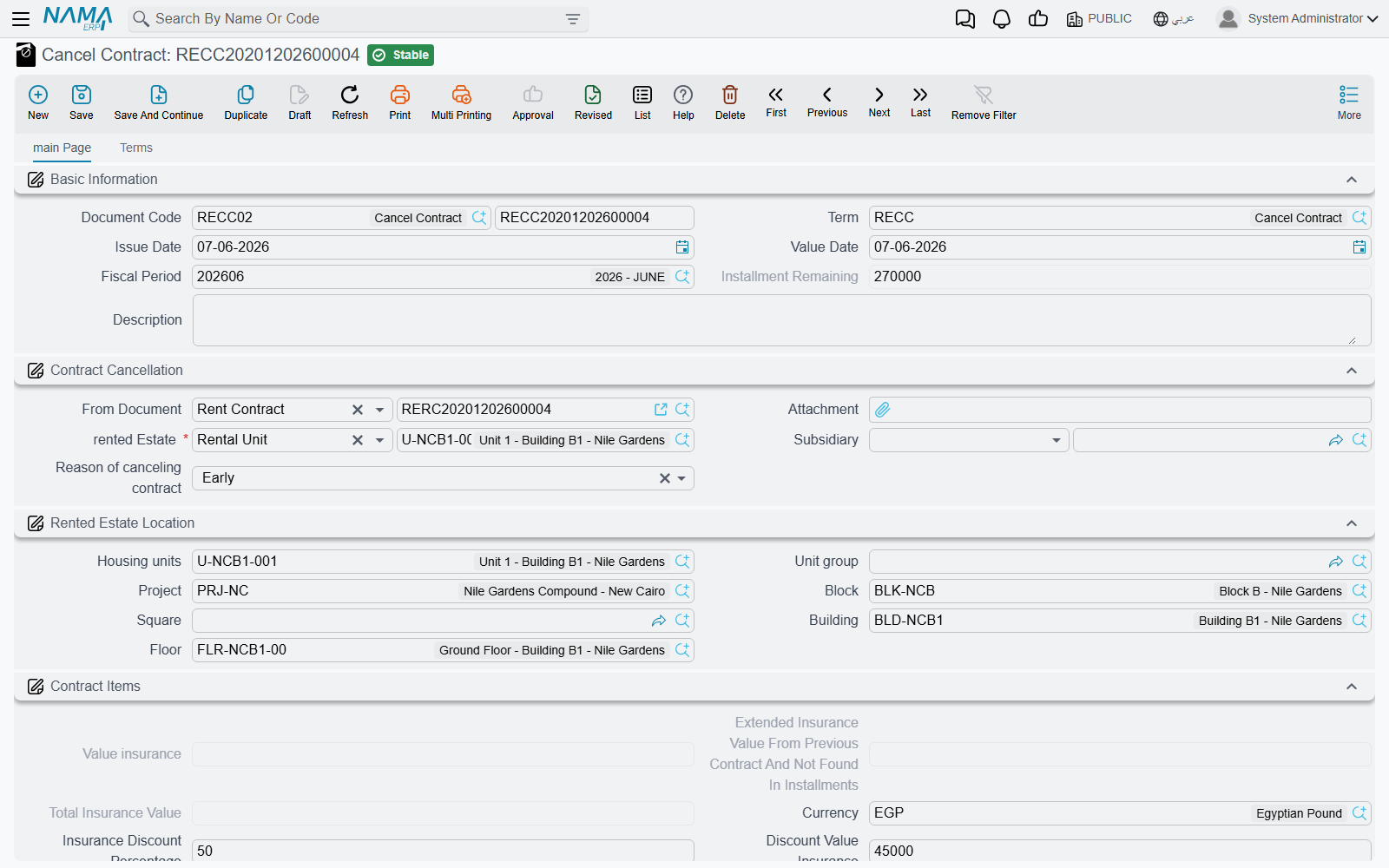
The Cancel Contract document (انهاء عقد ايجار), reached from Real Estate and Property > Rents > Cancel Contract or from the Cancel Rent Contract button on the lease, is the settlement. It is not an "undo": the lease happened, rent was earned and money changed hands, and this document works out the balance between the two parties at the moment the tenant hands the keys back.
Opening it from the contract
Pressing Cancel Rent Contract on a lease that has not already been terminated opens a new termination document in a popup, pre-filled from the contract: the source document, the from and to dates, the owner, the tenant, the estate and its site, the currency and rate, the insurance deposit as the starting insurance value, and a remaining figure that sums the outstanding amounts of the lease's rent lines only — the lines of type Installment. Every other line of the contract — commission, insurance, water, maintenance, expenses — is copied into the document's own expenses grid, so that each of those charges can be settled in its own right.
What the settlement computes
The document is organised as one block per money bucket, and each block follows the same shape: what was charged, what is being withheld, what is left to hand back.
- Insurance. The deposit taken at the start, plus any top-up taken during an extension, gives the total held. Against it you set a withholding — as a percentage or as a value — plus any other discounts, and the document shows the net deposit the tenant actually receives.
- Commission. The total agency commission for the lease and the unused part of it.
- Water expenses and maintenance, each with their own discount percentage and value, total and remainder — the tenant does not get back the share of the service costs already consumed.
- Rent already paid. Two figures: the rent that belongs to the current year, and rent that was paid in advance for the next year. Prepaid rent for a year the tenant will not be there is a straightforward refund; the current year's is where an early departure has to be apportioned.
- The expenses grid, carrying the contract's non-rent lines, each split between what belongs to the current year and what was prepaid for the next one.
- A subsidiary on the header says who the settlement is against — a safe deposit, an employee or an owner.
For our shop, a tenant leaving four months before the end of the third year with a 10% early termination withholding gets 12,000 less 1,200, so 10,800 of the deposit comes back, alongside the unused water and maintenance charges and any rent already paid for periods after his departure — each of those going out through its own accounts.
Early or ordinary
The End Type on the header is either Early (مبكر) or Ordinary (عادي), and a new document defaults to Ordinary. It is the document's own record of why the lease is ending — a tenant walking out mid-term against a lease that simply ran its course — and it is what a report or an entity flow would filter on when you want to see how much early-exit withholding a portfolio produced in a year.
Terminating a lease with money still owing
By default Nama will not let you close a lease while installments are still unpaid; the arrears have to be collected, exempted or otherwise cleared first. The termination term carries Allow Cancel Of Rent Contract With Unpaid Installments (السماح بانهاء عقد الايجار مع وجود اقساط غير مسددة) for the cases where that is not realistic — a tenant who has disappeared, a lease being written off. With it on, the termination goes through and the outstanding balance is carried by the accounts configured on the term's Remaining Effects page.
A companion option, Calculate Remaining Rent Values Based On System Paid Rent (احتساب المتبقي من الإيجار بناءً على الإيجارات المدفوعة نظامياً), changes how the current-year and next-year rent figures are derived: with it on they follow what was actually collected through the system rather than what the contract's schedule says was due.
What happens to the accrual ledgers
A lease that ends early usually leaves accrual documents standing for periods that will now never be earned. Two options on the termination term deal with that:
- Delete Ldegers Saved As Draft After Saving Cancel Contract (حذف مسودات القيود عند إنشاء إنهاء العقد) — when the termination is saved, any accrual documents of that lease still sitting as drafts are deleted, so future accruals do not quietly get committed later. This works hand in hand with the contract term's Save Generated Ledger As Draft: if accruals are committed immediately, there are no drafts to clear.
- ReCreate Ledgers After Deleting Cancel Contract (إعادة إنشاء القيود مع حذف إنهاء العقد) — if the termination document is later deleted, the contract's accrual documents are generated again, so undoing a termination restores the lease's accruals rather than leaving a hole.
(The shipped spelling Ldegers is reproduced here so you can find the field on screen.)
Where the accounting comes from
The termination has its own توجيه, separate from the rent-contract one, with a page per bucket. In layout order they are:
| Page | Title | What it books |
|---|---|---|
| 0 | Remaining inssurance effects | The net deposit going back to the tenant, plus the two ledger options above |
| 1 | Inssurance effects | The gross deposit being released |
| 2 | Commissions Effects | The commission settlement |
| 3 | Water Expenses Effects | The water-cost settlement |
| 4 | Maintenance Effects | The maintenance settlement |
| 5 | Discount value insurance effects | The part of the deposit you are withholding |
| 6 | Other discount effects | Other withheld amounts |
| 7 | Remaining Effects | The unpaid balance, the current-year and next-year rent, the current-year and prepaid expenses, and the two behavioural options |
| 8 | Taxes | Nothing — it holds Send As, which decides whether the termination goes to the tax authority as an Invoice, a CreditNote or a DebitNote |
When the termination is one that must be sent to the tax authority and Send As is empty, the save is refused with:
Send As must be selected in the term — «يجب اختيار إرسال كـ في التوجيه»
Pick the type on the term's Taxes page and save again. The fine term has the same field and the same check.
Each page is a pair of accounting sides, and — as everywhere in the module — a pair only produces ledger lines when both of its sides are filled in. A half-configured page is skipped in silence, so when a bucket is missing from the journal entry, the first thing to check is whether both of its sides were set. Configure the accounts on each page by what the page is for, and confirm the result on a test document before relying on it in production. The rest of the rent term family is described in Rent Document Terms.
Like every document in the module, saving the termination creates its accounting as a business request processed in the background; a failure is retried from the Business Requests list view with More → Reprocess / Recommit.
"Cancel Contract" is a rent document
The name causes trouble, so it is worth saying plainly: despite sitting alphabetically next to the sales documents and reading like a contract cancellation of any kind, this document terminates a lease. It lives in the Rents menu, it is gated on the realestate-rent licence, and it points only at rent contracts and opening rent contracts.
Undoing a sale is a completely different story with different documents — see Waivers and Cancelling a Sale.
Actions on these screens
Both journeys on this page start from a button on the rent contract (and on the opening rent contract): Extend Contract for a renewal and Cancel Rent Contract for a termination. Both need the contract saved first. The Cancel Contract document they lead to has no buttons of its own — you review the settlement it was opened with, then save and commit it. Its More menu does carry Installment Payments, which lists in a pop-up the payment documents recorded against this document's installments. The contract's full button list is on The Rent Contract.