
The Leasing Cycle
A company owns Shop G-07 on the ground floor of Al-Nakheel Tower. A prospective tenant walks in and asks what three years would cost him. From that question to the day he hands the keys back, Nama walks that one shop through a fixed chain of documents — a quotation, a lease, a monthly revenue accrual, a stream of collections, and finally either a renewal or a settlement. Each link in the chain has its own screen and its own page in this section; this page is the map that shows how they fit together, and it settles two things that confuse almost every new user before they get anywhere near the contract screen.
Two things to settle before you open a rent screen
The Renter is the same party field the sales screens call Buyer
On a sales contract the person who buys is picked in a field labelled Buyer. On every rent screen — offer, contract, accrual ledger, termination — the Renter field is that same field, wearing a different label. It is not a parallel "tenant" concept: it reads from the same party master file, it is filtered by the same rule, and it feeds the same place in the accounting entry (the customer side of every ledger line the contract produces).
Three practical consequences follow:
- A person or company you want to appear in the Renter picker must be flagged as a buyer/tenant on their party record. If they are only flagged as an owner, they will not show up, and the usual reaction — "the tenant is missing from the list" — is really a missing tick on the master file.
- The same record can be a landlord on one contract and a tenant on another; the roles are independent switches, not separate files.
- Anywhere in the module that talks about the "buyer" — a collect document, a fine, a list-view column — you are looking at the tenant when the source document is a lease.
The Rental Contract term flag decides which way the money flows
Everything else on this page assumes you are the landlord: you own the shop, you lease it out, rent comes in. Nama also supports the mirror case — your company renting premises from somebody else — and it is a single tick on the rent contract's document term that switches between them: Rental Contract / عقد استئجار.
| Rental Contract | What the contract means | Money buttons on the contract |
|---|---|---|
| Unticked (the normal case) | We are the landlord. The renter owes us. | Create Receipt Voucher From Selected Line is available; the payment-voucher button is blocked. |
| Ticked | We are the tenant. We owe the landlord. | Create Payment Voucher From Selected Line is available; the receipt-voucher button is blocked. |
This is not a cosmetic switch. It changes what the whole module means for that contract: the schedule is a list of what you will pay rather than what you will collect, and the vouchers you are allowed to raise flip with it. Because the flag lives on the term and not on the document, a company that both leases out its own property and rents its own offices needs two rent-contract terms — one with the flag off for the properties it owns, one with it on for the premises it occupies — and the user picks the right term when creating the contract. The flag exists only on the rent contract; offers and accrual ledgers do not have it.
The chain of documents
Everything below lives under Real Estate and Property > Rents, and every one of these documents needs the realestate-rent licence.
- Rent offer (عرض سعر ايجار) — a priced, dated quotation for one estate, on the same screen shape as the lease so the numbers you quote are the numbers you will sign. Its term decides two things: whether committing the offer actually holds the unit, and whether it creates any accounting entry at all (normally it does not — a quotation is not revenue). See Rent Offers and Reserving a Unit for Rent.
- Rent offer cancel (إلغاء حجز عرض سعر إيجار) — releases a unit that an offer is holding, so it can be quoted or leased to somebody else. Covered on the same page.
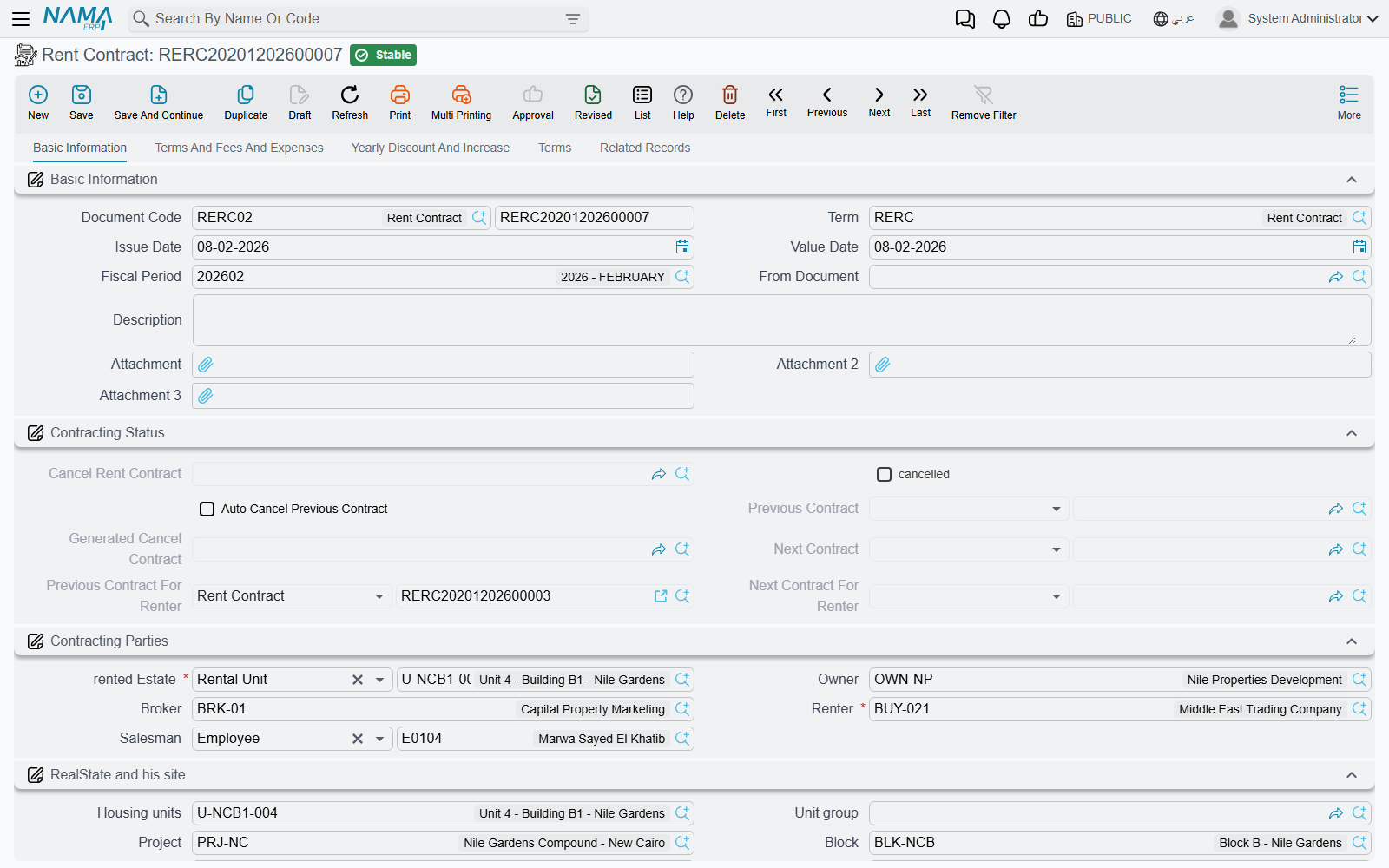
- Rent contract (عقد إيجار) — the lease itself. Committing it builds the full installment schedule, marks the unit rented all the way up the property tree, links itself into the chain of contracts on that unit, and creates the contract-level accounting entry. See The Rent Contract, and Generating the Rent Schedule for what the Create Rents button actually calculates.
- Two variants exist. Multi rent contract doc (سند عقود مجمعة) is the batch version — one header, a grid of units, one button, and Nama creates a real rent contract per line; it is documented with the schedule generator because it runs the same engine. Opening rent contract (عقد ايجار افتتاحي) is the migration version, for leases that were already running before you went live.
- Rent installment ledger (قيد إثبات استحقاق قسط إيجار) — the periodic accrual. A lease is one document dated at the start of the term, but the rent is earned month after month; when the contract's term asks for it, Nama generates one accrual document per period, dated when the money falls due, and recognises that period's revenue there. Nobody types these — see Rent Installment Accrual Ledgers.
- Collection — collect documents and receipt vouchers, described in How Installment Collection Works.
- Renewal or ending — the Extend Contract button rolls the lease forward into a fresh contract, and Cancel Rent Contract opens the settlement document that works out what goes back to the tenant. Both are on Renewing and Ending a Lease.
Collection always happens against the contract
This trips people up often enough to say it here, at the top of the section: money is collected against the contract's installment lines, never against the accrual ledger. The ledger exists to put revenue in the right accounting period; the contract is the record of who owes what. The paid columns you see on an accrual ledger are a copy of the contract's line state taken the last time the contract was committed, so treat the contract as the source of truth for balances.
The estate rent-status timeline
This is where most leasing errors come from, so it is worth understanding before you meet it as a red message on a commit.
Nama does not keep a single "rent status" field on a property that documents overwrite. Instead, every rent document that changes an estate's rent state writes a dated entry into a timeline kept per estate — and it writes one for each child estate too. Lease a floor, and every unit on that floor gets an entry. Lease a unit group, and every unit in the group gets one. The entries are sorted by value date, then by the order they were created, and the last entry in that chain is what determines whether the unit currently shows as rented, as reserved for rent, or as free. That is also how a "rented" marker rolls up the tree so a building shows as partially rented.
Four kinds of entry exist, and each is written by exactly one kind of document:
| Entry | Written by | Meaning |
|---|---|---|
| Reserved | A rent offer whose Reservation Status is Reserve | The unit is being held for a named prospect. |
| Rented | A rent contract or an opening rent contract | The unit is leased. |
| Reservation Cancelled | A rent offer cancel | The hold is released; the unit is free again. |
| Rent Cancelled | A lease termination | The lease has ended; the unit is free again. |
A rent offer whose Reservation Status is Without Reservation writes nothing — the unit stays free and somebody else can lease it. Accrual ledgers never write to the timeline at all.
The sequence is validated, and this is what the messages mean
Because the timeline is chronological, Nama checks that each new entry makes sense after the one before it. These are the errors you will actually see:
| What you did | The message tells you |
|---|---|
| Committed a termination as the very first document for an estate | Document {0} can not be the first document for estate {1} — nothing was ever leased, so nothing can be ended. |
| Committed a reserving offer on a unit that is already rented | The unit was rented in the named document. Find that lease and end it first. |
| Committed a reserving offer on a unit another offer already holds | The unit was reserved in the named document. Cancel that reservation first, or work from that offer. |
| Committed a lease on a unit that is already leased | The unit was rented in the named document. |
| Committed a lease on a unit that a different offer is holding | Estate {0} is reserved in document {1}, to continue you should select rent offer in from document — see below. |
| Committed a termination against a unit with no live lease | A rent-cancelled entry must follow a rented entry. |
| Committed an offer cancel against a unit that was never reserved | A reservation-cancelled entry must follow a reserved entry. |
The fifth row is the one people meet daily. Once an offer has reserved a unit, that unit can only be leased by a contract whose From Document is that offer. This is deliberate — it is what stops a second salesperson leasing a unit out from under a colleague's held quotation — and it is why the offer screen has a Create Rent contract button: using it sets From Document for you.
The whole check is skipped when Auto Cancel Previous Contract is ticked on the new contract, which is exactly what a renewal needs: the new lease legitimately overlaps the old one, and Nama ends the old one automatically as part of the commit.
Turning the timeline off for history you are importing
Migrated leases rarely arrive in a clean order. A lease that ran 2021–2023 might be loaded after the one that ran 2024, and every sequence rule above will fire.
The Real Estate module configuration carries a cut-off date — Do Not Validate Estate Before — that switches the timeline validation off for everything dated before it. Set it to your go-live date while you are loading history, and the imported contracts commit without fighting each other; everything from that date onwards is still fully validated.
The cut-off date is a global setting
There is one Real Estate configuration record per database, so this date applies to every estate and every user. Set it as part of a migration, and review it once the migration is finished — leaving it far in the future disables the protection for live leasing too.
Following Shop G-07 through the cycle
Put the pieces together on the shop we started with. The asking rent is 120,000 a year, the tenant wants a three-year lease, paid quarterly, with a security deposit of 10%.
- The quotation. You raise a rent offer for Shop G-07, from 1 January 2026 to 31 December 2028, annual base 120,000, quarterly, insurance 10%. Its term is set to Reserve, so committing the offer writes a Reserved entry against the shop and nobody else can quote or lease it. The offer creates no accounting entry.
- The lease. The tenant signs. From the offer you press Create Rent contract; the new contract arrives pre-filled — dates, values, schedule, parties — with From Document pointing at the offer, which is what lets it past the reservation check. You commit it. The shop is now marked rented, the tower shows partially rented, a Rented entry joins the timeline, and the contract creates its entry: the portion of rent falling in the current financial year as income, the rest as deferred income.
- The schedule. The contract's Rents grid holds twelve quarterly installments of 30,000, plus the commission and the 12,000 deposit emitted on the first date.
- The accruals. The contract's term asks for accrual ledgers grouped monthly, so Nama generates one accrual document for each month in which an installment falls due, recognising that period's rent in the accounting period where it belongs. They are listed on the contract's Related Records page.
- The money. Each quarter you collect 30,000 against the contract's installment line — not against the accrual document — and the line's collected and remaining columns move.
- The renewal. In December 2028 the tenant stays. Press Extend Contract: Nama duplicates the lease, shifts every date forward by three years, clears the paid values, and turns Auto Cancel Previous Contract on, so committing the new contract also ends the old one and the timeline stays consistent.
If instead the tenant leaves early, the Cancel Rent Contract button opens the settlement that works out what comes back to him — the deposit less any discount, the unused commission, and the rent already paid for periods he will not occupy — and writes the closing Rent Cancelled entry that frees Shop G-07 for the next quotation.