
Opening Rent Contracts
A shop in Al-Nakheel Tower has been leased since early 2024: three years at 120,000 a year, paid quarterly, and the whole first year has already been collected. On go-live day that lease still has eight quarters to run, and the property manager needs to see them, accrue them and collect them — without Nama accruing revenue for four quarters that were earned and banked before it existed.
Opening rent contract / عقد ايجار افتتاحي, under Real Estate and Property > Rents, is the document for exactly that.
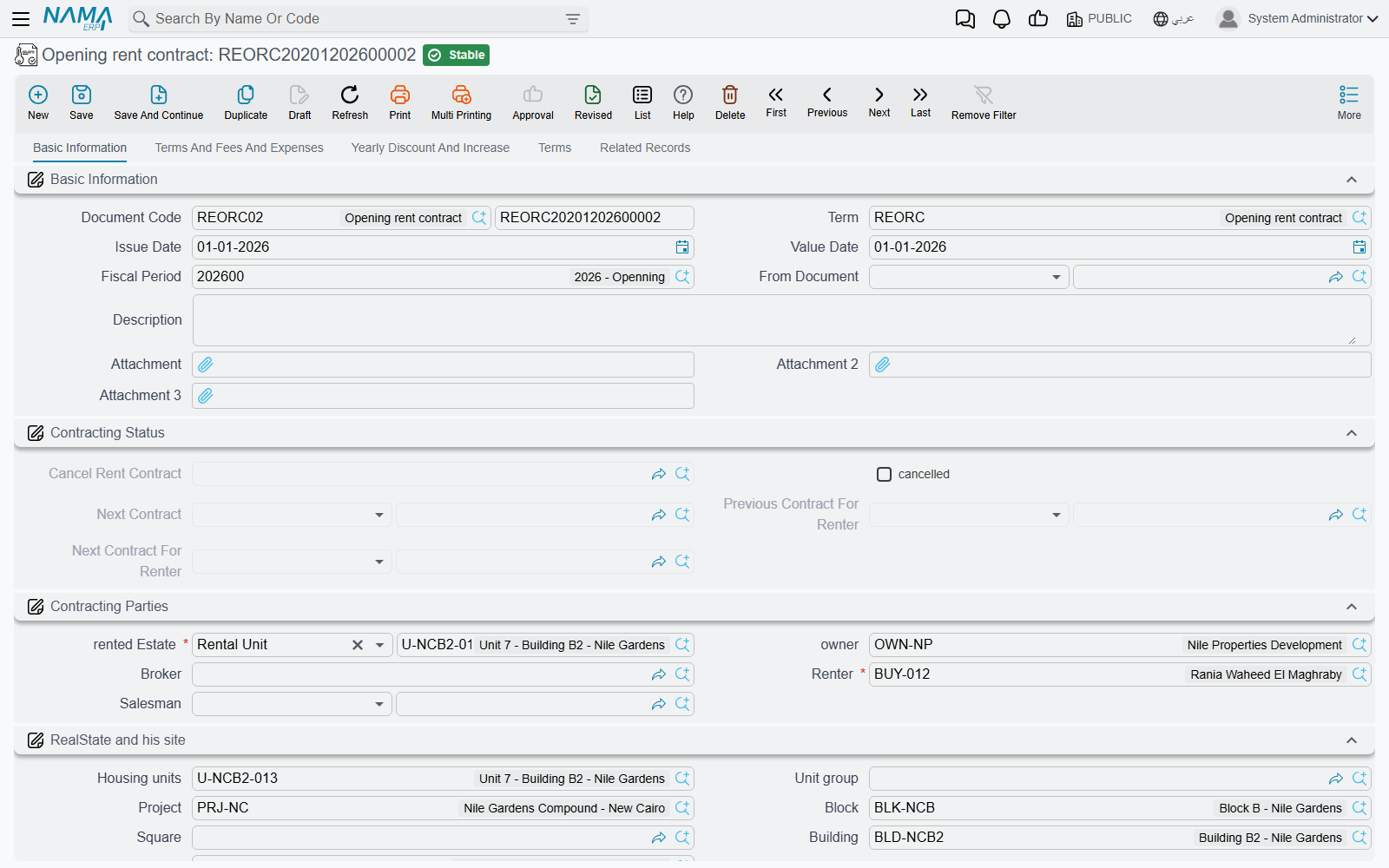
Identical to the rent contract, on purpose
There is very little to learn here, because the opening contract is the rent contract. Same five pages — Basic Information, Terms And Fees And Expenses, Yearly Discount And Increase, Terms, Related Records. Same contract values block, same expenses grid, same yearly increase and discount, same standard clauses. Create Rents / إنشاء الايجارات builds the schedule with the same engine and the same rules, the accrual ledgers are generated the same way, and the Extend Contract and Cancel Rent Contract buttons are both there.
So read the ordinary pages for the substance:
- The Rent Contract for the screen, the values block and what commit does.
- Generating the Rent Schedule for how Create Rents turns a lease into dated installments.
- Rent Installment Accrual Ledgers for the documents the contract generates to recognise revenue period by period.
- Renewing and Ending a Lease for extension and termination.
Three things are different, and all three exist because the lease started before Nama did.
1. It commits only in the opening fiscal period
The opening rent contract requires an opening fiscal period and says so when it does not have one: Fiscal period must be openning. Unlike the opening sales contract, there is no term option here that lifts the restriction — so create the opening period before you start entering leases, and plan to have all of them in before you close it. The wider go-live order is in Going Live: Opening Balances in Real Estate.
2. A prepaid figure for rent collected before go-live
The header carries a Prepaid / المدفوع مسبقا amount: the rent the tenant had already handed over before the migration, sitting on the books as an obligation to give him occupancy rather than as revenue still to come. The document's term has a page of its own for the accounting effect of that figure — Pre paid effects / تأثيرات المدفوع مسبقا — so the opening entry can put the prepaid money where your chart of accounts expects it. The rest of the term is the ordinary rent-contract term, described in Rent Document Terms.
3. Fully Paid, and what it does to the accruals
The installments grid carries the same Fully Paid / مدفوع بالكامل checkbox as the opening sales contract, and it behaves the same way: tick it on an installment and the system closes the line on save — paid value cleared, remaining recomputed, then paid set equal to remaining — so nothing on that line is outstanding.
On a lease it does something extra and important. Fully paid installments are left out of the generated accrual ledgers. A period that was earned and collected before go-live should not produce a revenue accrual inside Nama; if it did, the first year of our shop lease would be recognised twice — once in the old system and once here.
So the migration of that lease looks like this:
- Enter the contract: three years from January 2024, 120,000 a year, quarterly.
- Press Create Rents. Twelve quarterly installments of 30,000 appear, running to the end of 2026.
- Tick Fully Paid on the four 2024 quarters.
- Commit. The unit is marked rented, the schedule is live, eight quarters totalling 240,000 remain collectable, and the accrual ledgers are generated only for those eight.
Two columns on the grid help you check the result afterwards: Ledger Installment Value Date / التاريخ الفعلي لقيد الاستحقاق, which lets one installment accrue on a date other than its due date, and a column showing the accrual document that was generated for the line — empty on every line you ticked.
Collection still happens on the contract
As with any lease, money is collected against the contract's installments, not against the accrual ledger documents. See How Installment Collection Works.
Actions on this screen
The opening contract carries the rent contract's buttons, minus one. Each is described in full on The Rent Contract:
Create Rents — builds the Rents grid from the values block, rewriting it.
Select all installment lines — ticks every row of the Rents grid.
Merge installments — folds the ticked rents into the remaining ones within a code or date range, with an optional discount percentage.
Extend Contract — rolls the lease into a new contract (see the next section for what comes out).
Cancel Rent Contract — opens a Cancel Contract document pre-filled from this lease.
Create Fine Document — opens a fine document linked back to this contract.
Create Receipt Voucher From Selected Line — a receipt voucher for the remaining value of the ticked rows.
Create collect doc from selected line — on each row of the Rents grid; opens a collect document for the ticked rows, or for that row when nothing is ticked.
Installment Payments (in the More menu) — lists the payment documents recorded against the contract's installments.
The one that is missing is Create Payment Voucher From Selected Line — it is not on this screen.
The renewal is where it turns into an ordinary lease
This is the part that makes the whole design click. Press Extend Contract on an opening rent contract and what comes out is a normal rent contract — the duplicate is converted on the way out — with every date shifted forward by one contract period and the paid values cleared.
That gives migration a clean shape: one opening contract per lease covering the historic term, and ordinary rent contracts from the first renewal onwards. Our shop keeps its opening contract for 2024–2026, and when it is renewed in 2027 it becomes an ordinary lease like any other, with no trace of the migration left in the chain except the link back to the contract it replaced.
Extension also forces the previous contract to be cancelled automatically, which means the term must name a book and term for the cancellation document or the save will fail — the mechanics are in Renewing and Ending a Lease.