
Opening Sales Contracts
A villa was sold in 2023. The buyer paid 20% down and has been paying 96,000 a year since; four installments are behind him and six are still to come. None of that happened in Nama, and yet from next Sunday the collections clerk has to be able to open that contract, see the six outstanding installments and take money against them.
Opening sales doc / عقد بيع افتتاحي, under Real Estate and Property > Sales, is the document that makes that possible. It states an already-completed sale as of go-live: who bought the unit, at what price, what has been paid and what is still owed.
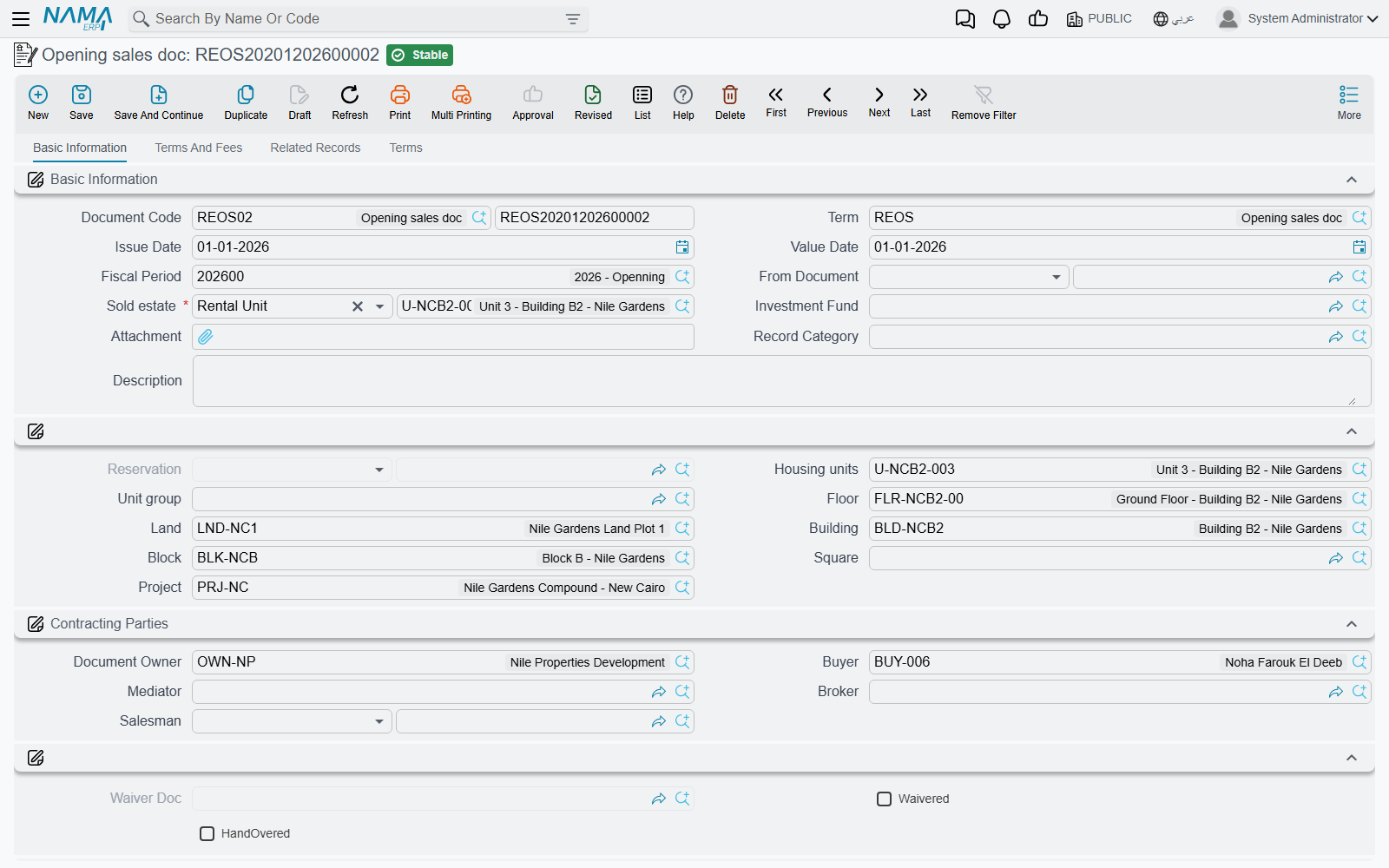
It is the sales contract, with a different job
The screen is the sales contract's screen. Page 0 carries the header, the read-only estate breadcrumb, the Contracting Parties / اطراف التعاقد (owner, buyer, mediator, broker, salesman), the Sales Payment Method / نموذج الدفع, the whole Payment Details / تفاصيل الدفع price block, the installment-construction block and the multiple-construction grid, the action block and the Installments / الدفعات grid. Page 1 is Terms And Fees / الشروط و المصاريف with the Other Fees Lines / رسوم أخري grid, page 2 lists the related collect documents, installment payments, fines and annexes, and page 3 holds the standard contract clauses.
Everything you know about that screen applies here unchanged, and rather than repeat it this page sends you to the two that own it:
- The Sales Contract for the header, the parties and what commit does.
- Building the Installment Plan for the price block, the construction rules and Create installments, which overwrites the whole grid exactly as it does on a live contract.
What follows is only what is different.
The Fully Paid column
The single most useful thing on this document is one checkbox per installment line: Fully Paid / مدفوع بالكامل.
You type the entire historic schedule — all ten installments of our villa, with their real dates and amounts — and then tick Fully Paid on the four that the buyer already settled. On save the system closes those lines for you: it clears the paid value, recomputes the remaining, and then sets the paid value equal to the remaining, so each ticked line ends up showing nothing outstanding.
The result is a contract that looks exactly like the truth. The full 1,200,000 history is visible, the four settled installments are visibly settled, and only the six open ones — 576,000 — are collectable. Nobody has to reconstruct the past out of receipt vouchers, and nobody can accidentally collect an installment that was paid two years ago.
Enter the schedule before you tick
Create installments rebuilds the grid from scratch, and rebuilding it clears the ticks along with everything else. Generate or type the schedule first, then go through it marking what was paid.
Actions on this screen
The opening sale carries the sales contract's installment toolbar with three buttons fewer — there is no Create Bank Transfer From Selected Line, no Create Fine Document From Selected Line and no Create Fees. What is there works exactly as on The Sales Contract:
- Create installments, Select all installment lines and Merge installments — build and reshape the Installments grid.
- Create Receipt Voucher From Selected Line and Create RE Return Payment Doc From Selected Line — collect, or hand back, the remaining value of the ticked rows.
- Create Fine Document — opens a fine document linked to this contract.
- Create A Bank Portfolio For Selected Installments, Create Postponed Bank Portfolio for Selected Installments, Create A Partial Payment For Selected Installments and Create Notification For Selected Installment — move the commercial papers on the ticked rows.
- Create collect doc from selected line — a button on each row of the Installments grid (and of the multiple-construction grid); it opens a collect document for the ticked rows, or for that row when nothing is ticked.
The one to keep away from after the history is typed in is Create installments, for the reason in the tip above.
The opening fiscal period
Like the other opening documents, this one refuses to commit outside an opening fiscal period — the message reads Fiscal period must be openning. Create the opening period first and select it on the document.
The one exception in the whole opening family lives here: the term option Allow Non Opening Fiscal Period In Opening Sales / السماح بفترات محاسبيه غير افتتاحيه في عقد البيع الإفتتاحي. Books using a term with that option ticked will accept an ordinary period, which is how you handle the contract that surfaces months after the migration was closed. See Going Live: Opening Balances in Real Estate for the rest of the go-live sequence.
No commissions
An ordinary sales contract carries a commissions grid, and commissions are booked when it commits. The opening contract has no commissions grid at all. That is the right behaviour for migration — the broker on a 2023 sale was paid in 2023, through the old system — but it does mean that if a commission is genuinely still outstanding on a historic sale, it does not come across on this document and has to be carried in as an ordinary payable.
The fees grid, on the other hand, is present: Other Fees Lines / رسوم أخري works exactly as it does on a live contract, with each fee booking to its own fee type's accounts.
Licensing, and what commit does
The opening sales contract is gated on the realestate-sales licence, not on the base realestate licence that the opening cost document uses. A customer licensed for leasing only cannot use it.
On commit the document does what the sale it represents would have done: the estate is marked sold and stamped with the buyer, the installment schedule becomes live, and an opening journal entry is created from the accounts configured on the term — the price, the installment schedule, the owner and buyer fees, the maintenance deposit, discounts and penalties. The accounting pages of the term are described in Sales Document Terms.
One validation is worth knowing before you enter a hundred of these: unless the term switches it off, the schedule total must equal the contract's remaining value, within the rounding tolerance set in the module settings. Migrated schedules that were rounded differently in the old system are the usual reason a batch of opening contracts refuses to save.
From the moment it is committed there is nothing special about the contract. Collect documents, receipt vouchers, fines and return payments all work against it exactly as they work against a contract signed this morning — see How Installment Collection Works.