
Rent Document Terms
A lease is a promise stretched over time. A three-year shop lease at 120,000 a year signed in September commits the tenant to 360,000, but almost none of that is this year's revenue — and alongside the rent itself there is a security deposit that is not income at all, a brokerage commission earned once, a maintenance charge, a water charge, and a collection commission. Each of those is a separate conversation with the general ledger.
The rent term gives each of them its own page. That is the defining feature of this family: where a sales term crams every account block onto one long page, a rent term spreads them across eight numbered pages, one per kind of money. Configuring a lease term is therefore mostly a matter of walking the pages in order and deciding, page by page, whether this company books that kind of money at all. Each page corresponds to a value on the lease itself, so it helps to have The Rent Contract open beside the term screen the first time you configure one.
Read How Real Estate Document Terms Work first for the anatomy of an accounting side, the both-halves-or-nothing rule, the Confiuration List routing grid and the tax-policy precedence.
Configure by page title, never by field name
The field names behind the rent term pages are legacy and describe entirely different things from what the pages actually do. If a colleague, an import file or a customisation refers to a rent term field by its internal name, do not assume it means what it says. Always identify a rent term setting by the page it lives on, exactly as the tab caption reads on screen. Every instruction on this page is written that way, and so should yours be. The field ids are listed below so that you can match an import column or a customisation to the right tab — read them as labels, not as descriptions.
The eight pages of a rent contract term
| Page | Title on screen | Debit / credit field ids | The money it books |
|---|---|---|---|
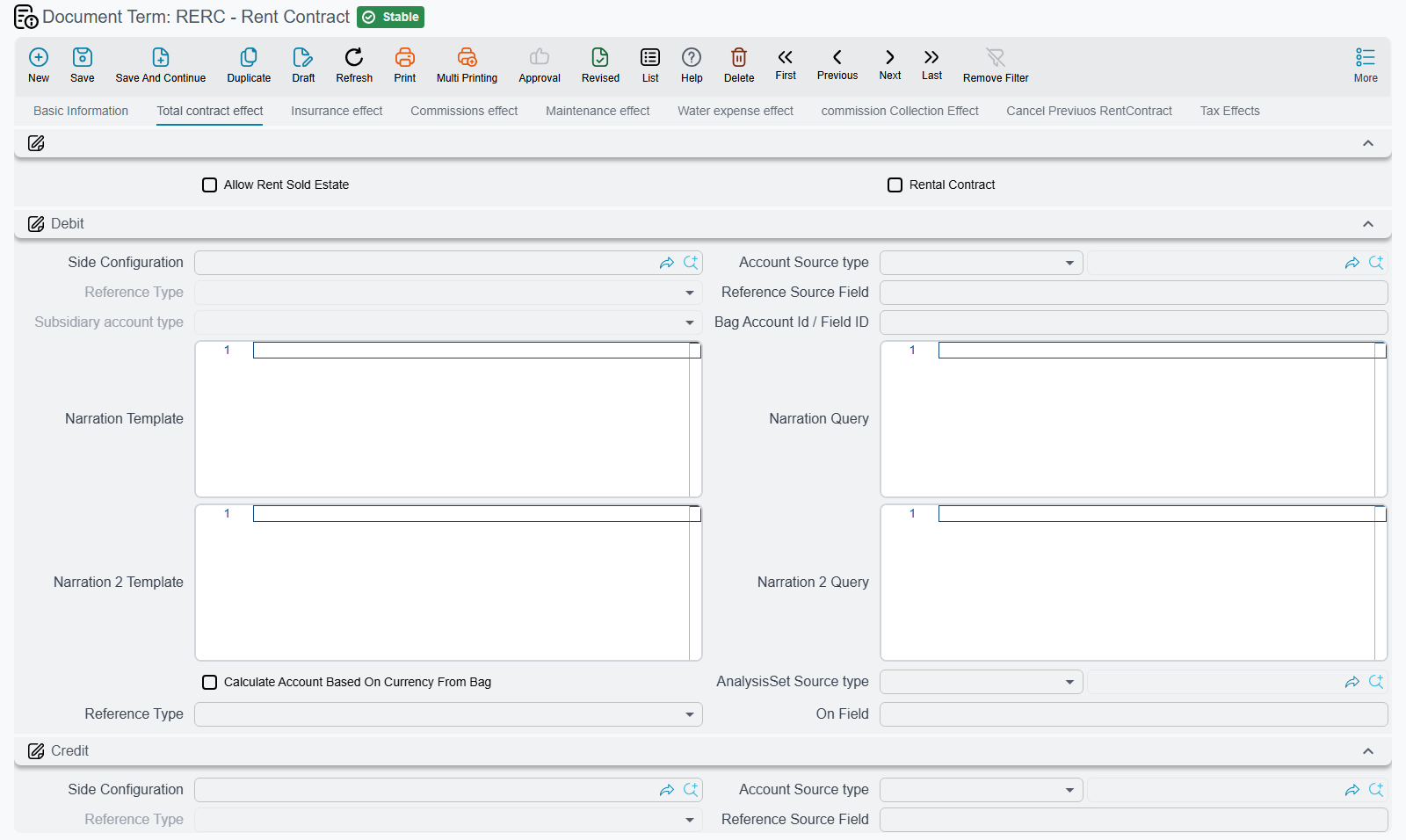
| 0 | Total contract effect · اساس العقد | termConfig.debit2 / termConfig.credit2 | The contract's total rent value, the split between recognised and deferred rent, and every behavioural option |
| 1 | Insurrance effect · تاثيرات التأمين | termConfig.issuedDebit / termConfig.issuedCredit | The tenant's security deposit |
| 2 | Commissions effect · تاثيرات السعي | termConfig.feesValDebit / termConfig.feesValCredit | The brokerage commission on the lease |
| 3 | Maintenance effect · تاثيرات الصيانة | termConfig.interestValDebit / termConfig.interestValCredit | The maintenance charge carried on the lease |
| 4 | Water expense effect · تاثيرات مصاريف المياه | termConfig.receivedDebit / termConfig.receivedCredit | The water and utility charge |
| 5 | commission Collection Effect · تاثيرات عمولة التحصيل | termConfig.collectDebit1 / termConfig.collectCredit1 | The collection commission |
| 6 | Cancel Previuos RentContract · إعدادات إلغاء العقد السابق | — | The book and term used when a renewal auto-cancels the previous lease |
| 7 | Tax Effects · تأثيرات الضريبة | — | The tax plan and the two tax account pairs |
The captions on pages 1 and 6 ship with typos ("Insurrance", "Previuos"); they are reproduced here so you can recognise the tabs on screen.
Pages 1 to 5 each contain nothing but a debit block and a credit block, and each configures one amount. Leave a page's blocks empty and that amount is simply not booked — which is the normal configuration for a company that does not charge a water levy or does not pay a collection commission.
Page 0 — the contract's own effect
Page 0 does three jobs at once: it books the contract value, it splits the schedule between this year and later years, and it holds every behavioural option in the family.
The account blocks
| Block | Field ids | Books |
|---|---|---|
| Debit / Credit | termConfig.debit2 / termConfig.credit2 | The contract's total rent value |
| Income Debit / Income Credit | termConfig.loanValDebit / termConfig.loanValCredit | Installments falling due inside the document's fiscal year |
| Advance Income Debit / Advance Income Credit | termConfig.liquidDebit / termConfig.liquidCredit | Installments falling due in later years |
| Paid Value Debit / Paid Value Credit | termConfig.paidValueDebit / termConfig.paidValueCredit | Amounts already paid on the contract at the time it is processed |
The income / advance income split is the heart of rent accounting, so it is worth walking a real case. The 3-year shop lease at 120,000 a year is signed in September and billed quarterly, so its schedule holds twelve installments of 30,000. When the contract is processed, the two quarters falling before the fiscal year end go to the income blocks — 60,000 — and the remaining ten quarters, 300,000, go to the advance income blocks. The company's first-year profit and loss shows 60,000 of rent, not 360,000.
One option refines this further:
| Option | Field id | What it does |
|---|---|---|
| Split Installment Value If It Spans More Than Two Years | termConfig.splitInstallmentValueIfItSpansMoreThanTwoYears | An installment whose period starts inside the fiscal year but ends after it is divided pro-rata by day count into two ledger lines, one up to the year end and one after. Deposit, commission, water and maintenance lines are never split — only the rent itself. |
Without it, a quarter running November to January lands wholly in one year or the other. With it, two thirds of that quarter is this year's income and one third is deferred.
The behavioural options
| Option | Field id | What it does |
|---|---|---|
| Rental Contract | termConfig.rentalContract | Flips the direction of the whole lease. Left off, we are the landlord: only receipt vouchers may be raised from the schedule. Turned on, we are the tenant renting property in, and only payment vouchers are allowed. Get this wrong and users hit a refusal the first time they try to collect. |
| Allow Rent Sold Estate | termConfig.allowRentSoldEstate | Off by default, which blocks leasing a unit that is already flagged sold. Turn it on for the sell-then-lease-back case, or when the company manages a unit it has sold to an investor. The sold unit only appears in the unit lookup when Allow Sold Unit For Rent is also ticked on the unit itself — see How Properties Are Modelled. |
| Shorten Ledger Effect | termConfig.shortenLedgerEffect | Merges ledger lines that share an account and analysis, so a twelve-installment lease produces a compact entry instead of one line per installment. |
| Manual Coding | termConfig.manualCoding | Stops the system numbering the installment lines, so the user types the codes. The setting survives Extend Contract. |
| Pay Installments In Order | termConfig.payInstallmentsInOrder | Forces collections against the lease to settle installments oldest first. |
| Fixed Maintenance | termConfig.fixedMaintenance | Affects only the leases created by the batch lease generator. Normally each year's maintenance charge on a generated lease is recomputed as the lease's maintenance percentage of that year's rent, so it rises with the yearly increase. On, the maintenance value on the batch line is kept unchanged for every year of the lease. A rent contract entered on its own ignores this option. |
| Modifiable Tax | termConfig.modifiableTax | Leaves the tax amounts on the installment grid editable. Off, they are recomputed from the tax policy on every save. |
| Legal Entity Taxes | termConfig.legalEntityTaxes | The term's own tax policy grid. Filled, it wins outright; empty, the module configuration applies. |
| Confiuration List | termConfig.configLineList | The per-installment-type routing grid. On a lease this is where you send the current year's and next years' rent to different accounts per charge type. |
Two more options appear on page 0 only on rent offers and offer cancellations, in a group of their own:
| Option | Field id | What it does |
|---|---|---|
| Reservation Status | termConfig.reservationStatus | Reserve or Without Reservation. Picking the term pre-fills the offer's own reservation field, so the term effectively decides whether quoting a unit blocks it. |
| Create Accounting Effects | termConfig.createAccountingEffects | Off, the offer creates no entry at all — the normal setting for a quotation. A rent contract always creates its entry; only offers can be silenced this way. |
Generating the accrual ledgers
Also on page 0, in a group of its own, is the block that produces the periodic revenue-recognition documents. This is where the rent accrual ledger described in Rent Installment Accrual Ledgers comes from — those documents are generated, never typed, and everything about them is decided here rather than on their own screen.
| Option | Field id | What it does |
|---|---|---|
| Generate Rent Installment Ledger | termConfig.generateRentInstallmentLedger | The master switch. Off, nothing is generated at all. On, every commit or update of the contract groups the installment lines by period and creates or updates one accrual document per group; a group that becomes empty deletes its document. |
| Rent Ledger Period Type | termConfig.rentLedgerPeriodType | Daily, Monthly or Yearly. It decides both the grouping and the accrual document's value date. Leaving it empty means Daily — one accrual document per distinct installment date, which is rarely what anyone wants. |
| Generate Rent Installment Ledger By Line | termConfig.generateRentInstallmentLedgerByLine | On, the lines are grouped by installment code instead of by period, so each installment gets its own accrual document. The period type still sets the value date: the start of the month or year for Monthly or Yearly. |
| Save Generated Ledger As Draft | termConfig.saveGeneratedLedgerAsDraft | On, the generated accruals are left as drafts for review. Off, they are committed immediately. |
| Generated Rent Installment Ledger Book | termConfig.generatedRERentLedgerBook | The book the generated accruals are created in. |
| Generated Rent Installment Ledger Term | termConfig.generatedRERentLedgerTerm | The term the generated accruals are created with — this is where the accrual's own accounts live, not on the contract term. |
That last point catches people out. The contract term decides whether and when accruals are generated; the term named in Generated Rent Installment Ledger Term decides which accounts they hit. The accrual ledger's own term is a rent-family term too, but a very short one: it shows only the Total contract effect and Tax Effects pages, because an accrual has no deposit, no commission and no water charge to book.
Worked example — a landlord term that accrues monthly
For the 3-year shop lease at 120,000 a year, a typical landlord configuration is:
- Page 0, income blocks pointing at rent revenue, advance income blocks pointing at deferred rent income, and Split Installment Value If It Spans More Than Two Years on so the September–November quarter is apportioned correctly.
- Generate Rent Installment Ledger on, Rent Ledger Period Type set to Monthly, Save Generated Ledger As Draft off, and a dedicated accrual book and accrual term named.
- The accrual term itself debits deferred rent income and credits rent revenue on its Total contract effect page.
Committing the lease now produces thirty-six monthly accrual documents, each releasing one month's share out of deferred income into revenue. The contract booked 300,000 as deferred on day one; the accruals give it back month by month.
Pages 1 to 5 — deposits, commissions, charges
Each of these pages holds one debit block and one credit block, and each books exactly one amount from the lease's value block.
Insurrance effect books the tenant's security deposit. It is not income — it is money held on the tenant's behalf — so the pair almost always credits a deposits-held liability. When the lease ends, the termination document decides what comes back.
Commissions effect books the brokerage commission earned on the lease. One option sits on this page:
| Option | Field id | What it does |
|---|---|---|
| Rent Value Include Commission | termConfig.rentValueIncludeCommission | Off, the generated schedule adds the commission as a separate line on top of the rent. On, the commission is treated as already inside the quoted rent and no extra line is produced. |
Maintenance effect books the maintenance charge carried on the lease, and Water expense effect books the water and utility charge. Both are charges the tenant pays alongside the rent, and both are optional — a lease that does not levy them leaves the pages empty.
commission Collection Effect is the page where you set the accounts for the commission charged on collecting the rent — the fee a managing agency keeps out of what it collects for the landlord. Like the other charge pages it holds one debit block and one credit block, and both must be filled for the commission to be booked at all. Its two captions are swapped: the block captioned Commission Collection Credit holds the debit side (termConfig.collectDebit1) and the block captioned Commission Collection Debit holds the credit side (termConfig.collectCredit1).
Page 6 — the auto-cancel book and term
When a lease is renewed with Extend Contract, the renewal automatically cancels the lease it replaces, and to do that it needs somewhere to put the generated termination document. That is the whole content of this page:
| Field | Field id | What it does |
|---|---|---|
| Cancel Contract Book | termConfig.cancelContractBook | The book the auto-generated lease-termination document is created in |
| Cancel Contract Term | termConfig.cancelContractTerm | The term it is created with |
Both are mandatory whenever a contract uses auto-cancel, and because Extend Contract always turns auto-cancel on, in practice they are mandatory on any term used for renewable leases. Leave them empty and the renewal fails to save with "Please specify cancel contract book" or "Please specify cancel contract term", with the error pointing back at the term field. See Renewing and Ending a Lease.
Page 7 — tax effects
| Field | Field id | What it does |
|---|---|---|
| Taxable | termConfig.taxable | Copied onto the contract; decides whether tax rows are computed for the installments at all |
| Tax Plan | termConfig.taxPlan | The tax plan the contract falls back on |
| Tax1 Debit / Tax1 Credit, Tax2 Debit / Tax2 Credit | termConfig.tax1Debit / termConfig.tax1Credit, termConfig.tax2Debit / termConfig.tax2Credit | The accounts the two taxes are booked to |
The lease-termination term
Ending a lease early is a settlement, not a cancellation: several buckets of money flow back to the tenant or stay with the landlord, and each of them belongs somewhere different. The termination document therefore has a term all of its own, with nine pages: eight that each own one bucket, and a Taxes page:
| Page | Title on screen | Debit / credit field ids | The bucket |
|---|---|---|---|
| 0 | Remaining inssurance effects · تاثيرات صافي التامين | termConfig.debit / termConfig.credit | The net deposit after everything has been deducted |
| 1 | Inssurance effects · تاثيرات التامين | termConfig.debit2 / termConfig.credit2 | The gross deposit |
| 2 | Commissions Effects · تأثيرات السعي | termConfig.commissionDebit / termConfig.commissionCredit | The unused portion of the commission |
| 3 | Water Expenses Effects · تأثيرات تكاليف المياه | termConfig.waterExpenseDebit / termConfig.waterExpenseCredit | The unused water charge |
| 4 | Maintenance Effects · تأثيرات تكاليف الصيانة | termConfig.maintenanceDebit / termConfig.maintenanceCredit | The unused maintenance charge |
| 5 | Discount value insurance effects · تاثيرات خصم التامين | termConfig.issuedDebit / termConfig.issuedCredit | The discount taken out of the deposit |
| 6 | Other discount effects · تاثيرات الخصومات الأخرى | termConfig.receivedDebit / termConfig.receivedCredit | Any other discount applied to the settlement |
| 7 | Remaining Effects · تاثيرات المتبقي | termConfig.loanValDebit / termConfig.loanValCredit | Everything still owed or prepaid at termination |
| 8 | Taxes · الضرائب | termConfig.sendAs | Not a bucket: the single Send As field — Invoice, CreditNote or DebitNote, as the English screen spells them — that decides how the termination is sent to the tax authority |
Pages 2, 3 and 4 each hold a debit block and a credit block for their bucket, and follow the same both-halves-or-nothing rule as everywhere else: an unconfigured page means that bucket is not booked and the tenant's settlement is simply shorter by that amount.
Captions swapped on pages 2, 3 and 4
On these three pages the block captioned Debit holds the credit side and the block captioned Credit holds the debit side (for example, on page 2 the Debit block is termConfig.commissionCredit). Put the account you want debited in the block captioned Credit. Pages 0, 1, 5, 6 and 7 are captioned correctly.
Page 7 is the largest. It holds the remaining-balance blocks plus four further account pairs that separate what belongs to this year from what belongs to the next:
- Rent For Current Year Debit / Credit and Rent For Next Year Debit / Credit (
termConfig.rentForCurrentYearDebit/rentForCurrentYearCredit,termConfig.rentForNextYearDebit/rentForNextYearCredit) - Expense For Current Year Debit / Credit and Expense For Next Year Debit / Credit (
termConfig.expenseForCurrentYearDebit/expenseForCurrentYearCredit,termConfig.expenseForNextYearDebit/expenseForNextYearCredit)
That split is what lets a tenant who leaves in September get this year's unearned rent treated differently from rent he has already prepaid for next year.
Four behavioural options complete the term:
| Option | Field id | What it does |
|---|---|---|
| Allow Cancel Of Rent Contract With Unpaid Installments | termConfig.allowUnpaidInstallments | Off, a lease cannot be terminated while any installment is still unpaid. On, termination goes ahead and the arrears are carried by the Remaining Effects accounts — which is how most companies handle a tenant who leaves owing money. |
| Calculate Remaining Rent Values Based On System Paid Rent | termConfig.calcCurrentYearAndNextYearValueFromPaidRent | Derives the current-year / next-year rent split from the amounts actually recorded as paid rather than from the contract schedule. |
| Delete Ldegers Saved As Draft After Saving Cancel Contract | termConfig.deleteDraftLdegersAfterSave | Deletes the terminated lease's draft accrual documents when the termination is saved, so future accruals do not linger. Pairs with Save Generated Ledger As Draft on the contract term. (The shipped label carries the typo "Ldegers".) |
| ReCreate Ledgers After Deleting Cancel Contract | termConfig.reCreateLedgersAfterDelete | If the termination document is later deleted, regenerates the original lease's accrual documents so the schedule comes back intact. |
Worked through: a tenant on the 120,000-a-year shop lease leaves four months early. Allow Cancel Of Rent Contract With Unpaid Installments is on, so the termination commits despite one outstanding quarter. The gross deposit is booked on page 1, a 10% early-termination discount on page 5, the unused commission on page 2, and the net refund on page 0. The outstanding quarter and the rent already prepaid for next year land on page 7's current-year and next-year blocks.
The two remaining rent terms
The batch lease generator — the document that opens forty shop leases in one run — has a single page titled Settings carrying just two fields: the book (termConfig.rentContractBook) and the term (termConfig.rentContractTerm) that the generated rent contracts will be created with. Both are mandatory, and their pickers only offer books and terms belonging to the rent contract, so you cannot point them at the wrong document type by accident. All the real accounting configuration lives in the term you name here — the batch document itself creates no entry. See Generating the Rent Schedule.
The opening lease term is the ordinary rent contract term with one extra page, Pre paid effects · تأثيرات المدفوع مسبقا, for rent that the tenant paid before the system went live. That page edits the same two fields as the commission Collection Effect page (termConfig.collectDebit1 / termConfig.collectCredit1), so on an opening lease the two pages always show the same accounts, and filling one fills the other: the prepaid rent and any collection commission are booked to the same pair. Everything else — the eight pages above, the accrual generation block, the tax page — behaves exactly as it does on a normal lease, which is the point: an opening lease is a normal lease with a historical start date. See Opening Rent Contracts.