
Collection, Maintenance, Investment and Cost Document Terms
Once the two contract families are configured, everything else in Real Estate is a short term. Money comes in, money goes out, a cost is capitalised, a fund's profit is split — each of those documents needs somewhere between two and a dozen accounts and almost no options at all. Most of the terms on this page fit on a single screen page, and several of them have literally nothing on that page except a Debit block and a Credit block.
The exception is the collection term, which is genuinely rich, and the cost-document term, which borrows the whole supply-chain invoice machinery. Those two get the longest sections; the rest are a paragraph each.
Everything on this page assumes you have read How Real Estate Document Terms Work — the accounting-side anatomy, the rule that a pair only fires when both halves are filled, and the Confiuration List routing grid.
The collection term
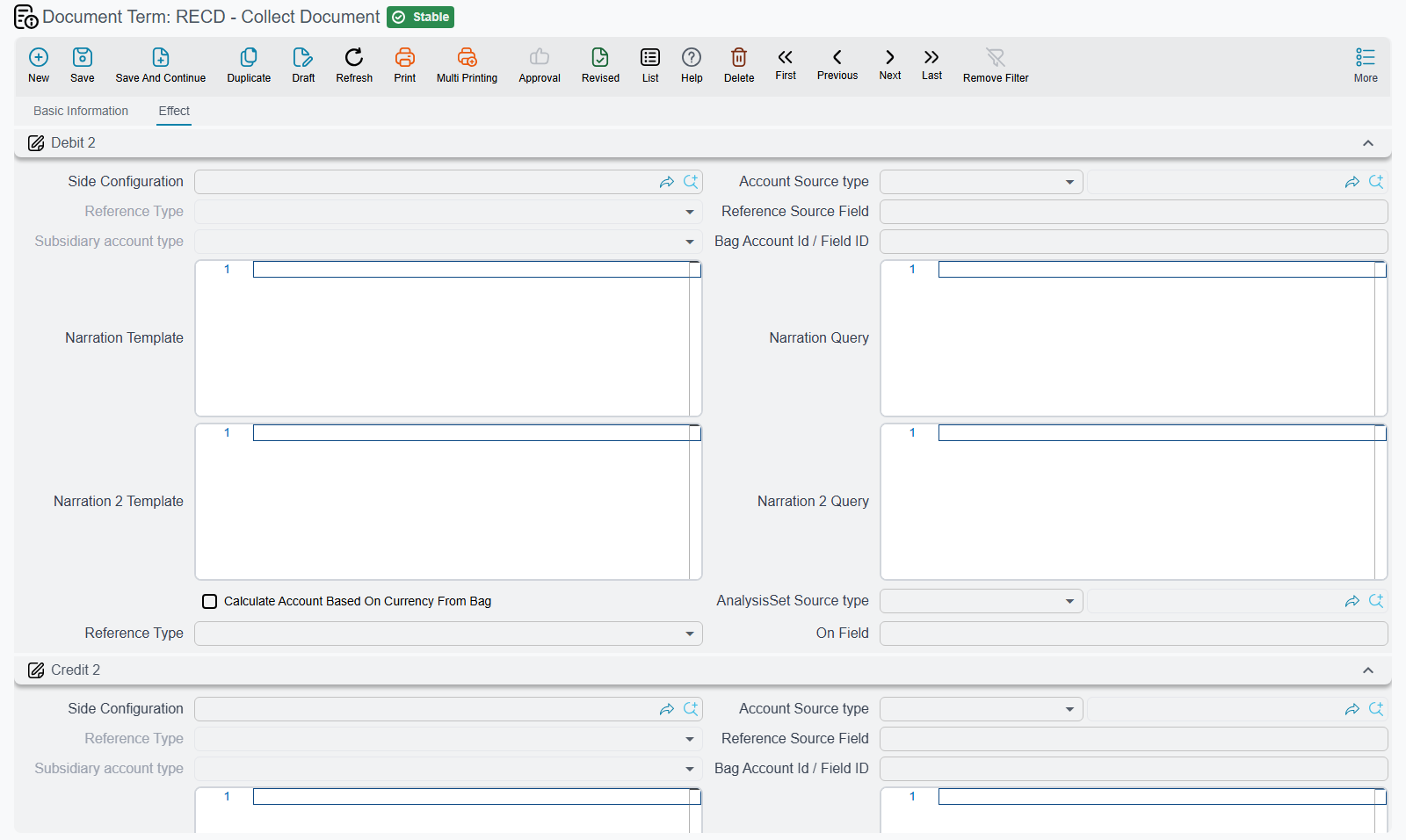
The collect document and the exemption document share one term shape — the same screen, the same options, the same single page titled Effect (التأثير). That is not a coincidence: an exemption is mechanically a collection that collects nothing in cash, so it needs exactly the same configuration with different accounts behind it. Configure one, understand both.
Where the collected money goes
The page carries two independent account pairs for the collected amount. The first is the entry you would expect — the receivable is settled and the money lands wherever cash or the clearing account lives. The second exists so that one collection can produce a parallel entry as well, for companies that keep a statistical or memo record alongside the financial one. Fill both pairs and both entries are produced; fill only one and only that one is. On screen the first two blocks are termConfig.debit2 / termConfig.credit2 and the next two are termConfig.debit / termConfig.credit.
Alongside them sits the Collection Discount pair (termConfig.collectionDiscountDebit / termConfig.collectionDiscountCredit), which books the discount granted at the moment of collection. That is a genuinely different thing from an ordinary contract discount: as How Installment Collection Works explains, a collection discount shrinks what the installment is considered to owe rather than paying it off, so it needs an account of its own.
The tax block
| Field | Field id | What it does |
|---|---|---|
| Tax Plan | termConfig.taxPlan | The tax plan the collection falls back on |
| Tax1 Debit / Tax1 Credit, Tax2 Debit / Tax2 Credit | termConfig.tax1Debit / termConfig.tax1Credit, termConfig.tax2Debit / termConfig.tax2Credit | The accounts the two taxes hit |
| Editable Taxes | termConfig.editableTaxes | On, the tax amounts the user typed on the collect lines survive the save. Off, they are recalculated from the tax policy every time. |
The tax accounts here are the last fallback, not the first. When a collect line is processed, the system looks at the expense type, then at the unit, then at the unit model, and only then at these term fields. A term whose tax sides are never used is not misconfigured — it just means the earlier links in the chain always answered.
The behavioural options
| Option | Field id | What it does |
|---|---|---|
| installment Effect | termConfig.installmentEffect | The most consequential setting on the whole screen. It decides which bucket on the contract's installment line the collected amount lands in — requested collection, collected by commercial paper, or system paid. There is no fallback: leave it empty on a collect document and the money is booked to the ledger but nothing lands on the installment. |
| Type | termConfig.type | Restricts the document to one installment type. If the term names a type, the document's own type must match or the commit fails with "Term config contain a different type". This is how you build a dedicated maintenance-collection book that physically cannot collect ordinary installments. |
| Do not apply effects on installments | termConfig.doNotApplyEffectsOnInstallments | On, committing the collect document does not touch the contract's paid and remaining figures at all — an accounting-only collection. |
| Allow Collection From Finished Contracts | termConfig.allowCollectionFromFinishedContracts | On, the check that refuses collections against cancelled or waivered contracts is skipped. Essential for chasing arrears after a lease has been terminated. |
| Ignore Pay Installments In Order | termConfig.ignorePayInstallmentsInOrder | Overrides the contract term's Pay Installments In Order for this collection book only, so a customer can pay a specific future installment out of sequence. |
| Split Installment Value If It Spans More Than Two Years | termConfig.splitInstallmentValueIfItSpansMoreThanTwoYears | The same pro-rata year-split as the rent family, applied to the routing-grid effects. |
| Confiuration List | termConfig.configLineList | Per-installment-type routing, exactly as described on the basics page. |
The aggregated collect term — where the real accounting lives
The aggregated collect document is a batch runner: it pulls every unpaid installment in a date range and, on commit, generates one ordinary collect document per line. Because of that, its own term is almost empty — it creates no entry itself. What it does instead is name the book and term the generated documents are created with, and that is where the accounting actually happens.
| Field | Field id | What it does |
|---|---|---|
| Aggregated Collect Document Book | termConfig.aggrRECollectDocBook | The book the generated collect documents are created in |
| Aggregated Collect Document Term | termConfig.aggrRECollectDocTerm | The term they are created with — the collection term described above |
| Exclude Installments Previously Added To AggrCollectDoc | termConfig.excludeInstallmentsPreviouslyAddedToAggrCollectDoc | When the button that loads due installments is pressed, each candidate is checked against the installments already aggregated before, and the ones already taken are skipped. This is what stops a repeated monthly run double-collecting. |
Both the book and the term are mandatory at commit: leave either empty and the document fails with "You must fill aggregated collect document book and term in term {0}".
Worked example — the monthly rent run
A property manager collects 120 shop rents on the 1st of every month.
- Build the collection term first: the collected-amount pair, installment Effect set to system paid so the contract's paid column moves, and Allow Collection From Finished Contracts left off. Pair it with a book called, say, Monthly rent collection.
- Build the aggregated collect term second. It has only three fields: name the Monthly rent collection book and the collection term from step 1, and tick Exclude Installments Previously Added To AggrCollectDoc.
- The aggregated document itself now produces no entry. Its 120 generated collect documents produce 120 entries, all through the term from step 1.
If a month's run looks like it did nothing, the aggregated term is the wrong place to look — check the generated documents and the term they were created with. See Collect Documents and Bulk Collection.
The fine term
A late-payment fine is a receivable in its own right, so its term is short: a single page titled Effect with one debit block and one credit block for the fine amount (termConfig.debit / termConfig.credit), plus one option and a Taxes group.
| Option | Field id | What it does |
|---|---|---|
| Do Not Copy Installments With Related To | termConfig.doNotCopyInstallmentsWithRelatedTo | Normally, pressing Create Fine Document on a contract copies the contract's installment lines into the fine as "related to" rows. Turn this on and the copy is skipped, so the fine is entered free-hand against the contract as a whole. |
| Send As | termConfig.sendAs | In the Taxes group: Invoice, CreditNote or DebitNote — decides how the fine is sent to the tax authority. When the fine must be sent and this is empty, the save is refused with Send As must be selected in the term — «يجب اختيار إرسال كـ في التوجيه». |
See Late-Payment Fines.
The return payment term
Returning money to a buyer is the mirror of collecting it, and the term reflects that. A single page titled Effect carries a Return Payment Value debit and credit pair for the returned amount (termConfig.returnPaymentValueDebit / termConfig.returnPaymentValueCredit), plus two familiar options:
| Option | Field id | What it does |
|---|---|---|
| installment Effect | termConfig.installmentEffect | Which bucket the returned amount is written back to. Unlike the collect document, this one has a sensible default: leave it empty and the return is recorded as system paid. |
| Do not apply effects on installments | termConfig.doNotApplyEffectsOnInstallments | On, the return is recorded in the ledger without touching the contract's installment figures. |
One behaviour worth knowing when you read the resulting entry: the return payment is recorded in the legal entity's ledger main currency rather than in the document's currency. See Exemptions and Returning Money to the Buyer.
The three maintenance terms
The maintenance expense term is the only interesting one of the three, because a maintenance job usually has two payers. Its single Effects page carries the ordinary Debit and Credit pair for the line value (termConfig.debit1 / termConfig.credit1), the tax block (termConfig.tax1Debit … termConfig.tax2Credit, termConfig.taxPlan) with its own Editable Taxes switch (termConfig.editableTaxes), and then the two pairs that make the document what it is:
| Block | Field ids | Books |
|---|---|---|
| Company Value Debit / Credit | termConfig.companyValueDebit / termConfig.companyValueCredit | The share of the maintenance cost the company absorbs |
| Customer Value Debit / Credit | termConfig.customerValueDebit / termConfig.customerValueCredit | The share recharged to the buyer or tenant |
Every line of a maintenance expense splits between those two shares, and the split must total 100%. Tax accounts here resolve through the maintenance item first and fall back to the term, so an item can override the term without anybody editing the term.
The maintenance expense request — the authorisation raised before the spend — has no term at all. It produces no journal entry, so there is nothing to configure. See Maintenance Requests and Expenses.
The maintenance accrual term has one page with a Debit and Credit pair (termConfig.debit1 / termConfig.credit1) and the tax block (termConfig.taxPlan, termConfig.tax1Debit … termConfig.tax2Credit). There is one thing to understand about it that no amount of reading the accrual screen will tell you: the accrual document can be raised on three bases — the year's maintenance, a debit difference or a credit difference — and the direction of the entry comes from the term you pick, not from the basis. A debit difference and a credit difference produce the same amount; what makes one of them a debit is that you chose a term whose accounts point that way. Companies that settle last year's over- and under-spend therefore keep two accrual terms, one for each direction. See Accruing the Annual Maintenance Charge.
The maintenance deposit profit term is the shortest term in the module: one page, one Debit block, one Credit block (termConfig.debit1 / termConfig.credit1). It books the return earned by the money parked in the maintenance fund's bank deposit. Because that money belongs to the owners' community rather than to the company, the credit side normally points at the maintenance-fund liability rather than at company income — but that is entirely your choice, since the document carries no logic of its own.
The three investment terms
The revaluation term is where a fund's profit is split, and it is the most structured of the three. A single Effect page holds four account pairs, one per slice of the gain:
| Pair | Field ids | Books |
|---|---|---|
| Management Profit Value Debit / Credit | termConfig.managementProfitValueDebit / termConfig.managementProfitValueCredit | The management fee taken out of the gain |
| Main Investor Commission Value Debit / Credit | termConfig.mainInvestorCommValueDebit / termConfig.mainInvestorCommValueCredit | The commission paid to the main investor |
| Distributed Profit Debit / Credit | termConfig.distributedProfitDebit / termConfig.distributedProfitCredit | The profit actually distributed to investors |
| Reinvested Profit Debit / Credit | termConfig.reinvestedProfitDebit / termConfig.reinvestedProfitCredit | The profit left in the fund |
Revalue a 1,000,000 plot to 1,200,000 and the 200,000 gain is split across those four pairs according to the distribution the document computes. See Estate Values, Additions and Revaluation.
The fund finance addition term — money going into a fund — is a single page with one Debit block and one Credit block (termConfig.debit1 / termConfig.credit1).
The agricultural profit claim term has one Effect page with two named groups: Profits (Profit Debit / Profit Credit, termConfig.profitDebit / termConfig.profitCredit) for the profit installments being claimed, and Paid Installments (Installment Debit / Installment Credit, termConfig.paidInstallmentDebit / termConfig.paidInstallmentCredit) for the amounts netted off what the investor owes elsewhere. The two blocks are independent, which is what lets one claim both recognise a profit and settle a property installment in the same entry.
The cost document term
The cost document is the odd one out in Real Estate: it is shaped like a purchase invoice, and its term genuinely is the supply-chain invoice term with a Real Estate label. That makes it the largest term in the module, spread over three pages.
Page 0 — Effect
The main debit and credit blocks live here (termConfig.config.debit / termConfig.config.credit) — typically a work-in-progress or project cost account on the debit side and the supplier payable on the credit side — together with a Shorten Ledger switch (termConfig.config.shortenLedger) attached to the credit block.
Around them are two groups of options:
| Option | Field id | What it does |
|---|---|---|
| Taxable | termConfig.taxable | Copied onto the document header; decides whether taxes are computed at all |
| Tax Plan | termConfig.taxPlan | The default tax plan pushed onto the header |
| Modifiable Tax | termConfig.modifiableTax | Whether the user may edit the computed tax values |
| Allow Editing Header Tax In Details | termConfig.allowEditingHdrTaxInDetails | Whether the header tax may be adjusted line by line |
| Pay Installments In Order | termConfig.payInstallmentsInOrder | Forces the document's payment schedule to be consumed in order |
| Is Sales Not Purchase | termConfig.isSalesNotPurchase | Flips the document's direction: it behaves as an outgoing/sales document, with receipts attaching to it instead of payments |
| Invoice Return | termConfig.returnInvoice | Marks the document as a return, which inverts the direction again — the credit-note case |
A third group controls what ends up in the capitalised cost:
| Option | Field id | What it does |
|---|---|---|
| Exclude Tax 1 … Exclude Tax 4 From Cost | termConfig.excludeTax1FromCost … termConfig.excludeTax4FromCost | Keeps each tax out of the cost base, so it is expensed rather than capitalised into the estate's cost |
| Exclude Discount 1 … Exclude Discount 8 From Cost | termConfig.excludeDiscount1FromCost … termConfig.excludeDiscount8FromCost | Keeps each discount out of the cost base |
| Link With Invoice Lines In accounting Document | termConfig.linkWithInvoiceLinesInAccountingDocument | Makes the invoice appear in the invoice grid of receipt and payment vouchers, so it can be settled from there |
| =Track Quantity Fields From Doc | termConfig.trackQuantityFieldsFromDoc | Which fields identify a quantity when the document is created from another one (the shipped English caption really does begin with an equals sign) |
| Copy Remaining Quantity From Doc Considering Fields | termConfig.copyRemainingQtyFromDocConsideringFields | The same, for copying the remaining quantity forward |
Page 1 — Other effects
Full accounting-side blocks for the cash portion (termConfig.cash) and for the four taxes — Tax 1, Tax 2, Tax 3 and Tax 4 (termConfig.tax, termConfig.tax2, termConfig.htax, termConfig.htax2) — each tax with its own "other side" selector (termConfig.taxesOtherSide.tax1OtherSide … tax4OtherSide) so that a tax can be recorded against something other than the document's main credit.
Page 2 — Discount Effects
Eight discount blocks labelled Discount 1 through Discount 8 on screen (termConfig.lineDiscount, then termConfig.firstDiscountAcc … termConfig.seventhDiscountAcc), plus an Invoice Discount block (termConfig.invoiceDiscount) for the header-level discount, each again with its own "other side" selector (termConfig.taxesOtherSide.discount1OtherSide …). At the bottom sits the External Effects grid (termConfig.externalEffectLines), which fires extra ledger entries when a payment document of a nominated type or matching a nominated criteria is linked to the cost document — one row per case, each with a debit and a credit.
Cost documents are the front end of the cost-distribution engine, so read this term together with Distributing Project Costs Over Properties, which explains what the per-estate cost entries do with the amount once the entry has been made.
The opening cost and post-handover cost terms
Both are single-page, two-field terms, and they are best understood as a pair with the sales contract's pre-handover block.
The opening cost term has an Opening Cost Debit and an Opening Cost Credit lookup (termConfig.openingCostDebit / termConfig.openingCostCredit), and that is the whole screen. It books the historical cost loaded per estate at go-live. See Going Live: Opening Balances in Real Estate.
The post-handover cost term has a Remaining Cost Debit and a Remaining Cost Credit lookup (termConfig.remainingCostDebit / termConfig.remainingCostCredit). It handles the construction cost that arrives after a unit has been delivered — the mirror image of the sales term's pre-handover pair, which handles the cost accrued before delivery. Between the two, every currency of construction cost on a sold unit has somewhere to go. See Handing the Unit Over.
The three money-movement terms
Ownership transfer, the bank payout request and the owner payout request each have exactly the same term: one page titled Effect, one Debit block, one Credit block, and no options whatsoever. The two blocks are termConfig.debit2 / termConfig.credit2 on all three.
That is not a gap in the configuration — it reflects what these documents are. An ownership transfer moves title between two owners at an agreed price and records one pair for that price. A bank payout sweeps collected cash to the bank and records one pair for the header total. An owner payout settles a landlord's share and does the same. There is nothing to decide beyond which two accounts.
The lease-termination term
Ending a lease is a settlement with eight separate buckets and a term to match, but it belongs with the leasing story rather than here. It is documented in full on Rent Document Terms.