
How Service Queues Work
Required licence
srvcenter-service-queues. Nothing on these pages is available on a base installation, and the licence also gates the endpoint the queue devices talk to — without it the kiosk, the display screen and the advisor stations are refused by the server.
At 08:12 on 3 March 2026, Fahad Al-Otaibi walks into Al-Sahra Motors' reception hall with his Saif 1.6. He presses a button on a small tablet by the door and it prints him a slip that says A014. He sits down. A screen on the wall shows which numbers are being served and at which desk, with the dealership's own advert beside them. A few minutes later A014 appears on that screen next to Majed Al-Qahtani's desk, Fahad walks over, and the visit begins — from there it is the ordinary workshop job cycle.
That is the whole of the Service Queues sub-module: a ticket, a display, and an advisor who calls the next customer. It is a small, self-contained feature and — unusually for something this peripheral — it works end to end.
You reach its two records from Service Center → Queue Service.
The two records you set up, and the three roles they serve
Everything the queue does is driven by exactly two master files in Nama:
| Record | Arabic | What it holds |
|---|---|---|
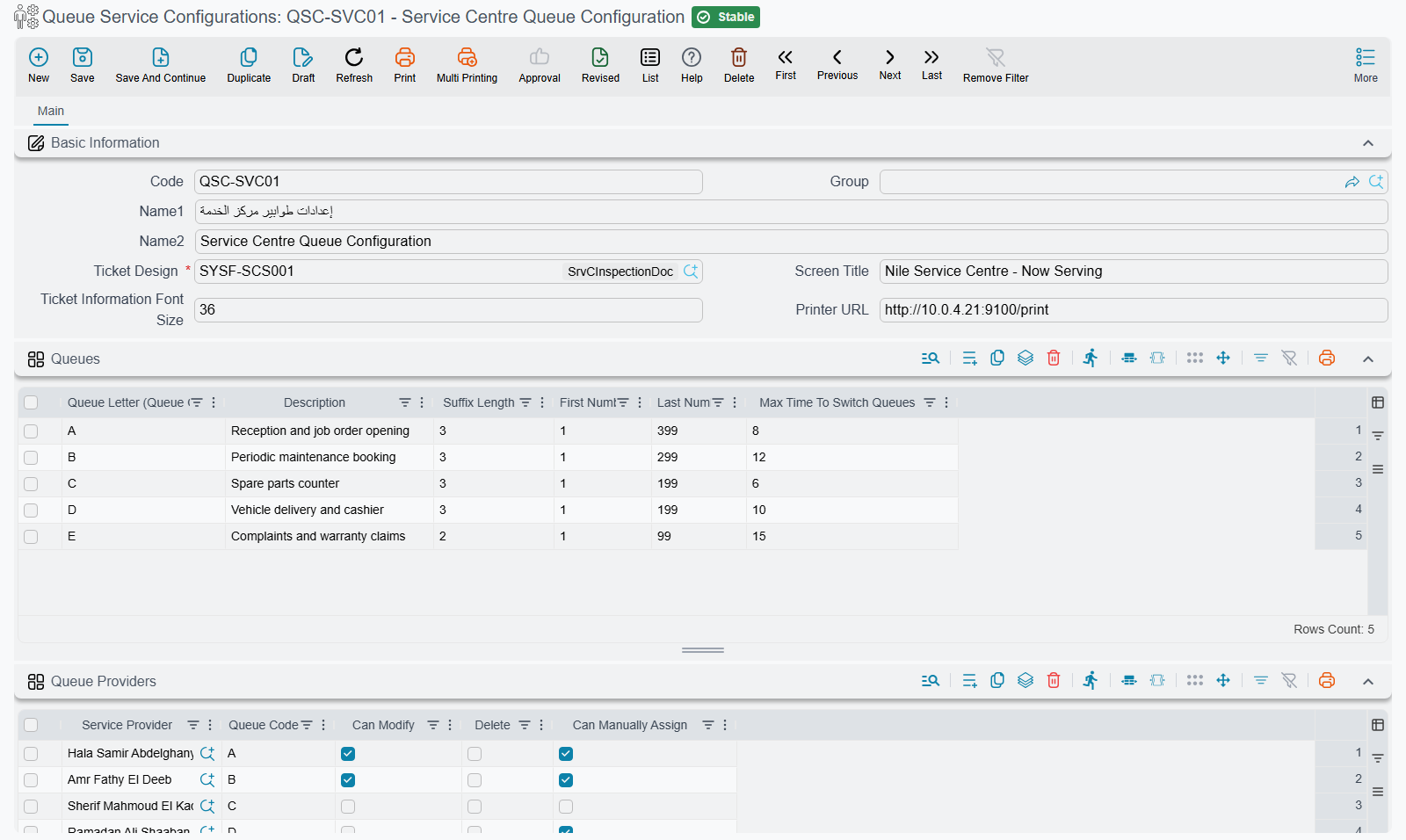
| Queue Service Configurations | إعدادات طوابير الخدمة | The rulebook: the queues themselves, which advisor may serve which queue, the display banners, the printed ticket design, and an optional self-service decision flow. |
| Queue Service Branch | فرع خدمة طوابير | The physical reception. Points at one configuration and sets the time the working day starts. |
A configuration is reusable — several branches may share the same rulebook. Al-Sahra has one of each: configuration QSC-01 Riyadh Reception / استقبال الرياض and branch QSB-RUH.
Around those two records sit three client roles. They are not three products and not three licences — they are three modes that the same queue application registers itself in when it connects to the server. Setting up a reception counter means deciding which device plays which role:
- Ticket creator — the tablet or kiosk by the door. Its only job is to issue and print tickets. Al-Sahra keeps one at the reception desk, operated by the receptionist, and could add a self-service one facing the customer.
- Display screen — the wall screen in the waiting area. It shows the tickets currently in progress and the first active banner you loaded onto the configuration. It carries the title you typed in Screen Title.
- Service provider — the advisor's or engineer's station. This is the one that pulls the next customer. The advisor signs in with an engineer number (positions 1 to 12), which is what the display uses to say "ticket
A014, desk 3". The same engineer number cannot be signed in twice at once, so two advisors cannot both claim desk 3.
The queue app is not a Nama screen
The kiosk, the wall display and the advisor station are one separate application — the Service Queue app — that talks to the ERP server. Installing it, signing in and choosing each device's role are covered in The Service Queue App; these pages cover everything you configure on the Nama side. If a device shows nothing, the question to ask is always the same: can it reach the server, and does the installation carry the srvcenter-service-queues licence?
The life of a ticket
1. It is created
There are three ways a ticket comes into existence, and a branch may use all three at once:
- From the kiosk or the reception tablet — the ordinary path. The operator (or the customer) picks a queue, optionally identifies the customer and types a plate number, and the ticket is issued and printed.
- Self-service by mobile number — the customer types a mobile number and a plate number, and the server runs the configuration's automatic ticketing steps to decide what to do: recognise the customer, put them in the right queue, or refuse them with a message. This is the self-service flow described on the configuration page.
- By hand from the branch screen — a supervisor adds a ticket directly from the Not Assigned Tickets list on the branch record, using Add Day Ticket. Useful when a device is down or a customer needs to be slotted in.
However it was created, the ticket gets the next number in its queue, a printed code such as A014, a creation time, and — if they were supplied — a customer and a plate number.
2. It waits
The ticket now sits in the branch's waiting list. It is visible on the branch record under Not Assigned Tickets / التذاكر اليومية (في الانتظار), and on the wall display as part of the waiting count.
3. It is called
An advisor presses next on their station (or a supervisor pulls the ticket for them from the branch screen). The server picks the next ticket like this:
- Anyone who has waited too long comes first. If a queue has a Max Time To Switch Queues set and a ticket has been waiting at least that many minutes, it jumps ahead of the whole branch's waiting list regardless of its letter — oldest such ticket first. Al-Sahra sets 20 minutes on queue
A. - Otherwise tickets are taken in queue-letter order, so
AbeforeB. - Within a letter, oldest first, and then by ticket number.
- That candidate must be in a queue the advisor is allowed to serve, according to the configuration's Queue Providers grid. An advisor whose provider row leaves Queue Code blank is offered the first waiting ticket of any queue.
One more rule matters in practice: calling the next ticket closes whatever the advisor still had open. An advisor is never serving two customers at once, so if Majed pulls a new ticket while A014 is still open, A014 is stamped finished at that moment.
4. It is closed
A ticket can be closed explicitly — the advisor ends the visit, or signs out at the end of the shift, which closes everything still open in their name. But the real business path is different, and it is the one thing about this feature that surprises everybody.
The ticket is closed by the job order — not by the service request
This is worth stating flatly because the opposite is the natural guess.
The queue is not linked to the Service Request. The service request is the appointment book: Fahad's visit was booked on SCSR-2026-0881 two days earlier. That document carries no ticket fields.
The link lives on the Job Order. Its Basic Information group carries two fields — Service Branch (فرع الخدمة) and the ticket code — and when Majed raises job order SCJO-2026-0417 for Fahad's car he picks branch QSB-RUH and then chooses A014 from a suggestion list. When that job order is committed, ticket A014 is stamped finished and the wall display drops it.
So the ticket is not closed when the customer stops standing at the desk. It is closed when the paperwork the visit produced is committed. On a busy day that can be an hour later, and the display will keep showing the ticket as in progress until it happens. If your advisors save job orders as drafts and commit them in a batch at the end of the day, your wall display will be wrong all day — commit the job order at the desk.
The link is covered in full, including what happens if the job order is later cancelled, on the branches page.
Ticket numbering, in one paragraph
Each queue has a letter and a suffix length. Numbering restarts at the branch's day start time, and the first customer of the day gets number 1 — printed as the letter followed by the number padded out to the suffix length, so with a suffix length of 3 the first ticket of the day is A001 and Fahad's, later that morning, is A014. The Last Number on the queue is a hard ceiling: issue past it and the ticket is refused.
Printing
The ticket slip is a report. The configuration names a Ticket Design — a report definition — and it is mandatory: no design, no configuration. When a ticket is issued, that report is rendered for the new ticket and is handed the number of people still waiting in the same queue, which is how a slip can print "you are 6th in line". Give the configuration the address of the machine that runs the Nama Printing Server for the counter printer in Printer URL, so the slip comes out of the counter printer rather than a server-side one.
What the queue does not touch
Nothing here creates a journal entry, nothing moves stock, and nothing generates a document. The queue only annotates a job order that already exists. Tickets themselves are not documents either — they have no book, no code series, no draft-and-commit and no term. They are lightweight rows you can see, add, edit and delete from the branch record, and nothing more.
Where to read next
- Queue Service Configurations — the rulebook: queues and numbering, advisors and their permissions, banners, and the self-service decision steps.
- Queue Branches and the Counter Console — the branch record, the service day and the nightly reset, the day-ticket lists and their actions, and the job-order link that closes the ticket.