
Service Requests
The service request (طلب خدمة) is the appointment book. A customer telephones, you agree a day and a time, you write down which services they are asking for, and the system tells you whether the shop can actually take the work that day. It is the only document in the whole module that acts as a capacity control, and that is really its whole job — it prices nothing that matters, it creates no journal entry, and it moves nothing.
Menu: Service Center > Documents > Service Request (مركز خدمة > المستندات > طلب خدمة).
Required licence
srvcenter. No document term is required — the Term (توجيه المستند) field is optional and only carries the product-status options.
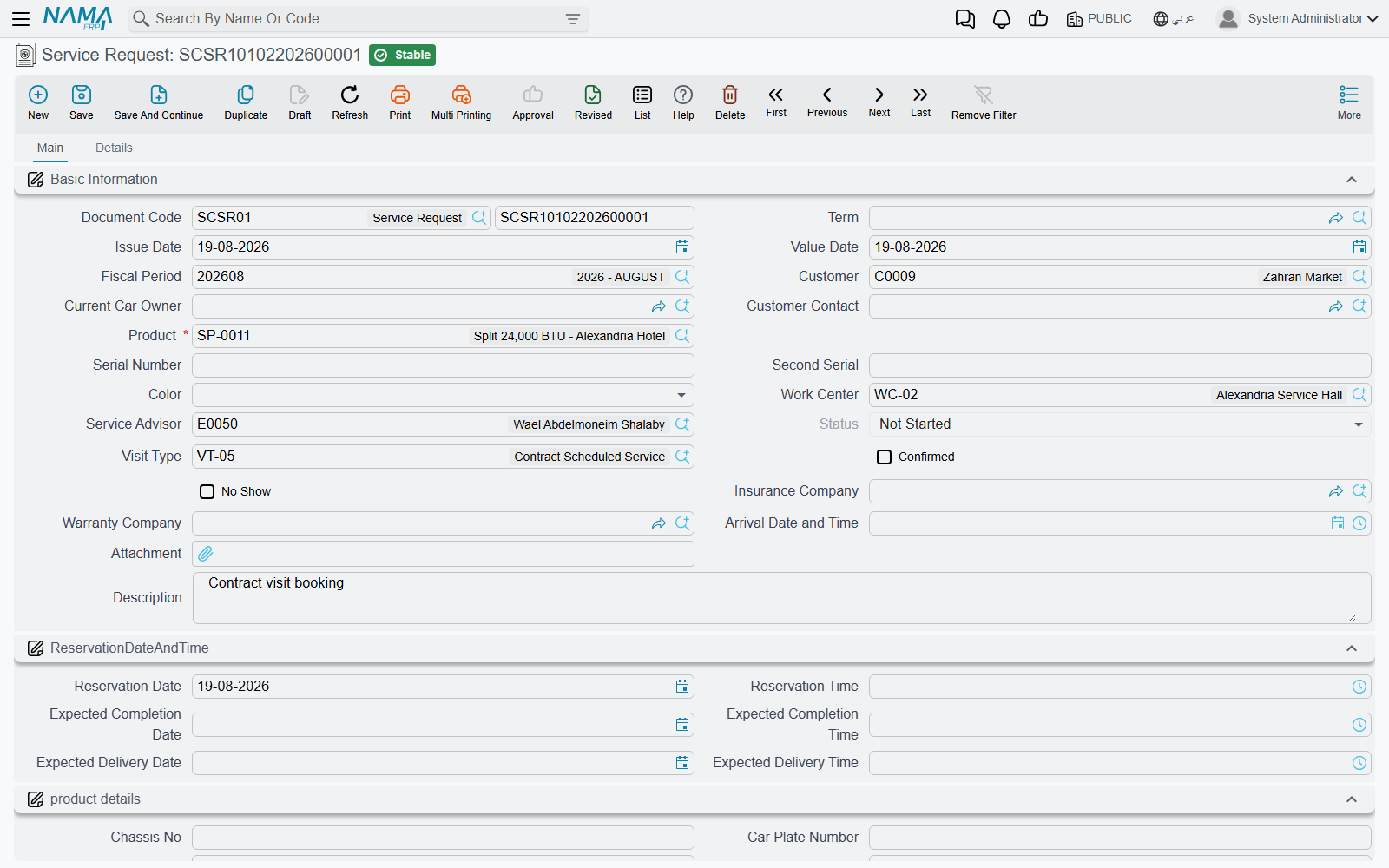
Booking Fahad's visit
Fahad Al-Otaibi telephones Al-Sahra Motors on 2 March 2026 to book his NAWA Saif 1.6 in for its routine service, with a complaint about the air conditioning. The service advisor raises SCSR-2026-0881:
- Picks the vehicle. Choosing
VEH-2031in the Product (المنتج) field fills in most of the screen: the current owner becomes the customer, and the plate, chassis, engine number, colour, brand, model, production year, insurance and warranty companies, the insurance dates and the last odometer reading all arrive from the vehicle file. - Sets the slot. Reservation Date 3 March and Reservation Time 09:00, with an expected completion and an expected delivery date and time.
- Lists the work. In the Operations (العمليات) grid the advisor enters the tasks — or a service that explodes into its tasks — and the hours and hour price arrive from the task catalogue. Five tasks totalling 6.5 hours.
- Chooses the visit type.
VT-SRVScheduled Service. The visit type matters more than it looks — see the capacity section below. - Commits. Those 6.5 hours are now booked against 3 March in the Mechanical Hall.
When he actually arrives on the morning of the 3rd, the advisor fills in Arrival Date and Time (تاريخ و وقت الوصول) on the same document.
The screen
Main page
| Group | What it holds |
|---|---|
| Basic Information (المعلومات الأساسية) | Document code (book + code), term, issue date, value date, fiscal period, customer, current car owner, customer contact, product, serial number, second serial, colour, work centre (صالة الإنتاج), service advisor, status, visit type, Confirmed and No Show ticks, insurance company, warranty company, arrival date and time, an attachment and remarks |
| Reservation Date and Time (تاريخ الحجز والتسليم) | Reservation date and time, expected completion date and time, expected delivery date and time |
| Product details (تفاصيل المنتج) | The vehicle block copied from the product file: chassis, plate numbers and characters, engine number, gear box, supplier code, accessories, last and current odometer with their dates and the difference between them, recall campaign, insurance kilometre, insurance start date, insurance period, insurance end date, brand, model, production year, average daily mileage, service contract and its status |
| Operations (العمليات) | Service, task, duration, count, hour price, total, remarks |
| Total (إجمالي السعر) | Materials total cost, tasks total cost, total cost — all calculated |
| Dimensions (المحددات) | Legal entity, analysis set, branch, sector, department |
Note what the operations grid on this document does not have: the four payer percent-and-value column pairs. The customer / insurance / warranty / internal split starts on the estimation and the job order, not here. A booking does not need to know who pays.
Details page
Two grids that mirror the job order's:
- Resources (موارد التشغيل) — task, resource, count, planned period (labelled Standard Flat Rate in the English UI), actual period, remarks.
- Spare Parts (قطع غيار) — task, material, unit and quantity, issue type, unit price, price, Restrict In Issuing, remarks.
Actions on this screen
- Collect Resources And Materials (تجميع الموارد والمواد الخام) — on the main page. It rebuilds the Resources and Spare Parts grids from the tasks already in the operations grid: each task's standard resources, and each task's standard spare parts that fit the vehicle's brand and model, priced through the ordinary supply-chain sales price engine for this customer. The two grids are replaced, not added to, so a line typed in by hand beforehand is gone afterwards. Spare parts come only when the Product field is filled.
- Create Reservation Doc (إنشاء سند حجز) — in the More menu. Opens a new, unsaved supply-chain reservation document whose From Document is this service request, with one line per row of the Spare Parts grid (item, quantity, remarks). Save the service request first. With an empty Spare Parts grid it refuses with: No Materials to be reserved — «لا يوجد قطع غيار ليتم حجزها»
A service request is a planning document: nothing is reserved or issued until you raise that reservation, or the job order's spare-parts documents.
How the capacity check works
This is the part worth understanding properly, because it is the only genuine capacity constraint in the module.
A loading table published for a work centre splits each day's total available hours into four buckets — appointments, carry-over, walk-ins and emergencies. Al-Sahra's Mechanical Hall has 5 bays × 8 hours = 40 hours a day, with 80 % — 32 hours — allocated to appointments.
When you commit a service request, two checks run:
- The reception window. The reservation time must fall inside the work centre's reception start and end times, which default to 08:00–14:00. A booking at 16:00 is refused.
- The appointment hours. The sum of the reserved hours of all service requests for that work centre on that date is compared with the day's appointment hours. If the new booking would push the total past 32, it is refused with a message saying the reservation cannot be allowed.
Fahad's 6.5 hours are checked against the 32, and the day entry's remaining hours drop accordingly. Cancelling or deleting the request gives the hours back.
There is one deliberate way past the check: a visit type with Always Allow Reservation switched on bypasses the appointment-hours test entirely. That is what you use for the customer who has broken down outside and must be taken today. Keep it on one clearly named visit type — an emergency type — rather than on your everyday ones.
What committing actually does
- Reserves the request's hours against the work centre's day entry.
- Fills in empty fields on the vehicle file — chassis, plate, engine, gear box, accessories, supplier code, brand, model, production year and the insurance dates. Fields that already have a value are left alone.
- Records the customer's contact as the vehicle's last requester contact.
- Adds a product status entry, if the term names a status to change to — this is how a booked vehicle can show as Waiting Reception on the product file.
And that is all. There is no accounting effect, no inventory effect and no generated document.
From booking to estimate
Once the customer arrives and the vehicle has been looked at, the advisor raises a job estimation with its From Document pointing at this request. The header and all three grids are copied across, and committing the estimation moves the request to Under Processing. A job order may equally be built straight from the request, skipping the estimate.
Nothing forces either step. A service request that is never followed by anything simply stays at Not Started and keeps holding its hours until somebody cancels it — which is a good reason to review old open requests, since every one of them is still consuming appointment capacity for a day that has long passed.