
Service Tasks
A workshop sells time. Before it can put a price on a repair it has to agree what the repair is — "change the engine oil and the oil filter", "replace the front brake pads" — how long that takes on a normal car, what parts it swallows, and what an hour of it costs. The service task is that agreement written down.
It is the atom of the whole workshop. Everything larger is built from tasks: a service is a bundle of them, a job order is a list of them, the shop-floor time sheet clocks them one by one, and the customer's invoice carries one line per task performed.
| Menu | Service Center → Master Files → Service Center Task (مركز خدمة > الملفات > المهمه) |
| Kind | Master file — no inventory effect, no accounting effect |
Required licence
srvcenter
Al-Sahra's Catalogue
Five tasks carry the whole of this documentation's workshop story:
| Code | Task | Standard hours | Hour price | Recurs every |
|---|---|---|---|---|
TSK-OIL | Engine oil and filter change / تغيير زيت وفلتر | 1.0 | 120 | 10,000 km |
TSK-BRK | Front brake pad replacement / تغيير تيل الفرامل الأمامي | 1.5 | 120 | — |
TSK-AC | A/C compressor replacement / تغيير كمبروسر التكييف | 3.0 | 120 | — |
TSK-ALN | Wheel alignment / ضبط زوايا الإطارات | 0.5 | 120 | — |
TSK-WSH | Vehicle wash and valet / غسيل وتنظيف السيارة | 0.5 | 120 | — |
Read the first row as a sentence: an oil and filter change on a NAWA Saif 1.6 takes one hour, that hour is billed at 120, and the car needs it again 10,000 km later.
A Task Is a Catalogue Entry, Not a Job
The single most common misreading of this screen is to treat it as work in progress. It is not. Nothing on the task record belongs to one car, one customer or one day. It is a price list entry and a method sheet — the thing the workshop can do.
The performed work lives elsewhere: as a line on a job order (planned), and as a clocked line on the shop-floor time sheet (actual). Editing a task never changes a job order that has already been raised; the figures were copied onto the job order when the task was picked.
The Main Tab
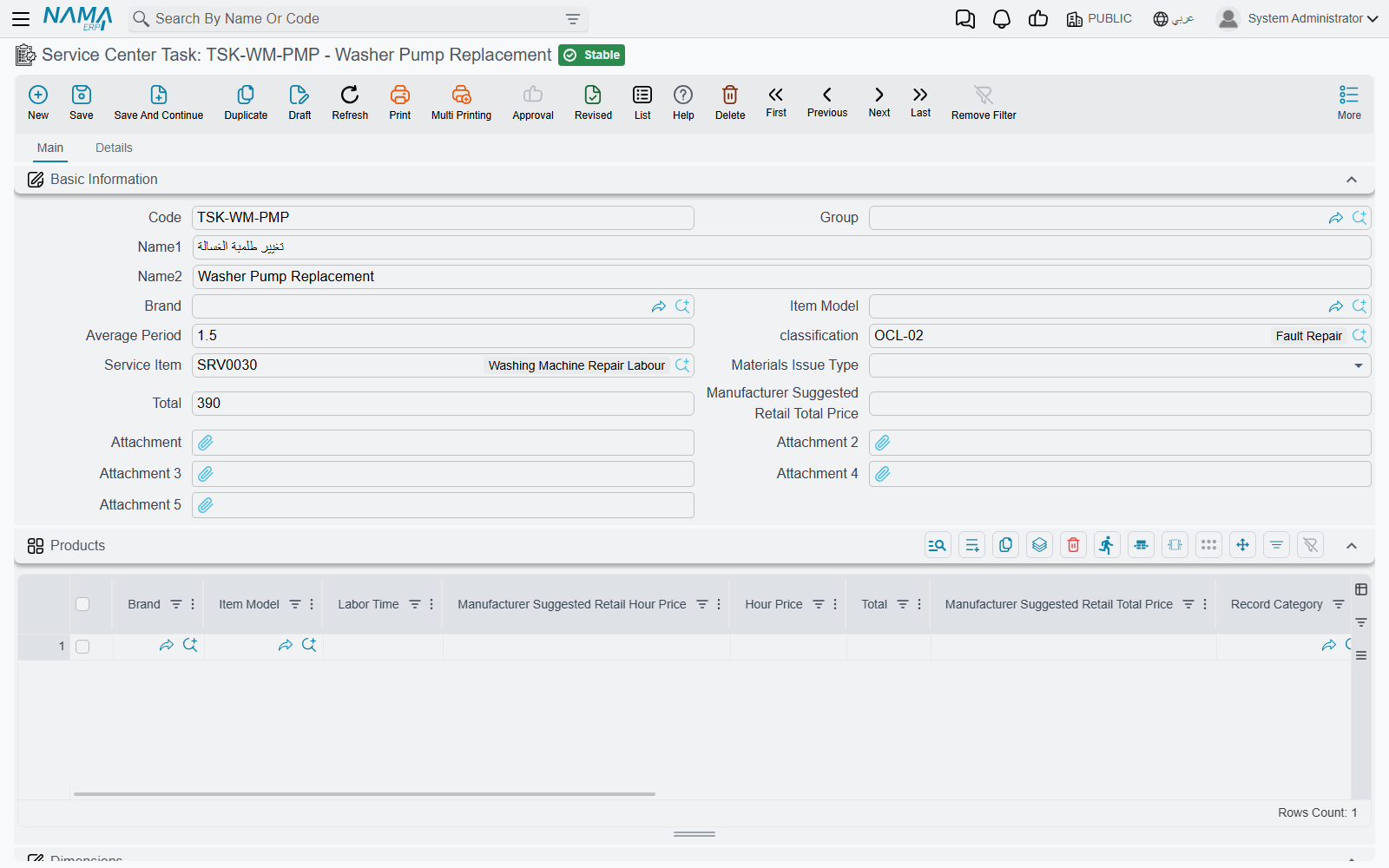
Basic Information
| Field | Arabic label | What it does |
|---|---|---|
| Code, Group, Name1, Name2 | الكود، المجموعة، الاسم العربي، الاسم الإنجليزي | Identity. Name1 is Arabic, Name2 English. |
| Brand | الماركة | Header classification — which marque this task belongs to. |
| Item Model | الموديل | Header classification — which model. |
| Average Period | متوسط مدة العملية | The generic standard duration, in hours. 1.0 for the oil change. This is the figure used when no model-specific row fits. |
| classification | التصنيف | A free tag from the Standard Operation Classification file. |
| Service Item | صنف الخدمة | The item that gets invoiced. When a job order is invoiced, this is the item on the labour line — SRV-OIL for the oil change — with a quantity of standard hours × count. Without it the task cannot be billed. |
| Materials Issue Type | طريقة صرف المواد الخام | Automatic (تلقائي) or Manual (يدوي) — how the parts this task consumes are meant to leave the store. |
| Total | إجمالي السعر | A flat total price for the task. |
| Manufacturer Suggested Retail Total Price | إجمالي سعر المورد | The manufacturer's list price for the same task, used instead of Total when the module is set to the MSRP pricing strategy. |
The brand field is spelled brad
Wherever you refer to this field by its identifier — an import file, a criteria definition, an entity flow, a query expression — the correct spelling is brad, not brand. The screen label reads "Brand"; the identifier does not. The same typo appears on the Products grid below.
The Products Grid — Labour Time per Model
Below the basic block is the grid headed Products (منتج), and despite the name it is not a list of vehicles. It is the manufacturer-style labour-time guide: one row per model, saying how long this task takes on that model and what the hour costs.
| Column | Arabic label | What it holds |
|---|---|---|
| Brand | الماركه | The marque. Required on every row. |
| Item Model | الموديل | The model — MDL-SAIF16. |
| Labor Time | مدة التشغيل | Hours this task takes on this model — 1.0. |
| Hour Price | سعر الساعة | The rate — 120. |
| Manufacturer Suggested Retail Hour Price | سعر ساعة المورد | The manufacturer's rate for the same hour. |
| Total | إجمالي السعر | Labour time × hour price, filled in for you. |
| Manufacturer Suggested Retail Total Price | إجمالي سعر المورد | The same product using the manufacturer's rate. |
| Record Category | تصنيف سجل | Optional. Lets you hold different rates for different categories of document. |
| Item Tax and Tax 2 / 3 / 4, Total After Taxes | ضريبة مبيعات … | The tax treatment carried with the row. |
| Description | الوصف | Free text. |
| Legal Entity, Branch, Sector, Department, Analysis Set | الشركة، الفرع، القطاع، الإدارة، المجموعة التحليلية | Dimensions on the row. |
Al-Sahra keeps this simple: each of the five tasks carries one row, for MDL-SAIF16, at the labour time and the 120 rate in the table above. That is deliberate, and the next section explains why.
Where the Hours and the Rate Actually Come From
Pick TSK-OIL on a job order for VEH-2031 and two numbers appear on the line: 1.0 hours and 120 an hour, giving a line total of 120. Where did they come from?
The screen looked in the task's Products grid for a row that fits the vehicle in front of it, found the MDL-SAIF16 row, and took its labour time and hour price. If it had found nothing, it would have fallen back to the header — the Average Period and the header Total — and derived an hour price by dividing one by the other.
That is the behaviour you see while typing.
Keep the product grid simple
The product row that fits your vehicle is looked up in three places: when you pick the task on a document, when the server recalculates prices on the saved document — where, if no row matches, it falls back to the work center's hour price and the task's Average Period — and when you build a service out of tasks. Keep the grid simple so that all three land on the same row:
- One row per model. Never two rows for the same model that differ only by brand.
- Fill Brand with the marque that actually owns the model. The column is required.
- Leave Record Category empty unless you genuinely price by document category, and then use it on every row.
- Make the work center's hour price agree with your rows. At Al-Sahra both are 120, so a recalculation lands on the same price.
Which price column is used
The module setting Service Price Strategy decides whether the workshop reads the ordinary Hour Price column or the Manufacturer Suggested Retail Hour Price column. It is an installation-wide switch, not a per-task one. Al-Sahra uses the ordinary price throughout.
The Details Tab
Raw Materials — What the Task Consumes
The grid headed Raw Materials (المواد الخام) is the task's bill of materials.
| Column | Arabic label | What it holds |
|---|---|---|
| Material | مادة خام | The spare part — SP-OIL-5W30, SP-FLT-OIL. |
| Item Model / Item Brand | الموديل / الماركة | Which vehicles the row applies to. |
| Primary UOM / Primary Quantity | الوحدة الرئيسية | How much of it the task uses — 5 litres of oil, 1 filter. |
| Issue Type | طريقة الصرف | Automatic or manual issue for this part. |
| Restrict In Issuing | المطابقة في السحب | Whether the store is held to the planned quantity when the part is issued. |
| Description | ملاحظات | Free text. |
On a job order there is a button, Collect Resources And Materials (تجميع الموارد والمواد الخام), which walks the task lines already on the order and rebuilds the spare-parts grid from each task's standard materials — filtered by the vehicle's model and brand — pricing each one through the ordinary sales-price engine. That is how the oil change's 5 litres and one filter reach the spare-parts grid without anyone typing them.
Restrict In Issuing is set by the document
The Restrict In Issuing column also appears on the job order's spare-parts grid, and there it is forced from the job order's توجيه on every save. Setting it here describes your intent; the document decides.
Resources — the Machines It Needs
A second grid, Resources (الموارد المستخدمة), lists the equipment the task needs: Resource ( مورد تشغيل), Resources Count (العدد), Resource Rate (مدة عمل المورد) and a description. The same job-order button that collects materials also collects these onto the order.
They travel as descriptive columns. There is no equipment scheduling anywhere in the module, so listing the alignment rig here documents the method — it does not reserve the rig.
Recurrence — What Makes a Task Come Back
The rest of the tab is about mileage-based maintenance.
- Default Recur Every Kilometre (القيمة الافتراضية لمدة تكرار الخدمة) — the general interval.
10,000on the oil change. - The Recurrence Rates grid (سطور معدلات التكرار) — per Product (المنتج), Item Model (الموديل) and Item Brand (الماركة), each with its own Recur Every KM (تكرر كل / كم). Use it when the same task recurs at different intervals on different models, or on one particular vehicle.
The first matching row wins; if none matches, the default interval applies.
That interval is what makes the arithmetic on the vehicle's file mean something. VEH-2031 last had its oil done at 36,000 km; the interval is 10,000 km; so the next one falls due at 46,000 km. The car reads 45,300 on 3 March and burns about 60.7 km a day, which puts the next visit around 15 March 2026 — and that is the date the job order closing projects.
Finding and Tagging Tasks
The picker lists the whole catalogue. On a job order, the task picker shows every task in the catalogue. If you want technicians to find the right task quickly, use codes and groups that sort well.
The classification is a free tag. The classification field, and the Standard Operation Classification file behind it, give you a column to search and filter the task list by. See tags and classification files.
Building the Catalogue
- Create the work center first, so its hour price is available as the safety net.
- Create one task per repair step you want to be able to quote, name and clock separately. Resist the urge to make one task mean "full service" — that is what a service bundle is for.
- Give every task a Service Item. Without one the labour cannot be invoiced.
- Set the Average Period to the honest generic duration, then add one Products row per model you actually service, at the labour time and rate that model deserves.
- Add the raw materials and the equipment if you want the job order's collect button to fill them in.
- Add a recurrence interval to anything mileage-based, and give the mileage-based tasks the tightest naming — they are the ones a service advisor hunts for under pressure.