
Parts on a Job Order
Half of a workshop's invoice is usually metal, not labour. On Al-Sahra's job order SCJO-2026-0417 the five tasks come to 780 and the four parts come to 2,435 — a compressor, a set of brake pads, an oil filter and five litres of oil. Getting those four lines right is most of getting the bill right.
This page is the map of how a part travels from the plan on the job order to the customer's invoice, and of the two numbers — cost and price — that travel with it.
Required licence
srvcenter
The journey
- Planned. The job order's own materials grid lists what the work is expected to consume: item, quantity, unit price, and a per-line المطابقة في السحب / Restrict In Issuing flag that decides whether that plan is a limit or a suggestion.
- Requested (optional). The technician raises a Spare Parts Issue Request (طلب صرف قطع غيار) asking the store for the parts. It is a piece of paper — see below.
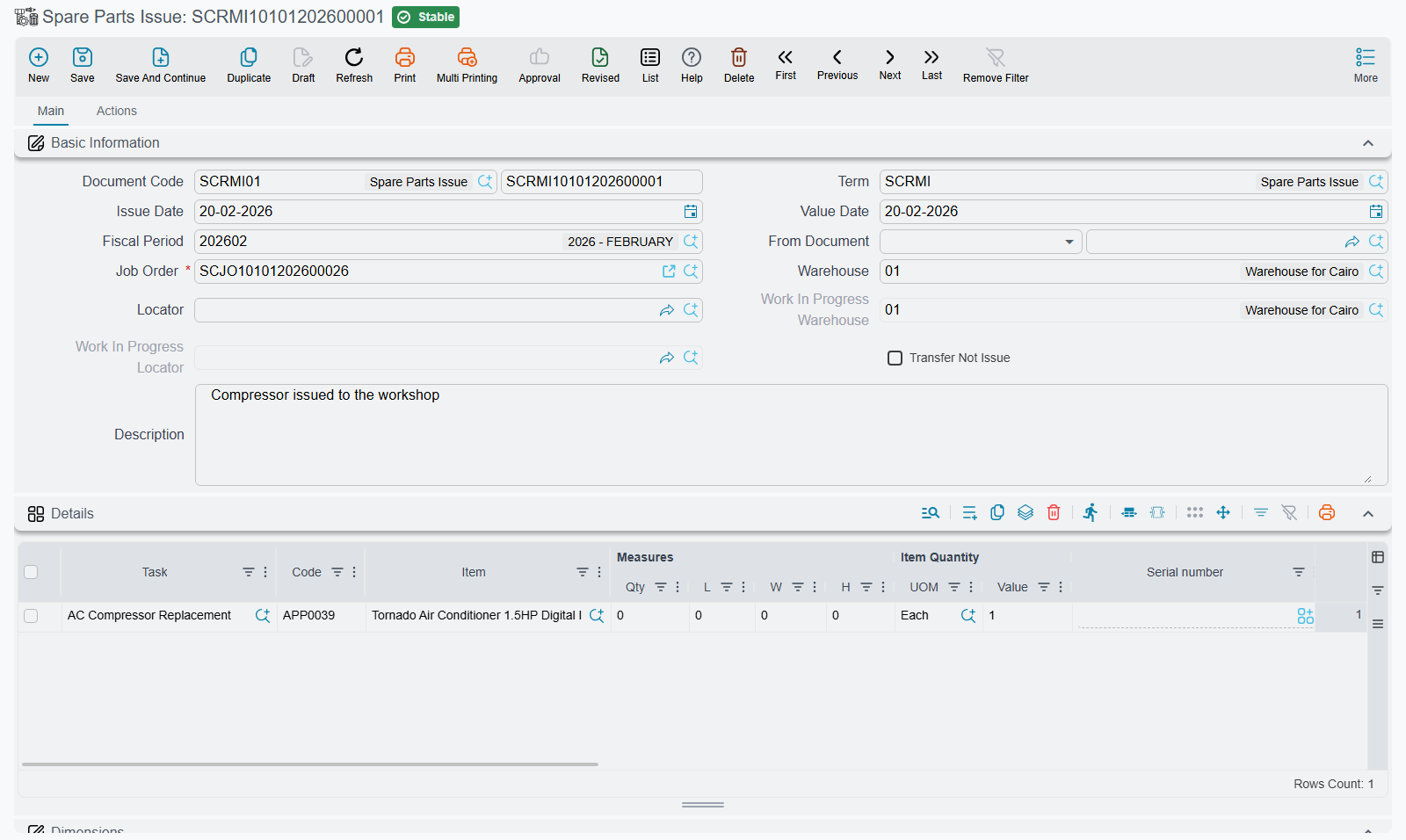
- Issued. The storekeeper raises a Spare Parts Issue (صرف قطع غيار) against the job order. Depending on the term, this either issues the parts out of the store or transfers them into the job order's work-in-progress store.
- Returned (when something comes back). A Spare Parts Return (إرتجاع قطع غيار) puts unused parts back.
- Consumed. The job order closing splits every material's value across the customer, insurance, warranty and internal shares, and the invoices are raised from those shares.
On the canonical job, step 3 is issue SCRMI-2026-1902 on 3 March out of WH-PARTS, which generates stock issue STI-2026-1188; step 4 is return SRMR-2026-0344 bringing one litre of oil back.
| Item | Issued | Returned | Consumed |
|---|---|---|---|
SP-OIL-5W30 Engine oil 5W-30 | 6 | 1 | 5 |
SP-FLT-OIL Oil filter | 1 | — | 1 |
SP-PAD-FR Front brake pad set | 1 | — | 1 |
SP-CMP-AC A/C compressor | 1 | — | 1 |
No Service Center document moves stock by itself
This is the sentence to remember before configuring anything.
The spare parts issue, the return and the request are all paper documents in inventory terms. None of them changes a quantity on hand, and none of them creates an inventory or cost-of-sales entry. What the issue does is generate a supply-chain document — a stock issue, or a stock transfer if its term says Transfer Not Issue — and it is that generated document which raises the inventory business request, moves the quantity and books the cost. The return generates a stock receipt (or the reverse transfer) in exactly the same way.
A blank generation book and term means nothing moves
The generated document is created with the Generation Book and Generation Term named on the spare-parts document's own term. If either is empty, no stock document is created at all — and any one previously generated is deleted. The spare-parts document still saves, still commits, still shows quantities and prices, and still writes the job order's parts ledger. The parts simply never leave the store as far as inventory is concerned.
This is the single most common configuration mistake in the module, and it produces no error message of any kind. Before going live, commit one test issue and confirm the generated stock issue appears on the document's الحركات / Actions page.
To stop generation, clear the book or the term; to start it, fill them both.
Because the stock movement belongs to the generated document, that is also where you look when something goes wrong: a failed inventory entry is a business request against the stock issue, not against the spare parts issue, and it is retried from the Business Requests list view.
Cost and price are two unrelated numbers
Readers almost always assume the second is derived from the first. It is not.
Cost is the item's inventory cost. The generated stock issue is valued by the standard costing engine using the item's own cost method, and the entry it creates is the one that relieves inventory and charges cost of sales. Nothing in Service Center overrides that valuation with the price on the line.
Price is what the customer is billed, and it comes from the job order's plan — the unit price on the materials grid — or, when the plan carried no price, from whatever the storekeeper typed in Unit price on the issue, which is then written back onto the job order.
On SCJO-2026-0417 the two numbers look like this:
| Item | Qty consumed | Inventory cost | Billed unit price | Billed value |
|---|---|---|---|---|
SP-OIL-5W30 | 5 | 21 | 32 | 160 |
SP-FLT-OIL | 1 | 28 | 45 | 45 |
SP-PAD-FR | 1 | 245 | 380 | 380 |
SP-CMP-AC | 1 | 1,290 | 1,850 | 1,850 |
| Total | 1,668 | 2,435 |
There is no markup mechanism anywhere
Nothing in the module derives a selling price from a cost. There is no markup percentage on the item, on the task, on the work centre, on the job order term or on the material document. The 767 between 1,668 and 2,435 is not a configured margin — it is simply the gap between what the parts cost and what somebody decided to charge for them.
If your parts pricing has to follow cost, that has to come from the standard price-list machinery on the item, or from the price you plan on the job order. Do not expect a percentage anywhere.
The system parts ledger
Behind the documents sits a small system table — جدول قطع الغيار النظامى, the parts ledger — with one row per job order and item. Every commit of an issue or a return rebuilds it from all the job order's committed issues and returns, accumulating the issued, transferred, returned and transferred-back quantities into a net total, and storing a unit price.
That table is what the job order's materials grid is rebuilt from when the job order's term is set to accept tasks and materials from other documents, and therefore what the closing and the invoices are ultimately built on. It is worth knowing it exists, because it explains why cancelling a document can change a quantity you thought was typed by hand.
One row per item, or one per warehouse
By default the ledger keys on the item alone. Switch on إعتبار المخزن و الموقع في جدول قطع الغيار النظامى / Consider Warehouse And Locator In Material Entries in the Service Center settings and it keys on warehouse and locator too, giving you separate rows per store.
The plan, and whether it is a limit
The job order term option إضافة مهام قطع غيار لأمر الشغل من سندات خارجيه / Add Tasks And Materials to Job Order From Other Documents decides which of the two regimes you are in, and it is the most consequential option in this whole area.
Switched off — the plan rules. Every line on an issue must name a task; the item must be planned on the job order for that task, or you get
The item {0} is not planned with task {1}
and the cumulative issued quantity for that item and task may not exceed the planned quantity, or you get
Issued Qty for item {0} for operation {1} exceeds its allowed limit
Neither message has an Arabic text, so both appear in English on Arabic screens too. Returns are netted off before the comparison, so issuing 6 litres, returning 1 and issuing 1 more is fine against a plan of 6.
That limit only applies to job order material lines whose المطابقة في السحب / Restrict In Issuing box is ticked. An unticked line has no issuing limit at all — which is a deliberate switch, and a useful one for consumables, but it means an unticked plan is a suggestion and nothing more.
Switched on — the documents rule. All of the checks above are skipped, and the job order's materials grid is rebuilt from the issues and returns instead. This is the right setting for a workshop that discovers what it needs as it strips the car, and the wrong one for a workshop that wants its estimate honoured.
Somebody else's draft can trip your limit
The "exceeds its allowed limit" check counts every spare parts issue for the job order, including ones that have been saved but not committed. A colleague's draft issue for the same car can push your issue over the limit, with a message that names the item and gives no hint where the other quantity came from. If a limit message makes no sense, look for another open issue against that job order.
The issue request
The Spare Parts Issue Request exists so that a technician can ask for parts on the system rather than by shouting across the workshop, and so that the storekeeper can build the issue from it with the standard Generate Doc action, which carries the job order across.
That is the whole of it.
The request is a record of what was asked for and a source document for the issue: the stock movement, the parts ledger and the job order updates all come from the issue built from it.
The request does still run the full plan, limit and job order status validation described above — so a request that is refused tells you something real about the plan before the storekeeper wastes a trip.
Where to go next
- Issuing Spare Parts — the issue screen field by field, the two modes, and the price write-back.
- Returning Spare Parts — what comes back, and the one rule you must follow when it does.
- External Repair — work sent to an outside workshop, which behaves nothing like a part.