
External Repair
Some jobs leave the building. The A/C compressor on Fahad Al-Otaibi's Saif has to be bench-tested, and Al-Sahra has no rig for it, so it goes across town to SUP-91 Al-Faisal Auto Electric, who charge 400 for the work.
The External Repair document (مستند اصلاج خارجي) is how that 400 is recorded. It is worth being precise about what it is, because its name suggests a workshop document and it is not one: it is a purchase invoice for sublet work, and it behaves like one.
You will find it at Service Center > Documents > External Repair.
Required licence
srvcenter
The screen title
The screen title shows in Arabic in an English session too, spelled «مستند اصلاج خارجي» on screen. The menu entry reads External Repair.
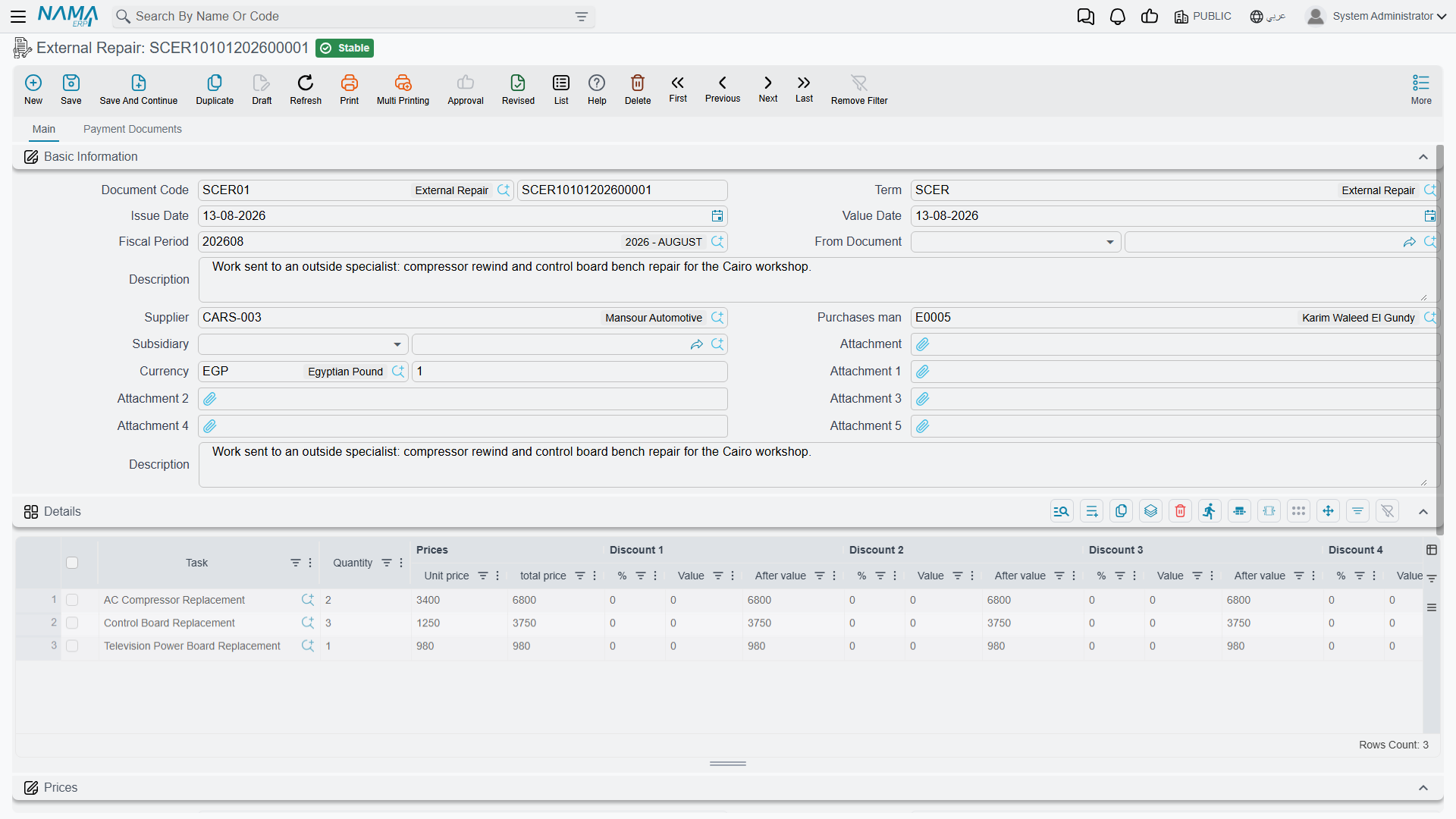
What the document holds
The Main page carries the document book and code, term, dates and fiscal period, a description, and then the commercial block: مورد / Supplier, مندوب المشتريات / Purchases man, الذمة / Subsidiary — which may be an employee or an account — currency and rate, six attachments, and a بناءا على / From Document field.
The details grid is where the work is listed, and it has no item and no warehouse:
| Column | What it is |
|---|---|
| المهمة / Task | Required. Which task of the job order the outside workshop performed. |
| Quantity, unit price, total | The sublet charge for that task. |
| Discounts 1–8, taxes 1–4, net | The standard invoice line money block. |
| حساب / Account | The expense account the charge is debited to. Typed per line. |
| Subsidiary and subsidiary account type | The counterparty for that line, if it differs from the header. |
Below the grid sits the money block — totals, discounts, taxes, net value, paid, remaining — and a Payment Documents page carrying external payment lines, payment method lines, a payment template and an instalment schedule.
Its only connection to the workshop is From Document. There is no job order field. Point From Document at job orderSCJO-2026-0417 and the grid pre-fills with one line per task on that order, each at quantity 1 — and no price. You delete the tasks that stayed in-house, keep TSK-AC, and type 400 and the expense account against it.
What committing does
Two things, and only two.
It books the money. The document is recorded as a purchase: the supplier — or the subsidiary named on the line — is credited and the line's expense account is debited, with discounts, taxes and cash following the accounts on the document's term. (The term option تعمل مبيعات ليست مشتريات / Is Sales Not Purchase reverses the direction for the unusual case where you are billing an outside party for work you did.) Any payments or instalments are handled from the second page, exactly as on any supplier invoice.
It marks the tasks finished. For every line on the document, the matching task on the job order is set to Finished.
It creates no purchase order, no purchase invoice, no stock document and no inventory movement.
The external cost does not reach the job order
This is the expectation everybody arrives with, and it is wrong.
The sublet cost never lands in job costing
Nothing in the job order's costing chain reads an external repair. The job order's own cost, the parts ledger, the job order closing and all three customer / insurance / warranty invoices are unaware that the document exists.
So Al-Sahra's 400 lands in the general ledger against the expense account and against Al-Faisal's supplier balance — correctly, and that is where it stays. It does not join SCJO-2026-0417's 3,215, it does not appear as a cost line on the job, and it is not re-billed to anybody automatically.
If the customer, the insurer or the warranty provider is meant to pay for the sublet work, somebody has to put it on the job order by hand: add a task or a material line carrying that value, before the order is closed. Nothing will remind you.
The practical consequence for anyone reading job profitability out of Nama: a job with sublet work looks more profitable than it is. If external repair is a regular part of your business, treat the supplier's account — or a dedicated expense account per workshop — as the place where that cost is analysed, and do not expect the job order to reconcile to it.
The tasks flip to Finished immediately
The moment the external repair is committed, every task it names goes to Finished on the job order — not when the outside workshop returns the work, but when the invoice is entered.
Cancelling does not put the tasks back
If you cancel or correct an external repair, the tasks it marked Finished stay finished. The document's cancellation restores nothing, and there is no message. Put the task status back yourself from the job order execution document — its change status buttons and its Review grid are the only way — before the closing picks up work that was never actually done.
Cancelling destroys the line attachments
Cancelling or deleting an external repair sets every detail line's attachment to empty, permanently. The outside workshop's quotation, its report, the photographs of the stripped part — all gone, and they are not restored when the document is committed again.
Keep the supplier's paperwork somewhere else as well: on the header attachments, on the job order, or in your document archive. Treat the line attachments on this document as disposable.
The car is out of the workshop, and nothing tracks it
There is no vehicle on this document. No sub-item, no warehouse, no locator, no "sent" date and no "returned" date. The only status it moves is the job order task status described above.
So the module has no answer to where is the car, and since when? while it is at an outside workshop. If you need that, the options are the job order's own remarks, a suspension raised from the pending operation document with a sent for external repair reason — which at least puts the order into a visible Pending state and stops it being closed — or a procedure outside the system. Do not look for it on the external repair.
Note also that the gate pass is a different document with a different job: it is a release check against invoices and payment, not a record of a vehicle leaving for a sublet repair. The two must not be confused.
Effects at a glance
| Inventory effect | None. No item, no warehouse, nothing moves. |
| Accounting effect | A payable to the supplier (or a receivable, with Is Sales Not Purchase), against the expense account named on each line. |
| Documents generated | None. |
| Effect on the job order | The named tasks are set to Finished. Nothing else — no cost, no material, no price. |
Actions on this screen
- Installment Payments (سندات سداد الدفعات, More menu) — opens a pop-up list of the payments recorded against this document's instalments: the instalment code, the paying document, its date, the paid value and the effect type. Use it to see which vouchers have settled which instalment.