
Issuing Spare Parts
The Spare Parts Issue (صرف قطع غيار) is the document the storekeeper raises when parts leave the store for a car. It is the busiest document in the workshop and the one that decides, more than any other, whether the job's cost and the customer's bill come out right.
You will find it at Service Center > Documents > Spare Parts Issue.
Required licence
srvcenter
The screen title is in Arabic even in an English session
This document — like the return, the request and the external repair — has no English title registered, so the screen header shows صرف قطع غيار whichever language you are working in. The menu entry is in English. Nothing is wrong with your installation.
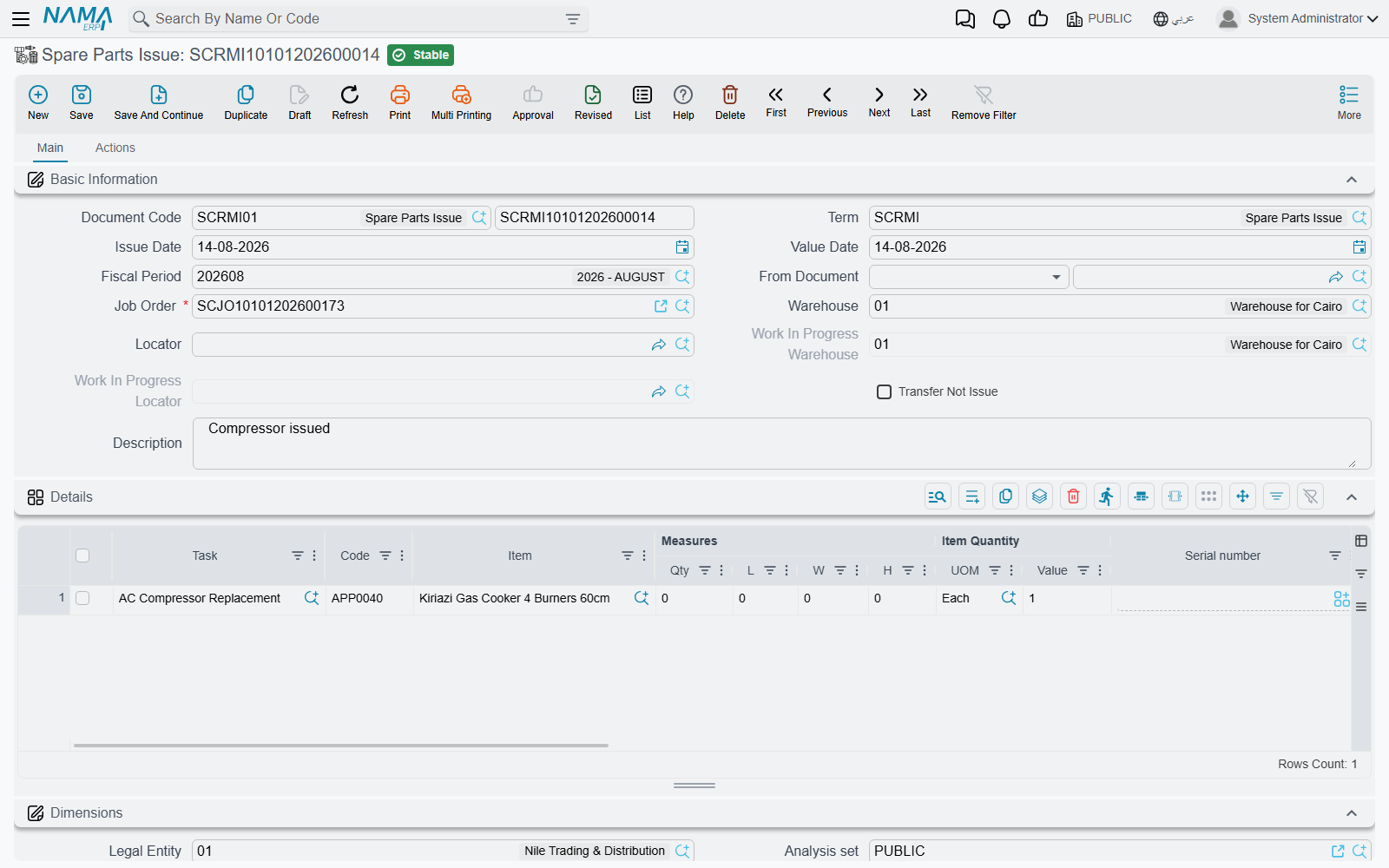
The screen
Basic Information carries the document book and code, توجيه المستند / Term, issue and value dates, fiscal period, بناءا على / From Document, and then the fields that matter:
| Field | What it is |
|---|---|
| أمر الشغل / Job Order | Required. Everything on the document hangs off it. |
| المخزن / Warehouse and الموقع / Locator | Typed by you — the store the parts come out of. Pushed down onto the lines, which may each override it. |
| مخزن التشغيل / WIP Warehouse and موقع مخزن التشغيل / WIP Locator | Read-only, copied from the job order. Used only in transfer mode. |
| تحويل لا صرف / Transfer Not Issue | Read-only, copied from the document term. It decides which of the two modes below you are in. |
The details grid is a full supply-chain line: المهمة / Task, item code and item, quantity and unit of measure, the item's own dimensions (serial, lot, size, colour, revision, production and expiry dates), a السياره / Customer Car column, a line-level warehouse and locator, an attachment, and — the two columns this page keeps returning to — سعر الوحدة / Unit price and the resulting total price.
The الحركات / Actions page holds two read-only lists: the stock transfer documents and the stock issues generated by this document. That is where you confirm the parts really moved.
Filling it in
Choosing the job order copies its planned materials in, one line each, with the item, the quantity and the planned unit price. That is the normal path and the one that keeps prices right. If your workshop would rather start from an empty grid, the term option عدم نسخ التفاصيل من أمر الشغل / Do Not Copy Details From Job Order turns the copying off.
Choosing a task in a line expands that task's parts list. The line you were editing disappears and is replaced by one line per material the task consumes, filtered to the vehicle's brand and model. Convenient — and the one place on this screen where you must check your work:
Parts added by expanding a task arrive with no price
The lines created by picking a task carry the item, the task and the quantity — and no unit price. Because the price write-back onto the job order only fills a price that is still zero, a zero-priced part stays zero all the way through: zero on the job order, zero in the closing, and zero on the customer's invoice. The part is given away and nothing warns anybody.
After expanding a task, type the unit price on every line it produced, before you commit.
The Task lookup on a line only offers tasks that exist on the job order, and the From Document lookup only offers job orders that are Under Processing or Not Started.
Two modes: issue, or transfer to the work-in-progress store
Which mode you are in is decided by تحويل لا صرف / Transfer Not Issue on the document's term, and copied onto the header where you can see it.
Issue mode (the default). Committing generates a Stock Issue out of the line's warehouse using the term's Generation Book and Term. That document raises the inventory business request, relieves the quantity and creates the cost-of-sales entry under its own term's accounts. On the canonical job, issue SCRMI-2026-1902 generates stock issue STI-2026-1188 out of WH-PARTS.
Transfer mode. Committing generates a Stock Transfer instead, using the term's Transfer Book and Transfer Term, moving the parts from your warehouse and locator into the job order's work-in-progress store — WH-WIP / WIP-01 at Al-Sahra. The parts remain in stock; they have simply moved to the shop floor. Use this when you want work-in-progress visible as inventory, and remember that in this mode it is the Transfer book and term that must be filled, not the generation pair.
If the book and term are blank, nothing moves
In either mode, an empty book or term means no stock document is generated at all — and any previously generated one is deleted. The issue still commits, still prices, still writes the parts ledger and still feeds the invoice. The parts simply never leave the store in inventory terms.
To stop this document generating a stock document, clear the book or the term.
Different warehouses, several stock issues
The generated stock documents are grouped by the line's warehouse. If some lines draw from WH-PARTS and others from a second store, one spare parts issue produces more than one stock issue. Both appear on the Actions page; both are processed separately.
What the price on the line does
The unit price on an issue line is not a cost. It is the price the customer will be billed, and after commit it is written back onto the job order:
- For every issued line, the matching job order material line is found by task and item, and if its unit price is still zero it is set to the issue line's price. A price already planned on the job order is never overwritten — the plan wins.
- When the job order's term has إضافة مهام قطع غيار لأمر الشغل من سندات خارجيه / Add Tasks And Materials to Job Order From Other Documents switched on, the job order's whole materials grid is rebuilt from the parts ledger instead: net quantity per item, unit price from the ledger, value recomputed. The term option فرد كميات الأصناف… / Spread Items Quantity If It Is Issued In Different Material Issues switches that rebuild from one aggregated line per item to one line per issue line.
The rebuild clears the payer split
When the materials grid is rebuilt from the issues, each rebuilt line comes back with its customer, insurance, warranty and internal values at zero. On a job like SCJO-2026-0417, where the compressor is 100 % warranty and the pad set is split 50/50, that split has to be re-entered on the job order after the parts are issued — and before the closing. Reopen the job order and check the four columns before you close.
The same part issued twice at two prices
The parts ledger keeps one unit price per item, and it is overwritten by each issue line processed — the last one wins, in no particular order. Issue five litres of oil at 32 and one more at 35 and the price that reaches the job order is whichever was processed last, not an average. Either keep one price per item per job, or switch on the spread quantities option so each issue keeps its own line and its own price.
What is refused
A spare parts issue is refused when the job order is Closed or Cancelled, or when a customer, insurance or warranty invoice has already been raised for it — "Invoice or more issued for this job order". With the plan regime in force, it is also refused for a line with no task, an item that is not planned for that task, or a quantity that takes the cumulative issued past the plan. Those checks are described on the overview page.
Who may delete a committed issue
A committed spare parts issue can be deleted after its job order has been closed and invoiced, and deleting one changes the cost of a job that has already been billed.
Restrict the delete permission on the spare parts issue to a small number of supervisors, and correct mistakes with a return rather than a deletion.
Accounting
The spare parts issue itself creates no entry unless you deliberately configure the debit and credit sides on its own term. Leave them empty — which is the normal setup — and the only accounting entry in the whole chain is the one the generated stock issue creates under its own term: inventory relieved at the item's cost, cost of sales charged. The customer's revenue arrives later, from the invoices raised after the job order closing.