
Who Pays for What
In an ordinary workshop the bill goes to whoever brought the car in. In a franchised dealership it almost never does. One visit can easily contain a routine service the owner pays for, a failed component the manufacturer's warranty covers, accident damage an insurer is settling, and a goodwill gesture the dealership absorbs itself — all on the same vehicle, on the same day, on the same job order.
Nama's Service Center handles that head-on. Every operation line and every spare-part line carries four percentages and four values: customer, insurance, warranty and internal. The split is decided line by line, it is checked when the document commits, and it is what the closing document totals and what the three invoice buttons read. This page is the rulebook for it.
Where you will meet it
The four percent-and-value pairs appear on the operations grid and the spare-parts grid of the job estimation, the job order, the Add Task To Job Order document and the job order closing. They do not appear on the service request — a booking has no opinion about who pays. Licence srvcenter.
The columns
| Column pair | Arabic | Meaning |
|---|---|---|
| Customer % / value | العميل | % / قيمة | What the person who owns the car pays |
| Insurance % / value | التأمين | % / قيمة | What the insurer named in the document header pays |
| Warranty % / value | الضمان | % / قيمة | What the warranty provider named in the header pays |
| Internal % / value | الشركة | % / القيمة | What the company absorbs itself |
The insurance company and the warranty company are single fields on the document header, filled in automatically from the vehicle file when you pick the vehicle. There is one insurer and one warranty provider per job order — you cannot split one line between two different insurers.
The split is applied to the line's value after discounts, not to its gross price. If you give a 10 % discount on a 380 part, the four shares divide the 342 that remains.
The rule, stated once
Every time the document is saved, each priced line is put through the same three steps.
1. An untouched line belongs to the customer. If all four values are empty or zero, the line is set to 100 % customer. This is the sensible default: type nothing, and the person who brought the car in pays for it. It is also why a workshop that never uses insurance or warranty can ignore these columns completely and nothing changes.
2. The customer share is driven by its percentage.
customer value = line value × customer %
3. The other three shares are driven by their values.
insurance % = insurance value ÷ line value (and the same for warranty and internal)
That asymmetry is not a typo and it is the single thing to remember from this page.
Type the customer's percentage, and the others' values
Because the customer share is computed from its percentage and the other three from their values, the same number typed into the wrong box behaves differently:
- Typing 80 into Insurance % and leaving the insurance value empty is not enough. On save the percentage is recomputed from the empty value — back to zero — and the line then fails the commit check with an error about the percentage distribution.
- Typing a customer value without the matching percentage is likewise overwritten.
On screen this rarely bites, because the fields keep each other in step while you type: fill in either box and its partner follows. The trap is everywhere else — an import file, a web service, a data load from a legacy system. Never load one side only. Supply both the percentage and the value for all four payers, or supply the customer's percentage and the other three payers' values.
Finally, if the percentages come to 100 but the four values are a rounding fraction short of the line price, the difference is added to the first non-zero share, in the order customer → internal → insurance → warranty. That is why an odd unit price can leave the customer a fraction of a riyal above the exact percentage.
What the document refuses
On commit, for every priced line:
- the four percentages must total 100 (within a hundredth of a percent), and
- the four values must total the line price.
If either fails, the commit is refused and the error is reported against the customer percentage column of the offending grid — so look at the whole line, not just the column the message points at.
Note the asymmetry with the estimation: the job estimation performs no checks of its own, so a broken split can sit quietly on a quote and only announce itself on the job order built from it.
The eight header percentage fields
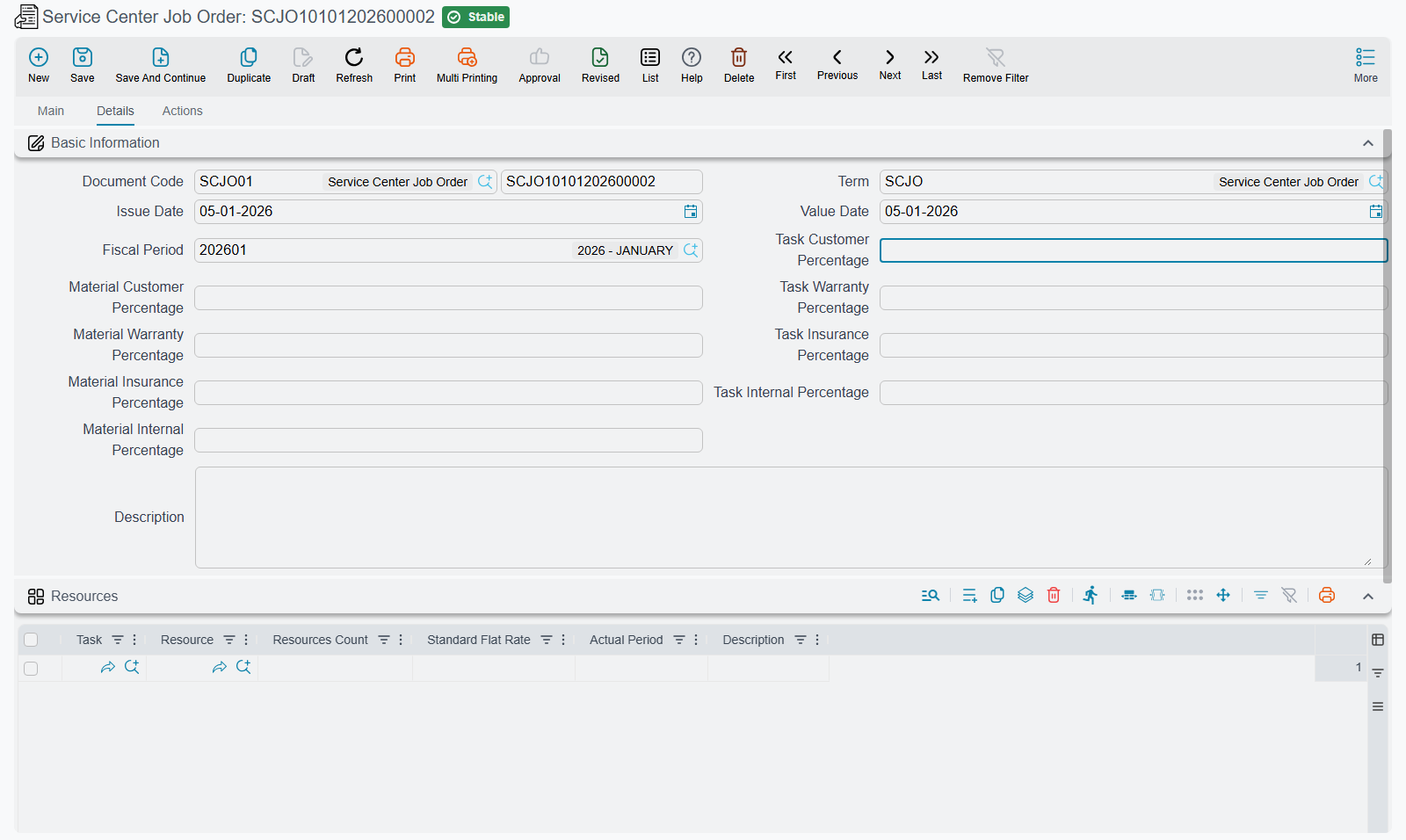
The Details page of the job order carries eight percentage fields — customer, insurance, warranty and internal, once for the operations grid and once for the spare-parts grid.
They are one-shot bulk-apply widgets. Type 100 into Task Customer Percentage and every line currently in the operations grid is stamped with 100 % customer and its value recomputed. That is their entire behaviour.
They are not:
- a default for lines you add afterwards — a new line ignores them completely;
- a policy that is re-applied when you save.
After you edit a single line, the header fields are stale and mean nothing. Use them as a fast way to paint a grid, then forget them.
The worked example
Fahad's job order SCJO-2026-0417 is the canonical case. The story behind the numbers: the routine service is the customer's, the air-conditioning failure is under warranty, the alignment follows an insurance claim, and the wash is a goodwill gesture the company absorbs. The brake job is shared — the pads were replaced early as a warranty gesture, the labour was not.
| Line | Line value | Customer | Insurance | Warranty | Internal |
|---|---|---|---|---|---|
| Oil change labour | 120 | 120 (100 %) | — | — | — |
| Engine oil 5W-30 | 160 | 160 (100 %) | — | — | — |
| Oil filter | 45 | 45 (100 %) | — | — | — |
| Brake labour | 180 | 180 (100 %) | — | — | — |
| Front brake pad set | 380 | 190 (50 %) | — | 190 (50 %) | — |
| A/C labour | 360 | — | — | 360 (100 %) | — |
| A/C compressor | 1,850 | — | — | 1,850 (100 %) | — |
| Alignment labour | 60 | — | 60 (100 %) | — | — |
| Wash labour | 60 | — | — | — | 60 (100 %) |
| Totals | 3,215 | 695 | 60 | 2,400 | 60 |
Every line's four percentages total 100 and its four values total the line price, which is exactly what the commit check requires. 695 + 60 + 2,400 + 60 = 3,215. ✓
Note the brake pad line: the operator typed 190 into the warranty value, and the customer percentage 50. Two different boxes, two different rules, one balanced line.
The roll-up per operation
Each operation line also carries four system totals — its own share plus the shares of every spare part hanging off it. These are the figures the closing document adds up, so it is worth being able to read them:
| Operation | Customer | Insurance | Warranty | Internal |
|---|---|---|---|---|
| Oil change | 325 | — | — | — |
| Brake pads | 370 | — | 190 | — |
| A/C | — | — | 2,210 | — |
| Alignment | — | 60 | — | — |
| Wash | — | — | — | 60 |
| Total | 695 | 60 | 2,400 | 60 |
What each share is finally used for
| Share | Where it ends up |
|---|---|
| Customer | The customer invoice; the closing's Total Customer box; and the only amount the closing records in the ledger |
| Insurance | The insurance invoice, raised against the header's insurance company as the accounting الذمة; the closing's Total Insurance box |
| Warranty | The warranty invoice, raised against the header's warranty company as the accounting الذمة; the closing's Total Warranty box |
| Internal | The closing's Total Internal box, and nothing else |
The internal share is a memo figure, not an accounting entry
There is no invoice button for the internal share, no book, no term option and no fetcher — nothing anywhere generates a document from it. And the closing's journal entry carries the customer amount only.
So the 60 that Al-Sahra absorbed for Fahad's wash appears on one screen, in one box, and reaches the general ledger by no route at all. If you need the cost of goodwill work in your accounts, you have to raise that entry yourself.
The insurance and warranty shares are better off — but only because their invoices record them. Skip the invoice and that money never reaches accounting either.
The job order also tracks an invoicing status per payer. A payer whose percentages across all lines come to zero is shown as Not Applicable rather than Not Invoiced, which is how you tell "there is nothing to bill this payer" apart from "this payer has not been billed yet".
Practical advice
- Decide the split when you price, not when you close. The closing copies whatever the job order says; correcting a split afterwards means deleting the closing, which is only possible while none of the three invoices exists.
- Use the header spreaders for the common case, then fix the exceptions line by line. Most job orders are 100 % customer with two or three warranty lines.
- Check the totals before closing. The four money boxes on the closing document are your reconciliation: they must add up to the job total.
- Never split a line between two insurers. There is one insurance company and one warranty provider per job order. Two insurers mean two job orders.