
Invoicing a Job Order
One repair, up to three invoices. That is the shape of billing in this module, and it follows directly from the payer split: the customer's share, the insurer's share and the warranty provider's share each become their own sales invoice, built from the lines where that payer owes something. The internal share becomes nothing at all.
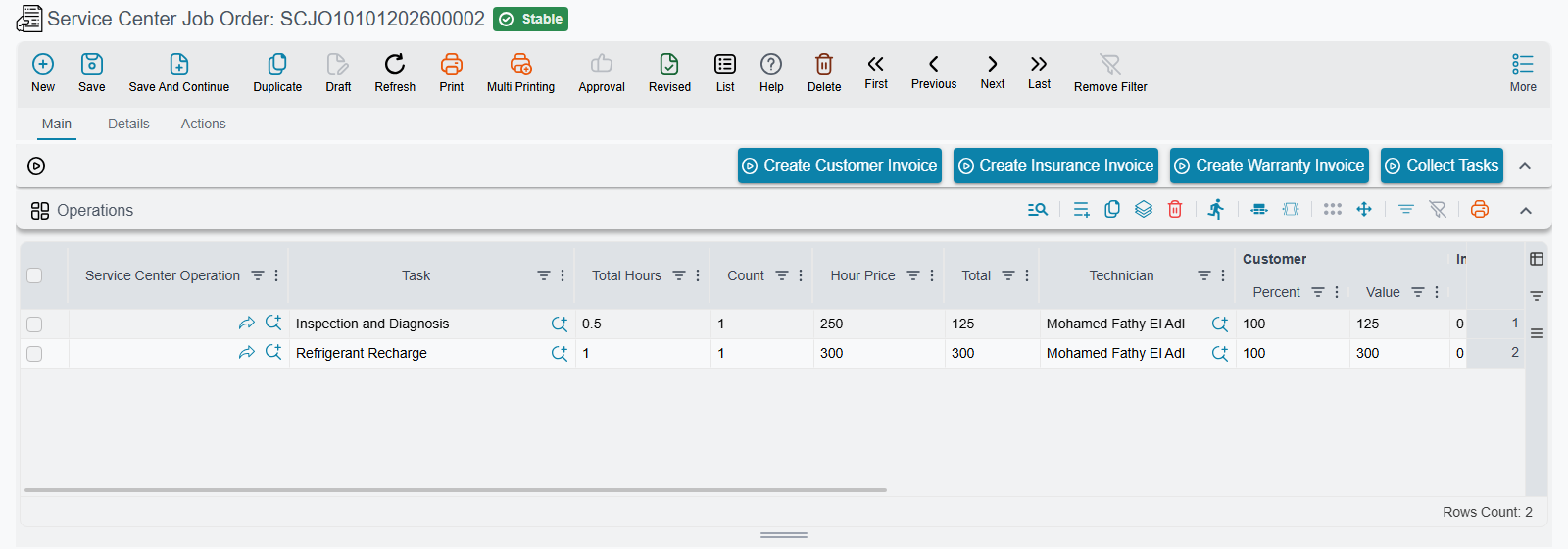
There is no separate invoicing screen. Three buttons on the job order — repeated on the closing document, where they simply do the same thing — do the work.
Required licence
srvcenter. The books and terms the invoices are created on live on the job order'sdocument term, so a job order committed on a term with no customer invoice book cannot be invoiced.
Before you press anything
The job order must be Closed. All three buttons refuse to run otherwise, with a message saying the job order must be closed first; the check is repeated on the server, so there is no way around it. Closing is therefore the gate, not the invoice.
And because the closing cannot be deleted once any one invoice exists, the sequence to work in is: close → verify the four money boxes → invoice.
The three buttons
| Button | Arabic | Produces |
|---|---|---|
| Create Customer Invoice | إنشاء فاتورة العميل | An invoice for the customer share |
| Create Insurance Invoice | إنشاء فاتورة التأمين | An invoice for the insurance share |
| Create Warranty Invoice | إنشاء فاتورة الضمان | An invoice for the warranty share |
Each one:
- takes its book and term from the corresponding pair on the job order's document term — customer invoice book and term, insurance invoice book and term, warranty invoice book and term;
- builds the lines from the job order (see below);
- saves the document — as a draft if the term ticks Save Invoices As Draft, otherwise committed through the normal approval pipeline;
- navigates you to the invoice it just made.
For Fahad's job the three come out as:
| Invoice | Payer | Net | VAT 15 % | Total |
|---|---|---|---|---|
SINV-2026-3311 | Customer | 695 | 104.25 | 799.25 |
SINV-2026-3312 | Warranty | 2,400 | 360.00 | 2,760.00 |
SINV-2026-3313 | Insurance | 60 | 9.00 | 69.00 |
| — | Internal | 60 | — | never invoiced |
How the lines are built
For each payer, the generator walks the job order and writes one invoice line for every task line and every spare-part line whose share for that payer is non-zero. Lines where the payer owes nothing are simply absent.
- A labour line becomes a line for the task's service item. Quantity is the standard hours × count; the line value is the payer's share; the unit price is therefore the share divided by the hours.
- A spare-part line becomes a line for the part itself, at the ordered quantity, valued at the payer's share. The warehouse and locator are copied from the job order line unless the module setting that stops this is on.
- Service rows and their children collapse according to how the service was priced: with total pricing the service row is invoiced and its children are skipped; with per-line pricing the children are invoiced and the service row is skipped.
Fahad's customer invoice therefore looks like this — note how the shared brake-pad line arrives at its 190 share, not its 380 price:
| Item | Quantity | Unit price | Value |
|---|---|---|---|
| Oil change service item | 1.0 h | 120 | 120 |
| Brake service item | 1.5 h | 120 | 180 |
| Engine oil 5W-30 | 5 | 32 | 160 |
| Oil filter | 1 | 45 | 45 |
| Front brake pad set | 1 | 190 | 190 |
| Total | 695 |
All three invoices name the vehicle's owner as customer
This surprises everybody the first time, so state it plainly to your staff: on the insurance invoice and the warranty invoice, the Customer field shows Fahad Al-Otaibi — the person who owns the car — exactly as it does on the customer invoice. What differs is the accounting الذمة (subsidiary): Wafa Insurance on the insurance invoice, the NAWA Warranty Programme on the warranty invoice.
It is deliberate, not a bug. The commercial relationship on the document is with the vehicle's owner; the receivable belongs to the insurer or the warranty provider. If your printed forms need the insurer's name in the addressee block, take it from the subsidiary, not from the customer field — and remember that every workshop form here is custom work.
The rest of the header is inherited from the job order: the salesman is the reception engineer, the remarks are the job order's operation remarks, and From Document points back at the job order. By default the invoice takes the job order's value date; with Use Today For Invoice Value Date on the term it takes today's instead.
Sales orders instead of invoices
Some installations do not want the service desk raising invoices directly. Tick Generate Sales Orders Not Invoices on the job order's term and all three buttons produce sales orders rather than sales invoices, on the same books and terms — the invoice then follows through your ordinary sales process.
The pickers for the books and terms on the term screen follow the flag, so you always see the right kind of book. Note that switching the flag on a term that has already generated documents deletes what was generated before and rebuilds it in the other form.
Editing a generated invoice
By default the generated document is editable — you can add a line, change a price, apply a discount.
Whether you should is a different question, and the module gives you a switch. With the module settingForce Job Order Invoice Qty And Prices on, the invoice is locked to the job order: the expected lines are rebuilt and any added, removed or re-priced line is refused. Installations that care about the job order being the single source of truth switch it on.
Pressing the button twice rewrites the invoice
The buttons do not create a second invoice. Press Create Customer Invoice again and the existing invoice is put back into edit mode and all its lines are replaced from the job order. Any manual edit you made is gone.
Treat the buttons as "publish the job order to this invoice", not as "make an invoice". If someone has hand-adjusted a generated invoice, do not press the button again.
Gate pass and payment
Once the invoices exist, the gate pass is what checks that they exist — and, depending on its term, that they are paid — before the vehicle is released. That is the last link in the cycle.