
Job Estimations
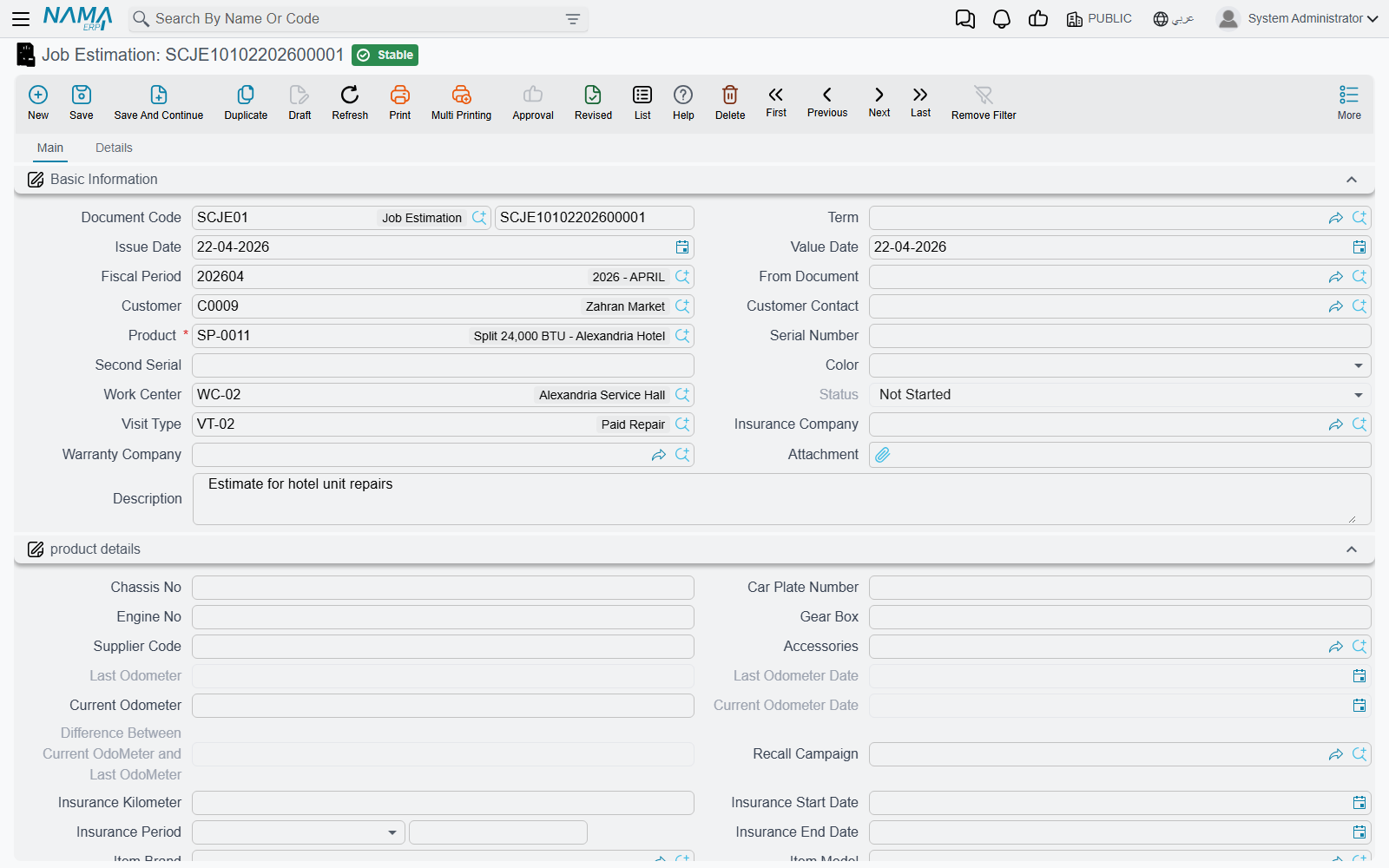
The job estimation (مقايسة) is the quote. Before anyone touches the car, someone has to be able to tell the customer what the work will cost and — in a workshop where a repair is often paid for by three different parties — who is going to be asked to pay which part of it. That is what this document is for.
Structurally the estimation is the job order with the teeth removed: the same header, the same three grids, the same payer columns, but no odometer push, no recall check, no invoices and no accounting. It exists to be priced, printed, argued over, and then copied forward.
Menu: Service Center > Documents > Job Estimation (مركز خدمة > المستندات > مقايسة).
Required licence
srvcenter. No document term is required for either document on this page.
Pricing Fahad's job
Fahad's car is on the ramp and the technician has confirmed that the compressor has failed. The advisor raises estimation SCJE-2026-0455, pointing From Document at the morning's service request so the vehicle block and the requested operations arrive ready-made.
The Operations (العمليات) grid ends up like this — the line total is always hour price × duration × count, with the duration coming from the task catalogue:
| Task | Duration | Count | Hour price | Total |
|---|---|---|---|---|
| Engine oil and filter change | 1.0 | 1 | 120 | 120 |
| Front brake pad replacement | 1.5 | 1 | 120 | 180 |
| A/C compressor replacement | 3.0 | 1 | 120 | 360 |
| Wheel alignment | 0.5 | 1 | 120 | 60 |
| Vehicle wash and valet | 0.5 | 1 | 120 | 60 |
| Operations | 780 |
The Spare Parts (قطع غيار) grid on the Details page adds the parts, each priced by the ordinary supply-chain sales price engine for this customer and date — there is nothing service-centre-specific about a spare part's price:
| Task | Part | Qty | Unit price | Price |
|---|---|---|---|---|
| Oil change | Engine oil 5W-30 | 5 | 32 | 160 |
| Oil change | Oil filter | 1 | 45 | 45 |
| Brake pads | Front brake pad set | 1 | 380 | 380 |
| A/C | A/C compressor | 1 | 1,850 | 1,850 |
| Parts | 2,435 |
Estimated total: 3,215.
Then comes the part that makes this module what it is: each of those nine lines is split between the customer, the insurer, the warranty provider and the company itself. The full rules live on Who Pays for What; for this estimate the split works out at 695 / 60 / 2,400 / 60.
The third grid, Resources (موارد التشغيل), lists the machines a task needs, so the estimate shows what the job will occupy.
The estimation checks nothing
Errors on an estimation surface later, on the job order
The job estimation performs no validation of its own. An estimation with no operation lines at all, with a task repeated twice, with an operation row that has no sub-rows, or with a payer split whose percentages do not add up to 100 and whose values do not add up to the line price, all save and commit without a word of complaint.
Those same errors are enforced on the job order. So an estimate that saved cleanly can produce a job order that refuses to commit — and the person who has to fix it is usually not the person who typed the estimate.
Practical rule: if the estimate matters (because it was printed and signed, or because it will be copied straight into a job order), check the payer split by eye before you send it. Percentages down each line's four columns must total 100, and the four values must total the line price.
Do not describe or teach the estimation as a validated document. It is a pricing sheet.
Committing it
Committing the estimation moves a source service request to Under Processing, adds a product status entry if the term names one, and back-fills empty fields on the vehicle file. It has no accounting effect, no inventory effect and generates no document.
The Estimation Update
Fahad looks at the 3,215, accepts the mechanical work, and asks for the wash to be taken off. What do you do with the estimate you already gave him?
Menu: Service Center > Documents > Estimation Update (مركز خدمة > المستندات > تعديل مقايسة).
The Estimation Update (تعديل مقايسة) is a second, revised estimation that names the first one. It has the same header and the same three grids, plus one required field pointing at the estimation it relates to. You raise SCJEU-2026-0119, point it at SCJE-2026-0455, and price the revised job on it.
Think of it as two estimates side by side, the second one carrying a pointer to the first. The original keeps its own lines, prices and totals; it moves on only when a job order is eventually built from the revision. If your process needs the superseded quote marked as such, cancel the original or use a naming convention your staff follows.
Its practical purpose is to be the From Document of the job order after the customer approves the revised quote. When that job order is committed, both the original estimation and the original service request are moved to Under Processing, so the whole trail lights up at once.
Actions on these screens
The estimation and the estimation update carry the same two actions.
- Collect Resources And Materials (تجميع الموارد والمواد الخام) — on the main page. It rebuilds the Resources and Spare Parts grids from the tasks already in the operations grid: each task's standard resources, and each task's standard spare parts that fit the vehicle's brand and model, priced through the ordinary supply-chain sales price engine for this customer. The two grids are replaced, not added to, so a line typed in by hand beforehand is gone afterwards. Spare parts come only when the Product field is filled.
- Create Reservation Doc (إنشاء سند حجز) — in the More menu. Opens a new, unsaved supply-chain reservation document whose From Document is this estimation, with one line per row of the Spare Parts grid (item, quantity, remarks). Save the estimation first. With an empty Spare Parts grid it refuses with: No Materials to be reserved — «لا يوجد قطع غيار ليتم حجزها»
Use the reservation when the quote depends on a part you want held.
What comes next
The job order is created with its From Document pointing at whichever estimate the customer approved — the original or the revision. Everything is copied across as a snapshot. From that moment the estimation is history: editing the job order does not change it, and changing it does not touch the job order.