
Gate Pass
The gate pass (تصريح عبور البوابة) answers one question, and only one:
Has this job order been invoiced — and paid — for every payer that owes something?
If the answer is yes, the document commits and you have a printable release note the customer can carry to the exit. If the answer is no, the document refuses to commit and tells you which invoice is missing or how much is still outstanding. That is the whole feature.
Menu: Service Center > Documents > Service Center Gate Pass (مركز خدمة > المستندات > تصريح عبور البوابة).
Required licence
srvcenter. A document term is required — and it is the term that does all the work, because every check on this page is a term option.
What it is not
Set expectations before anyone configures this, because the name promises more than the document delivers.
The gate pass has no direction — there is no "in" and no "out". It has no gate: no barrier integration, no guard, no camera, no gate identifier. It has no time of passage — nothing records the moment the vehicle actually crossed anything. It moves no stock, creates no journal entry and leaves the job order as it is.
It is a release check, not gate control. If you need a vehicle in/out log with timestamps, that is not this document and there is nothing else in the module that does it.
Understood in those terms, it is genuinely useful: it is the mechanism that stops a car leaving before the money side is done, and the seven options that drive it are real and enforced.
The screen
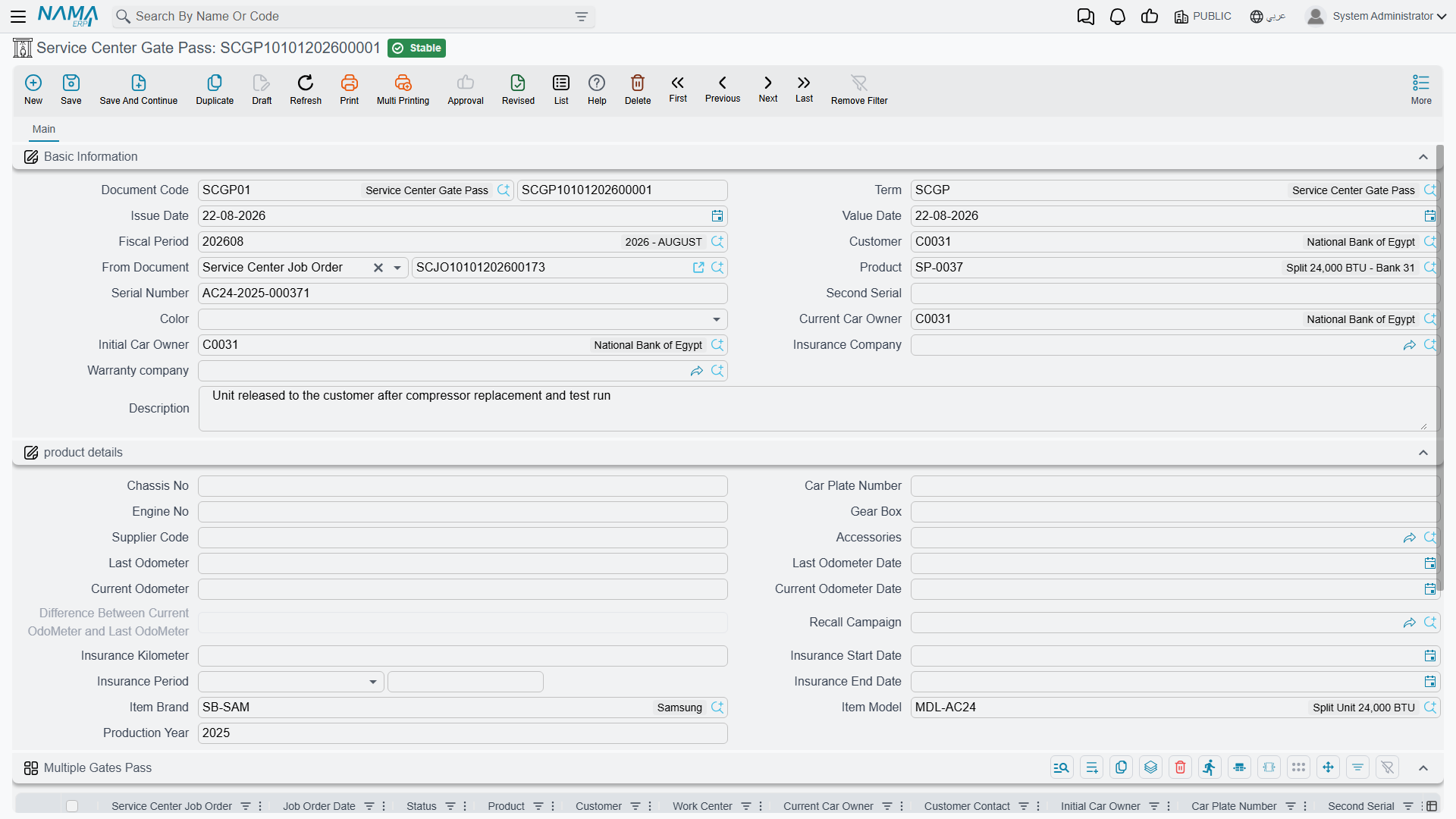
The header carries the customer, From Document, the vehicle, its serials, colour, the last requester and contact, the current and initial owner, and the insurance and warranty companies, followed by the usual product-details block and the dimensions.
Below that sits one large grid — one row per job order being released. Pick a job order in a row and the row fills itself from that order: its date, status, product, customer, owners, plate, serials, colour, visit type, reservation date and time, insurance and warranty companies, chassis, engine, gear box, supplier code, odometers, accessories, recall campaign, WIP warehouse, reception engineer, production year, model and the insurance block. The row is a mirror of the job order's header — it is there so a printed pass shows the vehicle in full.
Because the vehicles are on the grid rows, the header's own Product field is not required on this document — the only Service Center job document where that is true.
The seven checks
Every check is a term option phrased as an allow without… permission. Leave the option unticked and the check is enforced; tick it and the check is waived.
| Term option | When unticked, the pass is refused unless… |
|---|---|
| Allow Gate Pass Without Job Order | From Document is filled and is a job order |
| Allow Gate Pass Without Customer Invoice | a committed customer invoice exists — but only if some line of the order actually has a customer share |
| Allow Gate Pass Without Insurance Invoice | the same, for the insurance share and the insurance invoice |
| Allow Gate Pass Without Warranty Invoice | the same, for the warranty share and the warranty invoice |
| Allow Gate Pass With Remaining In Customer Invoice | the customer invoice is fully paid; otherwise the message names the invoice and the amount still outstanding |
| Allow Gate Pass With Remaining In Insurance Invoice | the same, for the insurance invoice |
| Allow Gate Pass With Remaining In Warranty Invoice | the same, for the warranty invoice |
Notice how sensibly the invoice checks are scoped: a job order with no insurance share at all is not asked for an insurance invoice. The check only bites where money is owed.
Releasing Fahad's car
Al-Sahra Motors configures its gate pass term to require a committed and fully paid customer invoice, plus committed insurance and warranty invoices — the insurer and the warranty provider are on account, so their invoices need not be settled before the car leaves, but the retail customer's must be.
Gate pass SCGP-2026-0475 is raised on 4 March 2026 with one grid row for job order SCJO-2026-0417. At that point:
- the customer invoice
SINV-2026-3311exists and Fahad has paid its 799.25 in cash — ✔ - the warranty invoice
SINV-2026-3312exists and is committed — ✔ - the insurance invoice
SINV-2026-3313exists and is committed — ✔
The pass commits and is printed. Had Fahad wanted to leave without paying, the document would have refused with a message naming his invoice and the amount remaining — which is exactly the conversation the reception desk needs to have.
Note that nothing on the pass records 16:20, or which exit he used, or that he came back an hour later. The pass is the permission, not the event.
What it does when it commits
Almost nothing, and that is by design:
- No accounting effect. No inventory effect. No generated document.
- It fills in empty fields on the vehicle file, like every other job document.
- If the term names a status to change the product to, it adds a product status entry — which is how a vehicle's file can show Exited From The Center once its pass has been issued. The usual companions apply: an optional criteria filter so the status only changes when the criteria match, and an optional notification.
That product status change is, in practice, the only lasting trace a gate pass leaves. If you want reporting on released vehicles, that status entry and the pass documents themselves are what you have.
Configuring it well
- Decide your policy once, per term. The seven options are not per-vehicle or per-customer; they are the workshop's rule. Most dealerships end up with one strict term for retail customers and, sometimes, a looser one for fleet accounts.
- Do not tick everything. A term with all seven options ticked produces a document that checks nothing at all — a piece of paper with no logic behind it.
- Remember the invoices come first. Since the pass depends on committed invoices, and the invoices depend on the job order being closed, the gate pass is genuinely the last document in the cycle.
Messages you may see
| Message | Why | What to do |
|---|---|---|
| From doc must be job order — «بناءا على يجب ان تكون أمر شغل» | From Document is filled with something that is not a job order, while Allow Gate Pass Without Job Order is unticked on the term. | Point From Document at the job order the vehicle was worked on under. |
| The order {0} does not have a customer invoice — «لا توجد فاتورة عميل لأمر الشغل {0}» | Some task or material line on the order carries a customer share, and the order's customer invoice is either missing or still a draft. Only a committed invoice counts. | Raise and commit the customer invoice for the order, or tick Allow Gate Pass Without Customer Invoice (السماح بعمل التصريح بدون فاتورة العميل) on the term if this workshop releases before invoicing. |
| The order {0} does not have an insurance invoice — «لا توجد فاتورة تأمين لأمر الشغل {0}» | The same, for the insurance share and the insurance invoice. | Commit the insurance invoice, or tick Allow Gate Pass Without Insurance Invoice (السماح بعمل التصريح بدون فاتورة التأمين). |
| The order {0} does not have an warranty invoice (the product's own wording; this message has no Arabic string, so it appears in English on Arabic screens too) | The same, for the warranty share and the warranty invoice. | Commit the warranty invoice, or tick Allow Gate Pass Without Warranty Invoice (السماح بعمل التصريح بدون فاتورة الضمان). |
| The invoice {0} is not fully paid, remaining is {1} — «الفاتورة {0} ليست مدفوعة بالكامل. المتبقي {1}» | The invoice exists and is committed, but still has a remaining balance, and the matching with remaining option is unticked. The same message covers the customer, insurance and warranty invoices — read which one it names. | Collect the balance, or tick the matching …Without Fully Paying The … Invoice option on the term. |