
Odometer Readings and Service Intervals
Everything in a workshop that repeats — the oil change, the belt, the major service — repeats by distance, not by date. So the module keeps a running picture of each vehicle's mileage, works out roughly how fast it is being driven, and uses those two numbers to say when a given service falls due and roughly on which day the car should come back.
The chain is short: readings go onto the vehicle file, the vehicle file derives an average daily distance, the job order records which service was performed at which reading, and the closing projects a date from all of it. This page walks that chain and names the documents involved.
Required licence
srvcenter. Neither document on this page needs a document term to work — the Kilo Metrage document requires none at all.
The three numbers on the vehicle file
| Field | Arabic | What it is |
|---|---|---|
| Last Odometer + date | قراءة العداد السابقة | The previous accepted reading |
| Current Odometer + date | قراءة العداد الحالية | The latest accepted reading |
| Average KM Daily Consumption | متوسط استهلاك الكيلومتر يوميا | Calculated — the distance between the two readings divided by the days between them |
For Fahad's Saif 1.6, vehicle VEH-2031:
| Reading | Date | |
|---|---|---|
| Last odometer | 41,600 | 1 January 2026 |
| Current odometer | 45,300 | 3 March 2026 |
| Difference | 3,700 km over 61 days |
3,700 ÷ 61 = 60.7 km a day.
The average is only recalculated when enough time has passed — the module setting Min Days To Calculate Average KM Consumption sets the minimum gap. That is deliberate: two readings a day apart would produce a wild figure and poison every projection built on it. Set it to something like a fortnight and leave it alone.
Who writes readings
Three things can move a vehicle's odometer:
- The Kilo Metrage document (سجل قراءة العداد) — the dedicated screen, described below.
- The job order. The current odometer typed on a job order is pushed onto the vehicle file every time the order is saved. In practice this is where most readings come from: reception reads the dial as the car arrives.
- Any other document that records a reading, including the product task opening document — though a reception inspection sheet only validates the reading it captures and never advances the vehicle's odometer.
Whatever the source, the rule is the same: a new reading rolls the current reading into the last reading and takes its place, and a reading is not allowed to go backwards. If the new document's date is on or after the vehicle's current odometer date, its reading may not be lower than the vehicle's current odometer. Odometers do not run backwards, and a typo that says they did is refused.
Recording a reading taken on a different day
On the job order the Current Odometer Date is disabled and always follows the document's value date. So a reading taken on Tuesday cannot be entered on Thursday's job order with Tuesday's date. Use a Kilo Metrage document for that.
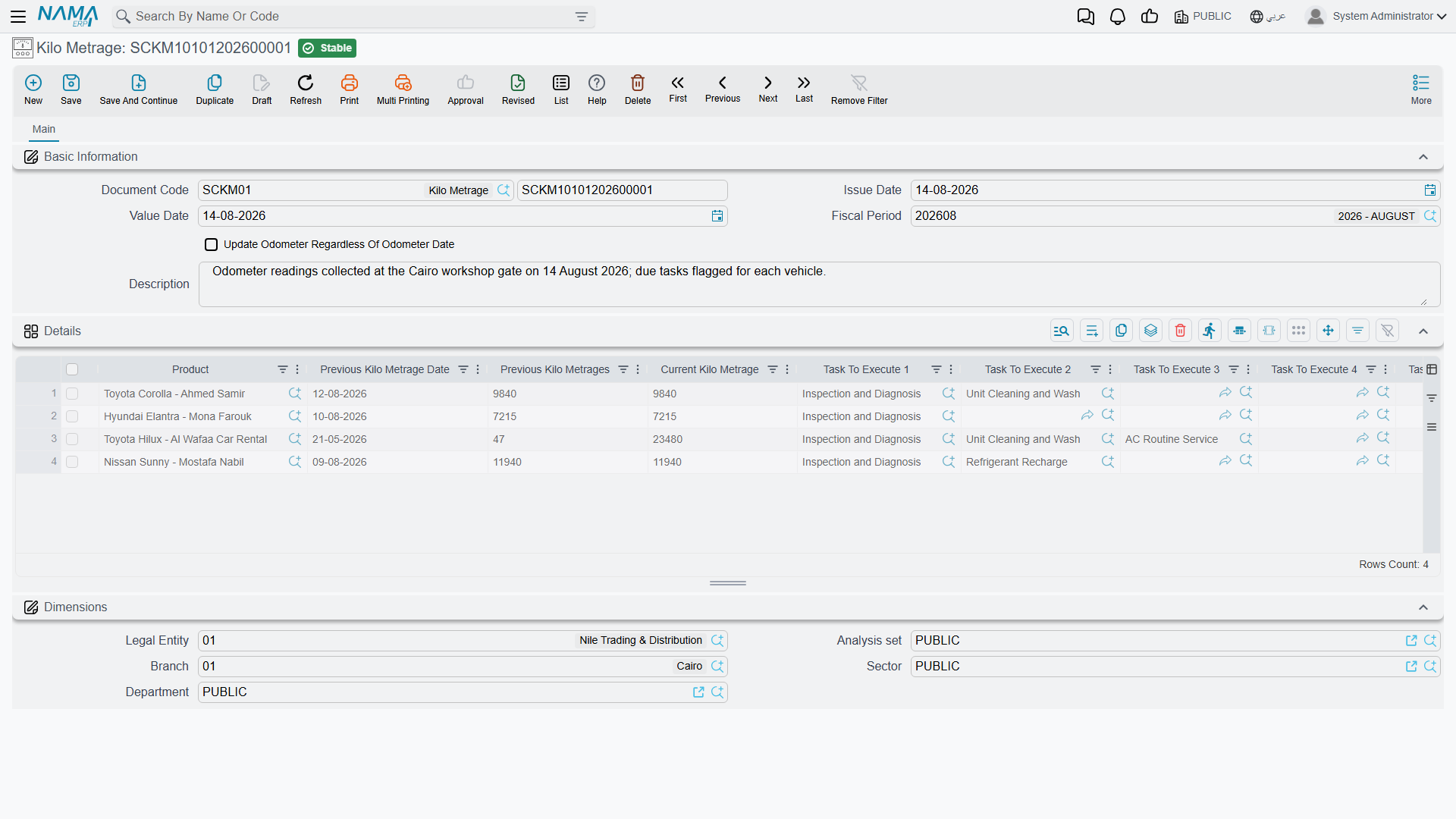
The Kilo Metrage document
Menu: Service Center > Documents > Kilo Metrage (مركز خدمة > المستندات > سجل قراءة العداد).
A simple document: a header with the usual code, dates and one tick — Update Odometer Regardless Date — and a grid with one row per vehicle:
| Column | Arabic | Typed or filled in |
|---|---|---|
| Product | المنتج | Typed |
| Previous KM date | Filled in from the vehicle file | |
| Previous KM | Filled in from the vehicle file | |
| Current KM | Typed — the new reading | |
| Due task 1 … 5 | Filled in — see below |
The Update Odometer Regardless Date tick is the escape hatch: with it on, an older-dated reading is allowed to overwrite the vehicle's current odometer. Use it to correct a mistake, not as routine.
The due-task columns
When you enter a reading, the five due task columns fill themselves with the maintenance tasks that are now due at that reading — the ones whose last execution mileage plus their recurrence interval has been reached or passed. Only the first five are shown, and they are purely informational: nothing is created from them, and no document is generated.
They are, however, the reliable way to see what a vehicle needs. Read them, then type the work onto the job order by hand.
The last-service register
How does the system know that Fahad's oil change was last done at 36,000 km?
Because the job order told it. When a job order is committed, it records for every task on it that this service was performed on this vehicle at this reading on this date. Those records accumulate into a per-vehicle, per-task register — visible as a read-only list on the vehicle's own file — and that register is what the due-task calculation reads.
The recurrence interval itself comes from the task catalogue: each task can carry a recurrence in kilometres, optionally different per model. Fahad's oil change recurs every 10,000 km.
So: last done at 36,000, recurs every 10,000, next due at 46,000. The car reads 45,300 on arrival — 700 km short. At 60.7 km a day that is about 11.5 days, which is how the closing document arrives at an expected next visit of 15 March 2026.
Seeding history for vehicles you inherit
There is an obvious problem with all of this on the day you go live: the workshop has been servicing these cars for years and the register is empty. Every vehicle looks as if it has never had an oil change, so nothing is ever due.
That is what the Product Task Opening Document (افتتاحي مهمات منتج) is for. Menu: Service Center > Documents > Product Task Opening Document.
It is an opening balance, but what it opens is a service history. One grid, one row per vehicle and task:
| Column | Arabic | Notes |
|---|---|---|
| Product | المنتج | Typed |
| Task | المهمة | Typed |
| Task KM | القراءة عند تنفيذ المهمة | Required — the reading when that service was last done |
| Task Date | تاريخ المهمة | Required |
| Recur Every KM | تكرر كل / كم | Read-only — filled in from the task's recurrence rules for this vehicle |
Committing it writes those rows into the last-service register exactly as if job orders had done it, and pushes each vehicle's odometer forward to the reading on the line. Cancelling or deleting the document removes them again.
For Fahad's car, one line — engine oil and filter change, 36,000 km, with its date — is all it takes for kilometre-based maintenance to work from day one.
The opening document checks nothing
This document performs no validation of its own. A line with an implausible reading, a duplicate vehicle-and-task pair, or a date that contradicts the vehicle's own history commits without complaint — and it goes straight into the register that everything else trusts.
Treat it as a data-migration tool: prepare the list carefully outside the system, load it once, then spot-check a handful of vehicles' last-service lists on their own files before you rely on the due-task figures.
What mileage does not drive
Two things worth stating so nobody goes looking for them:
- Recall campaigns are matched by vehicle, not by mileage. A campaign lists individual vehicles; the odometer plays no part in whether a job order is blocked. See Recall Campaigns.
- Nothing schedules a visit for you. The next-visit date is a projection written onto the job order and its closing. It raises no reminder, no task and no service request — following it up is a job for whoever runs your customer-contact process, working from the expected next visit date on closed job orders.
Finally, to see which services are due at a reading, use the due-task columns on the Kilo Metrage document.