
Returning Spare Parts
Not everything the store issues gets used. The storekeeper sends six litres of oil out with the service kit and the engine takes five; a gasket turns out to be the wrong one; a part is issued for a job the customer then declines. The Spare Parts Return (إرتجاع قطع غيار) is how those parts come back — off the job, out of the customer's bill, and into stock.
You will find it at Service Center > Documents > Spare Parts Return.
Required licence
srvcenter
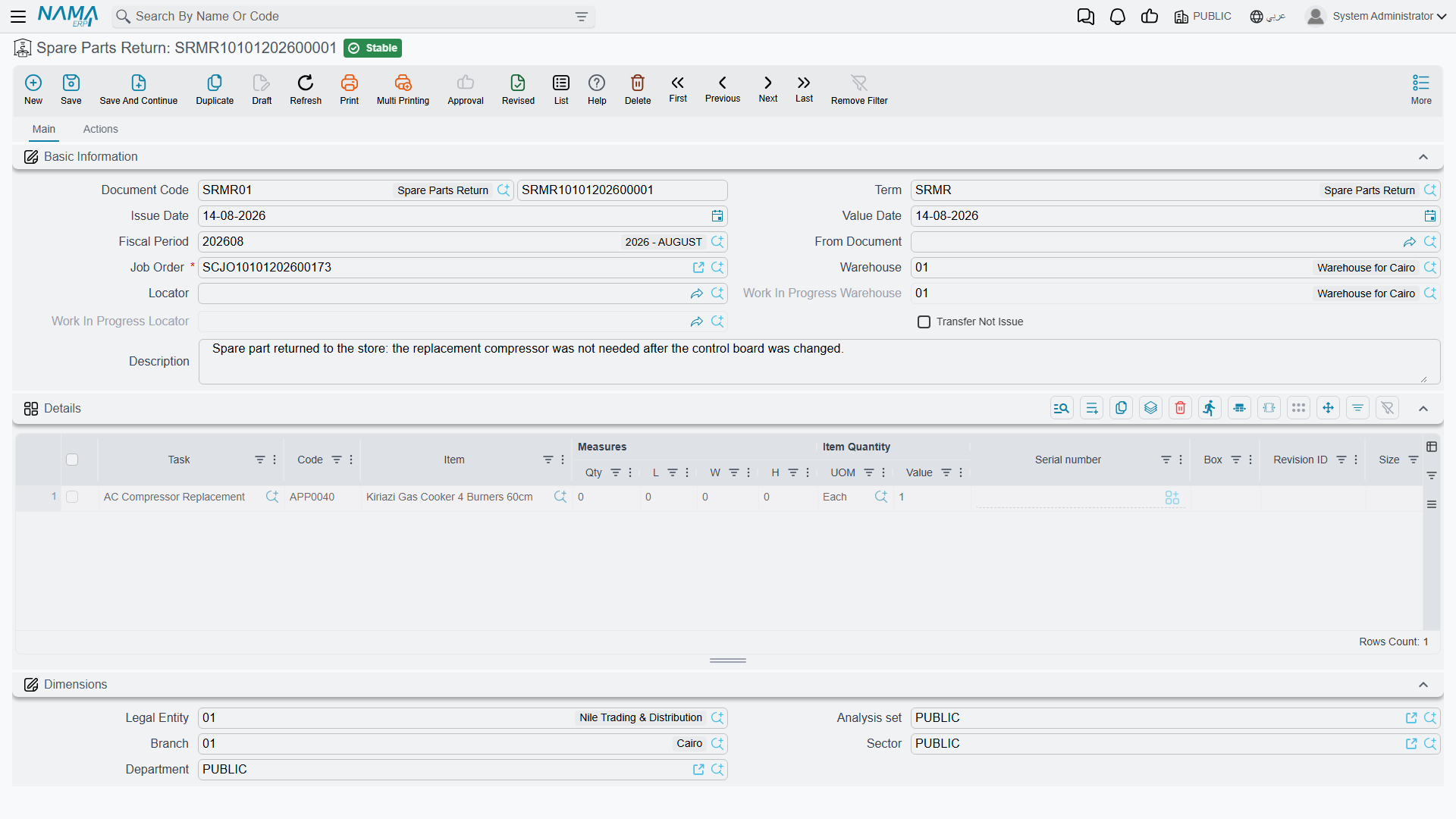
The screen, and what commits
The return is the issue's mirror image, and the screen says so: the same أمر الشغل / Job Order, the same warehouse and locator, the same read-only work-in-progress store and Transfer Not Issue flag copied from the term, and the same details grid keyed on المهمة / Task and item. Its الحركات / Actions page shows the generated stock transfer documents.
Committing does three things:
- It generates the stock document that actually moves the parts — a Stock Receipt back into the line's warehouse in normal mode, or a Stock Transfer out of the job order's work-in-progress store and back into your store when the term says Transfer Not Issue. As with the issue, an empty generation book or term means nothing moves at all — clearing the book or term is how you stop it.
- It nets the parts ledger: the job order's issued quantity for that item less what has come back.
- It refreshes the job order's materials grid, so the closing and the invoices bill the net quantity.
On Al-Sahra's job SCJO-2026-0417, return SRMR-2026-0344 brings one litre of SP-OIL-5W30 back on a single line. Six litres issued, one returned, five consumed, and the customer is billed 5 × 32 = 160.
One return line per item — and one return document at a time
In normal (stock receipt) mode, work to these rules:
- one line per item on a return — if two litres come back, return them as a single line of 2;
- one return document per job order at a time — if more of the same item comes back, amend the existing return rather than raising a new one;
- before invoicing a job that had returns, open the job order and check the material quantities against what is physically back.
After cancelling a return, reopen the job order and save it again before closing or invoicing. That save rebuilds the materials grid from the parts ledger.
Where the return is and is not the issue's mirror
| Issue | Return | |
|---|---|---|
| Generates the document that moves stock | Stock issue, or transfer to the work-in-progress store | Stock receipt, or transfer back |
| Updates the parts ledger on commit | Yes | Yes |
| Refreshes the job order's materials grid on commit | Yes | Yes |
| Writes a price back onto the job order | Yes, when the plan had none | No — and correctly so; a return should never set a price |
| Counted in the "issued exceeds planned" limit | Added | Subtracted |
| Deletion refused once the job order is closed or invoiced | No | Yes |
That last row is worth reading twice, because it is the opposite of what people expect: the return is the protected document. Once a job order has been closed or invoiced, a committed return cannot be deleted — while a committed issue can.
Prices, and what the return does not touch
A return carries the same price columns as the issue, and they are the right ones to leave alone. Nothing on the return writes a price back onto the job order — the value the customer is credited is simply the planned unit price multiplied by the smaller quantity.
The return also creates no entry of its own by default. The only accounting entry in the chain is the one the generated stock receipt creates under its own term: the item back into inventory at cost, and the cost-of-sales charge relieved by the same amount.
Before you invoice a job that had returns
Three checks, in this order, on any job order where parts came back:
- Open the return's الحركات / Actions page and confirm the stock receipt (or transfer) is actually there.
- Open the job order's materials grid and confirm the quantities match what was physically consumed — five litres, not six.
- Confirm the customer, insurance, warranty and internal split still adds up on each material line, since a rebuilt grid comes back with those four columns zeroed.
Then close and invoice.