
Publishing Daily Capacity
A workshop only has so many hours in a day, and they are not all available to the person answering the telephone. Some of yesterday's work is still on the ramps. Somebody will walk in without an appointment. Something will arrive on a recovery truck at four o'clock. If the whole day is sold as appointments, all three of those cars become a problem.
The Loading Table (جدول تحميل) is where you write that judgement down: it takes a work centre's total available hours for a date range and splits them between appointments, carry-over, walk-ins and emergencies. You will find it at Service Center > Settings > Loading Table.
Required licence
srvcenter
It is a document, so it needs a document book — but unusually it needs no term at all.
What the sheet holds
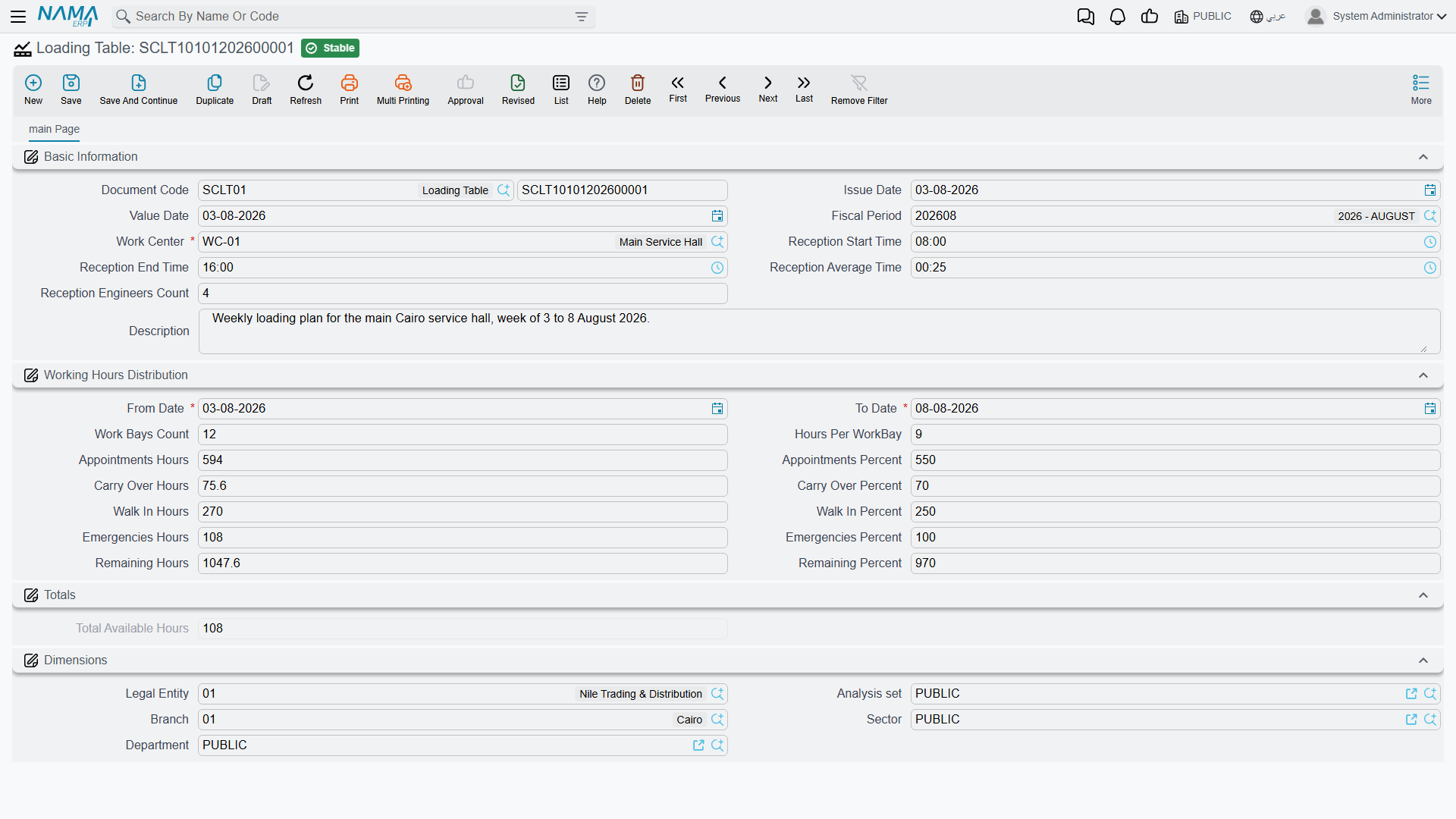
The Basic Information block carries the document code, issue and value dates, fiscal period, the صالة الإنتاج / Work Center (required), the reception window and reception staffing copied from that work centre, and remarks. Below it sits the sheet proper: من تاريخ / From Date, إلى تاريخ / To Date, the bay count and hours per bay, and then the four buckets — each as a pair of hours and a percentage — with a fifth "remaining" pair below them. إجمالي الساعات المتاحة / Total Available Hours is calculated and read-only.
Choosing the work centre does most of the typing for you: its reception times, engineer count, bay count and hours per bay are copied across, total available hours are computed as bays × hours per bay, and the four percentages — seeded from the Service Center settings at 80 / 10 / 5 / 5 — are turned into hours. After that, typing an hours figure recalculates its own percentage, and typing a percentage recalculates its hours.
Al-Sahra's mechanical hall WC-MECH has 5 bays working 8 hours, so its sheet for 1–31 March 2026 reads:
| Bucket | Percent | Hours |
|---|---|---|
| ساعات الحجز / Appointments Hours | 80 % | 32 |
| Carry Over Hours | 10 % | 4 |
| Walk In Hours | 5 % | 2 |
| ساعات الطوارئ / Emergencies Hours | 5 % | 2 |
| الساعات المتبقة / Remaining Hours | 0 % | 0 |
| إجمالي الساعات المتاحة / Total Available Hours | 40 |
Four English labels on an Arabic screen
The Carry Over and Walk In pairs have no Arabic translation registered, so they show their English labels even in an Arabic session. They are reproduced above exactly as they appear.
What it enforces — the appointment bucket
Committing the sheet writes one capacity row per calendar day in the range, each carrying that day's appointment hours, the engineer count and the reception window.
From then on, a service request — the booking document — does two things against those rows: it adds its own total hours to the day's reserved hours, and it refuses a booking whose hours would take the day past its appointment allowance, unless the visit type is flagged as always allowed. It also refuses a reservation time outside the reception window.
That is the entire enforcement surface. Carry-over, walk-in, emergency and remaining hours are planning information: a statement of intent for the people running the shop, not a rule the system applies.
Which is a perfectly reasonable way to use the sheet — as long as you know that is what you are doing. Publish it, print it, use the appointment figure as the number reception may sell, and treat the other three as the shop's own budget.
Keep the four shares adding up to 100
The الساعات المتبقة / Remaining Hours and النسبة المتبقية / Remaining Percent pair is meaningful while the four buckets total 100 % or less — as they do in the table above, where nothing is left over. Keep the four shares within 100 % so the sheet reads as a real split of the day.
Effects
The loading table moves no stock and creates no accounting entry. Its only footprint is the set of day-capacity rows described above — which is also why deleting or re-issuing a sheet is something to do deliberately, with an eye on the days it covers.