
Bank Loans
A bank loan isn't just an amount that lands in your account and then gets repaid; it's a commitment that stretches over months or years, with a principal, interest, fees and an installment schedule — and it may draw down an agreed facility limit with the bank. So Nama doesn't record loans as a single manual journal, but as a connected system: a master document holding the loan terms, then movement documents that issue it, repay its installments and accrue its interest across its whole life.
Required license
Bank loans are part of the accounting-loans license — the same license that covers Fixed Deposits and Credit Facilities.
The story from the start
Every screen hangs off the Banks > Bank Loans root in the menu tree. The loan lifecycle runs like this:
- Bank Loan Request — an optional first step to document the loan request before it's approved.
- Bank Loan — the master file holding the full loan terms (its initial status is "Initial").
- Loan Issue — the moment the loan amount actually arrives (it creates a journal entry, and the loan's status flips to "Released").
- Bank Loan Scheduling — to redistribute the installments when needed.
- Loan Interests Calculation — to compute and lock in the period's interest.
- Loan Installment Payment — repaying one (or more) installments with its principal, interest and any late fine (it creates a journal entry).
- Bank Loan Changing Document — to amend the loan after it's been issued.
Loan type
Before recording loans, a Bank Loan Type (Banks > Bank Loans > Bank Loan Type) is created as a classifying file that groups similar loans and unifies their accounting terms. It's an organizational matter that makes later reporting and accounting easier.
The loan master file
On the Bank Loan screen (Banks > Bank Loans > Bank Loan) the loan terms are defined in three main areas:
- Basic information: the loan value, the bank and the bank account it's deposited into, the fees value, and the loan type. The loan can be linked to the loan request that preceded it, to the facility limit it draws down, and to a project contract when financing a specific project.
- Installments: the installments count, the installment value, installments start in (first installment date) and calculated per (the recurrence, e.g. every month) — or relying on a ready-made installments template.
- Interests: the annual interest percent, the interest type, interests start in and paid per. Important options here include: calculate interest once at the end of the period, interest start date is the same as the loan start date, calculate interest based on the value not the percent, and adjust the last interest value if needed.
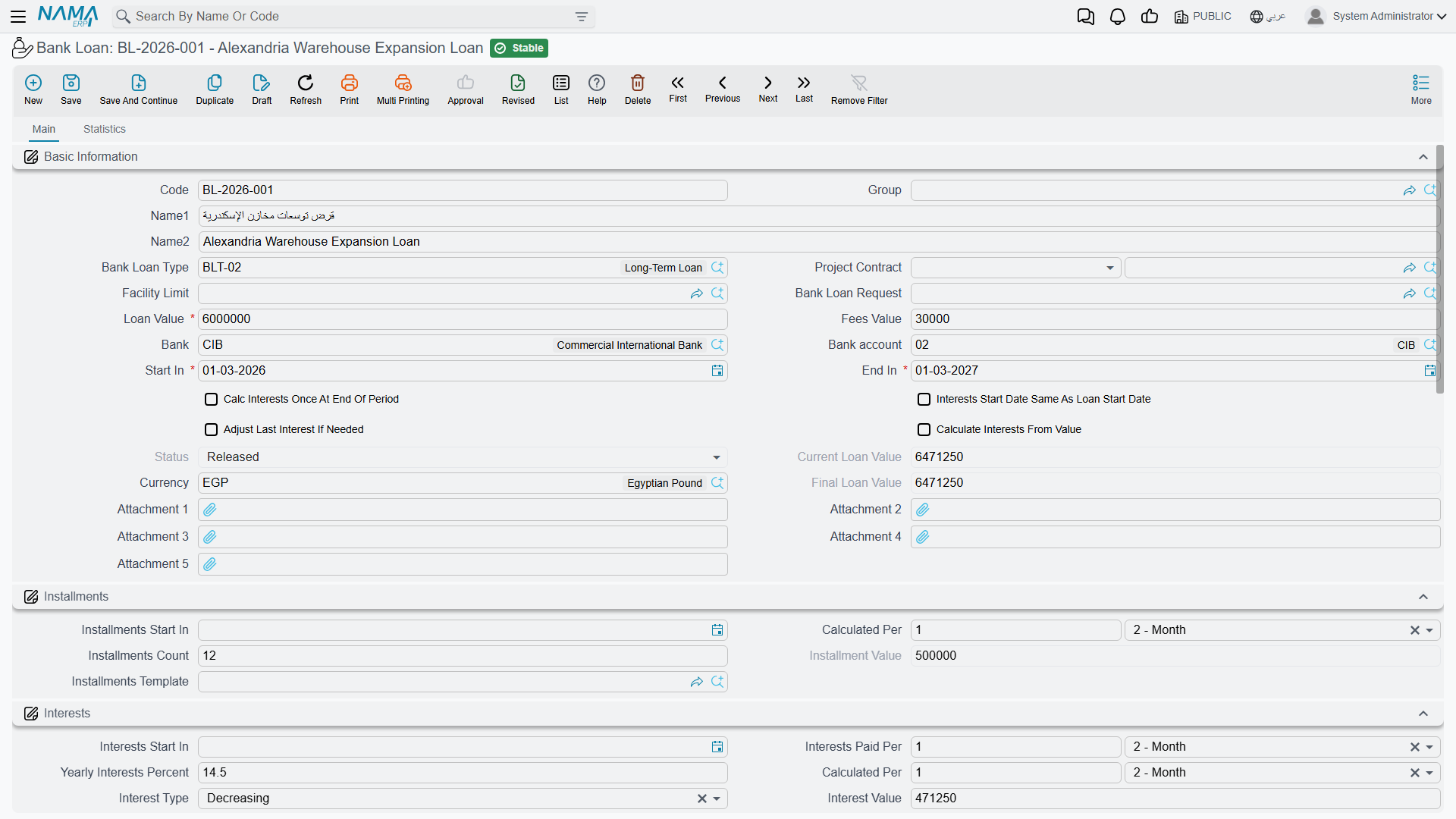
The available interest types:
| Type | Meaning |
|---|---|
| Simple | A fixed interest computed on the full loan principal for the whole term. |
| Decreasing | Interest on the remaining balance, so it shrinks with each principal installment repaid. |
| Manual | Interest values are entered by hand in the interests table instead of being computed automatically. |
The allowed late days and late fine percent fields together govern how the late-installment fine is computed at payment time.
Loan statuses
The loan moves through these statuses, which advance automatically with the movement documents:
| Status | When |
|---|---|
| Initial | when the loan is saved before being issued. |
| Released | after the loan issue document is saved. |
| In Progress | while installments are being paid. |
| Finished | after all installments and interest are fully paid. |
| Cancelled | on cancellation. |
Issuing the loan
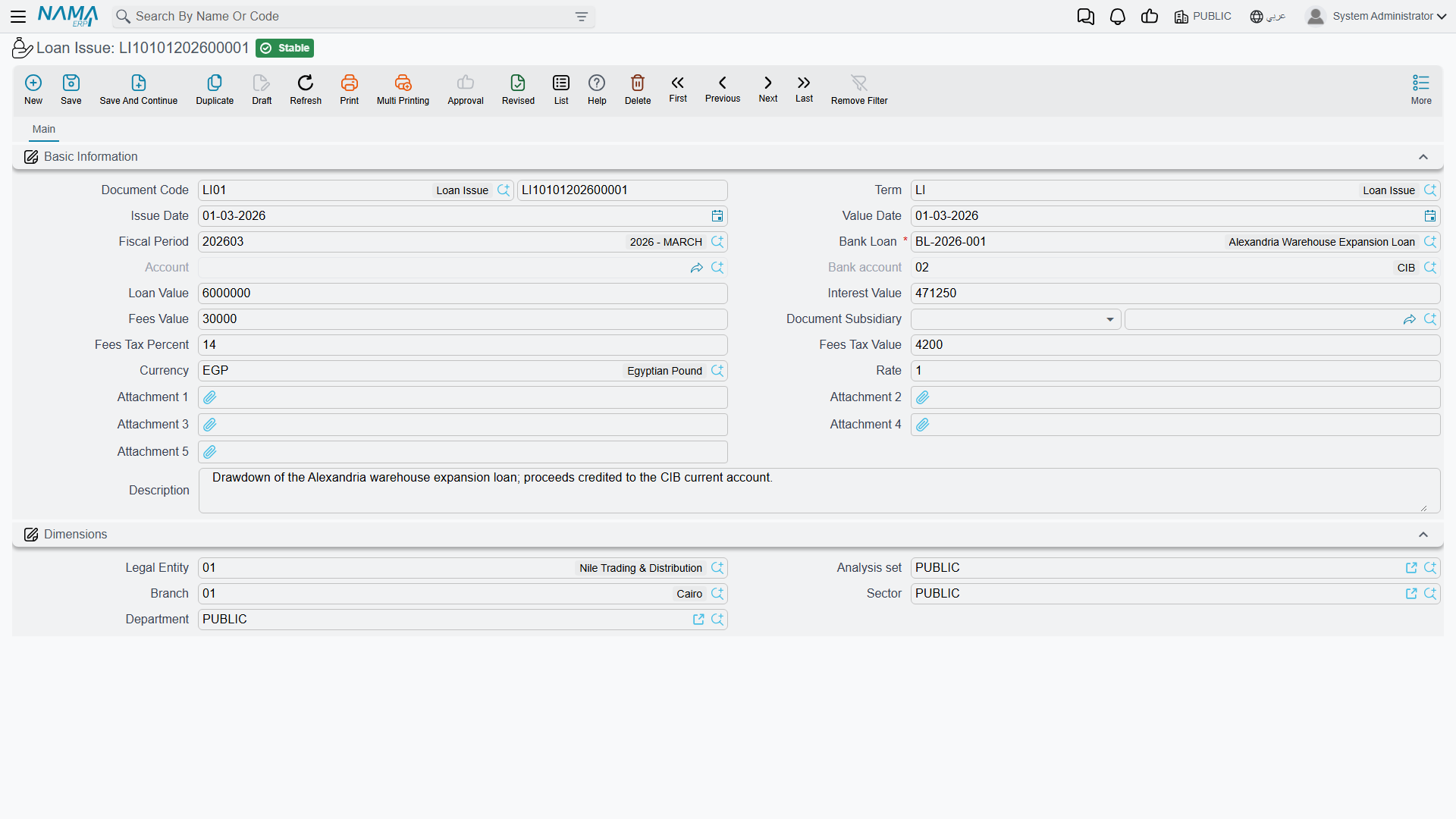
As long as the loan is in its initial status it's just an agreement on paper. When a Loan Issue (Banks > Bank Loans > Loan Issue) is recorded the amount actually arrives: the document creates a journal entry that records the loan against the bank and deposited into the account, and the loan's status flips to "Released". The issue term covers the sides: loan value debit/credit, fees value debit/credit (with fees tax), and interest value debit/credit — i.e. where the accounts for the loan principal, its fees and its interest come from. (The detail of where these accounts come from is in the Document terms reference.)
Interest accrual and repayment
As the loan periods pass, a Loan Interests Calculation is recorded to lock in the period's due interest according to the chosen interest type.
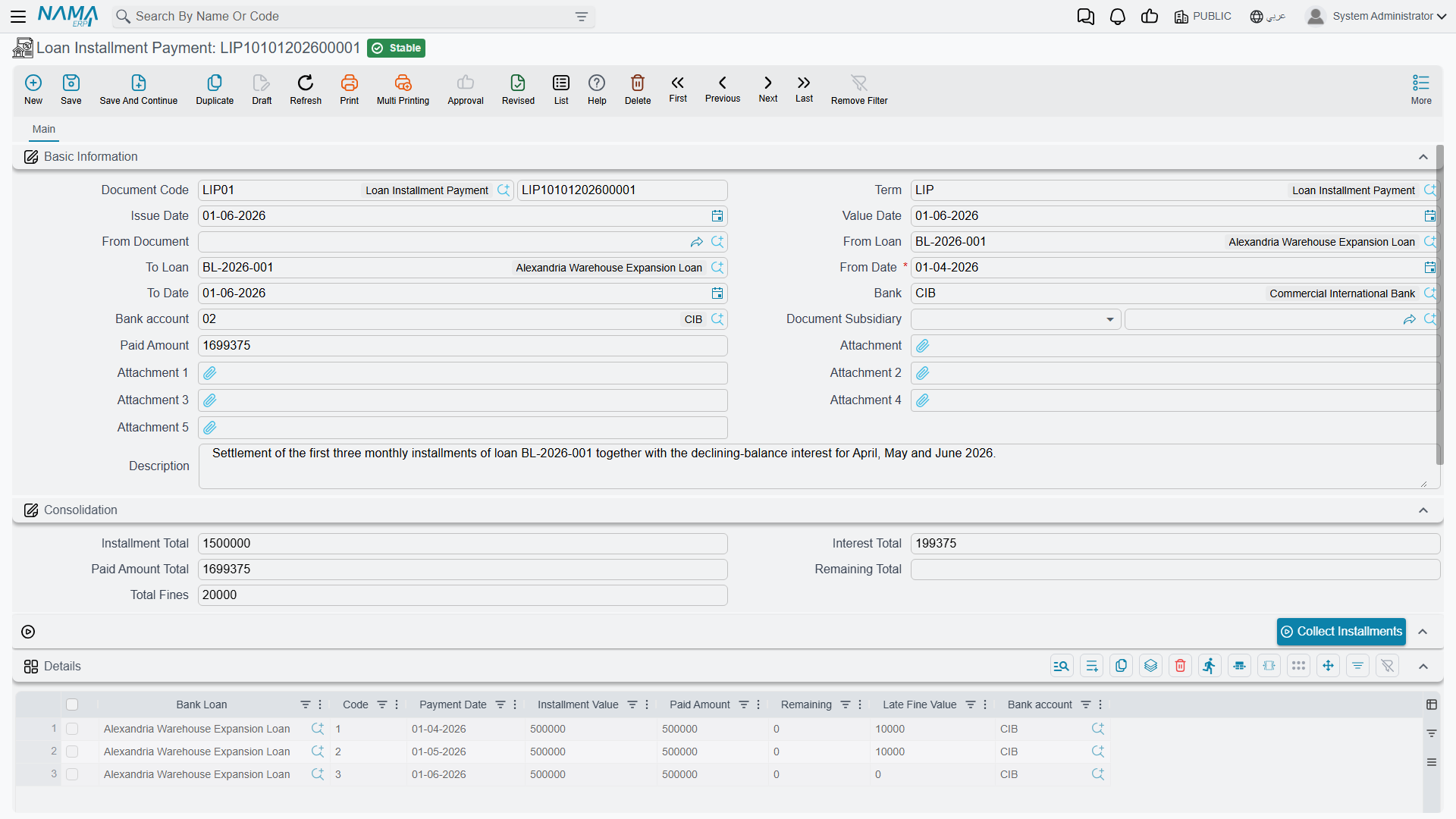
Then comes the Loan Installment Payment (Banks > Bank Loans > Loan Installment Payment) to repay one or more installments. The document shows the loan totals (total installments, interest, paid and remaining), and its lines separate the installment principal, the interest paid and the late fine (computed automatically from the late days and fine percent). The document records its entry on the sides: fine debit/credit, interest payment value debit/credit, plus the collected-principal side.
The interest-payment document is shared with deposits
The Interest Payment Document (Banks > Fixed Deposits > Interest Payment Document) is used to record interest/profit payments, and it's the same document used in Fixed Deposits.
Scheduling and amendment
If repayment circumstances change, a Bank Loan Scheduling document redistributes the remaining installments over new periods. A Bank Loan Changing Document is used to amend the loan data itself after it's been issued, within the system's controls.
Actions on this screen
Almost nothing in the loan system is typed line by line — the schedules are generated, and the payment documents fetch what is due.
On the loan, its request and the scheduling document:
- Generate Installments Table — builds the instalments grid from the loan value, the installments count and value, installments start in and calculated per. Run it whenever you change any of those figures; it rebuilds the schedule to match.
- Generate Interests Table — the same for the interests grid, from the from/to dates, interests start in, the interest recurrence and the annual percent, following the loan's interest type.
- Generate Installments And Interests Table — both grids in one press, which is how a new loan is normally set up.
On the loan request there is also:
- Generate Bank Loan — creates the loan itself from the approved request, carrying its terms over, so you do not re-key them. The request must be saved first, and the loan opens as a new record for you to check and save.
On the Loan Installment Payment:
- Collect Installments — set a from loan / to loan range (or a bank and bank account) and a date range, and it fills the document with every unpaid instalment falling in that window, across all matching loans. This is how one payment document settles several instalments — or several loans — at once.
- Generate Interests — the interest counterpart: it brings in the interest lines due in the same range.
On the Loan Interests Calculation:
- Collect Interests — gathers the interest still unproven for the chosen loan range and date range into the interests grid. From loan is required; without it the button tells you so and does nothing.
Reports
| Report | Answers |
|---|---|
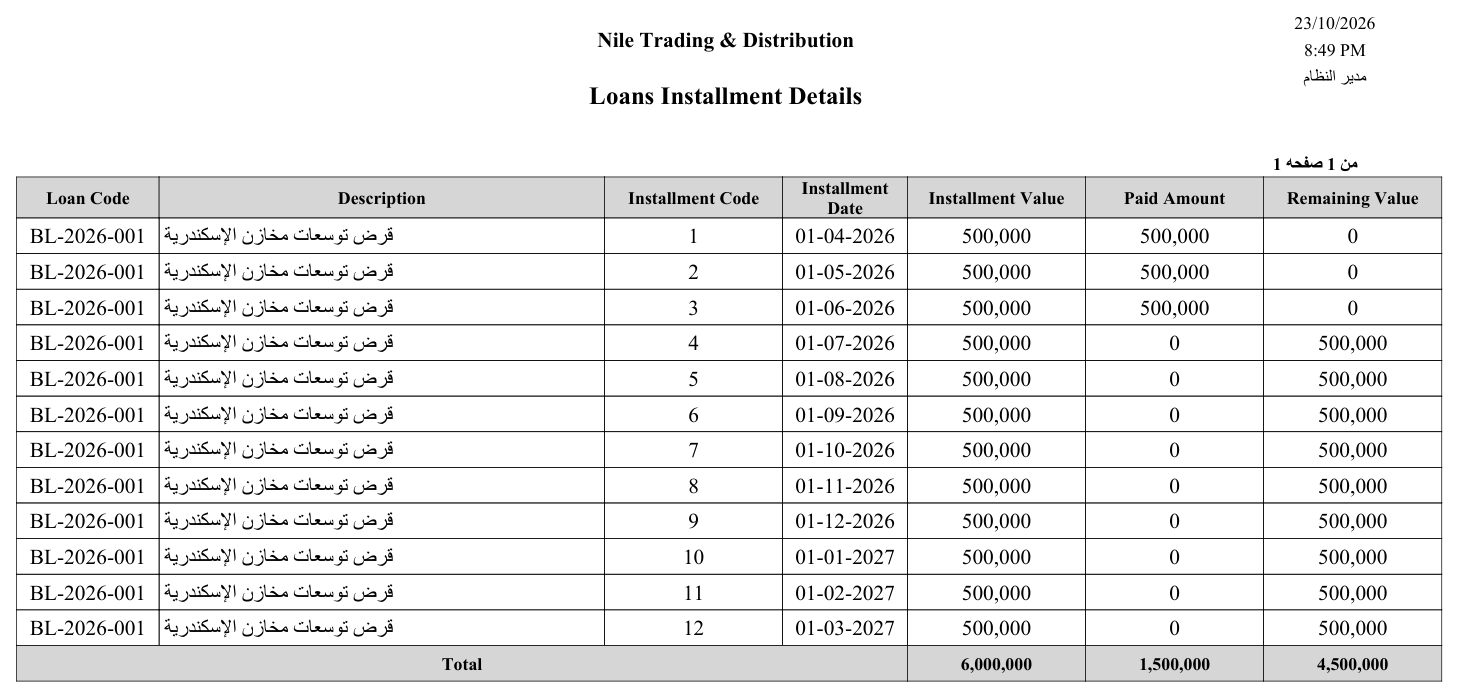
| Loan installment details (SYSR-LON001) | The loan's installment schedule: due, paid and remaining for each installment and its interest. |
| Details of banking facilities (SYSR-LON002) | Facility-limit consumption across loans, guarantees and credits (see Credit Facilities). |
For Support
- "The loan is still Initial and the amount hasn't arrived" — the loan issue document hasn't been recorded yet; issuing is what records the amount in the ledger and moves the status to "Released".
- "Where do the loan, fees and interest accounts come from?" — from the Loan Issue and Installment Payment terms; see Document terms.
- "The late fine isn't computed" — make sure the allowed late days and late fine percent are set on the loan.
- "The loan doesn't draw down the facility limit" — make sure the loan is linked to the correct facility limit; details in Credit Facilities.
- The accounting-processing mechanism is in How documents are processed into accounting effects.
Messages you may see
| Message | Why | What to do |
|---|---|---|
| Installment {0} value greater than installment value {1} in bank loan {2} — «القسط {0} اكبر من قيمة القسط {1} فى القرض {2}» | The payments recorded against one installment code — this document plus every other committed Loan Installment Payment — now exceed that installment's value on the loan. | Reduce the paid amount on this document, or check whether the installment was already paid elsewhere. |
| Interest with interest date {0} and interest value {1} greater than interest value {2} in bank loan {3} — «الفائدة التى تاريخها {0} وقيمتها {1} اكبر من قيمة الفائدة {2} فى القرض {3}» | The same over-payment check on the interest side: the interest paid for that date now exceeds the interest line on the loan. | Correct the interest paid, or re-run Loan Interests Calculation if the accrued interest itself is wrong. |
| Can not find installment line with code {0} in bank loan {1} — «لا يمكن ايجاد سطر قسط بكود {0} فى القرض {1}» | A payment line carries an installment code that no longer exists on the loan — usually because a Bank Loan Scheduling or Changing Document rebuilt the schedule with different codes. | Re-pick the installment on the payment document; if a scheduling document removed paid installments, correct that document instead. |
| Can not find interest line with interest date {0} and interest value {1} in bank loan {2} — «لا يمكن ايجاد سطر فوائد بتاريخ فائدة {0} وقيمة فائدة {1} فى القرض {2}» | The same, for an interest payment line whose date-and-value pair no longer matches any interest line on the loan. | Re-pick the interest line, or restore it on the loan. |