
Credit Facilities & Facility Limits
Two related but distinct ideas meet on this page:
- A facility limit is the ceiling the bank grants you, shared by a number of instruments — a loan here, a letter of guarantee there, a letter of credit — each of which reserves part of the ceiling, and the system tracks the consumed and remaining amounts.
- A credit facility is a standalone instrument: a revolving-drawdown agreement with the bank with its own value, interest and fees, issued, repaid and terminated through its own documents.
Required license
Credit facilities are part of the accounting-loans license — the same license that covers Bank Loans and Fixed Deposits.
Facility limit: the shared ceiling
On the Facility Limit screen (Banks > Credit Facilities > Facility Limit) the ceiling granted by a particular bank is defined, and its details are configured through the Facility Limit Config (Banks > Credit Facilities > Facility Limit Config).
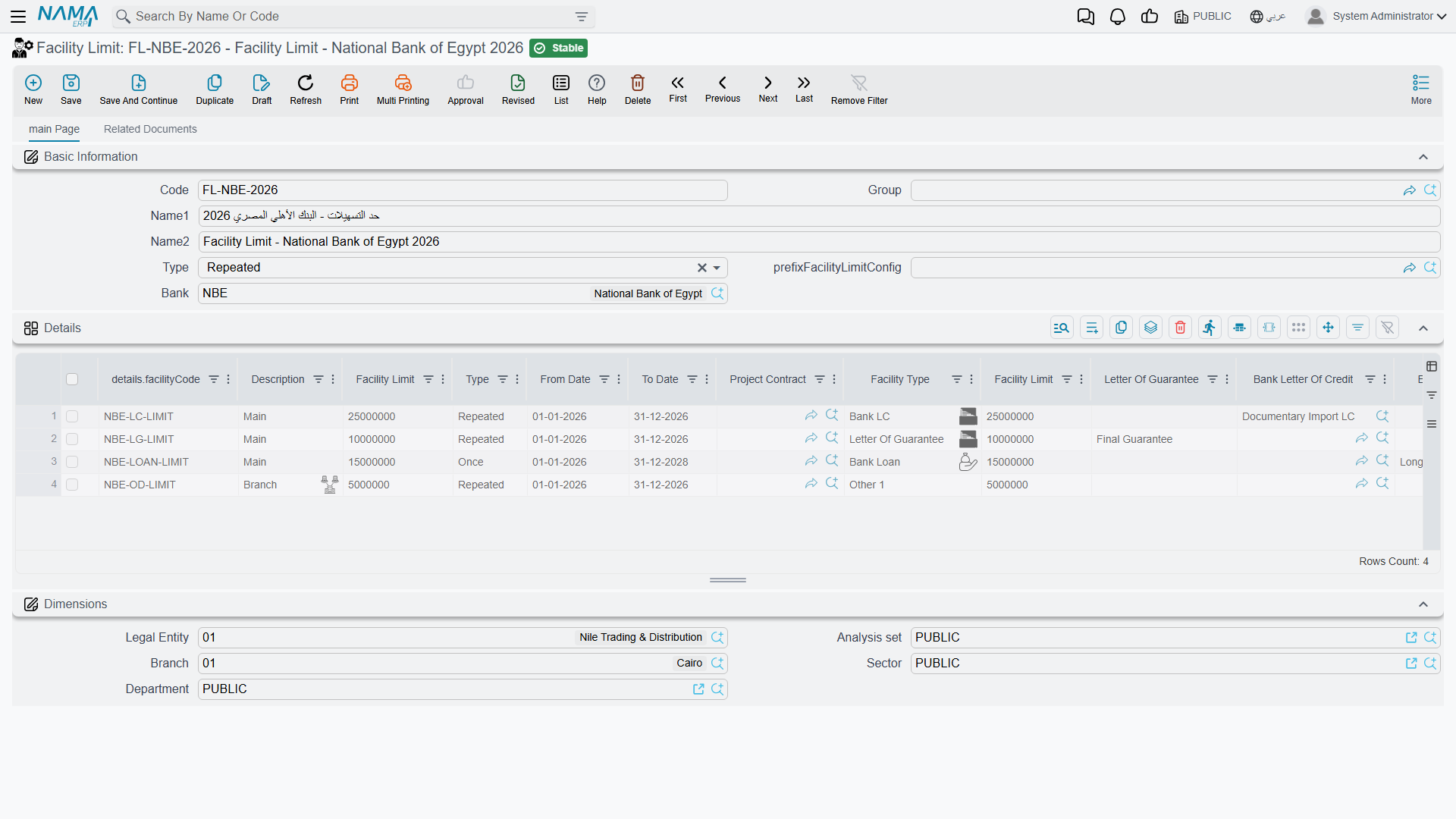
As soon as a loan, letter of guarantee or LC is linked to a facility limit, it draws down from it at issue/opening; the system blocks any issue that would push the consumed amount over the ceiling. And because the three instruments share the same ceiling, the Details of banking facilities report (SYSR-LON002) gives you a unified picture of what's reserved across all of them.
Credit facility: from setup to termination
A credit facility is a revolving-drawdown instrument, and its cycle runs like this:
- Credit Facility Setting — the shared template: the interest-calculation method, the rule for allocating a payment between principal and interest, and the accounts.
- Credit Facility — the master file in its "Not Started" status.
- Credit Facility Issuance — activates the facility (it creates a journal entry, and the status flips to "In Progress").
- Credit Facility Payment — repaying an installment that gets split between principal and interest per the setting (it creates a journal entry).
- Credit Facility Termination — terminating the facility (status "Terminated").
The facility master file
On the Credit Facility screen (Banks > Credit Facilities > Credit Facility) the terms are defined: the linked setting, the supplier, bank and bank account, the credit facility value, the interest percentage and expected interest value, the fees percentage/value, and the start / end date. The file shows live tracking totals: total calculated interest value, total credit facility payments, total interest payments, and the credit-facility/interest remaining after payment.
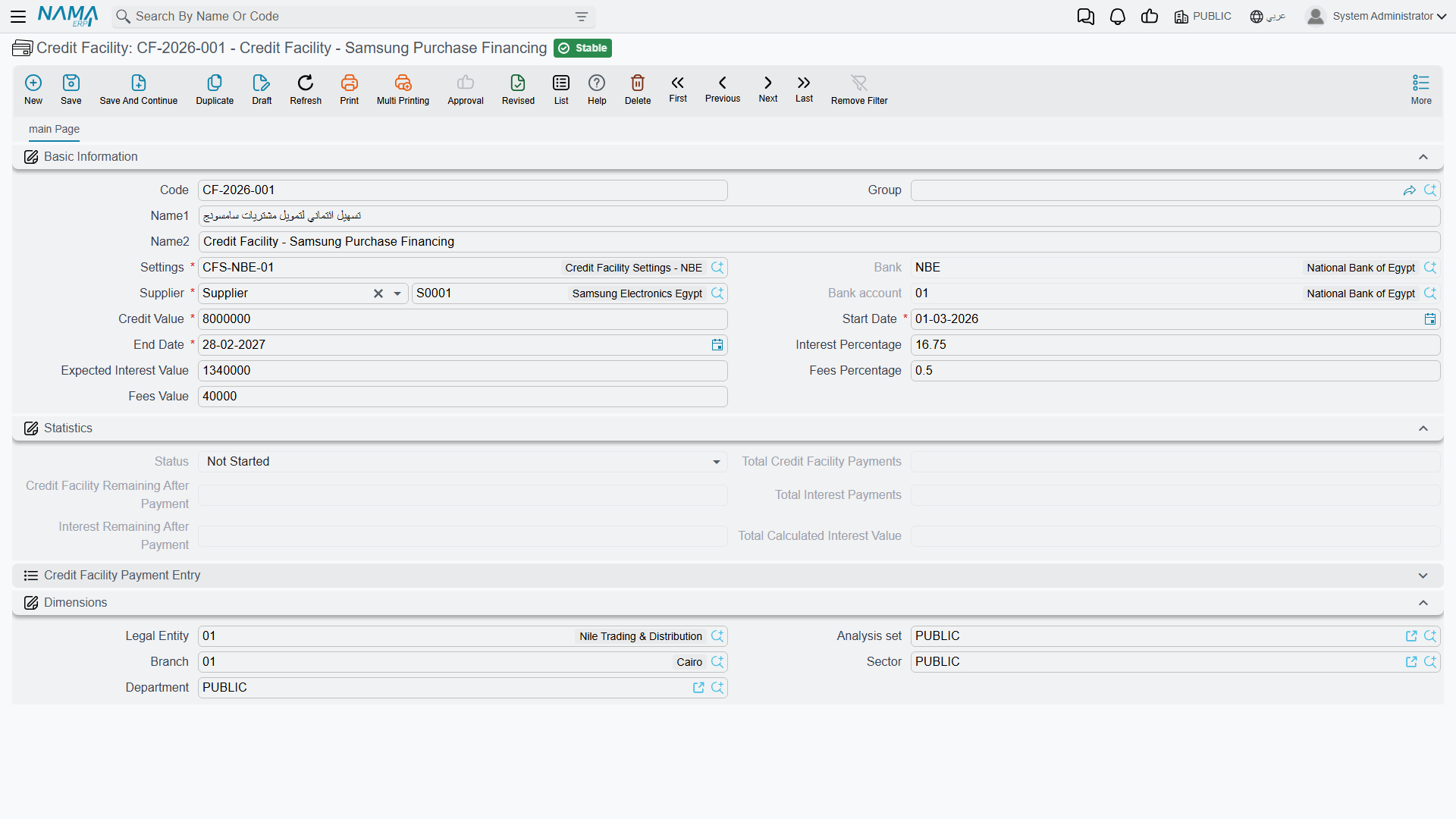
Facility statuses: Not Started → In Progress → Terminated.
The setting
The Credit Facility Setting gathers the rules shared by similar facilities: the interest-calculation method (the days per year for credit-facility interest calculation option sets the calculation basis, default 365 — see Accounting configuration) and the rule for splitting each payment between principal and interest.
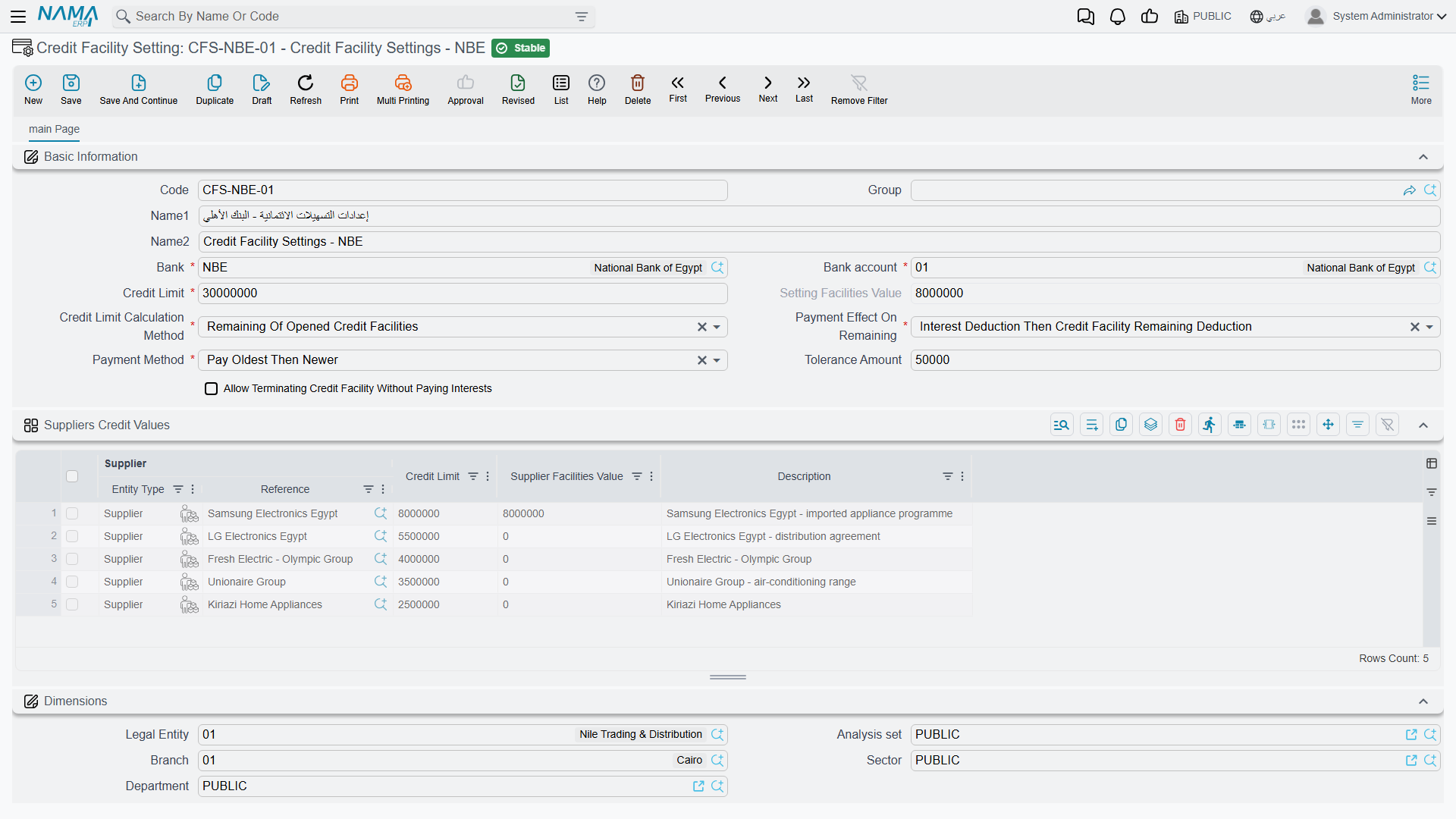
Issuance, payment and termination
Issuance activates the instrument and creates its accounting effect (a debit/credit pair). Then each payment document splits its installment between principal and interest per the setting, recording it on the sides: payment of credit-facility value debit/credit, payment of interest value debit/credit, and payment value debit/credit. Finally, the termination document closes the facility. (Where the accounts come from is in the Document terms reference.)
Actions on this screen
The Credit Facility Payment is the one screen here you should not fill in by hand — two buttons find the facilities a payment should go against:
- Collect Credit Facilities — you enter the payment value and, optionally, narrow by setting, supplier, bank, bank account and a start-date range; it then fills the payment's details with the outstanding facilities and spreads the payment across them. Tick collect by oldest then newest facilities only to have it settle in age order. The payment value must be greater than zero, or the button refuses with "Payment value should be more than zero".
- Collect Credit Facilities Without Payment Value — the same search, but it brings in the matching facilities without allocating an amount to each. Use it when you want to see everything outstanding for a supplier or bank and decide the split yourself.
Reports
| Report | Answers |
|---|---|
| Details of banking facilities (SYSR-LON002) | What's reserved and remaining of the facility limits across loans, guarantees, credits and facilities. |
For Support
- "What's the difference between a facility limit and a credit facility?" — a facility limit is a ceiling shared by several instruments, while a credit facility is a standalone drawdown instrument with its own documents.
- "Issuing a loan/letter/LC was rejected because of the limit" — the consumed amount exceeds the linked facility-limit ceiling; check the Details of banking facilities report.
- "The facility interest calculation looks wrong" — check the days per year in Accounting configuration and the allocation rule in the facility setting.
- "Where do the payment accounts come from?" — from the Credit Facility Payment term; see Document terms.
- The accounting-processing mechanism is in How documents are processed into accounting effects.
Messages you may see
| Message | Why | What to do |
|---|---|---|
| Payment value should be more than zero — «يجب ان يكون المبلغ المدفوع اكبر من صفر» | The Collect Credit Facilities button was pressed with the payment value empty, zero or negative. | Enter the amount you are paying first, or use Collect Credit Facilities Without Payment Value to bring the facilities in unallocated. |
| End date must be greater than start date — «تاريخ النهاية يجب أن يكون أكبر من تاريخ البداية» | The credit facility's start date is after its end date. (The same wording is used by several HR screens.) | Correct whichever of the two dates is wrong. |
| Setting {0} Credit Limit {1} Is Less Than The Remaining Of Opened Credit Facilities {2} — «الحد الائتماني {1} للإعداد {0} أقل من المتبقي من التسهيلات الائتمانية المفتوحة {2}» | Saving this facility would push the remaining value of all In Progress facilities that share the same Credit Facility Setting over the setting's credit limit. | Lower the facility value, raise the limit on the setting, or terminate a facility that is finished. |
| Supplier {0} Credit Limit {1} Is Less Than The Remaining Of Opened Credit Facilities {2} — «الحد الائتماني {1} للمورد {0} أقل من المتبقي من التسهيلات الائتمانية المفتوحة {2}» | The same check, but against the per-supplier limit line inside the setting rather than the setting's overall limit. | Raise that supplier's limit in the setting's suppliers grid, or reduce the facility value. |
| Credit facility {0} is not issued yet — «لم يتم إصدار التسهل الائتمانى {0}» | A payment (or another document) refers to a facility that has no committed Credit Facility Issuance. Nothing can be paid against a facility that was never activated. | Issue the facility first, then re-save the document. |
| You can not change the bank because the current document is used in {0} — «لا يمكن تغير البنك لأن الملف الحالى مستخدم فى {0}» | The bank on a Credit Facility Setting is being changed after committed facilities were already created from it. | Create a new setting for the new bank instead of editing the old one. |
| Credit limit {0} for supplier {1} is less than the total remaining credit facilities {2} — «الحد الائتمانى {0} للمورد {1} أقل من إجمالى المتبقى من التسهيلات الائتمانية {2}» | A supplier limit line on the setting is being saved with a ceiling below what that supplier's existing facilities still owe. | Raise the line's credit limit, or settle/terminate facilities for that supplier first. |
| Value date {0} can not be after credit facility {1} start date {2} — «لا يمكن ان يكون التاريخ الفعلى {0} بعد تاريخ البداية {2} للتسهيل الائتمانى {1}» | The Credit Facility Issuance carries a value date later than the facility's own start date — the facility would be active before it was issued. | Move the issuance date back to the start date or earlier, or push the facility's start date forward. |
| Credit facility {0} was issued before in {1} — «التسهيل الائتمانى {0} تم إصداره مسبقاً فى {1}» | A second issuance document is being created for a facility that already has one; a facility is issued once. | Use the existing issuance document; delete this one. |
| Credit facility {0} is already terminated by {1} — «تم انشاء مستند إنهاء تسهيل {1} للتسهيل الائتمانى {0}» | The facility has a committed Credit Facility Termination, so it accepts no further payment or termination. | If the termination was wrong, delete it first; otherwise nothing more is due on this facility. |
| Credit facility {0} has payments in document {1} — «التسهيل الائتمانى {0} له مدفوعات فى مستند {1}» | The issuance document is being edited or deleted while payment documents already exist against the facility. | Delete the payment documents named first, then change the issuance. |
| Payment value {0} must be equal to the sum of payment of credit facility {1} and payment of interest {2} — «المبلغ المدفوع {0} يجب ان يساوس مجموع المدفوع من التسهيل الإتماني {1} و المدفوع من الفائدة {2}» | On a payment line whose effect on the remaining is entered by hand, the line payment value does not equal principal plus interest. | Make the three figures agree, or let Collect Credit Facilities fill the line. |
| Payment value in line {0} can not be greater than the sum of payment of credit facility and payment of interest — «لا يمكن ان يكون المبلغ فى السطر {0} أكبر من مجموع المُسدد من التسهيل الائتمانى و المُسدد من الفائدة» | The line pays more than the principal and interest portions it is split into; the number in the message is the line number. | Reduce the line payment value, or raise the principal/interest split to match it. |
| Payment of interest value {0} can not be grater than the interest remaining before payment {1} — «لا يمكن ان تكون قيمة المدفوع من الفائدة {0} أكبر من قيمة المتبقي من الفائدة قبل الدفع {2}» | The interest portion of the line exceeds the interest still outstanding on that facility before this payment. | Cap the interest portion at the remaining interest; put the rest against principal. |
| Total payment of the details {0} is greater than {1} — «إجمالى المدفوع فى السطور {0} اقل من {1}» | The header payment value is larger than the total the detail lines actually allocate. (The Arabic wording of this message says "less than"; the check is the one described here.) | Either lower the header value or allocate the difference onto a facility line. |
| Credit facility {0} has {1} remaining unpaid amount — «متبقى من التسهيل الائتمانى {0} مبلغ {1} غير مدفوع» | A Credit Facility Termination is being saved while the facility still has an unpaid balance, and the setting does not allow terminating with interest outstanding. | Record the remaining payments first, or tick allow terminating credit facility without paying interests on the setting if that is the policy. |