
Financial Commitments
A company carries many recurring obligations that aren't invoices yet but are very real: a yearly rent paid in quarterly installments, an insurance policy, a financing agreement with a fixed repayment schedule. The financial-commitments system is where you register these obligations, lay out their installment schedule, and track what's been paid against what's still due — a regulation-and-tracking layer that sits beside your ordinary vouchers.
Required license
Financial commitments are part of the accounting-financial-commitments-regulation license.
A tracking layer, not an accounting document
The commitment and its payment document create no general-ledger entry themselves. They track the obligation and its settlement against the schedule; the actual money movement is recorded by your normal receipt/payment vouchers. Think of this system as the planner and watchdog over those obligations, not a replacement for the vouchers that move the cash.
The pieces
All screens are under the Accounting > Financial Commitment Management root:
- Financial Commitment Category — a master file for classifying commitments (rent, insurance, financing…), so you can group and report on them.
- Financial Commitment — the obligation itself: its total value, its category, a start date, a repayment period (every n months/…), and the resulting installment schedule.
- Financial Commitment Payment Document — records a payment against a specific installment, updating that installment's paid/remaining figures.
- Financial Commitment Reschedule — changes the schedule after the fact (add, edit or remove installments), keeping a before/after record of the change.
Setting up a commitment
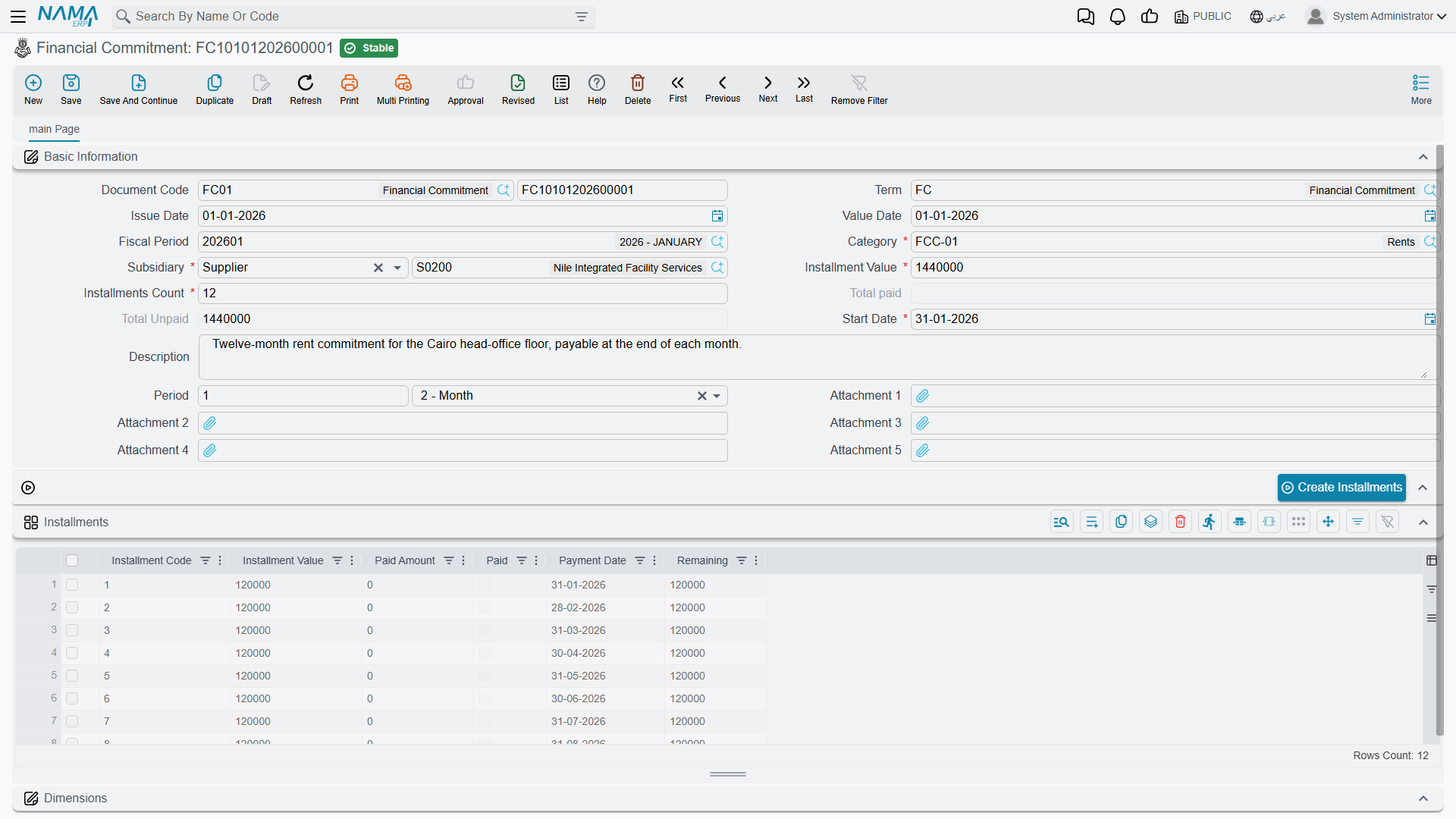
On the Financial Commitment (Accounting > Financial Commitment Management > Financial Commitment) you enter the obligation's category, its start date, the installments count and installments value, and the recurrence period (value + unit, e.g. every 1 month). From these the Installments grid is built — one line per installment carrying its installment code, value, payment date, and the running paid amount / remaining and a paid flag. The header keeps the rolling total paid and total unpaid so you can see at a glance where the obligation stands.
Paying an installment
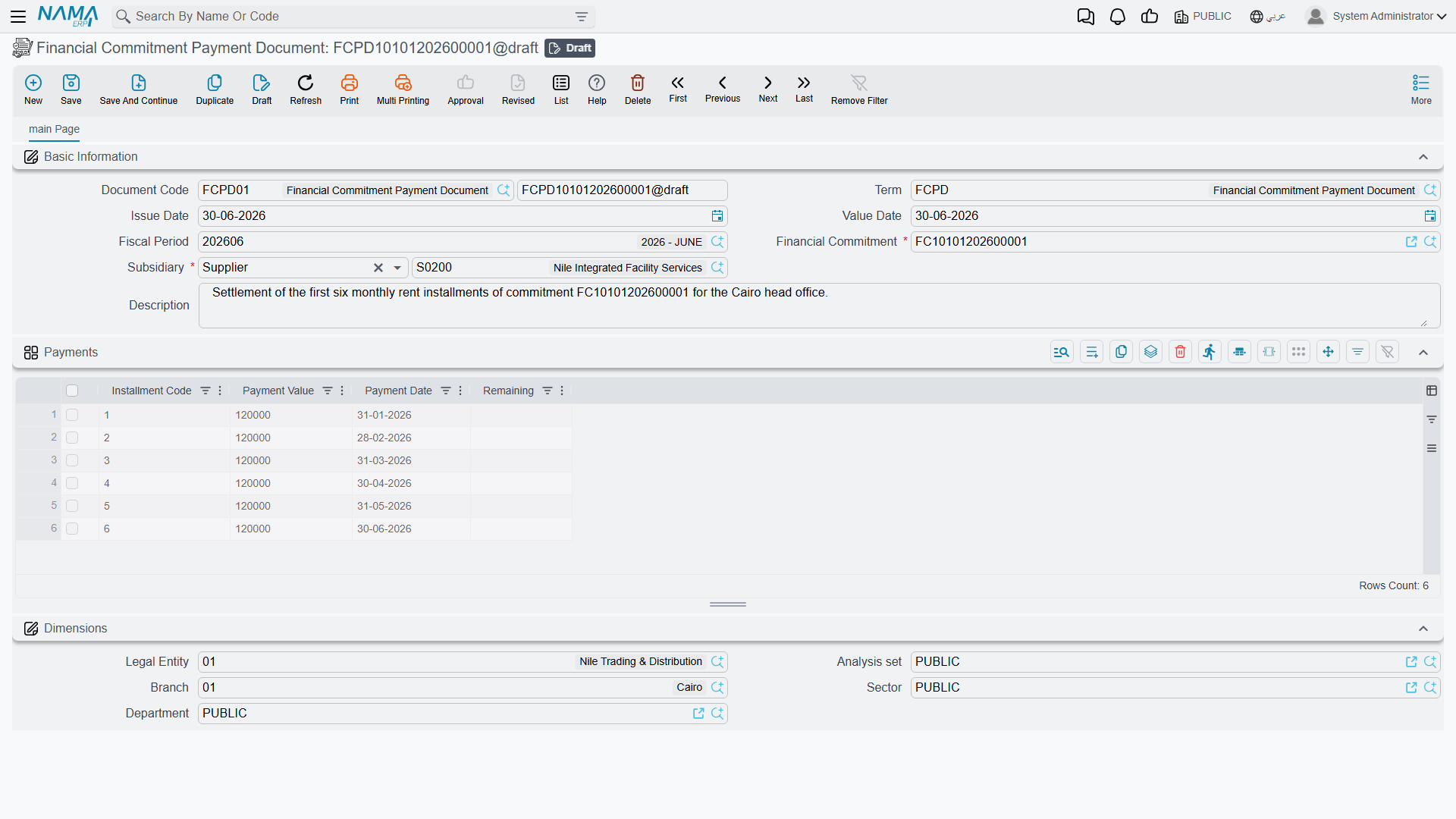
The Financial Commitment Payment Document (Accounting > Financial Commitment Management > Financial Commitment Payment Document) points at a financial commitment and records a payment against it. When committed, it updates the matching installment's paid amount and remaining, and flips the installment to paid once fully settled — so the commitment's totals always reflect reality.
Actions on this screen
The installment schedule is generated, not typed:
- Create Installments — builds the Installments grid from the installments value, the installments count, the start date and the recurrence period, dividing the value evenly and stepping the payment date forward by one period each time. All four fields are required; leave one blank and the button says which. It also refuses to run if any existing installment is already paid or carries a paid amount — regenerating would wipe settled history — so reschedule those with a Financial Commitment Reschedule instead.
- Create Installments For Selected Documents — the same generation, but from the commitments list view across every commitment you have selected. This is how you lay schedules onto a batch of commitments that were imported or entered without them.
Rescheduling
Plans change — an installment is deferred, the amounts are renegotiated. The Financial Commitment Reschedule (Accounting > Financial Commitment Management > Financial Commitment Reschedule) lets you add, edit or delete installment lines on an existing commitment. It keeps two grids — the details (the new schedule) and the details before edit (the schedule as it was) — so the change is auditable.
For Support
- "The commitment didn't create a journal entry" — that's expected; commitments and their payment documents create no ledger entry. Record the actual cash movement with a normal receipt/payment voucher.
- "The paid/remaining figures look wrong" — they're driven by the payment documents linked to the commitment; check that each payment is committed and points at the right installment.
- "I need to change the schedule" — use a Reschedule document rather than editing the original commitment; it preserves the before/after history.
- "An installment still shows unpaid after I paid it" — confirm the payment document fully covered the installment value; partial payments leave a remaining balance until topped up.
Messages you may see
| Message | Why | What to do |
|---|---|---|
| Installments Count must be {0} — «عدد الإقساط يجب أن يكون {0}» | The installments count on the header does not match the number of lines in the Installments grid; the number shown is the line count actually found. | Either correct the count, or press Create Installments again so the grid and the count are built together. |
| Sum of installments values {0} must equal installments value {1} in document header — «مجموع قيم الأقساط {0} يجب ان يساوى {1} فى رأس المستند» | The installment lines add up to something other than the header installments value. | Adjust a line value or the header figure. Create Installments always produces an even split that balances. |
| Paid installment with code {0} can not be removed — «لا يمكن حذف القسط المدفوع الذى كوده {0}» | A payment document already exists against that installment code, and the line has been deleted from the grid. | Put the line back. A schedule that has been paid against is changed with a Financial Commitment Reschedule, not by editing the commitment. |
| Payment value must be greater than zero — «يجب ان تكون قيمة الدفع اكبر من الصفر» | A line on the Financial Commitment Payment Document has an empty or negative payment value. | Enter a positive amount on that line, or delete the line. |
| Could not find installment line with code {0} in {1} — «لا يوجد قسط بكود {0} فى {1}» | The installment code typed on a payment or reschedule line does not exist on the commitment the document points at. | Pick the code from the commitment's Installments grid; codes are not free text. |
| Installment code {0} can not be repeated — «لا يمكن تكرار كود القسط {0}» | Two lines of the same payment document pay the same installment code. | Merge them into one line carrying the total amount. |
| Cannot change financial commitment from {0} to {1} in document {2} — «لا يمكن تغيير الالتزام المالى {0} الى {1} فى المستند {2}» | A saved Financial Commitment Reschedule is being repointed at a different commitment. | Delete the reschedule and create a new one against the other commitment. |
| Cannot edit document {0} on date {1} because of the reschedule document {2} — «لا يمكن تعديل المستند {0} فى تاريخ {1} لوجود مستند اعادة جدولة التزام مالى {2}» | A later reschedule exists for the same commitment; only the most recent reschedule may be edited. | Edit or delete the later reschedule first, then come back to this one. |
| Installment with code {0} is already paid and cannot be changed or deleted — «القسط الذى كوده {0} مدفوع مسبقاً ولا يمكن تعديله او حذفه» | A reschedule line targets an installment already flagged paid. | Remove that line; only unpaid installments can be rescheduled. Reverse the payment document first if the installment really must move. |
| Installment value {0} can not be less than paid amount {1} — «لا يمكن ان يكون القسط {0} أقل من المبلغ المدفوع {1}» | The reschedule would drop an installment's value below what has already been paid against it. | Raise the new value to at least the paid amount, or reduce the payment first. |
| Payment date {0} of add installment must be after payment date {1} of installment {2} — «تاريخ الإستحقاق {0} للقسط المضاف يجب ان يكون بعد تاريخ الدفع {1} للقسط {2}» | An Add line inserts a new installment after an existing one but gives it an earlier or equal payment date. | Move the new installment's payment date past the date of the installment it is added after. |
| Installment payment date {0} for installment code {1} can not be before installment payment date {2} for installment code {3} — «تاريخ الدفع {0} للقسط {1} لا يمكن ان يكون قبل تاريخ الدفع {2} للقسط {3}» | The date given would put the installment out of order against a later installment in the schedule. | Keep the schedule's payment dates ascending; shift the later installments too if the whole plan is moving. |
| Can not delete current document because {0} was created after it — «لا يمكن حذف المستند الحالى لأنه تم إنشاء المستند {0} بعده» | You are deleting a reschedule that a later reschedule for the same commitment was built on top of. | Delete the newest reschedule first and work backwards. |
| Subsidiary {0} is used in {1} and can not be removed — «لا يمكن ازالة الذمة {0} حيث انه مستخدم فى {1}» | A party line was removed from a Financial Commitment Category while a committed commitment still uses that category-and-party pairing. | Put the line back, or move the commitments named onto another category first. |
| Subsidiary {0} is repeated — «الذمة {0} مكرر» | The category's party grid lists the same party twice. | Delete the duplicate line. |
| Can not delete the file because it is used in {0} — «لا يمكن حذف الملف لأنه مستخدم فى {0}» | You are deleting a Financial Commitment Category that a committed commitment is classified under. | Re-classify (or delete) the commitments named first, then delete the category. |