
Site Quality Control
Every construction site runs on paper. Before a slab is poured somebody signs that the steel is right; when a lorry of cement arrives somebody signs that it is the cement that was ordered; when the fire loop is pressurised somebody writes down what the gauge said. Those signed sheets live in a folder in the site office, and when the consultant asks "who checked this?", the folder is the answer.
The Quality group in Contracting is that folder, typed instead of photocopied. Thirteen screens, each one the electronic version of a specific site form, each one filed against the project it belongs to and searchable months later.
This page is the pattern. Read it once and the four pages after it become short, because all thirteen screens are built the same way — the same header, the same signature model, the same handful of answer choices. What changes from one to the next is only the vocabulary of the questions.
Records, Not Gates
Start here, because it is the assumption that most often needs correcting.
Nothing in this family blocks or releases anything else in the module. A quality record is a record. To be specific:
- Committing a Pre-Concrete Inspection does not permit the pour. The pour is permitted by the engineer on site who decides to permit it.
- Approving an Activity Inspection Request does not release the corresponding quantities for certification. Project Execution and the extract do not look for an inspection and never will.
- A failed inspection does not hold up a payment. The extract does not read quality documents, so an unacceptable verdict costs the subcontractor nothing until somebody raises a fine or withholds a quantity by hand.
- No quality document creates another document, changes another document's state, creates a journal entry or moves stock. Not one of the thirteen has an accounting or inventory effect.
That is not a shortcoming to work around silently — it is worth telling your site team, because the natural expectation is the opposite.
If you do need a real gate
Use the platform's generic approval cycle. Any of these documents can be put behind an approval definition so that, say, the QC manager must approve before it can be committed. That gates the quality document's own commit — the discipline of "no pour without a committed inspection" then lives in your site procedure, enforced by people, not by the system.
Where They Live, and What Each One Is
All thirteen sit in one menu group, Contracting > Quality, and every one of them is a document.
| Screen | What it records | Licence | Covered in |
|---|---|---|---|
| ITP | the inspection and test plan itself — one row per inspectable activity | contracting-qc | Inspection and Test Plans |
| ITP Register | the submission and revision log for those plans | contracting-qc | Inspection and Test Plans |
| Activity Inspection Request | "come and inspect this before we cover it" — with three parties' verdicts | contracting-qc | Activity Inspection Requests |
| Material Receipt | the receiving inspection of a delivery on site | contracting-qc | Material Inspection on Delivery |
| MRR Register | the log of those receiving reports sent out and returned | contracting-qc | Material Inspection on Delivery |
| Pre-Concrete Inspection | formwork and steel readiness before a pour | contracting-qc | Site Checklists and Test Reports |
| Post-Concrete Inspection | what the concrete looks like once the formwork is off | contracting-qc | Site Checklists and Test Reports |
| Underground Piping Check List | checks on a buried pipe run before backfilling | contracting-qc | Site Checklists and Test Reports |
| Cleaning And Flushing | pipework blown through and flushed before commissioning | contracting-qc | Site Checklists and Test Reports |
| HydroStatic Test Report For Fire Protection System | the fire-loop pressure and leakage test | contracting-qc | Site Checklists and Test Reports |
| Finishing Works CheckList | a free-form activity checklist for civil and finishing work | contracting | Site Checklists and Test Reports |
| Digging And BackFiling CheckList | the same, for excavation and backfilling | contracting | Site Checklists and Test Reports |
| Test Report | a pressure or leak test certificate, with the gauge calibration schedule | contracting | Site Checklists and Test Reports |
The licence, and the exception inside the group
Ten of the thirteen need the sub-module licence contracting-qc on top of the base contracting licence. The three at the bottom of the table — Finishing Works CheckList, Digging And BackFiling CheckList and Test Report — need only plain contracting, even though they sit in the same menu group and behave identically to the rest.
That matters in practice more than it sounds. A customer who has bought the Contracting module but not the quality sub-module still gets the two general activity checklists and the test report — which happen to be the three most broadly useful screens in the group. If a contracting-qc screen is missing from the menu, it is a licence question, not a permissions question: a missing licence removes the screen and its document term from the menu entirely rather than greying anything out.
One Shape, Thirteen Vocabularies
Every screen in this group is a single page called Main, laid out in the same order:
- Basic Information — the document book and code, the document term, the issue date, the value date and the fiscal period. Then that document's own header fields: normally who inspected, where on site, and against which drawing and specification. Then a description box.
- Zero or more themed groups of questions — Curing, Hydrants, Surface Appearance and so on, depending on the document.
- At most one Details grid, titled Details, where the document lists things rather than answering fixed questions.
- Dimensions — legal entity, analysis set, branch, sector, department, exactly as on every other document in Nama.
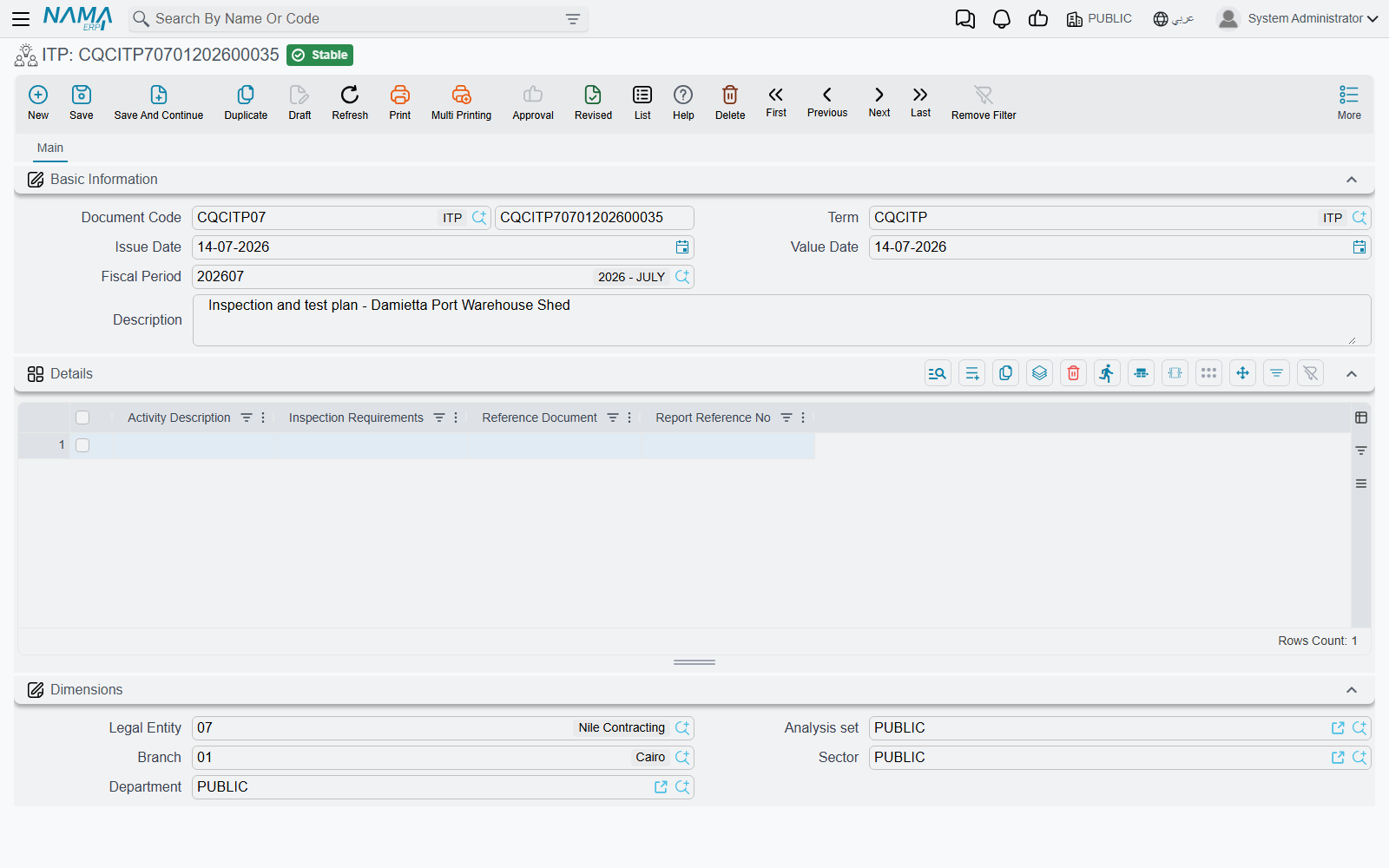
Learn that once and you can open any of the thirteen and know where to look. There are only two structural variations across the whole family:
- Questionnaires — a fixed set of tick-box questions in themed groups, each question with a remark box next to it, and no grid at all. The Post-Concrete Inspection and the hydrostatic fire-system test are the two.
- Line lists — a grid the user fills freely, row by row, with a small header above it. Everything else.
The document term
Every one of these documents requires a document term (توجيه), so creating one per document type is a real setup step you cannot skip — without a term the first record will not save.
There is nothing quality-specific on it. None of the thirteen has module-specific term options, so the term screen shows only the platform-standard tabs: the document book and numbering, default dimensions, the approval cycle, printing and permissions. Create a simple term per document type, point it at the right book, and move on. See Document Terms Basics.
Who Signs, and What That Means
Two signature shapes exist across the family, and both are plain data fields. Nothing requires them to be filled, and filling them triggers nothing.
The ordinary shape — two signatures. Nine of the thirteen carry a pair of employee references:
- Site Engineer — the company's engineer who did or witnessed the work
- Quality Control Engineer — the company's QC engineer who checked it
Where the client's side signs too, there is a third field for the consultant. Its type varies by document: on most screens it is a free-text name you type, on the Post-Concrete Inspection it is an employee, and on the Finishing Works CheckList it is a proper reference to the consultant master file. Whichever it is, it records who signed, nothing more.
The three-party shape — nine names on one document. Only the Activity Inspection Request uses it, and it is the most considered design in the group: three panels — the site team, the QC team, and the consultant — each carrying a Civil Engineer, a Mechanical Engineer and an Electrical Engineer. A slab inspection fills the civil slot in all three panels and leaves the other six blank; a duct inspection fills the mechanical ones. See Activity Inspection Requests.
There are no signature dates anywhere in the family except on the Test Report, which puts a date box beside each of its two signatures. If you need to know when a record was signed, you are reading the document's own issue date, not a signature date.
The two checklists carry a per-row tick instead
The Finishing Works and Digging And BackFiling checklists work differently, and better for their purpose: instead of one signature for the whole document, every row of the activity list has its own tick-box for the site engineer and for the QC engineer — and, on the digging checklist, a third one for the client's representative. Thirty activities can then be signed off individually as they are completed.
The Answer Choices
Where a document asks a fixed question rather than inviting free text, the answer comes from one of three small option lists. Between them they cover every tick-box in the group.
| The choice | What it means | Where you meet it |
|---|---|---|
| Yes / No | the plain question — was curing applied, do the hydrants operate | the Post-Concrete Inspection and the hydrostatic fire-system test |
| Acceptable / acceptable with comments / not acceptable | a verdict on submitted work | the QC and consultant verdicts on the Activity Inspection Request |
| Nothing to do / needs treatment | a defect verdict — either the finish is fine as it is, or remedial work ("treatment") is required | the surface-appearance questions on the Post-Concrete Inspection |
The last one comes in two flavours, and the difference is only how the "nothing wrong" option reads. On questions about workmanship — formwork joints, construction joints, chamfers — the good answer reads as OK. On questions about defects that are either present or absent — tie holes, cracks, formwork marks, sand runs — the good answer reads as none. Either way the second option is treatment, and it means the same thing: somebody has to come back and fix it.
Two of these lists show their options as short internal names rather than translated captions, so read them by their order and meaning rather than by their wording.
Every question that can answer treatment is paired with its own free-text remark box, and that pairing is the point of the whole document. The tick tells you there is a problem; the remark tells the foreman where it is and how big. "Honeycombing — Yes" is a statistic. "Honeycombing — Yes; two patches near column C4, 150 × 200 mm" is an instruction.
Reading On
The four pages that follow take the thirteen screens in the order you are likely to meet them on a project — plan first, then inspect the work, then inspect what arrives, then the trade-specific forms.
- Inspection and Test Plans — the ITP that says what will be checked, and the register that tracks its approval.
- Activity Inspection Requests — asking QC and the consultant to come and look.
- Material Inspection on Delivery — the receiving report, and the honest account of what it is and is not connected to.
- Site Checklists and Test Reports — the eight trade forms, grouped by what they check.