
Service Distribution
Required licence
crm-technician-appointments.
The appointment says the Giza crew is booked on Sunday morning for a split unit installation. The Technician Service Distribution (سند توزيع الخدمات) says what happened: Essam fitted the outdoor unit in 20 minutes, Mohamed fitted the indoor unit in 30. It is the after-the-visit document, normally one per appointment, and committing it is what marks the appointment as Executed.
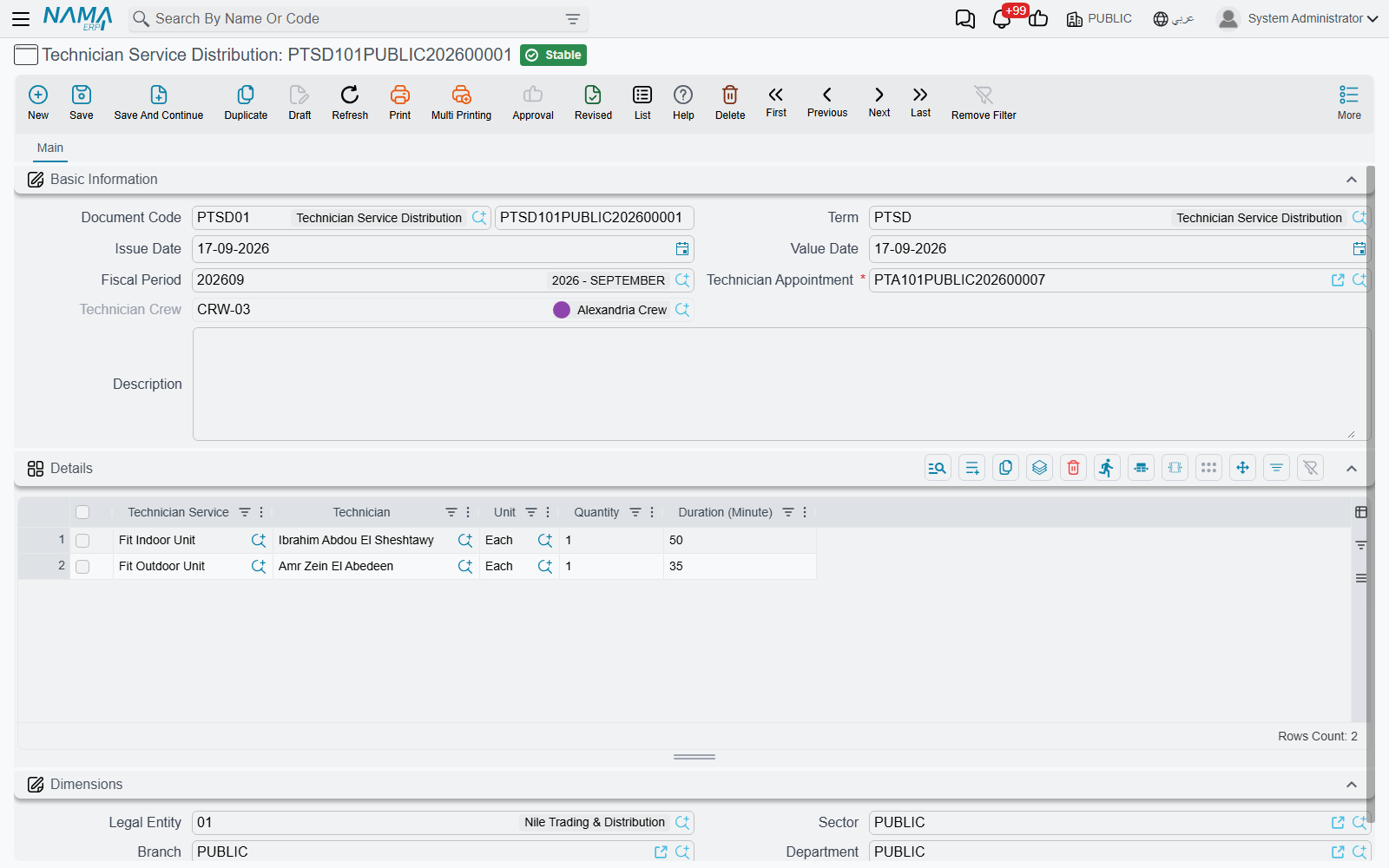
The header
Technician Appointment (موعد فني) — required, and the only thing you really have to choose. Everything else on the screen is shaped by it.
Technician Crew (فريق فنيين) — filled in from the appointment's detail rows the moment you pick the appointment, and kept in step on every save. You do not maintain it; it is there so the document, and the technician picker below, know which team's members are eligible.
The rest is the standard document frame: Document Code and book, Term, Issue Date, Value Date, Fiscal Period, Description and the Dimensions group.
The Details grid — who did what
One row per piece of work performed:
| Column | Meaning |
|---|---|
| Technician Service (خدمة فنية) | The task performed — required |
| Technician (الفني) | Who performed it — required |
| Unit (الوحدة) | The unit the quantity is counted in |
| Quantity (الكمية) | How many |
| Duration (Minute) (المدة (دقيقة)) | How long it took — required |
PTSD101PUBLIC202600001, written against appointment PTA101PUBLIC202600007 of the Alexandria Crew, carries two rows: Fit Indoor Unit by Ibrahim Abdou El Sheshtawy, 1 Each, 50 minutes; Fit Outdoor Unit by Amr Zein El Abedeen, 1 Each, 35 minutes.
Both pickers are narrowed for you, which is the point of having reported the work this way:
- Technician Service offers only the services listed on the appointment's procedure.
- Technician offers only the members of the appointment's crew.
Those two limits are also checked again when the document is committed, so a row that was valid when it was typed and has since drifted — the procedure's service list changed, somebody was transferred out of the crew — is caught rather than quietly saved. The refusals name the offending row; they are listed in full under Messages you may see below.
The quantity, the unit and the minutes are yours to record as they really were. Nothing recalculates them from the service catalogue's planning durations, which is exactly what makes the comparison between the two worth having.
What committing it does
Committing moves the appointment to Executed
On commit, the appointment named on the header is set to Executed (تم التنفيذ). Cancel the distribution and the appointment goes back to Booked (محجوز). Point a committed distribution at a different appointment and both are corrected: the new one becomes Executed and the one you moved away from returns to Booked.
One distribution per appointment is a habit, not a rule: the system accepts a second one. Keep in mind that cancelling or deleting any distribution of an appointment sets the appointment back to Booked, even when another committed distribution still exists. Also, if a period of an executed appointment is later moved or removed on the appointment's own screen, the appointment becomes Rescheduled.
That is the whole of this document's effect. It records effort — it does not price the work, does not move stock and creates no ledger entry. Invoicing continues to run off the sales document the appointment was raised from.
Fitting it into the day
The pattern that works in practice is one distribution per completed visit, written the same day:
- Open the appointment from the calendar or the list and note its code, or start from the distribution screen and pick the appointment there.
- Add a row per service actually performed, naming the technician who did it and the real minutes.
- Commit. The appointment turns Executed and drops out of your "still outstanding" filter on the appointment list.
Visits that did not happen never get a distribution — set the appointment to No Show or Cancelled by hand instead, so that "Booked" always means work still to do.
Messages you may see
| Message | Why | What to do |
|---|---|---|
| Technician Crew {0} does not belong to Technician Appointment {1} — «فريق الفنيين {0} لا ينتمي إلى موعد الفني {1}» | The Technician Crew on the header is no longer the crew the named appointment is booked for — usually because the appointment's crew was changed after this document was typed. | Reselect the appointment so the crew is refilled from it, then recheck the technicians in the grid. |
| Technician Service {0} does not belong to Technician Appointment {1} — «الخدمة الفنية {0} لا تنتمي إلى موعد الفني {1}» | A Details row names a service that is not on the appointment's procedure — commonly because the procedure's service list was edited after the row was typed. | Replace the service with one the picker now offers, or add it to the appointment's procedure. |
| Technician {0} does not belong to Crew {1} — «الفني {0} لا ينتمي إلى الفريق {1}» | A Details row names a technician who is not a member of the header crew — commonly because the technician was moved to another crew after the row was typed. | Choose a current crew member, or put the technician back in the crew if the row is right. |