
Technician Transfers
Required licence
crm-technician-appointments.
Because a technician may belong to only one crew, moving somebody is not a matter of editing two crew records — you would be rejected halfway through, with the person briefly a member of both. The Technician Transfer (سند نقل فني) exists to make the move atomic: one document, one commit, and the crews come out the other side correct.
It is also a record. Six months later, "when did Essam move from Cairo to Giza" has an answer with a document number and a date on it.
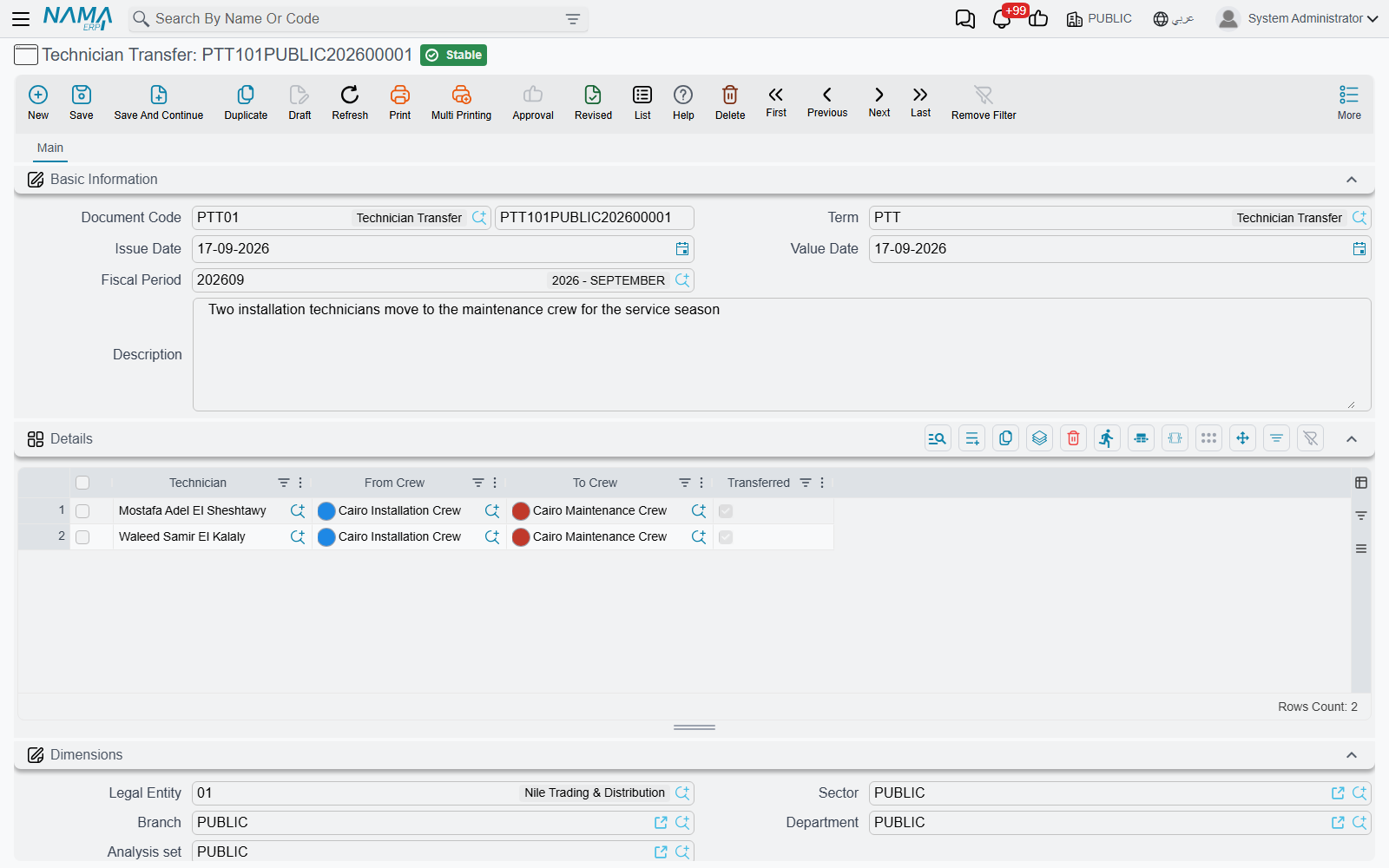
The Details grid
The document is a header of the ordinary kind — code and book, term, issue date, value date, fiscal period, description, and the dimensions — plus a grid where each row is one person's move:
| Column | Meaning |
|---|---|
| Technician (الفني) | The employee being moved — required |
| From Crew (من الفريق) | The crew they are leaving — required |
| To Crew (إلى الفريق) | The crew they are joining — required |
| Transferred (تم النقل) | Ticked by the system once the move has been applied |
PTT101PUBLIC202600001 moves two people in one go — Mostafa Adel El Sheshtawy and Waleed Samir El Kalaly, from the Cairo Installation Crew to the Cairo Maintenance Crew — and PTT101PUBLIC202600002 later brings them both back. That is the natural way to record a seasonal reshuffle.
The grid helps you fill it in from either end:
- Pick the technician first and, while From Crew is still empty, the system looks up the crew they are currently in and puts it in From Crew for you. In practice this is the fastest route: you know who is moving, not necessarily where they sit today. If From Crew already has a value, it is not changed.
- Pick the From Crew first and the Technician picker narrows to that crew's members.
- To Crew never offers the crew you are moving out of.
What is checked
Two rules are enforced when the document is committed, both reported against the offending row:
Nobody twice. A technician may appear on only one row — "Technician … is repeated in more than one line, a technician can be transferred only once per document". If somebody really moves twice, that is two documents on two dates, which is also the truer record.
Nobody into a crew they are already in — "Technician … already exists in Crew …". Usually this means the move has already happened, by this document or another one.
A third check comes from the crews themselves. If the person you are moving is the Crew Supervisor of the crew they leave, that crew no longer passes its own rule, and the transfer fails with the crew's "Crew supervisor … must be one of the crew technicians". Name a new supervisor on that crew first, then commit the transfer.
The receiving crew also has to pass the usual dimension checks. If the technician's branch doesn't match the To Crew's branch, the commit stops with a "Dimensions consistency error" that names the crew and the technician. Move people only between crews whose dimensions fit them.
What committing it does
On commit the document does the work itself: each un-transferred row's technician is removed from the From Crew and added to the To Crew, the affected crew records are saved, and the row's Transferred box is ticked. The technician is added as a new row at the end of the To Crew's Technicians grid, with an empty Description, so the Description they had on the old crew doesn't move with them.
That tick matters. It means the row has been applied, and it is what stops the same move being made twice if the document is committed again after an edit — already-transferred rows are skipped, and only new rows are acted on.
What a transfer does not touch
The move changes crew membership and nothing else. Appointments already booked for either crew keep their crews and their times, and past service distributions keep naming the person who did the work.
So if somebody moves mid-week, look at the bookings the two crews already hold and decide, case by case, whether the work still goes ahead with the crew as it now stands.
Cancelling or deleting a transfer does not undo the move. To move someone back, raise a new transfer.
The usual sequence
- If anyone moving is the Crew Supervisor of the crew they leave, name a new supervisor on that crew first.
- Raise the transfer with one row per person moving.
- Let the From Crew fill itself in, then choose the To Crew.
- Commit. The crews are updated and the rows are ticked.
- Open both crews to confirm the membership.