
The Depreciation Document
The depreciation document is the period-end run: one document per fiscal period, holding one line per asset, each line carrying that asset's charge for the period. It is the only document in the module that books depreciation, and for most sites it is the single most routine thing anybody does in Fixed Assets — twelve of them a year, each taking a couple of minutes.
You will find it at Assets → Documents → Depreciation Document (الأصول > المستندات > سند إهلاك). It needs the fixedassets licence and nothing else.
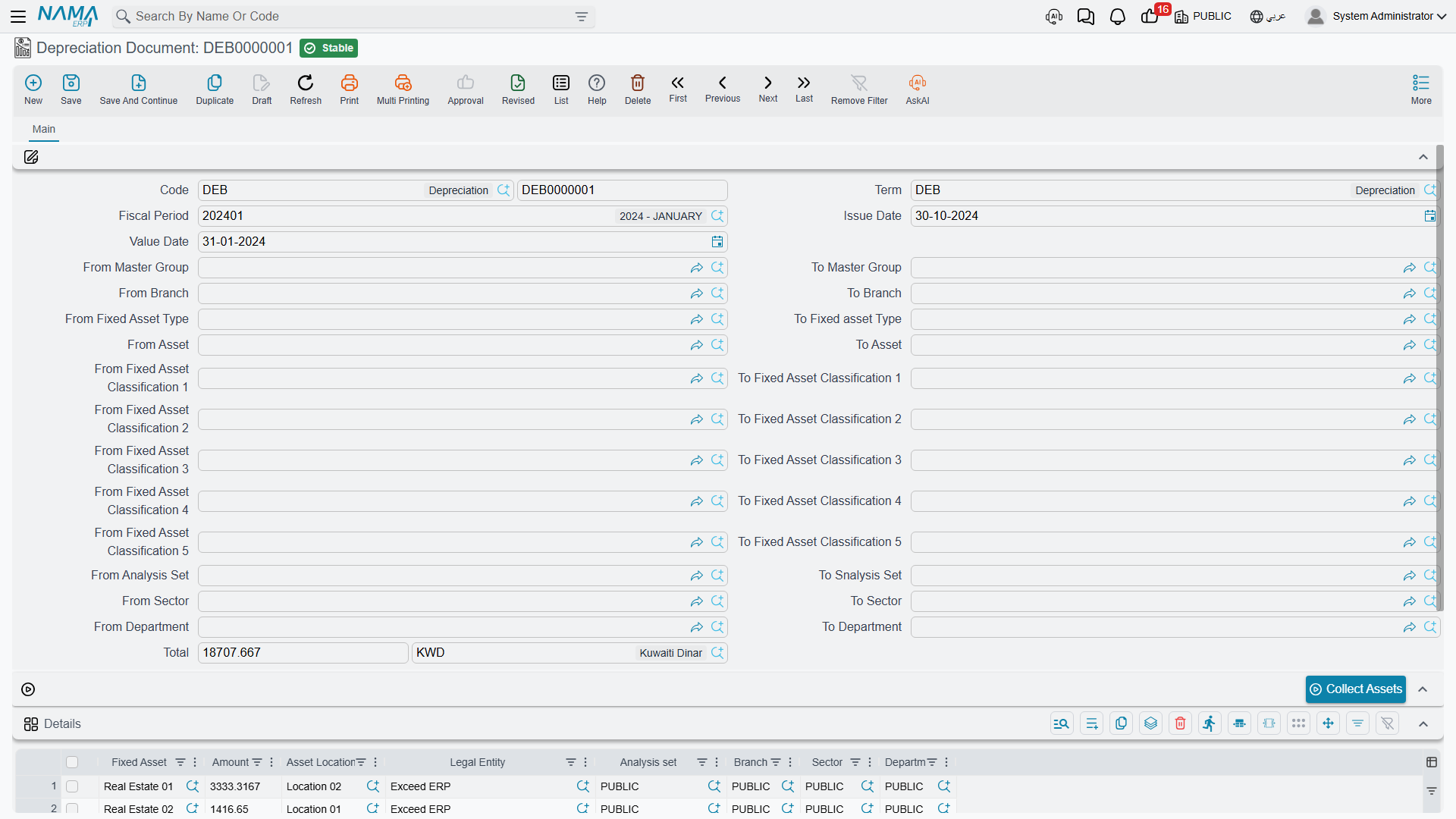
Running January 2026 for Al-Waha
Al-Waha Industries closes its books monthly, so on the last working day of January somebody opens a new depreciation document and does this:
- Choose the book and the fiscal period. The period is the whole point of the document; almost nothing else works until it is filled.
- Check the value date. The system fills it from the period, and it must be the period's last day — 31 January 2026 here. A value date that is not the period end is refused on commit. The issue date is a plain document date and can be whatever day you are actually working on.
- Narrow the run, if you want to. The header carries a long block of paired from … to fields: asset, fixed asset type, master group, branch, sector, department, analysis set and asset classifications 1 to 5. Each pair is a code range — everything from this code up to that code — so they are for slicing the register, not for picking individual assets. Leave them all empty and the run covers everything.
- Press Collect Assets (تجميع الأصول). The system finds every asset that is due in this period and fills the grid with one line each, already carrying the computed instalment. For
MCH-0007that line reads 3,600. - Review, and delete anything you do not want. More on this below.
- Save and commit.
The header total sums the lines. Its currency is forced to the legal entity's currency, so it is always a local-currency figure.
The Details Grid Is Read-Only by Design
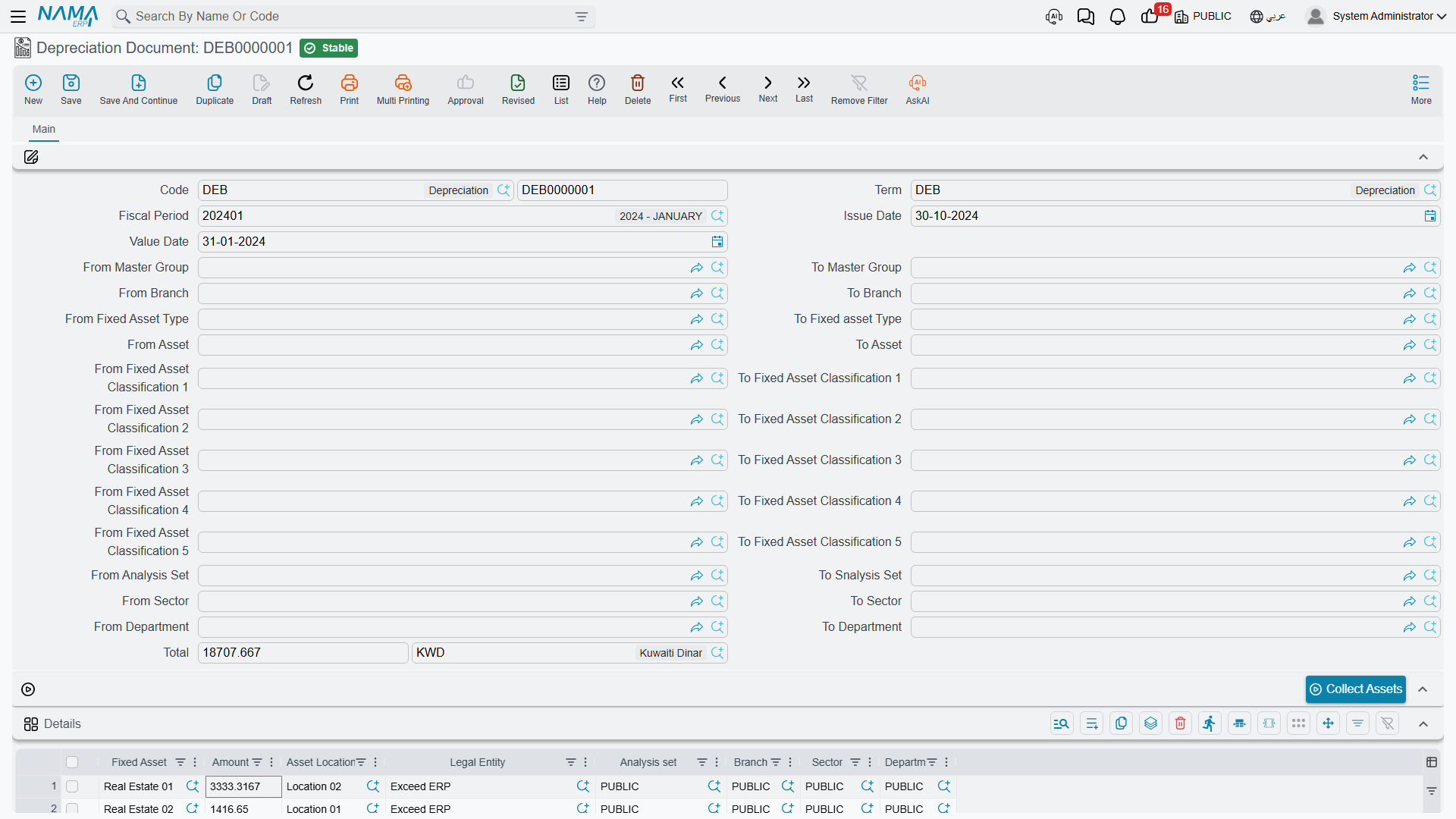
| Column | |
|---|---|
| Fixed Asset | the asset being depreciated |
| Amount | its instalment for this period |
| Asset Location | copied from the asset |
| Legal Entity / Analysis set / Branch / Sector / Department | the asset's dimensions, copied onto the line |
You cannot type in this grid. The asset column and the amount column are locked, and the dimensions and location are copied from the asset when the document is saved. The only editing action available is deleting a line.
That is deliberate, and it is the right model: the instalment is not an opinion, it is the output of the formula on How Depreciation Works. If a figure is wrong, the input is wrong — the asset's remaining life, its salvage value or its carrying amount — and the way to change it is a properties document or an addition or deduction, not a typed override here.
Deleting a line, on the other hand, is a real tool: it takes that asset out of this run. Be aware of what that means, though — the asset then has a gap in its series, and the consecutiveness rule will refuse to depreciate it in February until the gap is either filled or documented with a prevent depreciation document.
Which Assets Turn Up
Collect Assets applies your from/to filters and then a fixed set of conditions that you cannot change: status Running, method Straight Line, depreciation start date on or before the period end, the period immediately following the asset's last depreciation, no prevention covering it, and a computed instalment above zero. The full list, with the reasoning behind each condition, is on the concepts page.
The practical version: if an asset you expected is missing, look at its status first, then at its last depreciation period, then at its depreciation start date. Those three explain almost every absence.
What Committing Books
Committing creates an accounting business request (طلب أعمال) that is processed in the background, so the document saves instantly and the entry appears a moment later. Per line, for the instalment amount:
| Account | |
|---|---|
| Debit | the asset's depreciation account (حساب الإهلاك) — the expense |
| Credit | the asset's accumulated depreciation account (حساب الإهلاك التراكمي) |
For January 2026, MCH-0007 contributes a debit and a credit of 3,600 each; the document as a whole books the sum of all its lines.
The important detail is where those two accounts come from: the asset, through the accounts on its master file (which it usually inherited from its fixed asset type). They are not configurable on the term, which is why two assets on the same document can hit different accounts and why setting the type's accounts up correctly at the start matters so much.
Alongside the entry, committing also:
- writes a dated entry onto each asset's value timeline;
- reduces each asset's remaining life by one;
- recomputes each asset's current instalment for next period;
- flips any asset that has now reached its salvage value to Depreciated.
If the accounting request fails, it is retried from the Business Requests list view — filter for failed requests, select the rows and use the More menu → Reprocess / Recommit. The document itself does not need to be touched.
The Term, and the One Option Worth Knowing
This document does not require a term — it commits perfectly well without one, because it takes its accounts from the asset. A term adds narration templates and a handful of options; the one that changes behaviour for ordinary users is the one whose label lists four documents — addition, deduction, transfer and partial disposal (السماح بعمل مستندات اهلاك سابقا لتاريخ سندات).
Normally the module insists you work strictly forwards: once an addition, deduction, transfer or partial disposal exists on an asset, you cannot slip a depreciation run in behind it. With this option on, you can — which is what you need when a late-arriving upgrade invoice was dated into a month you have not depreciated yet. With it on, the run also re-derives each line's instalment when the document is saved and drops any line whose instalment has fallen to zero or below.
Sites that also run Contracting get depreciation as a project cost source; those options live on the same term and are covered with the rest of the module's accounting wiring in Depreciation and Disposal Terms.
Correcting a Run
There is no reversing document and no credit note. A wrong run is cancelled or deleted, and re-entered.
Three rules govern that:
- Newest first. An asset's value timeline is a chain, and you cannot pull a link out of the middle. If
MCH-0007has been depreciated in January, February and March, the January document will not come apart until March and February have been undone. The message names the document that is in the way. - The fiscal period cannot be changed on an existing document. The system says so plainly and asks you to delete and re-insert instead. Do that rather than looking for a way round it.
- Cancelling or deleting puts everything back. The dated entry is removed, the asset's previous values are restored, remaining life goes back up, the instalment is recomputed, an asset that had flipped to Depreciated returns to Running, and the accounting entry is withdrawn through a business request of its own.
Deleting a run is a real reversal
Cancelling or deleting a depreciation document does not just remove a piece of paper — it removes that period's charge from every asset on it and rewinds each asset's remaining life. On a document covering four hundred assets that is four hundred rewinds. Make sure you mean it, and re-run the period afterwards.
Period Closing Depends on This Document
Fixed Assets takes part in year-end closing: a Closing Entry is refused while any running asset of its legal entity whose depreciation start date falls before the end of the closing entry's period has not been depreciated in the period just before it. The refusal names the asset and that period:
Asset {0} is not depreciated in period {1} — «الأصل {0} غير مُهلك في الفترة {1}»
That check is the main reason to run depreciation as part of the month-end routine rather than when somebody remembers.
Two options on the module configuration relax it — one allows closing with un-depreciated assets outstanding, the other allows closing for assets that carry a prevention record. Turn them on only if you have decided, deliberately, that the register may lag the ledger.
Finding Runs Afterwards
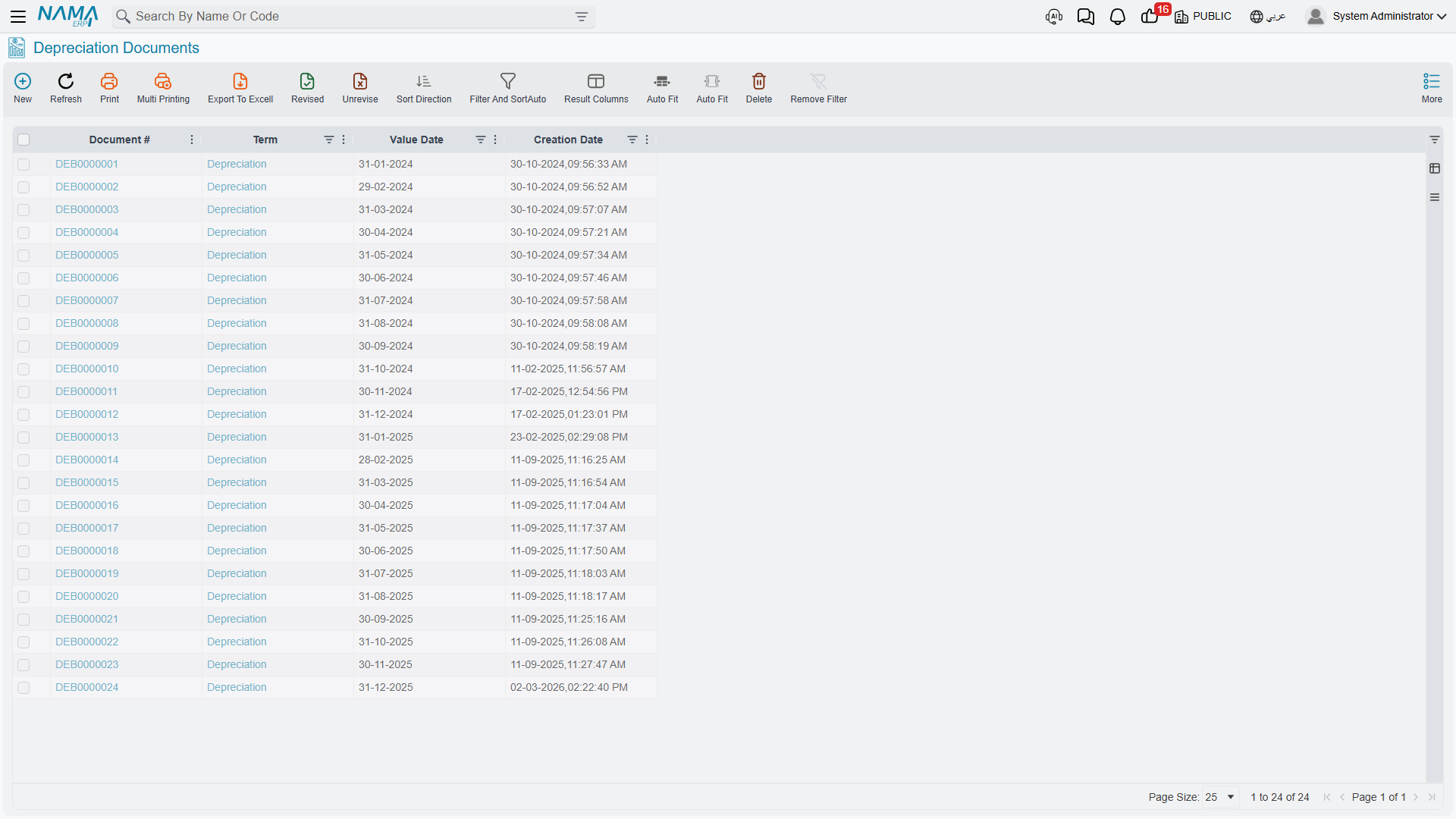
The list view is where you check that a period has been run at all, and it is the fastest way to see the shape of a month: one row, one period, one total. To see the same information asset by asset, use the module's reports, or the asset's own Statistics page.
If the register and the ledger have genuinely diverged — usually after documents were removed directly in the database, or after a bad import — there are administrator utilities for rebuilding an asset's depreciation history; see Fixed Assets Module Utilities. That is a repair tool, not part of normal operation.
When There Are Many Periods to Run
If you have twelve months of arrears to work through, you do not have to create twelve documents by hand. The aggregated depreciation document takes a period range and creates the individual runs for you.
Messages you may see
| Message | Why | What to do |
|---|---|---|
| Asset {0} is not depreciated in period {1} — «الأصل {0} غير مُهلك في الفترة {1}» | Saving a Closing Entry found a running asset that has not been depreciated in the period before the closing period. | Run this document for the period the message names, then save the closing entry again — or use one of the two configuration options above. |
| You can not change fiscal period in Depreciation Documents, please delete and re-insert — «لا يمكنك التغيير في الفترة في مستندات الإهلاك الرجاء مسح وإعادة الإدخال» | You reopened a saved depreciation document and changed its Fiscal Period. | Delete the document and enter a new one for the period you want. The period is fixed once the run exists. |
| Fixed asset {0} is repeated — «الأصل {0} مكرر» | The same asset appears on two lines of the details grid. | Remove the duplicate line. Use the collect button rather than typing lines to avoid this. |
| Cannot Depreciate Asset because it is undepreciable — «لا يمكن اهلاك الاصل لأنه اصل غير قابل للاهلاك» | A line names an asset flagged Undepreciable — land and the like are never depreciated. | Take the line off. Neither translation prints the asset code, so find it by sorting the grid on the undepreciable flag. |
| Cannot Depreciation because the status is Initial — «لا يمكن عمل اهلاك للاصل الثابت لان الحالة ابتدائية» | A line's asset is still Initial: it has no cost, no life and nothing to write down. | Raise a purchase or opening document for that asset first, then run the depreciation. |
| The Asset {0} Cannot depreciated by this document because the depreciation method is {1} use document {2} instead — «لا يمكن اهلاك الأصل {0} باستخدام هذا المستند لان طريقة اهلاك الاصل: {1} يجب استخدام المستند {2} بدلاٌ منه» | The asset's depreciation method is revaluation, and this document only handles straight line. | Take the asset off and use the revaluation document for it instead. |
| Can not depreciate the fixed asset {0} in the period {1} because last depreciation was in period {2} — «لا يمكن اهلاك الاصل {0} في الفترة {1} حيث انه كان اخر اهلاك للاصل كان في الفترة {2}» | There is a gap between the asset's last depreciated period and the period on this document. | Run the missing periods first, or cover them with a prevent-depreciation document, then come back to this one. |