
Freezing an Asset's Depreciation
Sometimes an asset should not be depreciated for a while. A production line is mothballed for six months while the plant is re-tooled. A vehicle is impounded pending a court case. An asset's ownership is disputed and the auditors want it left alone until the dispute is settled.
The obvious move — leaving the asset off the monthly run — does not work, and it is worth understanding why before reaching for the document that does.
Why You Cannot Simply Skip a Period
An asset's depreciation series has to be consecutive. The run will only depreciate an asset in the period immediately following the one it was last depreciated in, and it checks that on commit. So if you delete MCH-0012's line from the February run and try again in March, March is refused: the asset's last depreciation was January, and February is missing.
Worse, that refusal does not go away by itself. There is no "resume" button, and no later period will ever be the period immediately after January. A silently skipped period parks the asset outside the depreciation series for good.
The prevent assets depreciation document is how you skip a period on the record. It declares that named assets must not be depreciated across a stated range of periods, and the depreciation run then treats that range as a documented gap rather than a hole — it excludes those assets while the block is running, and picks them up cleanly in the first period after it ends.
You will find it at Assets → Documents → Prevent Assets Depreciation Document (الأصول > المستندات > مستند منع اهلاك اصول), under the fixedassets licence.
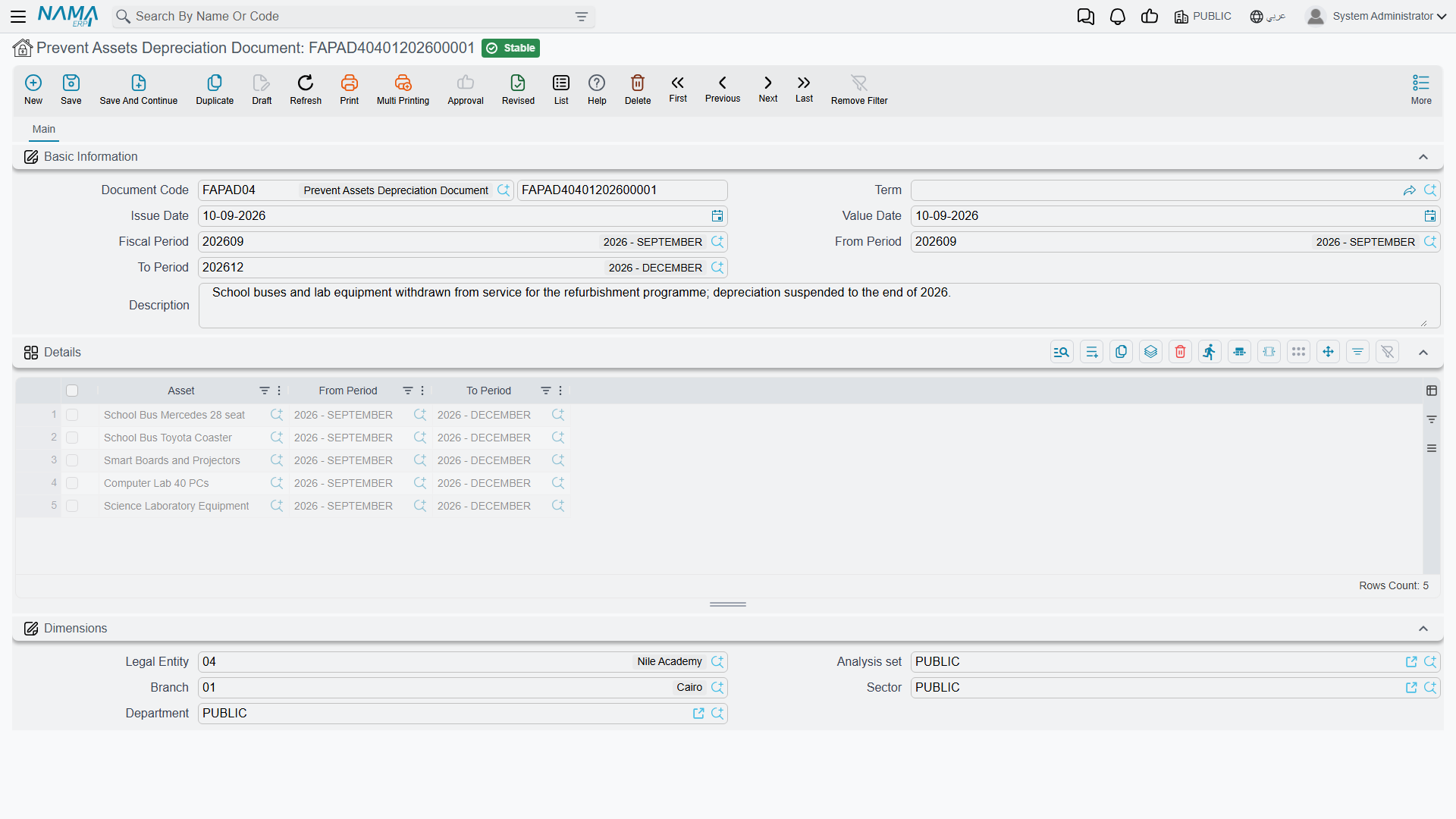
Filling It In
The screen is short. Under Basic Information you have the document code and book, the term, the issue date, the value date, the fiscal period, a description field, and the pair that does the real work: From Period (من فترة) and To Period (الي فترة).
The details grid then lists the assets, each with its own From Period and To Period. In practice you set the range once on the header, because the header values are pushed down onto every line each time the document is saved — so the header is the range and the grid is the list of assets it applies to.
There is a Dimensions group at the bottom, as on every document in the module.
The document needs no term settings and produces no accounting entry at all. Nothing is booked; nothing is deferred to a suspense account. It only changes what the depreciation run is willing to collect.
The Range Has to Butt Up Against the Asset's History
Three checks are run when you commit, and all three are about keeping the asset's timeline continuous:
- The asset must already exist financially. It must have an opening or purchase document dated before the period — you cannot pre-emptively freeze an asset that has never been capitalised. "The asset {0} does not have opening or purchase document before fiscal period {1}"
- There must be no gap in front of the block. The From Period has to follow the asset's last used period immediately. If the asset was last depreciated in January and you try to block it from April, the commit is refused and tells you to cover the gap — February and March have to be part of the block, or depreciated, before April can be blocked.
- The block must be clear of other transactions. If the asset has any document dated inside the range you are blocking, the commit is refused and names it.
Between them, these mean a prevention is planned forward from where the asset stands today, not patched in afterwards. Decide to freeze the asset before the period you want to skip, not after.
The document must also be committed to have any effect. An entered-but-uncommitted prevention is invisible to the depreciation run — every check the run performs looks only at committed prevention lines.
Actions on This Screen
The prevent-depreciation document has no buttons of its own. It is a header, an asset, two dates and a reason: fill them in, save and commit. There is no collect button to pull in a range of assets, so freezing a group of them means one document per asset.
What Happens While the Block Is On
Take MCH-0012, Al-Waha's forklift, taken out of service for the second quarter of 2026 while the warehouse is rebuilt. A prevention document is committed covering April, May and June.
- The April, May and June runs do not collect it. It is not on the list, and no line for it can be added by hand, because the grid is not typeable.
- Committing the prevention writes a zero-valued entry onto the asset's value timeline for each line. That entry is what makes the gap a documented one: it changes no value at all, but it stands in the timeline as the record of the block, and it is what the consecutiveness check reads later.
- July collects it again, at the instalment implied by its state — which is exactly where it was in March, because nothing was charged in between. Its remaining life has not moved either: only a depreciation entry reduces remaining life, and there were none. The asset's life has effectively been pushed out by three months, which is normally the intended outcome.
Period Closing While Assets Are Frozen
Fiscal-period closing normally refuses to close a period in which a running asset was not depreciated. A frozen asset trips that check, which would leave you unable to close April at all.
The module configuration has an option for exactly this case: allow closing when the asset is prevented from depreciation. It relaxes the close only for assets that carry a prevention record, which is narrower and safer than the general "allow closing with un-depreciated assets" option next to it. If you use prevention documents at all, this is the option to turn on.
Ending a Block Early, or Extending It
There is no "release" document. To change a block you cancel or delete the prevention document and enter it again with the range you want — subject to the same rule as everything else in this folder: the asset's timeline comes apart newest-first, so if depreciation has already been run after the block ended, those runs have to be undone first.
A prevention is also the tool for an asset that fell out of the series
If you find an asset that no depreciation run will collect because its first period was missed, a prevention document covering the missing periods is what restores it: the run treats the block as the asset's documented history and resumes in the first period after it. The same constraints apply — the block has to start immediately after the asset's last activity and be clear of other documents.
Messages you may see
| Message | Why | What to do |
|---|---|---|
| The asset {0} does not have opening or purchase document before fiscal period {1} — «الأصل {0} ليس له افتتاحي او سند شراء قبل الفترة {1}» | The asset on the line has no opening or purchase document dated before the From Period, so it has never been capitalised. | Capitalise the asset first. A prevention can only cover an asset that already exists financially. |
| The asset {0}, last used period {1} and from period is {2}, you must cover this gap — «الأصل {0}, اخر فترة مٌستخدمة {1} ومن فترة {2}, لابد الا يكون هناك فجوة بين الفترات» | The From Period does not follow the asset's last used period immediately — there are untouched periods in between. | Move the From Period back so the block starts right after the last activity, or depreciate the gap first. |
| The asset {0} has transaction in document {1} between period {2} and {3} — «الأصل {0} له حركات في المستند {1} بين الفتره {2} و الفترة {3}» | The asset has a document dated inside the range you are trying to block. The message names it. | Shorten the range so it clears that document, or reverse the document if it was entered by mistake. |