
Vacation Compensation & Transfer
Not every leave document is about an employee actually being away. This page covers four screens that instead cash out unused balance (Vacation Compensation / سند صرف بدل أجازة), carry a balance forward into a new HR year (Vacation Transfer Document / سند ترحيل أجازات), manually correct a balance (Vacation Changing Document / سند تعديل رصيد أجازة), or convert days actually worked on a holiday/rest day into balance (Holidays And Rest Days Balance Compensation Document / بدل أرصده راحات أسبوعية و عطلات رسمية). All four read and write the same balances defined in Vacation Types & Balances.
Vacation Compensation: cashing out unused leave
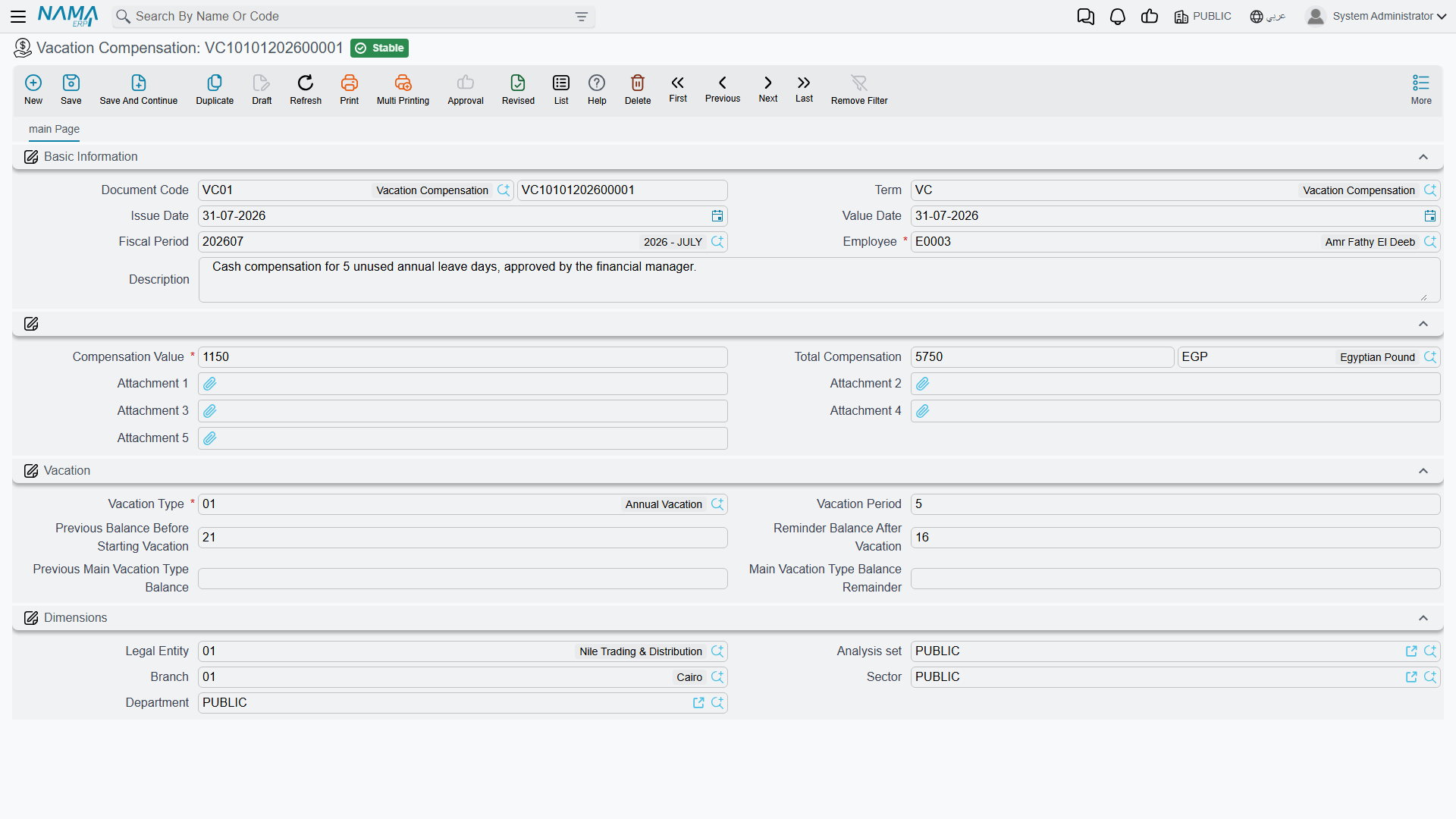
A Vacation Compensation (سند صرف بدل أجازة) document pays an employee money instead of letting them take (or keep accruing) a number of leave days — the "Repaid" side of a vacation type's Vacation Transfer Policy (سياسة ترحيل الأجازة, see Vacation Types & Balances). Unlike an ordinary vacation document, it does not send the employee away from work; it consumes balance and creates a payable amount.
Where to find it: Payroll > Vacations > Vacation Compensation.
| Field (English) | Arabic | Notes |
|---|---|---|
| Employee | الموظف | Who is being compensated. |
| Vacation Type | نوع الأجازة | Which balance is being cashed out; the vacation type must have a Vacation Class set. |
| Vacation Period | مدة الأجازة | How many days of balance this compensation covers — must be greater than zero. |
| Compensation Value | قيمة البدل | The money value of one day of this compensation. Can be entered directly, or — if the term/توجيه has a Compensation Calc Formula configured — calculated automatically from the employee's own salary data for the period, the same calculation engine used to price salary components. |
| Total Compensation (Amount / Currency) | إجمالي البدل | Compensation Value × Vacation Period — the actual amount to be paid. |
| Previous Balance Before Starting Vacation / Reminder Balance After Vacation | الرصيد السابق قبل بدء الإجازة / الرصيد المتبقي بعد الاجازة | The vacation type's own balance, before and after this compensation consumes Vacation Period days from it. |
| Previous Main Vacation Type Balance / Main Vacation Type Balance Remainder | الرصيد السابق من نوع الإجازة الرئيسي / الرصيد المتبقي بعد الإجازة من نوع الإجازة الرئيسي | The same before/after figures for the employee's main annual balance, when the compensated type is linked to it. |
This screen requires the humanresource-payroll license component.
How it's processed / what it posts
Committing a Vacation Compensation document does three things at once. First, exactly like a vacation document, it consumes Vacation Period days from the employee's balance for that vacation type. Second — and unlike an ordinary vacation document — it creates a business request that posts a real ledger entry: a debit line and a credit line, both for the Total Compensation amount, to whichever accounts are configured on the Vacation Compensation term/توجيه (the two sides are labeled Debit 2 / Credit 2 there). Editing an already-committed compensation document reissues that ledger entry with the new amount; deleting it reverses the entry and gives the days back to the balance. The amount is paid by that ledger entry alone — it is not added as a line on the employee's salary document, so do not go looking for it there.
Third — and this one is easy to miss, because nothing on the screen shows it — the document writes the employee's own Commencement Date After Holiday (تاريخ المباشرة بعد أخر اجازة) on the employee's record, setting it to the document's Return Date. That is the same field a genuine return from annual leave fills in, and the compensation fills it whenever the vacation type being cashed out carries the annual Vacation Class — even though the employee never left work. Deleting the compensation rolls the date back to whatever the employee's previous return-to-work record left there.
A cash-out can cut the salary period short
That third effect stays harmless until the HR module has Salary Worth From Last Work Start (بداية سندالراتب يحسب من تاريخ اخر مباشرة) switched on in HR Configuration. With that option on, a salary document's entitlement starts at the employee's last commencement date instead of at the period start — so a compensation dated the 14th of the month moves the salary start to the 14th. The month's salary is then generated for the 14th to the 30th only and flagged Partial Period, and nothing pays the 1st to the 13th: no second salary document covers the days the start date skipped over.
The option is doing exactly what it says — it exists for an employee who came back from unpaid leave in the middle of a month — but a cash-out is not an absence, so the outcome is rarely what payroll wants. If employees come up short in the very month they cash out leave, this pair is the first place to look. Turning the option off restores the full period; the salary document already issued for that month has to be regenerated, because it does not recalculate itself.
Vacation Transfer Document: carrying balances into a new HR year
At the close of an HR year, someone has to decide what happens to every employee's leftover balance: does it disappear, get migrated into the new year, or need repaying (via Vacation Compensation, above)? The Vacation Transfer Document (سند ترحيل أجازات) is the batch tool that performs the "migrate into the new year" step for every vacation type whose Vacation Transfer Policy is Migrated (ترحيل).
Where to find it: Payroll > Vacations > Vacation Transfer Document.
| Field | Arabic | Notes |
|---|---|---|
| From Year | من سنة | The HR Year being closed out. |
| To Year | إلى سنة | The HR Year balances are carried into. Must be a later year than From Year. |
| Value Date | التاريخ الفعلي | Must equal To Year's start date. |
| Details — Employee | التفاصيل — الموظف | The list of employees to run the transfer for. |
Saving the document expands that employee list into a computed Lines grid — one row per employee/vacation-type combination:
| Field | Arabic | Meaning |
|---|---|---|
| Assigned Balance | الرصيد المخصص | The employee's entitlement for that vacation type, as of the transfer. |
| Reminder From Previous Year | الرصيد المتبقي من العام الماضى | How much of the old year's unused balance survives the move — capped by the vacation type's migration limit, and by the employee's years of service. |
| Total Balance | الرصيد الكلى | What lands in the new year: Assigned Balance for non-migrating types, or Assigned Balance + Reminder From Previous Year for Migrated types. |
Egypt-style calendar years only
This document only works when the HR module's vacation balances are calculated on a shared calendar year (the model historically used in Egypt). If the module is instead configured to calculate each employee's balance from their own individual work-start date, Vacation Transfer Document is blocked outright — that configuration carries balances forward automatically per employee instead.
There is no ledger effect: this document only rewrites the vacation-balance records behind the two years — it marks the old year's balance as no longer current and plants the computed Total Balance as the new year's opening figure.
Vacation Changing Document: correcting a balance by hand
Sometimes a balance is simply wrong — a manual seniority bonus, a correction after a payroll audit, an ad-hoc grant of extra days — and there is no request/document workflow that fits. The Vacation Changing Document (سند تعديل رصيد أجازة) exists for exactly that: a direct, audited adjustment to one or many employees' balances.
Where to find it: Payroll > Vacations > Vacation Changing Document.
| Field | Arabic | Notes |
|---|---|---|
| Added Balance | الرصيد المضاف | A header-level default adjustment (positive to add days, negative to deduct) applied to every line that doesn't override it. |
| Work Start Date (Unified) | تاريخ بدء العمل (موحد) | Only relevant when vacations are calculated from each employee's individual work-start date — sets a single work-start date across all lines at once. |
| Employee range | — | A from/to filter (branch, department, sector, job position, and more) for quickly pulling many employees into the grid instead of adding them one by one. |
Vacations grid (one line per employee + vacation type):
| Field | Arabic | Meaning |
|---|---|---|
| Employee / Vacation Type | الموظف / نوع الأجازة | Whose balance, and which vacation type. |
| Work Start Date | تاريخ بدء العمل | Per-line work-start date (individual-start-date mode only). |
| Added Balance | الرصيد المضاف | The per-line adjustment, defaulting from the header value above. |
| Current Balance / Current Consumed / Current Remainder | الرصيد الحالي / المستهلك الحالى / المتبقي الحالى | The balance figures before this document, read live from the employee's vacation balance record. |
| New Balance / New Remainder | الرصيد المعدل / المتبقي المعدل | Current Balance + Added Balance, and the corresponding new remainder. |
There is no ledger effect here either — this document writes straight to the employee's vacation balance record; it does not touch accounting.
Holidays And Rest Days Balance Compensation Document
Employees who are called in to work on an official holiday or their weekly rest day are, in effect, owed something back. The Holidays And Rest Days Balance Compensation Document (بدل أرصده راحات أسبوعية و عطلات رسمية) scans an employee's attendance over a period and converts each holiday or rest day they actually clocked in on into vacation balance.
Where to find it: Payroll > Vacations > Holidays And Rest Days Balance Compensation Document.
| Field | Arabic | Notes |
|---|---|---|
| From Date / To Date | من تاريخ / إلى تاريخ | The attendance period to scan. |
| Details — Employee | التفاصيل — الموظف | Which employees to scan. |
| Details — Attendance Holidays Count | عدد أيام حضور عطلات رسمية | Days in the period marked as an official holiday where the employee still has an actual clock-in/clock-out recorded — computed automatically, not typed in. |
| Details — Attendance Rest Days Count | عدد أيام حضور راحات أسبوعية | The same, but for weekly rest days (not also a holiday). |
Two settings on the document's term/توجيه decide where those counted days land:
| Term setting | Arabic | Meaning |
|---|---|---|
| Holidays Compensation Vacation Type | نوع أجازة لبدل أيام العطلات الرسمية | The vacation type credited for each counted holiday day. |
| Rest Days Compensation Vacation Type | نوع أجازة لبدل أيام الراحة | The vacation type credited for each counted rest day. |
| Recalculate Employee Attendance Lines | إعادة حساب الحضور والإنصراف النظامي | Re-runs the attendance calculation for the period before counting, so the figures reflect the latest punches/corrections. |
Requires system-calculated attendance
This document cannot be used when the HR module is configured for fully manual attendance entry — it relies on the system's own calculated attendance lines to know which days were holidays/rest days and whether the employee actually clocked in.
Like the Vacation Changing Document, this is a balance-only mechanism — it does not generate a ledger entry; the value it creates is days, not money, and it lands in whichever vacation type the term settings point to. An employee whose vacation type has Vacation Transfer Policy = Repaid can later cash those days out with the Vacation Compensation document described above.
Actions on this screen
The single Vacation Compensation has no buttons of its own. The batch screens each have a button that fills their grid for you:
On the Aggregated Vacation Compensation (Payroll > Vacations > Aggregated Vacation Compensation, the many-employees version of Vacation Compensation):
- Collect Employees — lists every employee in the Working state who matches the employee range, optionally narrowed to a From/To Hiring Date window and a From/To Last Compensation Date window. The grid is rebuilt each time; you then enter the days and the per-day value on each line.
On the Vacation Transfer Document:
- Collect Employees — asks for a range (employee, department, analysis set, branch, sector) and lists the matching employees in Details, replacing what was there. Fill in both From Employee and To Employee: without both, the button collects nothing.
- Calculate — computes the Lines grid — assigned balance, the remainder carried from the previous year and the total — for every employee in Details. From Year, To Year and Value Date must be filled first.
On the Vacation Changing Document:
- Collect Employees — adds the employees in the Working state who match the employee range, then fills each line with that employee's current balance, consumed and remainder for the header's Vacation Type as of the value date, with the header's Added Balance applied.
On the Holidays And Rest Days Balance Compensation Document:
- Collect Employees — adds the employees who match the employee range and counts, for each, the official holidays and weekly rest days in From Date–To Date on which they actually attended. Both dates are required.
Messages you may see
| Message | Why | What to do |
|---|---|---|
| Vacation period must be greater than zero — «يجب ان تكون مدة الأجازة أكبر من الصفر» | The Vacation Compensation's Vacation Period is zero or negative, so there are no days to cash out. | Enter the number of days being compensated. |
| You Must Specify Vacation Class for Vacation Type {0} — «يرجي تحديد تصنيف الاجازة فى نوع الاجازة {0}» | The vacation type chosen on the compensation has no Vacation Class on its own master record, and the class is what decides how the cash-out is valued. | Open that vacation type and set its classification, then save the compensation again. |
| Value Date must be the same as To HR Year start ({0}) — «التاريخ الفعلي يجب ان يكون مساوي لبداية الي سنة الرواتب({0})» | A Vacation Transfer Document carries balances into a new HR year, so it must be dated on that year's first day — and its Value Date is not. | Set the value date to the start date of the To Year, shown in the message. |
| Cant transfer to old year — «لا يمكن الترحيل لسنة قديمة» | The To Year starts on or before the From Year, so the transfer would run backwards. | Transfer forwards: the from-year is the year ending, the to-year the one beginning. |
| vacation Balance update for {0} is created after this document according to {1} — «لايمكن تعديل الرصيد للموظف {0} تم تعدبل الرصيد فى مستند بتاريخ لاحق طبقا لسند {1}» | A later Vacation Changing Document in the same year already adjusted this employee's balance, so changing the earlier figure would leave the later one standing on a number that no longer exists. | Amend the latest balance change instead, or cancel it first and then correct this one. |
Where this fits
- Vacation Types & Balances — the vacation type rules (Transfer Policy, Vacation Class, balance limits) all four screens on this page read from or write into.
- Vacation Documents — the request/document pair and aggregations that consume balance the ordinary way, by sending someone on leave.
- HR Configuration — where Salary Worth From Last Work Start lives, the option that decides whether the commencement date a compensation writes reaches the salary document.