
Quoting a Monthly Instalment
Required licence
srvcenter-insurance-and-installments. The cars menu root that contains this folder is itself gated on srvcenter-subitems.
A customer walks into Al-Sahra's showroom and asks the only question that matters to them: what does it cost a month? The Car Installment Quotation (عرض سعر تقسيط سيارة) is the screen the salesperson opens to answer it. You reach it from cars → Car Installment.
Layla Al-Harbi bought her Rimal 2.4 for cash, so this page borrows the alternative version of her purchase — the one where she finances it instead — to work the numbers through.
What the quotation produces
The quotation works out a monthly instalment and prints it as an offer sheet for the customer. It is a standalone record:
- It does not create a sales order, a payment schedule or a receivable, and it creates no journal entry.
- Its Quotation Status (حالة عرض السعر) — Initial, Rejected, Accepted, Expired, Credit Approved (موافقة ائتمانية) — is a label you set by hand to track where each offer stands, and filter and report on.
When the customer says yes, the salesperson enters the chosen programme, lender and figures into the financing block of the car sales order.
The screen
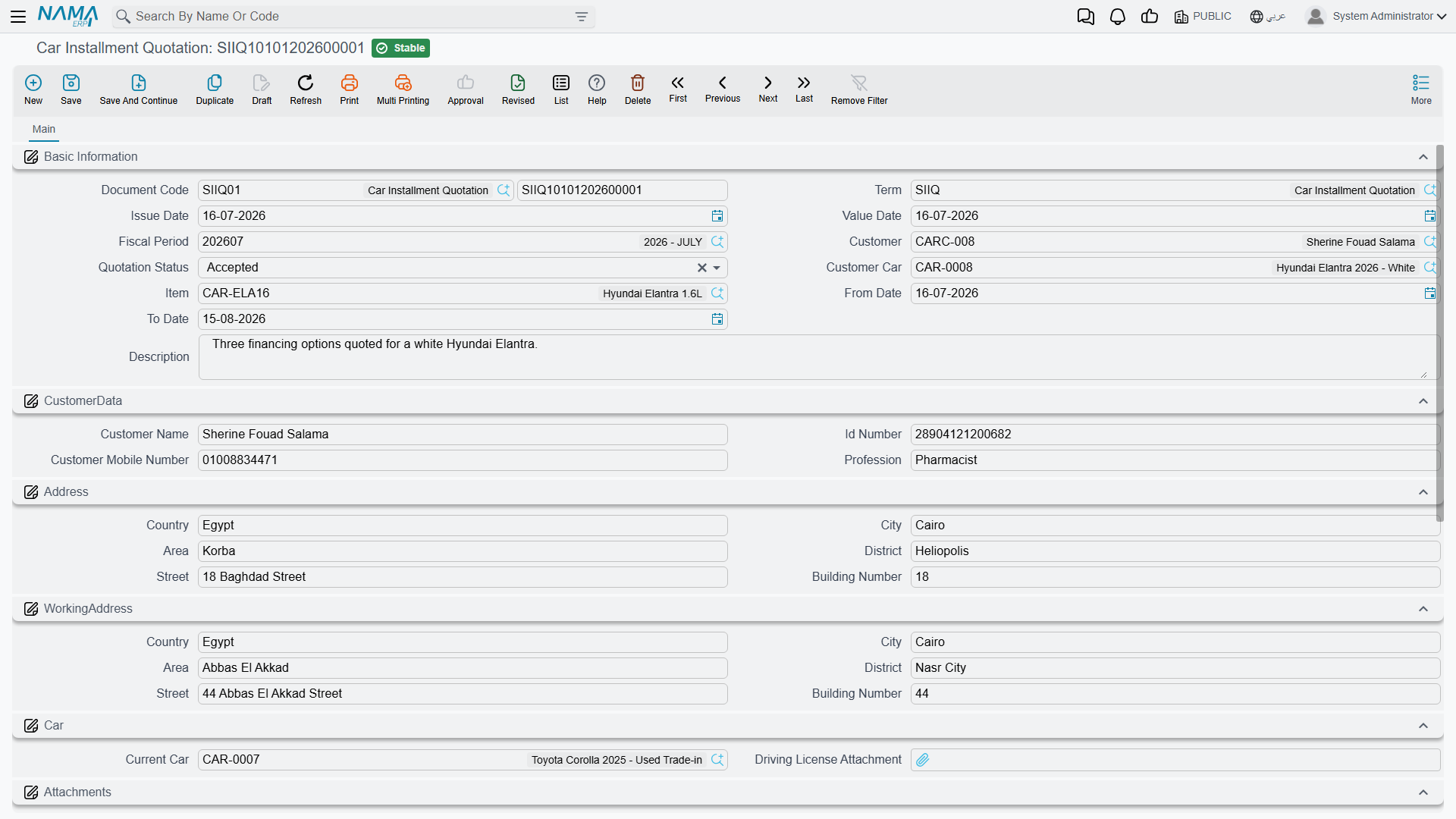
The header is mostly about the applicant, which tells you what the document is really for — it is a finance application form as much as a price quote.
Basic carries the customer, the Quotation Status (حالة عرض السعر), the item and the car, and a validity date range.
Customer data carries the customer's name, ID number, mobile number and Profession (المهنة), followed by an address block and a separate work address block.
Car carries the customer's Current Car (السيارة الحالية) — the vehicle record being traded or replaced — and a Driving License Attachment (مرفق رخصة القيادة). A further attachment slot holds the ID Scan (مرفق صورة الهوية), and a remarks block holds anything the customer said that is worth recording.
Then the grid, one row per financing option you want to show the customer, and the dimensions.
The grid
The line carries the car, the parties, the money and the result.
The parties: the item (required), the car, the bank, the finance company, the insurance company, the insurance programme and the Car Installment Program (برنامج تقسيط سيارة).
The inputs you type: the Car Price (سعر سيارة), the Financing Amount (قيمة التمويل), the Down Payment, the Installment Years (سنوات التقسيط), Other Expenses, and the various discounts — Car Price Discount and its percentage, Admin Fees Discount and its percentage, Insurance Discount Value and its percentage — and the Insurance Value, the premium the insurer quoted.
The figures the document works out: Admin Fees (مصاريف إدارية), taken from the instalment programme's fixed Admin Fees amount, Total Discounts, Total, Net Value and — the point of the exercise — the Monthly Installment Amount (قيمة القسط الشهري).
The arithmetic around the edges is straightforward: the total is the car price plus admin fees plus other expenses plus the insurance value; each discount percentage is applied to its own base; the net value is the total less the discounts.
How the monthly instalment is worked out
The interest model is flat (simple) interest on the original principal — not an amortised or reducing-balance loan. The rate is applied once to the whole financed amount for the whole term, and the result is divided evenly across the months.
Written out:
monthly instalment = financing amount × (100 + rate × years) ÷ (years × 12 × 100)
The rate comes from the chosen programme's Financing Percent. If the programme, the rate, the financing amount or the number of years is missing or zero, the monthly instalment comes out as zero rather than as an error.
Take the financed version of Layla's purchase: a car at 87,000, a 20 % down payment of 17,400, and therefore 69,600 to finance over 5 years at Bayan Finance's 6 % flat rate.
69,600 × (100 + 6 × 5) ÷ (5 × 12 × 100) = 69,600 × 130 ÷ 6,000 = 1,508.00 a month
Sixty payments of 1,508 come to 90,480 — which is 69,600 × 1.30, exactly as a flat rate implies. Compare that with an amortised loan at a nominal 6 %, which would cost far less in total, and you can see why the distinction matters when you explain the figure to a customer. This is a flat rate. Say so when you quote it.
The one number the document prints is that 1,508. There is no breakdown of principal and interest, no month-by-month table, and no closing balance.
The financing amount is typed
The monthly instalment is calculated from the Financing Amount, and that amount is typed. Enter the car price less the down payment the customer is putting down — for Layla, 87,000 − 17,400 = 69,600. The insurance value is part of the line total but not of the amount financed: if the customer is financing the insurance premium along with the car, add it to the financing amount you type.
Using it well
A workable routine:
- Fill the customer block properly — name, ID, profession, mobile, both addresses, the licence and ID scans. This is the part of the document with real value: it is a finance application on file.
- Work out the financing amount yourself — car price less the down payment the customer is actually putting down — and type it into Financing Amount.
- Pick the programme, type the years, and read the monthly instalment.
- Save, reopen, and read the figures back before printing anything.
- When the customer accepts, open the car sales order and re-enter the lender, the programme and the figures in its financing block by hand.