
Car Sales Orders and Approvals
The sales order is where a conversation becomes a commitment. Up to this point the showroom has only exchanged prices; here the customer, the car, the agreed figure, how she is going to pay and when she is going to pay it are all written down in one place — and, for the first time in the chain, a little money can move.
You will find it at cars > Car Sales > Car Sales Order (سيارات > مبيعات السيارات > أمر بيع سيارة).
Required licence
srvcenter-subitems.
What the screen holds
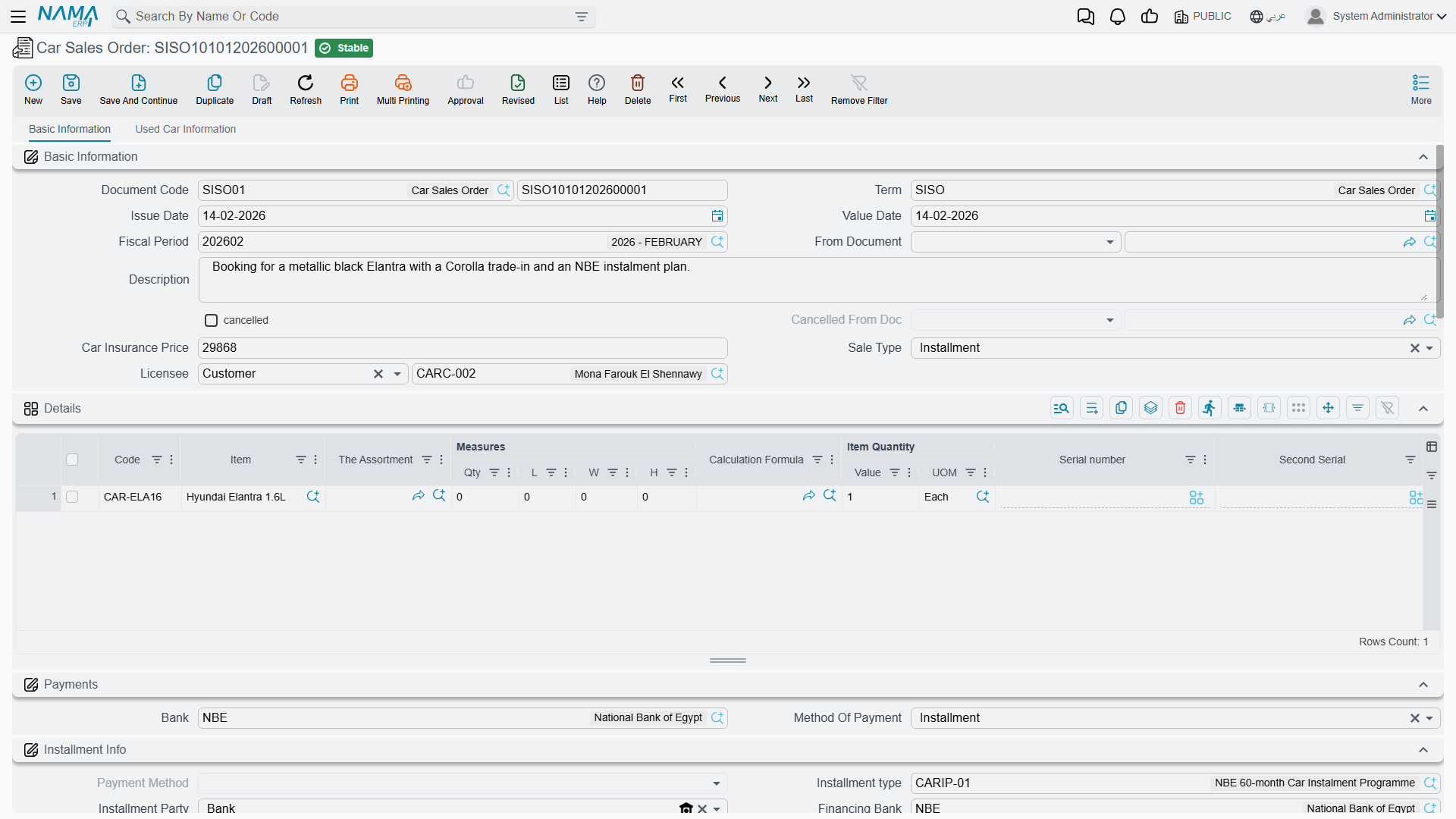
Basic Information
The header carries the ordinary document identity — book and code, document term (التوجيه), value date — plus the From Document (بناءا على) field that links this order to the quotation it came from, the customer, the salesman, the warehouse and locator, and remarks.
Three fields appear here that you will not find on most of the other car documents:
| Field | What it is for |
|---|---|
| نوع البيع (Sale Type) | Cash or Instalment. It classifies the deal; it does not open or close anything. |
| المرخص له (Licensee) | Whether the car is being licensed to the customer or to a third party. |
| سعر تأمين السيارة (Car Insurance Price) | The insurance figure agreed alongside the sale. |
Two more fields sit here read-only and are never typed by anyone: the cancelled marker and ملغي من سند (Cancelled From Doc). They are stamped by a Car Sales Order Cancel document — see Cancellation Documents.
The lines
One line is one car. The grid carries the item, the quantity, the unit price and price, the taxes, the department and salesman, the dimensions — and the column that matters most here, السياره (Customer Car), which is the specific chassis this line is about — a record in the car file.
Let From Document filter the picker
When the order is built on a quotation, the Customer Car picker offers only the cars that were on that quotation, and only cars whose current status the configuration allows on a sales order. That filter is the cheapest guard rail in the module — do not switch it off on the term unless you have a reason.
Two columns appear on the sales order line and nowhere else in the sales chain: the insurance programme and the insurance category to be sold with this car. They feed the insurance policy that may be raised later; they change nothing on the order itself.
The Used Car Info tab records a trade-in — the car number, model, manufacture year, odometer, colour, the price the customer wants for it, chassis and engine numbers, and how the trade-in is being settled. This tab appears on almost every document in the car sales family, but it is only meaningfully carried forward from the sales order and the sales invoice.
The money plan
This is the part of the screen that has no equivalent anywhere else in the chain except the sales approval:
- Payment method lines — how the customer pays, including card and payment-gateway columns.
- A payment template plus a GeneratePayments (إنشاء الدفعات) action, which builds the schedule for you.
- Schedule lines — the dated instalments of the agreed price.
- External payment documents — payments already collected on other documents.
- Standard terms — the contractual clauses printed with the order.
On commit the order checks that the payment schedule adds up against the remaining amount, that the prices comply with the sales price list (unless the term switches that check off), that the instalment codes are valid, and that the payment lines and standard terms are complete.
The financing block
For a financed deal the order carries an instalment block: the instalment programme, the financing bank or finance company and the reservation value — the details the salesperson enters from a car instalment quotation.
قيمة الحجز (Reservation Value) is the booking deposit, and it creates a journal entry. When the document term has its reservation-value debit and credit accounts filled and the value is not zero, the order produces a journal entry for it. This is the only accounting effect anywhere in the car sales chain before the invoice, and the only place in the whole module where those two accounts are used.
What the order does
| Effect | Detail |
|---|---|
| Accounting | Only if the term fills its debit and credit accounts — plus the booking deposit against the reservation-value pair |
| Inventory | None. The car is not reserved unless the term's Reserve switch is on, which creates an ordinary quantity reservation; pinning one chassis to the customer is the job of a car allocation |
| Documents generated | None |
| The car | A status line if a status updater targets the sales order; the sales-order and salesman references stamped onto the car's Statistics tab if the term says so |
Nothing about the order is enforced downstream. There is no rule that says a sales invoice must be built on an order, and no rule that stops you invoicing a different price from the one agreed here.
The worked example
Layla Al-Harbi agrees to buy CAR-000318, a NAWA Rimal 2.4, on 24 February 2026. Sales order SISO-2026-0233:
| Customer | CUS-1105 Layla Al-Harbi |
| Salesperson | EMP-131 Sara Al-Dosari |
| Car on the line | CAR-000318, chassis NWA7R24C26K000318 |
| Sale type | Cash |
| Agreed price | 87,000 |
| قيمة الحجز (Reservation Value) | 5,000 |
The 5,000 is recorded on the reservation-value accounts on the order's term. Nothing else on this document reaches the ledger, and the car does not move an inch in inventory.
The Car Sales Approval
cars > Car Sales > Car Sales Approval (سيارات > مبيعات السيارات > اعتماد بيع سيارة).
This document is a near-clone of the sales order: the same lines, the same payment methods, the same payment template and schedule, the same external payments and standard terms, the same validations. It exists so a showroom can record an internal sign-off on a deal — the full money plan, agreed and minuted — before or alongside the order itself.
It is a record, not a gate
The approval document approves nothing technically. It unlocks no document, it is checked by no validator, and no other document refuses to commit because it is missing. It is a full-money internal record with a name that suggests a workflow step.
If you need a real approval gate, build it the way every other document in Nama does: the standard approval cycle on the document you actually want to gate, plus — if the car's status should reflect it — a status updater line targeting this document. That is configuration, not a product feature.
Two smaller differences from the sales order are worth knowing:
- The approval can record an entry on its generic debit and credit pair if the term fills them, but the reservation-value accounts do not work on it. The booking deposit entry belongs to the sales order alone.
- No cancellation document targets the sales approval. The cancelled fields exist on it, but nothing can ever set them. To undo an approval, delete it.
Actions on these screens
The Car Sales Order and the Car Sales Approval carry the same three actions.
- Create Sub Item From Line Information (إنشاء صنف فرعي من السطر, More menu) — for every line whose item has sub items, creates the car record (or refreshes the one already on the line) from the line's data and writes it back onto the line. The car record is saved straight away. It runs only when the term's Create Sub Item From Line Info option is on.
- Add Current Line To Shortage Document (إضافة السطر الحالي الي مستند النواقص, More menu) — appends the line you are standing on to a shortage document, using the shortage book and term named on this document's term; it refuses with a message if they are missing.
- GeneratePayments (إنشاء الدفعات, main page, beside the payment template) — splits the remaining value into an instalment schedule. It asks for the number of payments, the period between them and its unit, the start date, a grace period, down / first / second / last payment values and a rounding mode. The English label ships as the raw name shown here.