
The Car Sales Cycle
Selling a car is not like selling a bag of cement. Nobody cares which bag of cement leaves the warehouse, but a customer who buys a car buys one specific chassis — and from the moment she picks it, that chassis has to be followed through enquiry, order, invoice and hand-over as an individual object with a history of its own.
That is what the whole Car Sales area exists to do. Every document in it names a car record, and every document leaves a mark on that record's history. What the marks mean, and which move is legal after which, is the part that surprises people: it is not built into the product at all.
Required licence
Everything on this page needs srvcenter-subitems. Nothing in the cars half of Service Center is available on a base installation.
Configuration decides almost everything here
Before the chain itself, the sentence that governs the entire folder.
A car's lifecycle in Nama is drawn by you, not shipped with the product. Each car model (the inventory item) carries a Car Status Configuration, and that configuration holds two tables:
- which document pushes the car to which status, and
- which status-to-status moves are legal at all.
If that configuration is missing or empty, every document on this page still saves perfectly, and changes nothing on the car — no status, no allocation, no history line. No error, no warning. The documents commit, the money and stock effects that belong to them happen, and the car record sits exactly as it was.
So when a page here says "the car moves to Allocated", read it as: if the site configured a status updater line for this document. That qualifier applies everywhere and is not repeated in every sentence.
There is no built-in chain either
Nothing forces a sales invoice to be built on a sales order, or an allocation to exist before an invoice. The chain is made by the ordinary From Document (بناءا على) field plus the status movement table. Two consequences worth knowing on day one:
- From Document is what filters the car picker. With a source document named, the Customer Car column offers only the cars already on that source. Leave the chain honest and the picker keeps you honest with it.
- Copying forward is a snapshot. Prices and quantities copied onto the next document do not stay linked to the previous one; editing the order after the invoice exists changes nothing on the invoice.
The chain, step by step
Car Sales Quotation Request     optional   the customer asks for a price
        ↓
Car Sales Quotation             optional   the showroom answers with a price
        ↓
Car Sales Approval              optional   internal sign-off on the deal and the money plan
        ↓
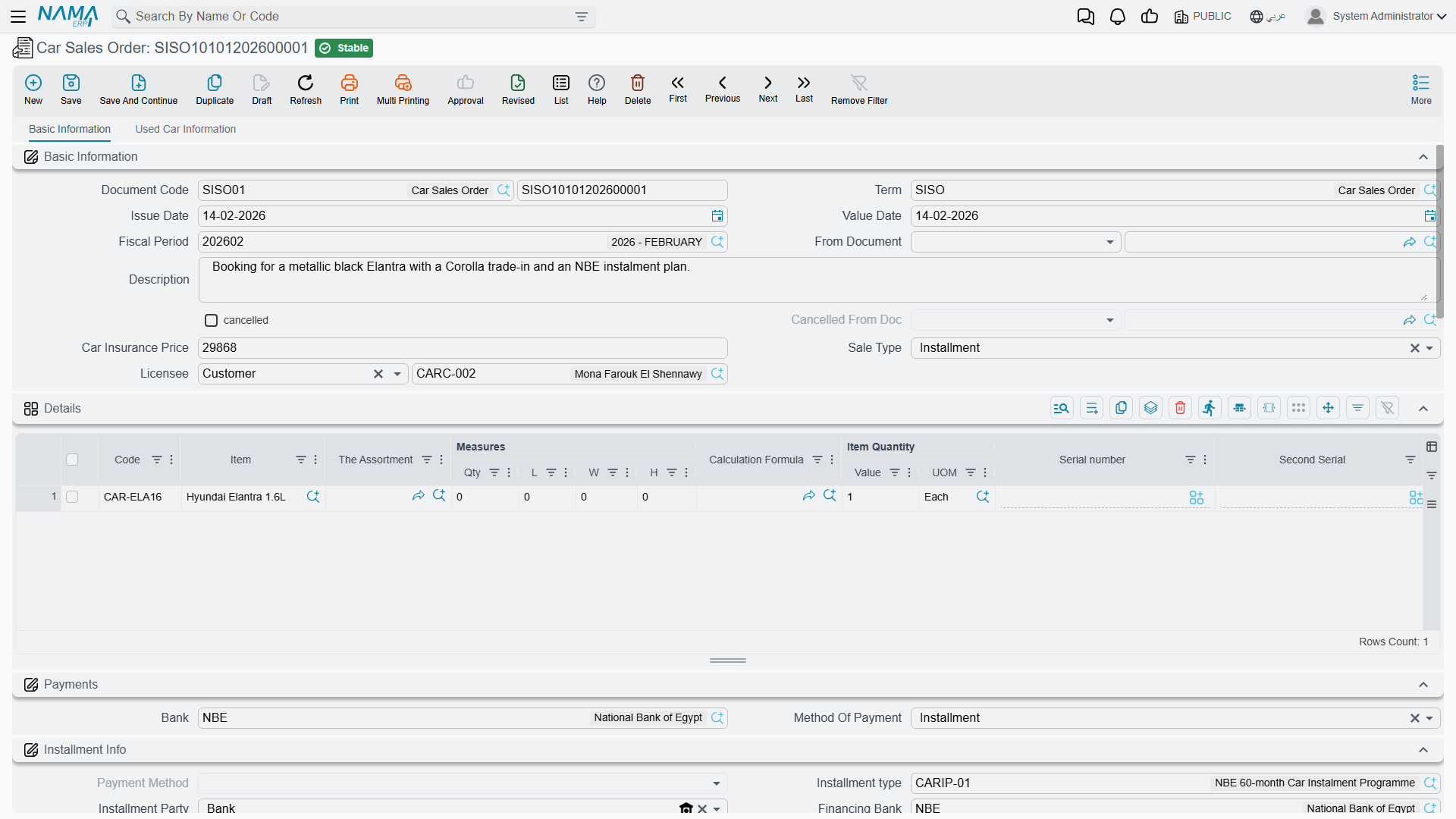
Car Sales Order                 in practice yes   the commercial commitment, the payment plan
        ↓
Car Allocation                  optional   pins one chassis to this customer
        ↓
Car Proforma Sales Invoice      optional   a full-looking invoice with no fiscal footprint
        ↓
Car Sales Invoice               ← the point of no return: revenue, tax, cost of sales, stock out
        ↓
Car Final Delivery optional the hand-over record| Step | What it contributes | Must you use it? |
|---|---|---|
| Quotation Request | Records that the enquiry happened | No |
| Quotation | Records the price you offered | No |
| Sales Approval | An internal record of the deal, complete with the payment plan | No |
| Sales Order | The agreed price, the payment method and schedule, the financing block, the booking deposit | Not enforced by anything, but everything downstream copies from it |
| Allocation | Stamps a customer, branch, department, salesman and warehouse onto one chassis | No — the stamp records who the car is promised to |
| Proforma Sales Invoice | A priced, payable-looking document you can hand to a bank | No |
| Sales Invoice | Revenue, tax, receivable, cost of goods sold, the stock issue, the e-invoice | Yes — this is the sale |
| Final Delivery | The hand-over event, and a stock issue if its term is configured to generate one | No |
The two record-only openers
The Car Sales Quotation Request (سيارات > مبيعات السيارات > طلب عرض أسعار سيارة) and the Car Sales Quotation (… > عرض أسعار سيارة) are exactly what they look like: paperwork. They create no journal entry and they move no stock. What they do give you is a searchable record of the enquiry and the offered price, a status movement on the car if you configured one, and — if the document term switches it on — a reference stamped back onto the car record's Statistics tab, so anyone opening CAR-000318 can see which quotation it was offered on.
Neither has a cancellation document. If a quotation is wrong, delete it or raise another one.
The point of no return
The Car Sales Invoice is the only document in this chain that books money. It is the only one whose effects are unconditional: revenue, tax, the customer receivable, the cost of goods sold and the stock issue that takes the car out of the showroom. Every step before it can be undone by deleting the document or by raising its matching cancellation document. After it, the only way back is a Car Sales Return.
The pro-forma sales invoice, despite its name and its full invoice layout, is not a financial document — see Car Sales Invoices.
The car can be issued from stock twice
Both the Car Sales Invoice and the Car Final Delivery can generate a stock issue, and neither can see the other's. Follow the natural path — invoice the car, then deliver it — with both document terms configured to generate, and the same chassis leaves stock twice: the cost is relieved to cost of sales twice and the car sits at −1 on hand, silently. If negative stock is blocked for that item, you get a confusing shortage error naming an auto-generated stock document rather than the car document you were saving.
The rule: fill Generation Book and Generation Term on exactly one of the two document terms. At Al-Sahra Motors the sales invoice generates the issue, so the final-delivery term's generation book and term are left empty.
To stop the final delivery generating, clear the generation book or the generation term on its term. Treat the invoice and the final delivery as alternatives for moving stock, never as a sequence.
The showroom thread, end to end
Al-Sahra Motors, the authorised NAWA dealer in Riyadh, has six Rimal 2.4s in the showroom, each landed at 76,500 (74,000 from the importer plus 2,500 of freight and customs). Layla Al-Harbi walks in on 20 February 2026 and leaves in March with CAR-000318.
- 20 February — the enquiry. Sales quotation request
SISQR-2026-0091records that Layla asked about a Rimal 2.4. Nothing else happens. - 21 February — the offer. Sales quotation
SISQ-2026-0102offers 89,500. Still paperwork. - 24 February — the deal. Sales order
SISO-2026-0233at the negotiated 87,000, cash sale, with a 5,000 booking deposit. That deposit is the only journal entry anywhere before the invoice. - 25 February — the chassis is pinned. Allocation
SIA-2026-0311stamps Layla, the Riyadh branch and salespersonEMP-131Sara Al-Dosari onto chassisNWA7R24C26K000318, and moves the car to Allocated. - 1 March — the sale. Sales invoice
SISI-2026-0498: 87,000 net, 13,050 VAT, 100,050 total, against a 76,500 cost of sales, a 10,500 gross margin, and stock issueSTI-2026-1201out ofWH-SHOW. Past this point, only a return will unwind it. - 1–2 March — the paperwork. Traffic letter request
SITLR-2026-0288then traffic letterSITL-2026-0296, so the car can be registered and plated. Neither creates any journal entry. - 3 March — the hand-over. Final delivery
SIFD-2026-0357. Its term has no generation book or term, so it issues nothing — the invoice already did that. - 5 March — the plates come back. Plate
ر ط ص 8318is typed on the car's own screen by hand. No document writes it.
That last line is not an oversight in the story. It is the single most common wrong expectation in this half of the module, and it has its own section on Handing the Car Over.
How the car's history is built
Every document that names a car writes a status history line on that car, and the car's current status is simply the last line in the chain. That chain is not appended blindly: on every save, all the lines for that car — from every document — are re-sorted by value date and replayed from the start. Each transition must find a legal move in the configuration, or the save is refused with a message naming the car, the two statuses and the document.
Two practical consequences:
- A back-dated document re-derives everything. Slot a document in between two existing ones and the whole chain is replayed around it. A move that was legal yesterday can become illegal, and the document that fails is not necessarily the one you are saving.
- Order is enforced only by that replay. There is no other sequencing check anywhere in the car sales family. If your configuration allows Received → Invoiced, the system will let you invoice a car you never allocated, and will not mention it.
The car's own screen shows the whole audit trail on its Statistics tab, alongside the reference fields each document stamps — the sales order, the sales invoice, the traffic letter and so on. That tab is the first place to look when someone asks "what happened to this car?".
What each document does to the money and the stock
The honest summary, which the rest of the folder expands:
| Document | Accounting | Inventory | Effect on the car |
|---|---|---|---|
| Sales Quotation Request | none | none | status line; quotation-request stamp |
| Sales Quotation | none | none | status line; quotation stamp |
| Sales Approval | only the generic debit/credit pair, and only if the term fills it | none | status line |
| Sales Order | the generic pair if filled, plus the booking deposit | none | status line; sales-order and salesman stamps |
| Allocation | none | none | writes the five allocation fields; status line |
| Proforma Sales Invoice | only the generic pair if the term fills it | none | status line |
| Sales Invoice | full sales entry, always | out, via a stock issue | status line; sales-invoice stamp |
| Final Delivery | none | out, via a stock issue — only if its term names a generation book and term | status line; delivery-date stamp |
| Sales Return | full reversal | in, via a stock receipt | status line |
| The cancellation documents | none | none | mark the source cancelled; status line |
The allocation, the final delivery, the quotations and the cancellation documents create no journal entry. Fill accounts on the document terms of the sales order, the sales approval, the pro-forma sales invoice, the sales invoice and the sales return.
Where a document does create a journal entry or move stock, the effect is created as a business request processed in the background, so the document itself saves instantly. If an effect fails, it is retried from the Business Requests list view — filter by failed, select the rows, and use More → Reprocess / Recommit.
Where to go next
- Car Sales Orders and Approvals — the price, the payment plan and the booking deposit.
- Allocating a Chassis — what allocation really does, and what really stops a second sale.
- Car Sales Invoices — the pro-forma and the real thing, side by side.
- Handing the Car Over — the hand-over record and the one setup rule that keeps stock correct.
- Taking a Car Back — what a return reverses and what it leaves behind.
- Cancellation Documents — the cancel pattern in one place.
- Traffic Letters — the registration paperwork.
Actions on the quotation screens
The Car Sales Quotation Request and the Car Sales Quotation carry one action each, in the More menu:
- Create Sub Item From Line Information (إنشاء صنف فرعي من السطر) — for every line whose item has sub items, creates the car record (or refreshes the one already on the line) from the line's data and writes it back onto the line. The car record is saved straight away, even before you save the document. It runs only when the term's Create Sub Item From Line Info option is on.
The actions on the later documents in the chain are listed on each document's own page.