
The Car Dealership in Nama
Al-Sahra Motors runs two businesses on one plot of land. On one side is the service centre, which repairs anybody's car. On the other is the showroom, which buys NAWA cars from the importer, keeps them in a yard, and sells them. This half of the documentation is about the showroom.
A car in a showroom is an awkward thing for an ERP system to hold. It is stock — it has a cost, it sits in a warehouse, it is sold and relieved to cost of sales like any other item. But it is not interchangeable stock. When Layla Al-Harbi buys a NAWA Rimal 2.4 she does not buy "one unit of item MDL-RIMAL24", she buys chassis NWA7R24C26K000318 — the one with 12 kilometres on the clock, the one whose customs release came through on Tuesday, the one parked in slot A-14 with key K-318 in the cabinet. Every question anybody asks about that car — where is it, who is it promised to, has its traffic letter come back, what did it actually cost us — is a question about that individual vehicle, not about the model.
So Nama gives each physical car its own master-file record, and hangs it off the ordinary supply-chain item as an item dimension. The item stays what it always was — NAWA Rimal 2.4, one line in the item file, with a selling price and an item group. The car record is the individual unit underneath it, and it is what the line on a purchase invoice, a stock receipt or a sales invoice actually points at.
Required licence
srvcenter-subitems. Nothing in the cars menu exists on a base installation.
The vocabulary bridge — read this before anything else
The same object has two names, and you will meet both on your first day.
- In the menu and on its own screen it is السياره / Customer Car.
- In roughly forty configuration options and document-term option labels it is الصنف الفرعي / Sub Item.
Create Sub Item From Line Information, Default SubItem Configuration, SubItem Status Movements — every one of those options is talking about the car record. There is no separate "sub item" screen to hunt for. Throughout these pages we call it the car record or the car file in prose, and reproduce the on-screen label verbatim whenever we quote a field.
What is on a car record
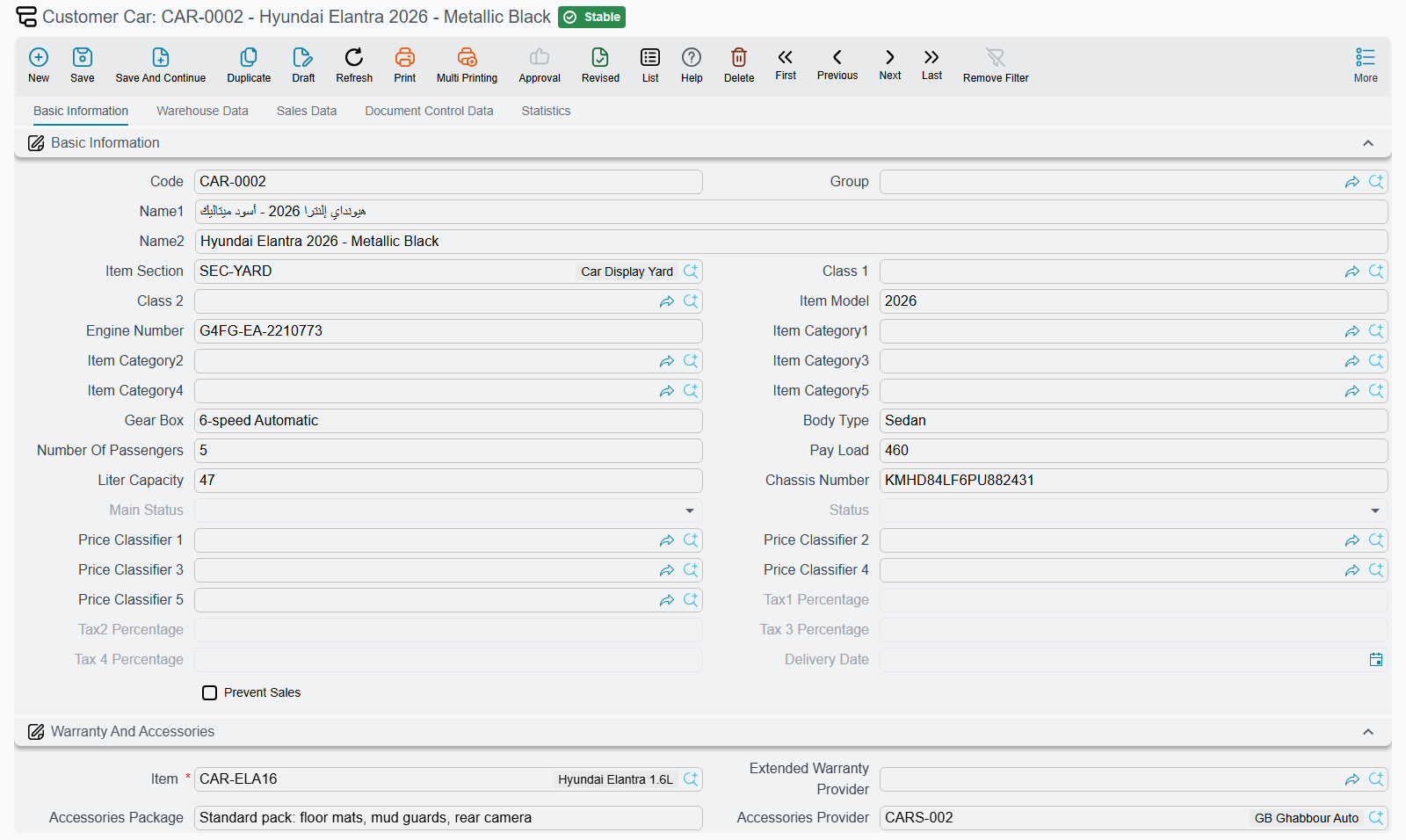
One record, one physical vehicle. It carries:
- Identity — chassis number, engine number, model (free text), gearbox, body type, number of passengers, colour-style classifiers.
- The warranty pack — has catalogue, has mats, has toolkit, has spare key, has warranty, the warranty period and any extended warranty, and who provides it.
- Where it physically is — warehouse, locator, key number, slot number, plate number, mileage, condition, PDI details.
- The paperwork — customs list number, customs paid flag and date, customs release number and date, vessel name, carrier, the OEM documents block and the registration documents block.
- A read-only trail — which purchase order, purchase invoice, stock receipt, sales order, sales invoice, traffic letter and salesperson touched it, and the complete list of status changes.
All of it is described field by field on The Car File.
The two registers are separate
Nama holds two vehicle files, and they are not connected.
| The car record | The workshop's product file | |
|---|---|---|
| Menu | سيارات (cars) > ملفات السيارات | مركز خدمة > الملفات > منتج |
| What it is | A serialised unit of a supply-chain item | The customer's vehicle as a serviced asset |
| Carries | Chassis, customs, warehouse slot, sales stamps | Odometer history, service contract, last-service register |
| Used by | Purchase, receipt, allocation, sales, delivery | Service requests, estimations, job orders, gate passes |
| Licence | srvcenter-subitems | srvcenter |
| Status values | Its own 20-value list, entirely configured | A different, workshop-specific list |
Al-Sahra sells CAR-000318 to Layla in March, and if Layla brings it back for its first service in September the workshop opens a new and unrelated product file for it. Nothing carries over: not the chassis number, not the warranty pack, not the purchase history.
The sold car and the serviced car are separate records
The two registers are kept apart: a workshop works from its own product file, and the dealership record holds the sale.
If you need the two joined — for example so a warranty claim can be checked against the sale date — that is a configuration project at your site.
Nothing about a car's behaviour is built in
This is the single most important sentence in this half of the documentation, and every page here repeats it in some form.
You would reasonably expect that a purchase invoice makes a car In Transit, a receipt makes it Free Stock, and a sales invoice makes it Invoiced. None of that is true out of the box. The only status the product itself ever assigns is the very first one, ما قبل المبدئي / Pre Initial, stamped at the moment a car record is created from a document line. Everything after that — which document sets which status, and which moves from one status to another are even legal — is drawn by you, per item, in a Car Status Configurations record.
Two dealerships running the identical documents can have completely different status behaviour, and a dealership that never fills in the configuration will find that every document saves happily and changes nothing. How to draw the lifecycle is the subject of Car Status Configurations.
Before any of it works
The cars half is switched off by default and needs four separate pieces of setup
It is not enough to hold the srvcenter-subitems licence. Until all four of these are in place, the car records either never appear or never get created — and in the most common failure nothing is reported at all.
- The Sub Items feature must be switched on. The supply-chain feature
scSubItem(الأصناف الفرعية / Sub Items) is what makes every car-related field visible in the first place — the item's Has Sub Item tick, the item's configuration slots, and the السياره (Customer Car) column on document lines. A database migrator adds it to the Config Group's Prevented Features list on upgrade, so on a real installation it starts life switched off. Remove it from Prevented Features before you look for anything else. - The item must be flagged as having sub items. On the NAWA Rimal 2.4 item, tick Has Sub Item. Decide this before you transact — the flag is locked once the item has movements.
- The item must carry a Car Status Configurations record. It is attached at Item ▸ Configurations ▸ Car Status Configurations, and automatic car creation refuses to run without it, failing with "Item … does not have Car Status Configurations". Note the message is reported against the item column of the document line, which sends most people hunting in the wrong place.
- You must add the chassis and engine columns to your purchase screen. Out of the box no Car Purchases screen shows a chassis number, an engine number, a gearbox or a key/slot column. The Car Receipt shows only the five warranty-pack tick boxes; the Purchase Order, Proforma Purchase Invoice, Purchase Invoice and Purchase Return show none of it. So the feature that reads the chassis number off the line has, as shipped, nowhere for anyone to type a chassis number. Add the line-grid columns through a screen modification before you rely on automatic car creation.
The module-level Default SubItem Configuration does not do what its name suggests
There is an option on the Service Center settings screen called إعدادات حالة الصنف الفرعي الإفتراضية / Default SubItem Configuration. It supplies the status filter rows used by the car picker on document lines when the item has no configuration of its own — and that is all it does.
It is not a fallback for the status engine, and it is not a fallback for automatic car creation. Both of those read the item's own configuration and refuse to proceed without it. Filling in the module default and expecting the rest to follow is the most common setup mistake in this half of the module; each vehicle model still needs its own Car Status Configurations attached to its item.
Nothing checks that a chassis number is unique
There is no uniqueness constraint and no validation on the chassis number anywhere. You can create two car records carrying the identical chassis, from two documents or by hand, and the system will accept both, give each its own code, and track stock and cost against each separately. Nothing warns and nothing merges them.
The practical consequence is that the discipline has to be yours: switch automatic creation on for exactly one document type, and search the car file before creating one by hand.
What is in the cars menu
The English menu root reads cars, in lower case — reproduce it as it is when telling somebody where to click. In Arabic it is سيارات. Underneath it are seven folders:
| Folder | Arabic | What lives there |
|---|---|---|
| Car Files | ملفات السيارات | The car record, Car Status Configurations, Insurance Company, External Agency |
| Car Purchases | مشتريات السيارات | Purchase order, proforma purchase invoice, purchase invoice, purchase return, assembly |
| Car Inventory | مخازن السيارات | Car receipt and car receipt cancel |
| Car Sales | مبيعات السيارات | Quotation request, quotation, sales order, approval, allocation, invoices, delivery, return, traffic letters |
| Cars Sales Cancellation | الغاء مبيعات سيارات | The cancel documents for the sales chain |
| Car Insurance | تأمين السيارات | Insurance programmes, policies and the seven policy documents |
| Car Installment | تقسيط السيارات | Finance companies, instalment programmes and quotations |
Two of those folders hold master files that surprise people by their location. Insurance Company sits in Car Files, not in Car Insurance, and it belongs to this licence — which means an insurance-only customer cannot create one. And External Agency sits there too.
External Agency
الجهة الخارجية / External Agency is a small party master file in cars > Car Files. It can carry a subsidiary account and tax data like any other party, and it exists so a site can register the outside bodies it deals with — a traffic department office, a clearing agent, an inspection centre.
It is worth being blunt about it: no document in the module references an External Agency. It takes part in no car flow, no purchase, no sale and no accounting entry. Record them if the list is useful to you, and do not expect anything to consume it.
Where to go next
- The Car File — the record itself, tab by tab, and which fields are typed by a person versus written by a document.
- Car Status Configurations — how to draw the lifecycle, the full status catalogue, and the rules that decide whether a document is accepted.
- Ordering Cars — the start of the buying chain, where most sites choose to have their car records born.