
Receiving Cars into the Showroom
توريد سيارة / Car Receipt — سيارات > مخازن السيارات > توريد سيارة (cars > Car Inventory).
The name misleads almost everybody on first meeting, so let us settle it in one line: this is metal, not money. The Car Receipt records a vehicle physically arriving in the yard. It has nothing to do with receiving payment from a customer — money is handled by the payment lines and payment vouchers on the sales documents, never here.
Required licence
srvcenter-subitems.
What is on the screen
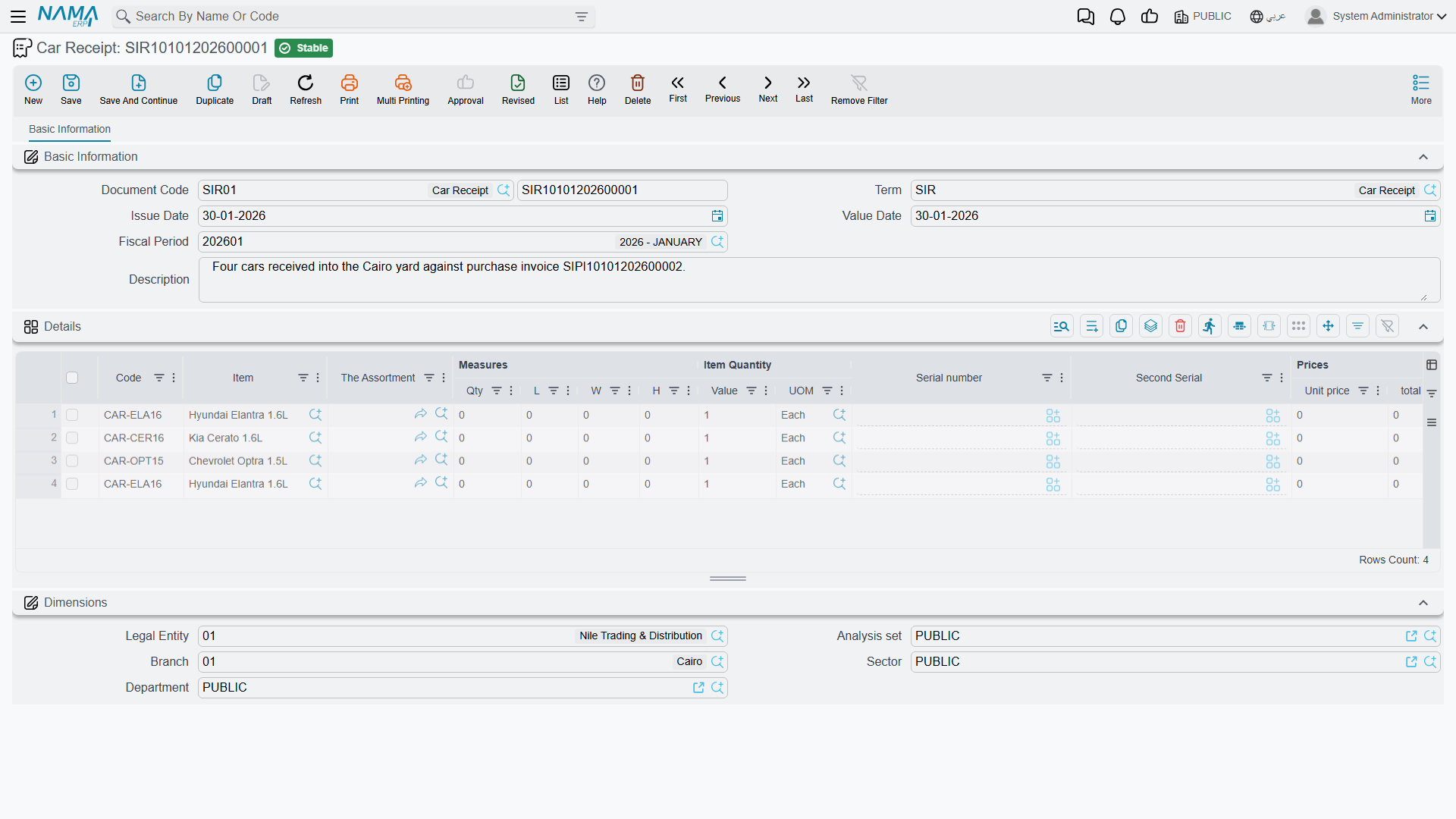
The basic group carries the book and code, the term, the dates, بناءا على (From Document), the destination warehouse and locator, the invoice classification and remarks. There is no supplier block — the receipt is an internal movement record, not a supplier transaction.
Then the line grid: item, measures and quantities, unit and total price, discounts and taxes, net value, box / revision / size / colour / lot, the السياره (Customer Car) column, dates, department, warehouse and locator, attachment, remarks and line type.
And the piece that is unique to this document — five accessory tick boxes on each line:
| Column | English |
|---|---|
| كتالوج | Has Catalog |
| دواسات | Has Mats |
| عدة | Has Toolkit |
| مفتاح احتياطي | Has Spare Key |
| ضمان | Has Warranty |
That checklist is the practical reason the Car Receipt exists. When the transporter drops six cars off, somebody walks the line with a clipboard confirming that each one arrived with its manual, its mats, its toolkit and its spare key, and this is where that gets recorded. The ticks are copied onto the car records, so afterwards the car file itself answers "did this one come with a spare key".
More menu: إنشاء صنف فرعي من السطر (Create Sub Item From Line Information), which runs the car-creation routine against the grid when the term's option is on.
What it does on commit
- Accounting: none of its own. The Car Receipt creates no journal entry.
- Stock: yes, indirectly — it generates a Stock Receipt, and that generated document is what actually carries the inventory movement and the inventory accounting, under its own book and term.
- Status entries on each car, as drawn in the item's Car Status Configurations. In the Al-Sahra configuration the receipt is what moves a car from Customs to مخزون متاح (Free Stock).
- The stock receipt reference stamped onto the car, if the term's Update Stock Receipt In Sub Item is on.
- Car records, if the term's Create Sub Item From Line Information is on — the same behaviour as on the purchase documents, and the same warning: switch it on for exactly one document type in your chain.
What makes it generate a stock receipt
Exactly two settings on the document term: دفتر الإنشاء (Generation Book) and توجيه الإنشاء (Generation Term) inside the generation configuration. Fill both, and every commit generates a stock receipt. Leave either blank, and it generates nothing — so to stop the Car Receipt moving stock, clear the Generation Book or the Generation Term.
The stock-in rule
The Car Receipt and the Car Purchase Invoice can each receive the same car
Both documents generate a stock receipt, and neither can see the other's. Each looks only for a stock receipt raised from itself, and nothing anywhere checks whether a chassis is already on hand — there is no already-in-stock validation on a car record at all.
Run the natural-looking sequence — purchase order → car receipt → purchase invoice — with both terms configured to generate, and every car is received twice. On-hand quantity 2 for a car that exists once. Double cost on the cost row. No error, no warning, nothing in a log. The eventual sale relieves one of the two, and the phantom sits in stock until somebody counts the yard.
The rule: fill the Generation Book and Generation Term on exactly one of the two document terms. The Car Receipt and the Car Purchase Invoice are alternatives for bringing cars into stock, never a sequence.
Al-Sahra generates stock on the purchase invoice, so the term used by SIR-2026-0088 has its generation book and term empty — the receipt records the physical arrival, the accessory checklist and the slot numbers, and moves no stock.
If you choose the other way round, leave the invoice's generation off and use تجميع (Collect) and تطبيق (Apply) on the invoice's Related Documents tab to attach the receipt's stock document to the invoice, with عدم إنشاء مستندات إذا وجدت مستندات يدوية (Do Not Generate Documents If Manual Documents Found) switched on.
Undoing a receipt
There are two ways, and they do different things.
Cancelling or deleting the Car Receipt itself deletes the stock receipt it generated. That is the real reversal: the quantity comes back out, and the inventory entry goes with it.
The Car Receipt Cancel document (إلغاء توريد سيارة, in the same Car Inventory folder) records the event and moves the status:
What the Car Receipt Cancel does
The Car Receipt Cancel is a numbered, filed marker that says "this arrival was cancelled", plus whatever status move you configure for it — typically Free Stock → Customs, or straight back to the initial status. It leaves the stock receipt the original Car Receipt generated in place, so the cars stay in stock and stay at cost.
So: to unwind the stock, cancel or delete the original Car Receipt. Raise the Car Receipt Cancel only if you want the event recorded and the status moved. And remember that its status move, like every other, has to be a legal row in the movements grid, or the cancel itself will be refused.
The worked example
SIR-2026-0088 records the six NAWA Rimal 2.4s arriving at Al-Sahra. Each line names its chassis through the السياره column, carries the four accessory ticks the transporter confirmed, and gets its yard slot — CAR-000318 into A-14, CAR-000319 into A-15, and so on.
Its term has no generation book and no generation term, so it moves no stock. The stock came in on STR-2026-0552, generated by purchase invoice SIPI-2026-021. That is the whole of Al-Sahra's rule, and it is why the six cars show a quantity of one each rather than two.
Actions on these screens
The Car Receipt and the Car Receipt Cancel carry one action each, in the More menu:
- Create Sub Item From Line Information (إنشاء صنف فرعي من السطر) — for every line whose item has sub items, creates the car record (or refreshes the one already on the line) from the line's data and writes it back onto the line. The car record is saved straight away, even before you save the document. It runs only when the term's Create Sub Item From Line Info option is on.